Unable to mount NFS share in XOA
-
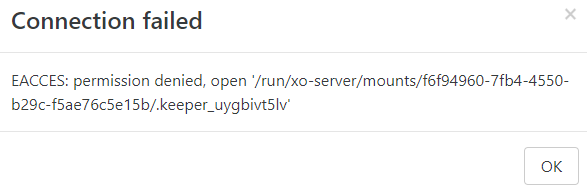
I am currently running a fresh Xen orchestra install and created an Ubuntu 18.04 NFS server. I can mount the share on the XOA vm via the command line and make files and folders but when I attempt to connect via the web console, I am told that I do not have access. In the /run/xo-server/mounts folder, I can see each of the 3 attempts I made via the web console. It creates the folder with my username but root permissions is the one that was mounted via the command line with SUDO. Now I can browse each of those folders and see the test folder I created but if I attempt to make a file or folder without root permissions, it fails.
Does anyone know what the correct permissions the /run/xo-server/mounts folders need to have?


-
Depends on the user your are running XO.
-
I was able to resolve the issue. It was a permissions issue on the NFS server. It was running on an Ubuntu 18.04 server and running the command chown -R nobody:nogroup.
-
@olivierlambert could this error be more verbose?
I think this error should say:
- Cannot write file
.keeper_uygbivt5lvon remote<whatever the remote name/address>
NFS is mounted but XOA cannot write to mounted dir.
This happens in NFSv4 as default whensec=syson NFS server (that is the default). - Cannot write file

Hello! It looks like you're interested in this conversation, but you don't have an account yet.
Getting fed up of having to scroll through the same posts each visit? When you register for an account, you'll always come back to exactly where you were before, and choose to be notified of new replies (either via email, or push notification). You'll also be able to save bookmarks and upvote posts to show your appreciation to other community members.
With your input, this post could be even better 💗
Register Login