XCP-ng
    • Categories
    • Recent
    • Tags
    • Popular
    • Users
    • Groups
    • Register
    • Login

    Strange issue with booting XCP-NG

    Scheduled Pinned Locked Moved Compute
    85 Posts 9 Posters 51.5k Views 2 Watching
    Loading More Posts
    • Oldest to Newest
    • Newest to Oldest
    • Most Votes
    Reply
    • Reply as topic
    Log in to reply
    This topic has been deleted. Only users with topic management privileges can see it.
    • ? Offline
      A Former User
      last edited by

      I dont see any failed services, though I have a question. The nvidia GPU (Quadro P400), do I have to configure Passthrough first? Maybe that could be the problem, as when I look into the host GPU's now it does not detect the GPU at all...

      1 Reply Last reply Reply Quote 0
      • R Offline
        r1 XCP-ng Team
        last edited by

        @Appollonius if you are using that GPU in a VM, yes, you need to enable passthrough for that pci id.

        ? 1 Reply Last reply Reply Quote 0
        • ? Offline
          A Former User @r1
          last edited by

          @r1 Well I will be in the future, but XCP-NG does not detect a GPU at all. Maybe that could be the cause of this issue? Atleast I think, as I see no GPU's listed in XCP-NG Center.

          1 Reply Last reply Reply Quote 0
          • R Offline
            r1 XCP-ng Team
            last edited by

            @Appollonius check # lspci -k or # lshw -c display

            ? 1 Reply Last reply Reply Quote 0
            • ? Offline
              A Former User @r1
              last edited by A Former User

              @r1 said in Strange issue with booting XCP-NG:

              lshw -c display

              lshw -c display
                *-display UNCLAIMED       
                     description: VGA compatible controller
                     product: GP107GL [Quadro P400]
                     vendor: NVIDIA Corporation
                     physical id: 0
                     bus info: pci@0000:07:00.0
                     version: a1
                     width: 64 bits
                     clock: 33MHz
                     capabilities: pm msi pciexpress vga_controller bus_master cap_list
                     configuration: latency=0
                     resources: memory:fb000000-fbffffff memory:d0000000-dfffffff memory:e0000000-e1ffffff ioport:e000(size=128) memory:c0000-dffff
              

              This is what I see, so I it does see that its there but for some reason it does not see the card in XCP-NG Center.

              Ohh wait, is that the Nvidia 'driver' problem? Which AMD cards dont have?

              In XO it does see the graphics card, so happy about that. Now I am still curious why it does not boot properly when the NVidia GPU is plugged in.

              1 Reply Last reply Reply Quote 0
              • R Offline
                r1 XCP-ng Team
                last edited by

                @Appollonius no, pci pass through does not need device drivers to be present in dom0. Try XOA to administer.

                ? 1 Reply Last reply Reply Quote 0
                • ? Offline
                  A Former User @r1
                  last edited by

                  @r1 Well it is now even stranger than. So the host detects the GPU, but without monitor input it will just not boot... hmmm

                  T 1 Reply Last reply Reply Quote 0
                  • T Offline
                    tuxen Top contributor @Guest
                    last edited by

                    @Appollonius check the BIOS for display emulation or ACPI configuration. Some boards may refuse to boot If the BIOS isn't properly configured to accept the headless mode.

                    ? 1 Reply Last reply Reply Quote 0
                    • ? Offline
                      A Former User @tuxen
                      last edited by

                      @tuxen Thanks for the suggestion, though when I leave out the GPU it still boots up fine. Its only when I install the GPU and dont connect it to a monitor that it will not boot properly. But then again, when I install the GPU and connect it to a monitor it will boot fine. So I think it has something to do with the display. And I dont know if this is a XCP-NG problem or a CentOS/System problem.

                      T 1 Reply Last reply Reply Quote 0
                      • T Offline
                        tuxen Top contributor @Guest
                        last edited by

                        @Appollonius said in Strange issue with booting XCP-NG:

                        Its only when I install the GPU and dont connect it to a monitor that it will not boot properly.

                        Maybe because, when there's a GPU installed but no monitor attached, the motherboard POST fails at EDID probe? As stated, some boards/BIOS require an explicit configuration in order to boot without a monitor/keyboard/mouse plugged, eg.:

                        https://www.supermicro.com/support/faqs/faq.cfm?faq=11902
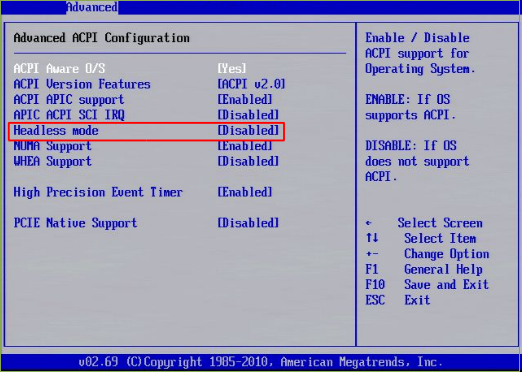
                        headless.png

                        ? 1 Reply Last reply Reply Quote 1
                        • ? Offline
                          A Former User @tuxen
                          last edited by A Former User

                          @tuxen Thanks for your reply, unfortunately I dont have the options ACPI - Display emulation. I use a Gigabyte Aorus X570 Pro for this server.
                          IOMMU is enabled on the bord.
                          With the Gigabyte B450 AORUS M I had zero issues, with booting in 'headless'.

                          1 Reply Last reply Reply Quote 0
                          • ? Offline
                            A Former User
                            last edited by

                            Unfortunately this issue has not been fixed, I will be waiting if someone has another suggestion for this. Though I do have another question, my Xen Orchestra continually says that the time is out of sync with the XCP-NG host. I have looked into the NTP settings, and they seemed the same. Does anyone know what this could be?

                            1 Reply Last reply Reply Quote 0
                            • olivierlambertO Offline
                              olivierlambert Vates 🪐 Co-Founder CEO
                              last edited by

                              Double check your NTP settings, if it tells it's not sync, it's not sync.

                              Note: XCP-ng now uses chrony, but in XO, ntpq -p will give you NTP stats

                              chrisarzuC 1 Reply Last reply Reply Quote 0
                              • ? Offline
                                A Former User
                                last edited by

                                Okay so today I upgraded to XCP-NG 8.2.0 but unfortunately it did not solve the issue with XCP-NG not being able to boot without a display attached to the GPU. Also I am getting the EFI_MEMMAP issue and I don't know if this issue has a relation to the GPU.

                                If someone has suggestions which I may try, please do so and I will test it 🙂

                                DanpD 1 Reply Last reply Reply Quote 0
                                • DanpD Offline
                                  Danp Pro Support Team @Guest
                                  last edited by

                                  @appollonius Are you booting on BIOS or UEFI mode? I ran across this issue earlier today that sounds exactly like what you've described.

                                  If this is the same issue, then I wonder why the "fix" hasn't made it into xcp-ng. 🙁

                                  ? 1 Reply Last reply Reply Quote 0
                                  • olivierlambertO Offline
                                    olivierlambert Vates 🪐 Co-Founder CEO
                                    last edited by

                                    We include all fixes from XS tree into XCP-ng (or those not included are completely analyzed to be sure about it)

                                    DanpD 1 Reply Last reply Reply Quote 0
                                    • DanpD Offline
                                      Danp Pro Support Team @olivierlambert
                                      last edited by

                                      @olivierlambert Wasn't trying to imply otherwise. I was more suspicious that their "fix" never made it into the public view.

                                      Did you happen to review the issue I linked?

                                      1 Reply Last reply Reply Quote 0
                                      • stormiS Offline
                                        stormi Vates 🪐 XCP-ng Team
                                        last edited by

                                        According to the issue it was fixed in CH 8.0, so it was in XCP-ng 8.0 too.

                                        DanpD 1 Reply Last reply Reply Quote 0
                                        • DanpD Offline
                                          Danp Pro Support Team @stormi
                                          last edited by

                                          @stormi Yes... I understand that is the way it is supposed to work. 😏

                                          1 Reply Last reply Reply Quote 0
                                          • ? Offline
                                            A Former User @Danp
                                            last edited by A Former User

                                            @danp Well I use UEFI as well, so we do have the same issue here :), still curious in how this can be fixed of course.. I even upgraded to the latest XCP-ng 8.2.0 RC to see if it has been fixed but no luck so far 😞 So I keep my GPU out for a while again or I gotta get a AMD Workstation GPU.

                                            I have tried every other solution, but no luck so far. I think its either XCP-NG or The MOBO I use (Gigabyte AORUS PRO X570).

                                            DanpD 1 Reply Last reply Reply Quote 0

                                            Hello! It looks like you're interested in this conversation, but you don't have an account yet.

                                            Getting fed up of having to scroll through the same posts each visit? When you register for an account, you'll always come back to exactly where you were before, and choose to be notified of new replies (either via email, or push notification). You'll also be able to save bookmarks and upvote posts to show your appreciation to other community members.

                                            With your input, this post could be even better 💗

                                            Register Login
                                            • First post
                                              Last post

