XO templates cd image problem
-
Hi all,
I am having issues with cd images attaching to the template created.
I need this for the cloud-init configuration.
There are 2 ways I try to accomplish that on freshly created Debian 10 template with cloud-init packages installed:-
I create new vm in XO and boot it. I stop it on grub level, then I attach my cd image with cloud-init user, meta and network data in XO, continue with the boot - cloud-init works as expected.
-
I create vm in CLI:
xe vm-install new-name-label=<vm_name> template=Debian10_cloud-init_template
xe vm-cd-add vm=Debian10_cloud-init_template cd-name=nciso11.iso device=4
xe vm-start vm=Debian10_cloud-init_template
and cloud-init does not work, cd is not moutable as it says that there is noting to mount.
Only difference I see is that when I create VM in XO I got two cd devices:
CD 0 VBD:
uuid ( RO)             : 7663f608-efdd-38e0-581a-87d2a21da3fc
    vm-name-label ( RO): Debian_10_cloud_init_template
            empty ( RO): false
       userdevice ( RW): 3

CD 0 VDI:
uuid ( RO)             : 105c96fb-0d1f-4df3-bf6e-e8edf51ee78a
       name-label ( RW): nciso11.iso
    sr-name-label ( RO): ISO's
     virtual-size ( RO): 376832
When I create it in CLI I have 3 fore some reason:
CD 0 VBD:
uuid ( RO)             : 3f18cca9-2630-0e2f-d146-ddd1f716ea65
    vm-name-label ( RO): Debian_10_cloud_init_template
            empty ( RO): false
       userdevice ( RW): 4


CD 0 VDI:
uuid ( RO)             : 105c96fb-0d1f-4df3-bf6e-e8edf51ee78a
       name-label ( RW): nciso11.iso
    sr-name-label ( RO): ISO's
     virtual-size ( RO): 376832


CD 1 VBD:
uuid ( RO)             : d28e5090-4e2c-cbaf-fbab-4ccbdd54c3ca
    vm-name-label ( RO): Debian_10_cloud_init_template
            empty ( RO): true
       userdevice ( RW): 3
... and then coud-init does not work as cd is not mountable - no media (???).
Could someone explain to me why CLI creates additional and empty CD? Thanks!
-
-
Hi,
I personally recommend that you use
xo-cli(CLI of Xen Orchestra), that would be better in the end (one central point, no need to access the host, only XO).
 -
Thanks @olivierlambert - I will try that just to compare maybe it will give me results I need.
-
OK - found the problem.
I do not need to add CD I need to insert it.xe vm-cd-insert vm=<name_of_your_vm> cd-name=<name_of_your_file.iso>If xe will say that there is no empty cdrom - eject inserted media:
xe vm-cd-eject vm=<name_of_your_vm>and then insert it ...
-
Ah yes, I forgot that, since I'm not using
xefor those commands (but XO orxo-cli)Good news anyway!
-
following this xo-cli thread though - is there a possibility to install xo-cli on the server which is not a xen server? Or it has to be the one and even more - the one with xen-orchestra?
-
You can install
xo-clianywhere you like. It's a client toxo-server, likexo-webSee:
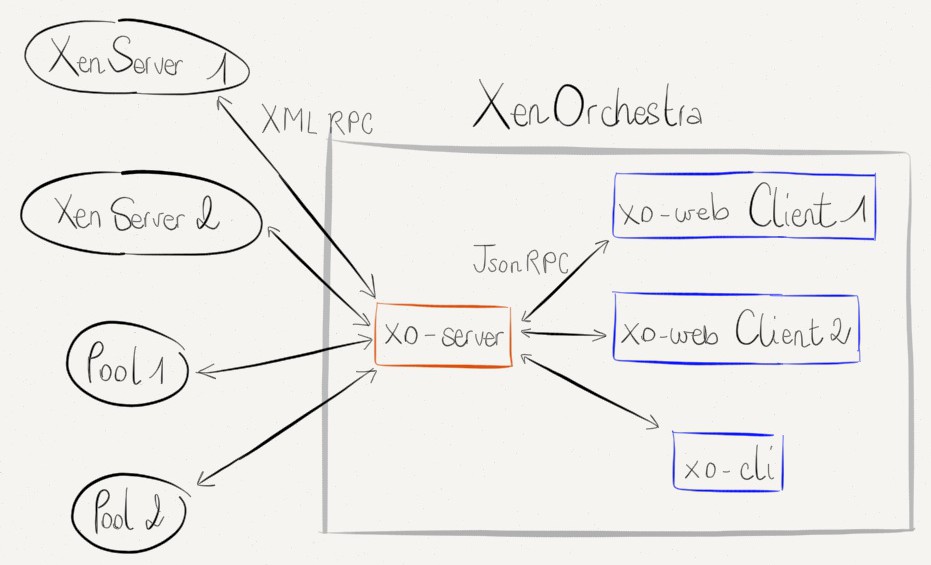
-
This is a great news as I will be able to have all my scripts written as of now and xo-cli in one place.
Thanks @olivierlambertFor those who are looking for direct instructions ... on Debian 10.x:
# install npm:
apt install npm# install xo-cli:
npm install -g xo-cli

Hello! It looks like you're interested in this conversation, but you don't have an account yet.
Getting fed up of having to scroll through the same posts each visit? When you register for an account, you'll always come back to exactly where you were before, and choose to be notified of new replies (either via email, or push notification). You'll also be able to save bookmarks and upvote posts to show your appreciation to other community members.
With your input, this post could be even better 💗
Register Login