XOCE - not working on 10Gb speed
-
Hi,
I have the following configuration:
- two servers with 6 network cards, each. Four on 1Gbps and two on 10Gbps,
- a NAS with 6 network cards, four on 1Gbps and two on 10Gbps.
- a switch with 1 Gbps ports
- a switch with 10 Gbps ports
XOCE is on a VM on the second server with two network cards configured and mapped to the server's two 10 Gbps network cards.
XOCE has the two servers connected on two different class of IPs on 10Gbps. Each server network card has its own class of IPs, as well as XOCE
ex:
servere, NAS
eth1 - 192.168.10.0/24 - 1Gbps
eth2 - 192.168.20.0/24 - 1Gbps
eth3 - 192.168.30.0/24 - 1Gbps
eth4 - 192.168.40.0/24 - 1Gbps
eth5 - 192.168.50.0/24 - 10Gbps
eth6 - 192.168.60.0/24 - 10GbpsXOCE
eth1 - 192.168.10.0/24 - 1Gbps
eth2 - 192.168.60.0/24 - 10GbpsXOCE - Server connection
eth - 192.168.60.0/24 - 10GbpsServer - NAS connection
eth - 192.168.50.0/24 - 10GbpsWhen I start to make a backup the transfer goes to a maximum of 70 Mb real value, while it should exceed this value and go to a performance of 6 Gbps as the HDD speed.
The transfer is as if on the 1Gbps switch not on the 10Gbps one.Where is the problem of not going further and stops at a maximum transfer of 1 Gbps ?
I did a test with a VM I mapped two disks one on first server and the other on the other server ( via iSCSI ) and I copied from server one to server two and the transfer goes in 300+ Mb real value.
Logic diagram of connections
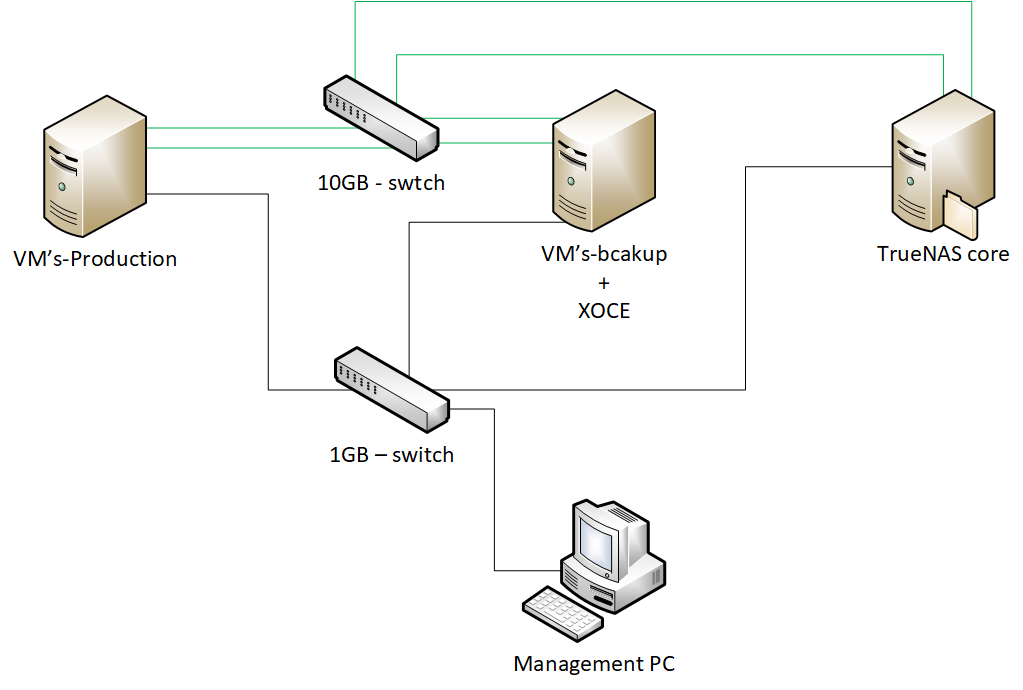
Thank you
-
Are you connected to the pool on the 10G IP or on the 1G one? (in Settings/server)
-
no, the servers are not in the pool. They go separately, each one is a master
And yes servers are connected to 10Gbps on Setting/server is on 192.168.60.0/24 witch is the eth 6 on servers -
Okay so everything is correctly set then

During a backup, check the host and XO VM stats, you will see on which network the traffic is flowing
-
yes it is going to the right eth ( eth6 ) of the server, as you can see in photo below,
but not on the max speed. Eth in photo is form 0 to 5 not 1 to 6. And green one is connection to NAS
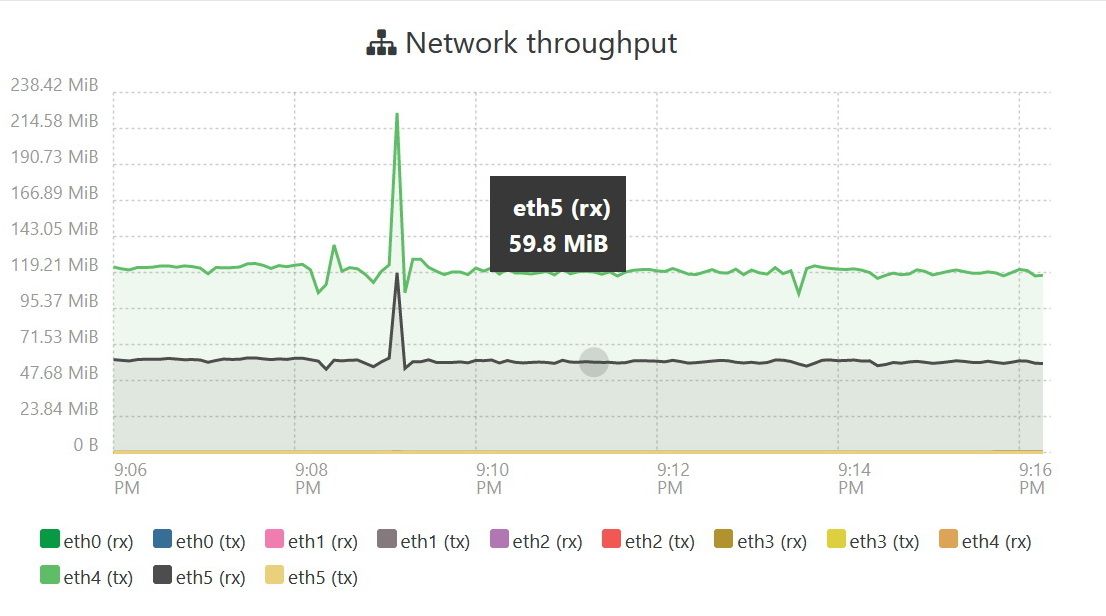
-
The main reason why I configured the backup server to be connected to the NAS, is because in case the main server no longer works I can switch to the backup server and in the back TrueNAScore to make a copy to the VM that exists on the backup server to the another NAS.
-
From a quick look, your backup speed is roughly average. You will never have 10G speed for VM export/backup.
-
can you tell me why, what is the technical reason ?
It is a single VM that exists on two servers, main and copy. Nothing else -
What kind of backup mode are you using?
-
on Saturday I make a full backup ( VM has 2.5TB in 3 vHDD ) the rest, which does not affect me as a transfer, is delta (continuous replication )
-
that was why I detected the problem with continuous replication

it is an Continuous Replication backup with Full backup interval set to reset on Saturday -
Try to connect in HTTP to your hosts and see if it's better.
-
I don't understand how to connect to HTTP, on Settings/Server is ssh
What I tried as a test was to make a VM with windows on server 2 and to map an hdd from server 1 ( iSCSI mode ) and an hdd from NAS ( iSCSI mode ), the average speed being 270 Mb real speed. VM had both network cards set to the server's 10Gbps network cards.XOCE is on ubuntu 20.04
The total transfer on windows is 3 to 4 hours, in XOCE it is 17 to 20 hours. Same value as size of files
-
- Not it's not SSH. XO is talking to the XAPI directly on port 443 by default. If you use
http://<IP ADDRESS>it will use plain HTTP instead of HTTPS. - VM export code is completely unrelated to the storage speed. It's not the same data path at all. VM export is using a VHD program in the dom0 that will expose it in HTTP(S), also computing the delta on the fly.
- There's no "network card speed" in the VM, because there's no emulation, only hypercalls (if you have the PV drivers installed).
- Not it's not SSH. XO is talking to the XAPI directly on port 443 by default. If you use
-
I understand, now I have a new track to test the connection.
I thought that everything was done on ssh/scp.
XOCE is set to work on https.Thank you
-
Just change HTTP in the Settings/server to connect to your pools with
http://<IP>that's it


Hello! It looks like you're interested in this conversation, but you don't have an account yet.
Getting fed up of having to scroll through the same posts each visit? When you register for an account, you'll always come back to exactly where you were before, and choose to be notified of new replies (either via email, or push notification). You'll also be able to save bookmarks and upvote posts to show your appreciation to other community members.
With your input, this post could be even better 💗
Register Login