The server (Lenovo System x3650 M5) has started and all 4 VMs are started and functional
 G
Offline
G
Offline
-
RE: XCP-ng 8.2 updates announcements and testing
-
RE: ova export not functional
Windows 22h2 ova is exported fine. The import goes to the end only if:
- it is not set to EFI boot by default
- the type of Operating System is on Other and the version is Other/Unknown
- video is under 16Mb
Linux ova export is fine. The import goes to the end with the same missconfiguration.
After the settings are done everything works fine.
Size of ova

-
RE: Continuous replication problem with multiple SR
I tested with commit e64c434 and it is ok.
Thank you -
RE: Continuous Replication on a large VM
Hello,
I have windows 2008R2 with SQL 2008R2 and a database of 4.3Tb, I use CR successfully (for 2+ years now), I do the transfer on a LAN link in http mode.For a transfer on a 1G LAN, you will have a transfer time of 60-72 hours. You must set in XCP-ng the time to kill the task for 72 hours minimum, in /etc/xapi.conf line 306 set: pending_task_timeout = 259200 # 3 days in seconds.
For a transfer on a 10Gb LAN you will have a transfer of 7-14 hours.
I don't use snapshot with memory but the recovery was ok, I had an event. -
Full backup interval with current step
Can you put an extra message at the Full backup interval, which will display what step it is until the next Full backup.
For example, as in the photo below, the first is the current one and the second is the desired one.original one

with the desired modification

Thank you
-
RE: Not seeing tasks any more (as admin)
For me is ok with fixTasks branch
-
RE: XOA: backup Active Directory vm
@fatek
AD has a maximum period of difference between Domain Controller's and as far as I know it is 24h.
If you don't do this, the oldest one will be out of sync and useless. -
RE: Backup VM with hardware passthrough
Update to 8.3 with boot CD, all is ok and backup is done with success.
Thank you -
RE: ISO Importing Results in .img Files
The problem is the same with all form of ISO SR: local, cifs (smb), nfs. On all I have *.img
-
RE: ISO Importing Results in .img Files
I can confirm that the file *.iso importing is converted to *.img
Importing
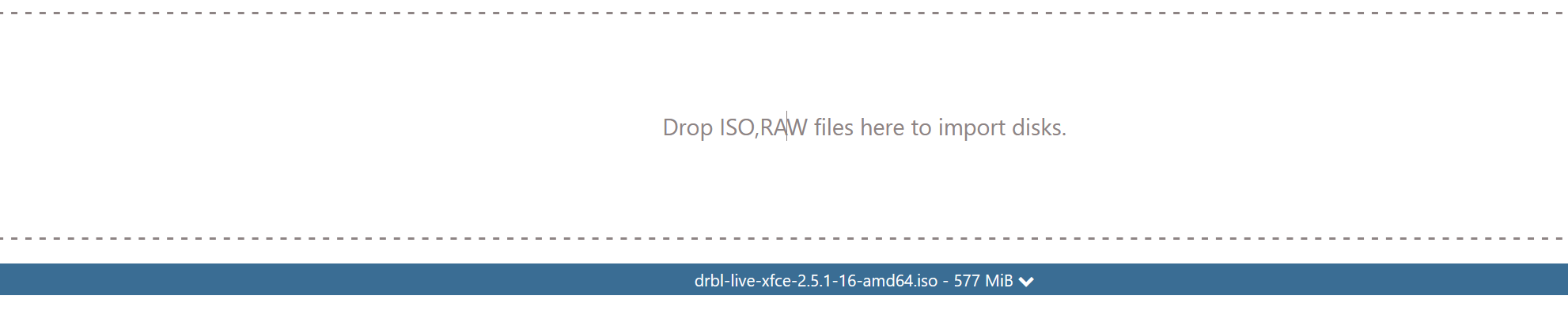
File on share is

File on XOCE, commit 3baa37846e6dbe775a8891f51f7eaebbbb28bea6

-
RE: VDI not showing in XO 5 from Source.
I have the same problem with 2 servers.
The solution for me was to:- migrate the VM between servers with different SR or to a 3rd one.
- export-import, virtual machines that are not that important and may have downtime.
-
RE: 🛰️ XO 6: dedicated thread for all your feedback!
For me it's a bit confusing XO6.
For example, why are the icons so small and in such far corners, like New VM? It's like you want it to be hidden.

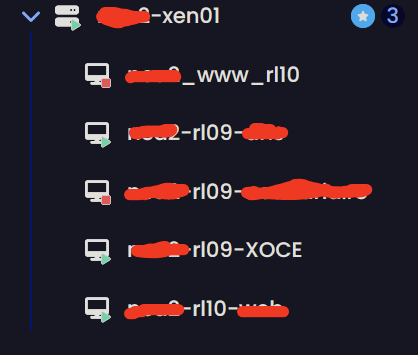
Isn't it more intuitive if they're at the top/bottom of this menu or in line with title (***-xen01)?

Another thing is the number of allocated processors. In my opinion it is misleading. It shows the total number of allocated processors even to VMs that are not started.
It is not better to be something like:
8 vCPUs running VMs / 4 vCPUs stopped VMs - total number allocated vCPUs 12/ Total CPUs 8.
And something like 8 - green / 4 -red - 12 orange/ 8 grey
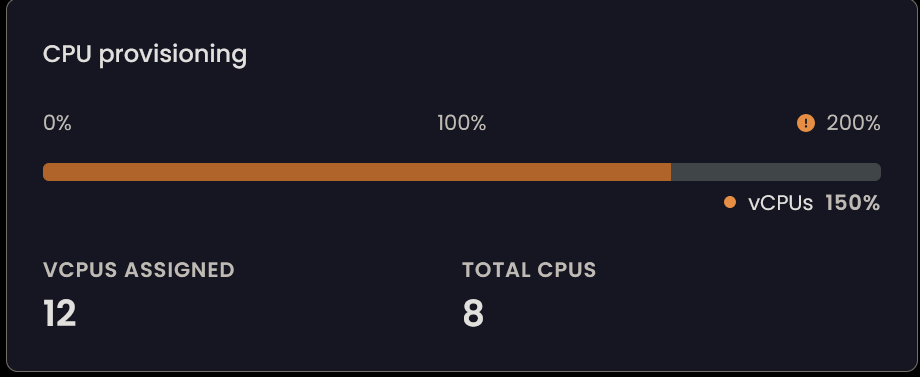
Running VM
-
RE: XO5 breaks after defaulting to XO6 (from source)
@MathieuRA
I also confirm that it works. Thank you -
RE: XO5 breaks after defaulting to XO6 (from source)
I managed to get it working, although the solution is not exactly to my liking.
I enabled both 80 and 443[http] [[http.listen]] port = 80 [[http.listen]] port = 443 cert = '/opt/ssl-local/fullchain.pem' key = '/opt/ssl-local/privkey.pem' # CRITICAL WEBSOCKET CONFIGURATION [http.upgrade] '/v5/api' = true '/v5/api/updater' = true # Make sure these routes are allowed for WebSocket upgrade [http.routes] '/v5/api' = { upgrade = true } '/v5/api/updater' = { upgrade = true } # List of files/directories which will be served. [http.mounts] '/v6' = '../../@xen-orchestra/web/dist/' '/' = '../xo-web/dist/' [redis] [remoteOptions] [plugins] -
RE: XO5 breaks after defaulting to XO6 (from source)
@ph7
On http it works, but without the lines below (those with /v5) in the config. On https it is the problem and it shouldn't be.... # List of files/directories which will be served. [http.mounts] '/v6' = '../../@xen-orchestra/web/dist/' '/' = '../xo-web/dist/' # List of proxied URLs (HTTP & WebSockets). [http.proxies] #'/v5/api' = 'ws://localhost:9000/api' #'/v5/api/updater' = 'ws://localhost:9001' #'/v5/rest' = 'http://localhost:9000/rest' ... -
RE: XO5 breaks after defaulting to XO6 (from source)
I don't run any scripts, I install according to the documentation.
nodejs 22
npm install -g npm
git clone -b master https://github.com/vatesfr/xen-orchestra
cp xo-server.toml  /opt/xen-orchestra/packages/xo-server/.xo-server.toml
cd /opt/xen-orchestra
yarn
yarn build
# XO6
yarn run turbo run build --filter @xen-orchestra/web
yarn cache clean
systemctl restart xo-server
The last compilation (b667bc8) works perfectly, this version is fine too, except for the links from v6 to v5 which are many.
In my opinion, v6 is not yet ready to be the default, too many links to v5.. -
RE: XO5 breaks after defaulting to XO6 (from source)
Same problem for me to.
The configuration file is like below, now. If I click on v6 from v5 it works but not the other way around.
And the links always go to /v5, but if v5 is the default what's the point?
I think that's the problem, instead of taking into account the config for the base they are explicitly passed in the links.The config
[http]

[http.cookies]

[[http.listen]]
port = 443
cert = '/opt/ssl-local/fullchain.pem'
key = '/opt/ssl-local/privkey.pem'

[http.mounts]
'/v6' = '../../@xen-orchestra/web/dist/'
'/' = '../xo-web/dist/'

# List of proxied URLs (HTTP & WebSockets).
[http.proxies]
'/v5/api' = 'ws://localhost:9000/api'
'/v5/api/updater' = 'ws://localhost:9001'
'/v5/rest' = 'http://localhost:9000/rest'

[redis]

[remoteOptions]

[plugins]
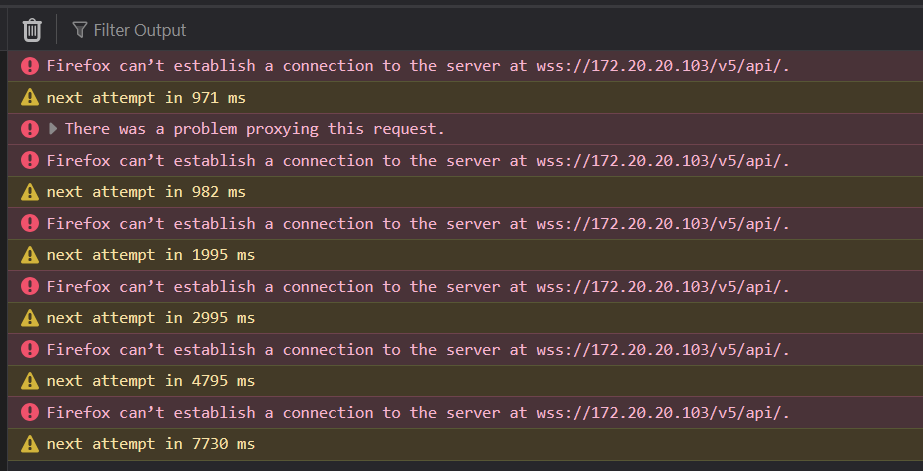
The problem with /v5
-
Permanent USB passthrough for smartcard
How do I make these settings permanent even if I update the server?
ALLOW: class=0a # CDC-Data
ALLOW: class=0b # Smartcard
from /etc/xensource/usb-policy.conf
Thank you
-
RE: Continuous replication problem with multiple SR
hmm,
I found the solution, after I read here on forum.
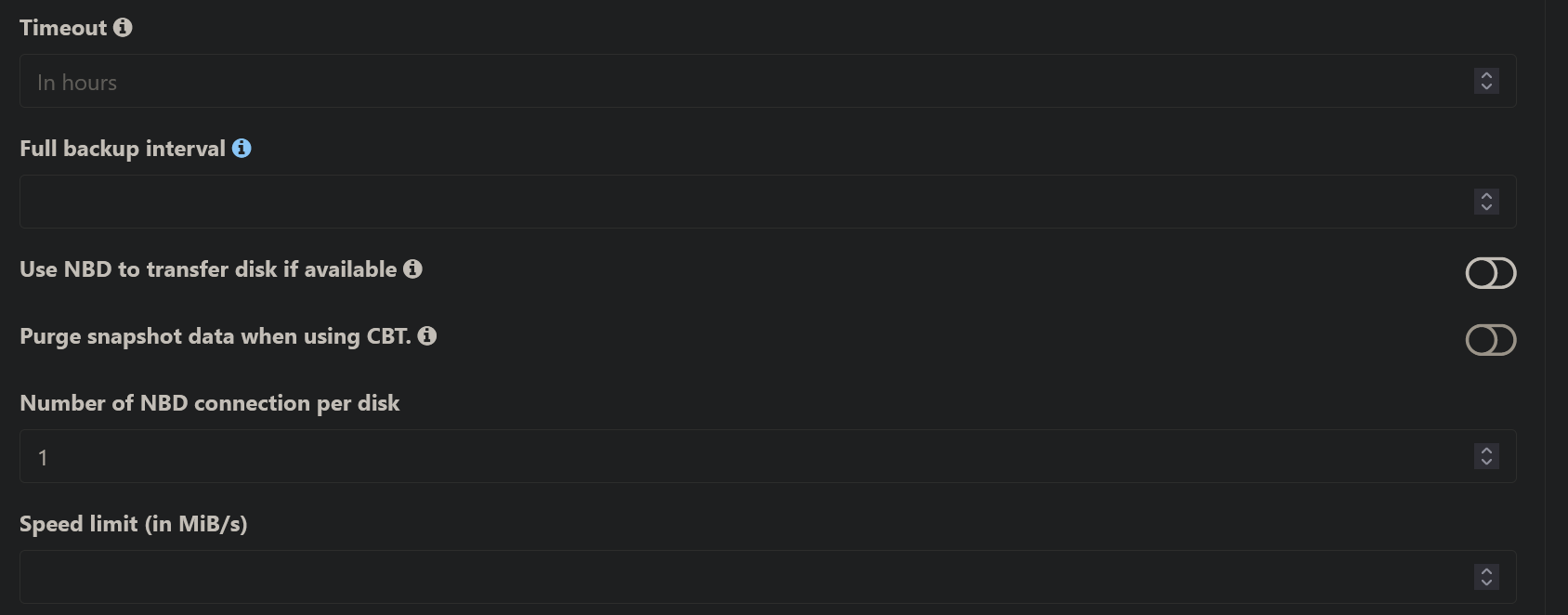
I enable this options and save and then disable and save and now is ok. Task is running again. It is running with last commit to
So the problem is with these settings which may not exist in the task created before the update.
-
RE: Continuous replication problem with multiple SR
@florent
The same result
Logs, but task is blocked on importing step{ "data": { "mode": "delta", "reportWhen": "always" }, "id": "1751375761951", "jobId": "109e74e9-b59f-483b-860f-8f36f5223789", "jobName": "tb-xxxx-xxxx-vrs7", "message": "backup", "scheduleId": "40f57bd8-2557-4cf5-8322-705ec1d811d2", "start": 1751375761951, "status": "pending", "infos": [ { "data": { "vms": [ "629bdfeb-7700-561c-74ac-e151068721c2" ] }, "message": "vms" } ], "tasks": [ { "data": { "type": "VM", "id": "629bdfeb-7700-561c-74ac-e151068721c2", "name_label": "tb-xxxx-xxxx-vrs7" }, "id": "1751375768046", "message": "backup VM", "start": 1751375768046, "status": "pending", "tasks": [ { "id": "1751375768586", "message": "snapshot", "start": 1751375768586, "status": "success", "end": 1751375772595, "result": "904c2b00-087f-45ae-9799-b6dad1680aff" }, { "data": { "id": "1afcdfda-6ede-3cb5-ecbf-29dc09ea605c", "isFull": true, "name_label": "tb-vrs1-RAID", "type": "SR" }, "id": "1751375772596", "message": "export", "start": 1751375772596, "status": "pending", "tasks": [ { "id": "1751375773638", "message": "transfer", "start": 1751375773638, "status": "pending" } ] }, { "data": { "id": "a5d2b22e-e4be-c384-9187-879aa41dd70f", "isFull": true, "name_label": "tb-vrs6-RAID", "type": "SR" }, "id": "1751375772611", "message": "export", "start": 1751375772611, "status": "pending", "tasks": [ { "id": "1751375773654", "message": "transfer", "start": 1751375773654, "status": "pending" } ] } ] } ] }