XCP-ng
    • Categories
    • Recent
    • Tags
    • Popular
    • Users
    • Groups
    • Register
    • Login

    Identify job from notification email
    Scheduled Pinned Locked Moved Backup
    19 Posts 5 Posters 2.3k Views 4 Watching
    Loading More Posts
    • Oldest to Newest
    • Newest to Oldest
    • Most Votes
    Reply
    • Reply as topic
    Log in to reply
    This topic has been deleted. Only users with topic management privileges can see it.
    • olivierlambertO Offline
      olivierlambert Vates 🪐 Co-Founder CEO
      last edited by

      Question for @MathieuRA & @florent

      1 Reply Last reply Reply Quote 0
      • M Offline
        manilx @McHenry
        last edited by manilx

        @McHenry Always had the same question, never asked....
        Looked up the job/VM in XO to get the info but it should be clearly specified here also, should be more than easy.

        P M 2 Replies Last reply Reply Quote 0
        • P Offline
          ph7 @manilx
          last edited by

          I updated my XOCE Yesterday but now 2 commits behind
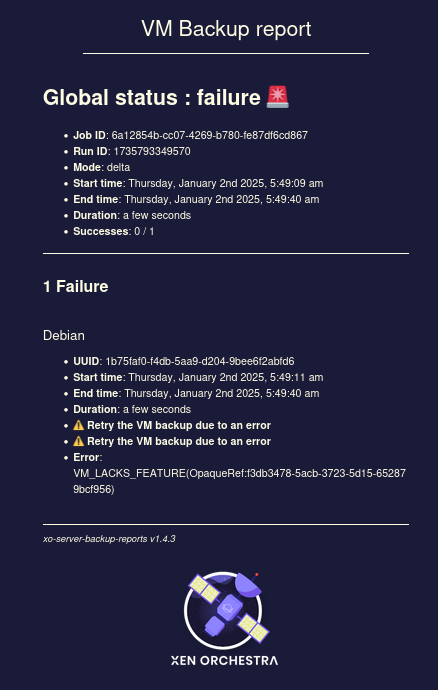
          It has more info about the jobs that failed.

          Global status : failure 🚨
          
              Job ID: 6a12854b-cc07-4269-b780-fe87df6cd867
              Run ID: 1735594483006
              Mode: delta
              Start time: Monday, December 30th 2024, 10:34:43 pm
              End time: Monday, December 30th 2024, 10:35:07 pm
              Duration: a few seconds
              Successes: 0 / 1
          
          1 Failure
          Debian
          
              UUID: 1b75faf0-f4db-5aa9-d204-9bee6f2abfd6
              Start time: Monday, December 30th 2024, 10:34:45 pm
              End time: Monday, December 30th 2024, 10:35:07 pm
              Duration: a few seconds
              ⚠️ Retry the VM backup due to an error
              ⚠️ Retry the VM backup due to an error
              Error: VM_LACKS_FEATURE(OpaqueRef:f3db3478-5acb-3723-5d15-652879bcf956)
          
          xo-server-backup-reports v1.4.3
          

          So I guess You are running XOA

          1 Reply Last reply Reply Quote 0
          • P Offline
            ph7
            last edited by ph7

            @McHenry
            I enabled the Shorter backup reports in a failing backup job, and got the same short report as You did.
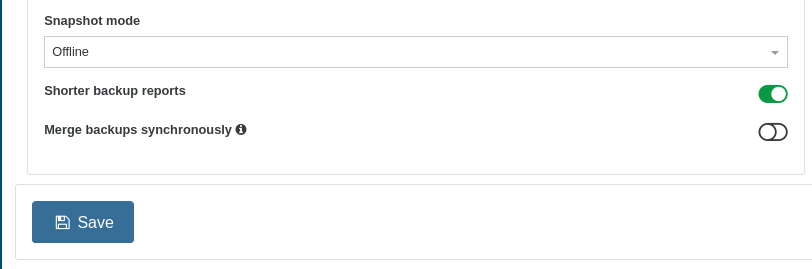
            9f54a072-bb2b-4799-9ebb-f489208747d1-bild.png

            M P 2 Replies Last reply Reply Quote 0
            • M Offline
              McHenry @ph7
              last edited by

              @ph7

              Yes, I am viewing the shorter email reports however these reports would be more useful if the origin of the report could be easily identified.

              1 Reply Last reply Reply Quote 0
              • M Offline
                McHenry @manilx
                last edited by

                @manilx

                Tried both and both have the same reports

                1 Reply Last reply Reply Quote 0
                • P Offline
                  ph7 @ph7
                  last edited by

                  @McHenry
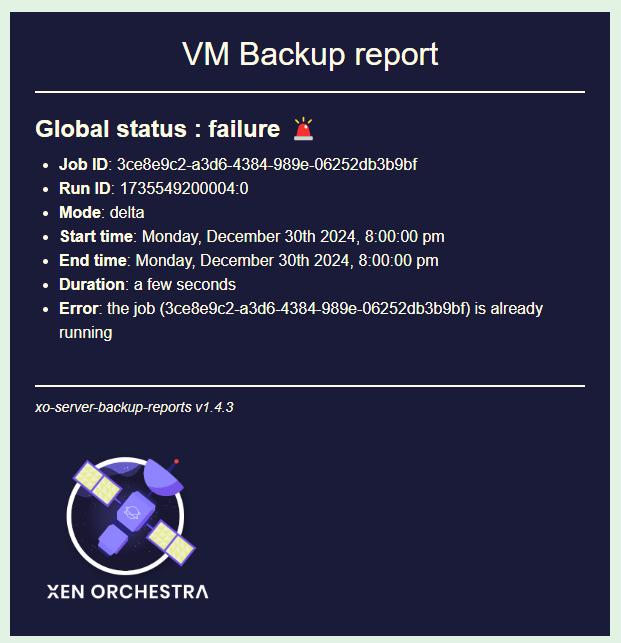
                  This is with the Shorter backup reports disabled:

                  Screenshot 2025-01-02 at 11-18-51 (3) Inkorg jake.blues@protonmail.com Proton Mail.png

                  M 2 Replies Last reply Reply Quote 0
                  • M Offline
                    McHenry @ph7
                    last edited by

                    @ph7

                    Thank you. Let me try that.

                    1 Reply Last reply Reply Quote 0
                    • M Offline
                      McHenry @ph7
                      last edited by

                      @ph7

                      OK, I see the difference.

                      When an individual VM fails to backup the report is as your shown above and displays the name of the VM however when the job fails as a whole the report inly includes the top section that has a Job ID & Run ID so no way I can see to identify where this job.

                      i.e.
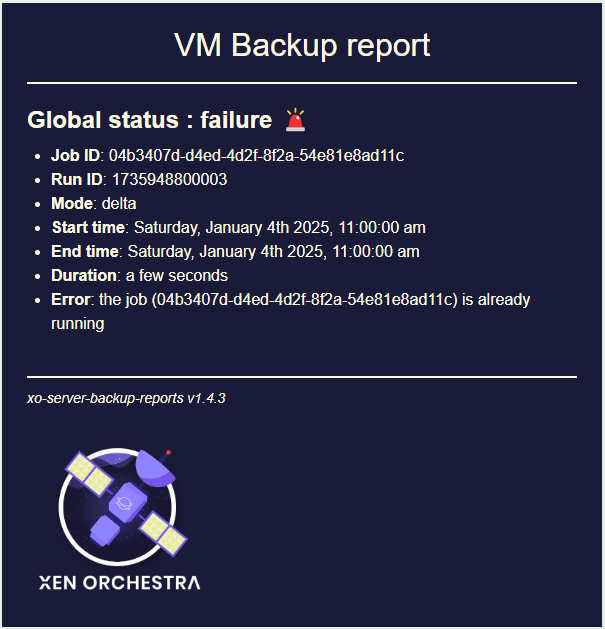
                      3357a537-55c4-40de-944a-dfe47458b6fb-image.png

                      @olivierlambert
                      Could these reports include both the pool name and host name in addition to the Job ID and Run ID?

                      1 Reply Last reply Reply Quote 0
                      • olivierlambertO Offline
                        olivierlambert Vates 🪐 Co-Founder CEO
                        last edited by

                        Yes, it should be possible, even if the name can be changed (it's not "stable" vs an UUID). But it makes sense, asking @pdonias about this.

                        M 1 Reply Last reply Reply Quote 0
                        • M Offline
                          McHenry @olivierlambert
                          last edited by

                          @olivierlambert

                          Good point, the UUID of the host or pool would also work.

                          1 Reply Last reply Reply Quote 0
                          • olivierlambertO Offline
                            olivierlambert Vates 🪐 Co-Founder CEO
                            last edited by

                            It has been added to the backlog, thanks!

                            M 2 Replies Last reply Reply Quote 1
                            • M Offline
                              McHenry @olivierlambert
                              last edited by

                              @olivierlambert

                              Whilst this request awaits implementation. If I check all hosts individually however I identify the host based upon the jobID or runID from the notification?

                              1 Reply Last reply Reply Quote 0
                              • olivierlambertO Offline
                                olivierlambert Vates 🪐 Co-Founder CEO
                                last edited by

                                Question for @MathieuRA

                                M 1 Reply Last reply Reply Quote 0
                                • M Offline
                                  McHenry @olivierlambert
                                  last edited by

                                  @olivierlambert

                                  Is this listed on GitHub so I can track any discussion/progress?

                                  I am keen to see this implemented as currently we receive backup reports of failed jobs and have no idea which host is came from.

                                  1 Reply Last reply Reply Quote 0
                                  • M Offline
                                    McHenry @olivierlambert
                                    last edited by

                                    @olivierlambert

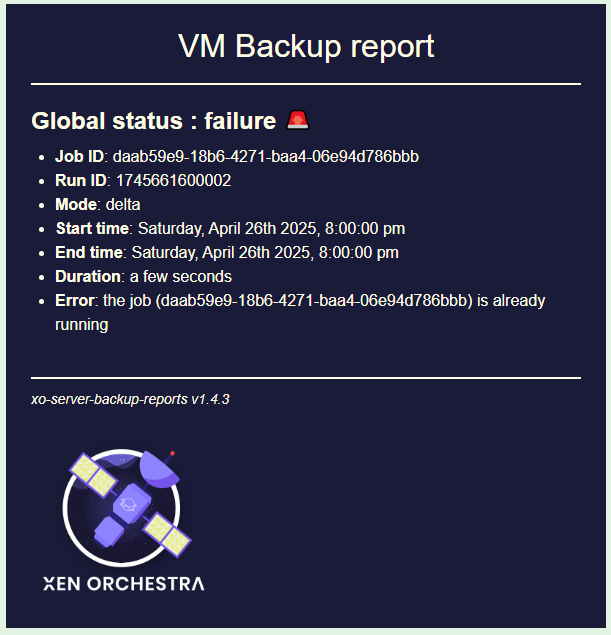
                                    Still trying to identify the owner of a job so the I can determine which backup job failed. The email report does not identify the host/pool. Accordingly, I need to login to every individual XO/XOA and check the backup log manually to find the failed job.
                                    d817a0bb-cd6a-4cdb-9413-363106f4ca9f-image.png

                                    lsouai-vatesL 1 Reply Last reply Reply Quote 0
                                    • olivierlambertO Offline
                                      olivierlambert Vates 🪐 Co-Founder CEO
                                      last edited by

                                      Ping @lsouai-vates

                                      1 Reply Last reply Reply Quote 0
                                      • lsouai-vatesL Offline
                                        lsouai-vates Vates 🪐 Product team @McHenry
                                        last edited by

                                        @McHenry hello, thanks for the report.
                                        Can you open a suggestion on Github so we can plan it or next roadmap?
                                        Have a good day.

                                        1 Reply Last reply Reply Quote 1

                                        Hello! It looks like you're interested in this conversation, but you don't have an account yet.

                                        Getting fed up of having to scroll through the same posts each visit? When you register for an account, you'll always come back to exactly where you were before, and choose to be notified of new replies (either via email, or push notification). You'll also be able to save bookmarks and upvote posts to show your appreciation to other community members.

                                        With your input, this post could be even better 💗

                                        Register Login
                                        • First post
                                          Last post