No mem stats under Windows Server
-
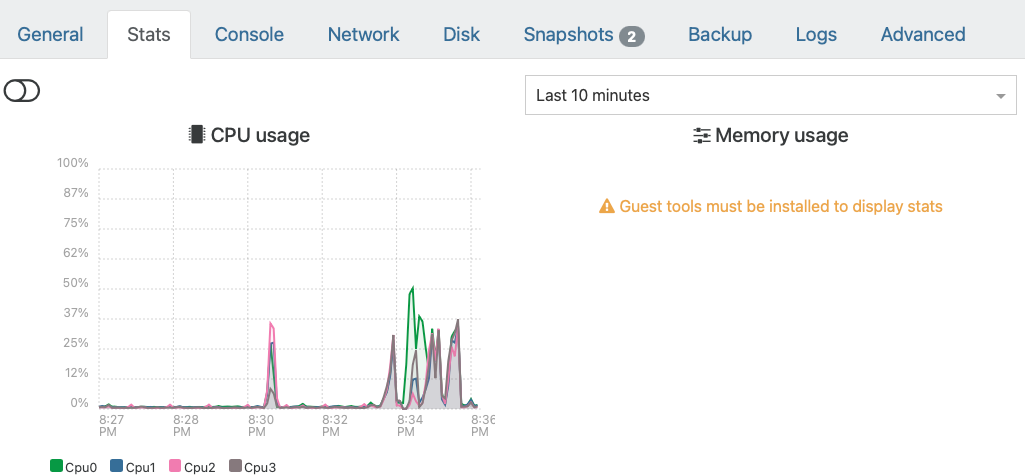
I have an issue where there is no mem stats showing for my Windows server 2022. I don't know if it's isolated with this or all windows workstation or server clients.
I have installed Xen Tools 9.4.1. Yet, it is not displaying the memory stats.
Then, I also tried by uninstalling Xen Tools 9.4.1 and used Manage Citrix PV drivers via Windows Update. But that also didn't work.
Lastly, I updated Xen Orchestra to the latest build (i.e. all commits) as of this post date, that didn't work either.
Thanks for your help & insights.
-
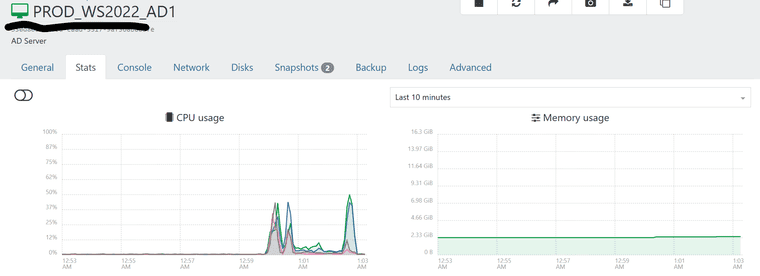

Mine seems to work okay.
Xen Orchestra, commit 1c01f
Master, commit 1c01f -
@okynnor The management agent in the 9.4.1 MSI is required for memory reporting. Is this VM a domain controller (as its name would suggest)? Is XenSvc running normally?
There are some known issues with the management agent on Server 2025, but I haven't heard it happening on Server 2022. Perhaps it was introduced by a recent update. -
@dinhngtu You are correct - it is a domain controller running on Windows Server 2022.
The XenOchestra commit is at 1c01f
Should I try to reinstall the Xen Tools? I suspect that it is going to be a futile attempt though.
--Update:
I went ahead and removed XenTools. Reboots. Reinstalled XenTools. But this time, I selected the second options -- to allow XenTools I/O Tools to automatically update when the "Manage Citrix PV drivers via Windows Update" is turned off (which it is)....Windows Server didn't prompt for a reboot. When I checked XenOrchestra, boom!, the Memory usage was there!!That second option did the trick.
-
@okynnor IIRC, it would take a reboot before the problem showed up. I'd check after a reboot if XenSvc wasn't stuck in the starting state.


Hello! It looks like you're interested in this conversation, but you don't have an account yet.
Getting fed up of having to scroll through the same posts each visit? When you register for an account, you'll always come back to exactly where you were before, and choose to be notified of new replies (either via email, or push notification). You'll also be able to save bookmarks and upvote posts to show your appreciation to other community members.
With your input, this post could be even better 💗
Register Login