Hey XCP-NG! How's my setup?
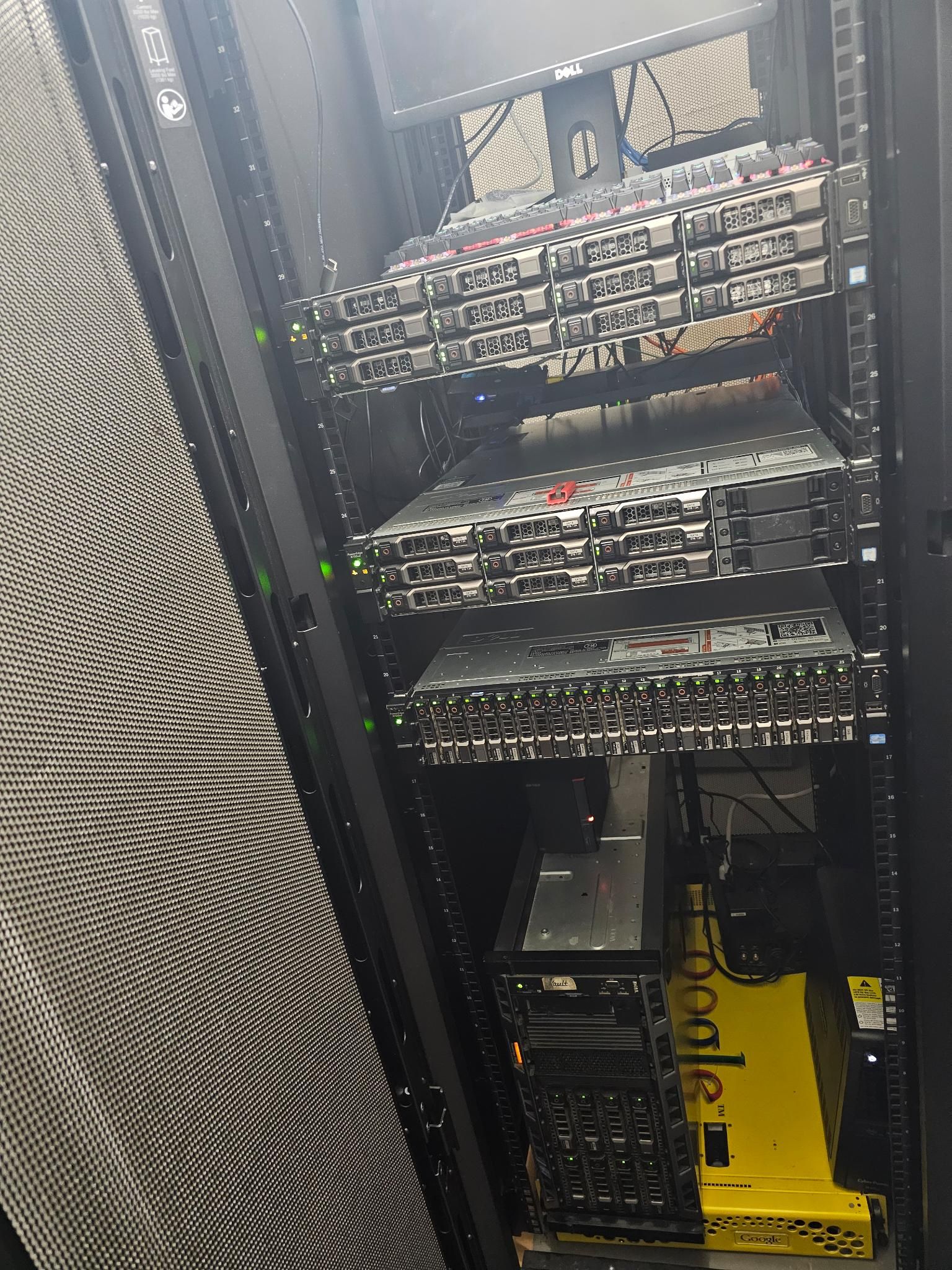
-
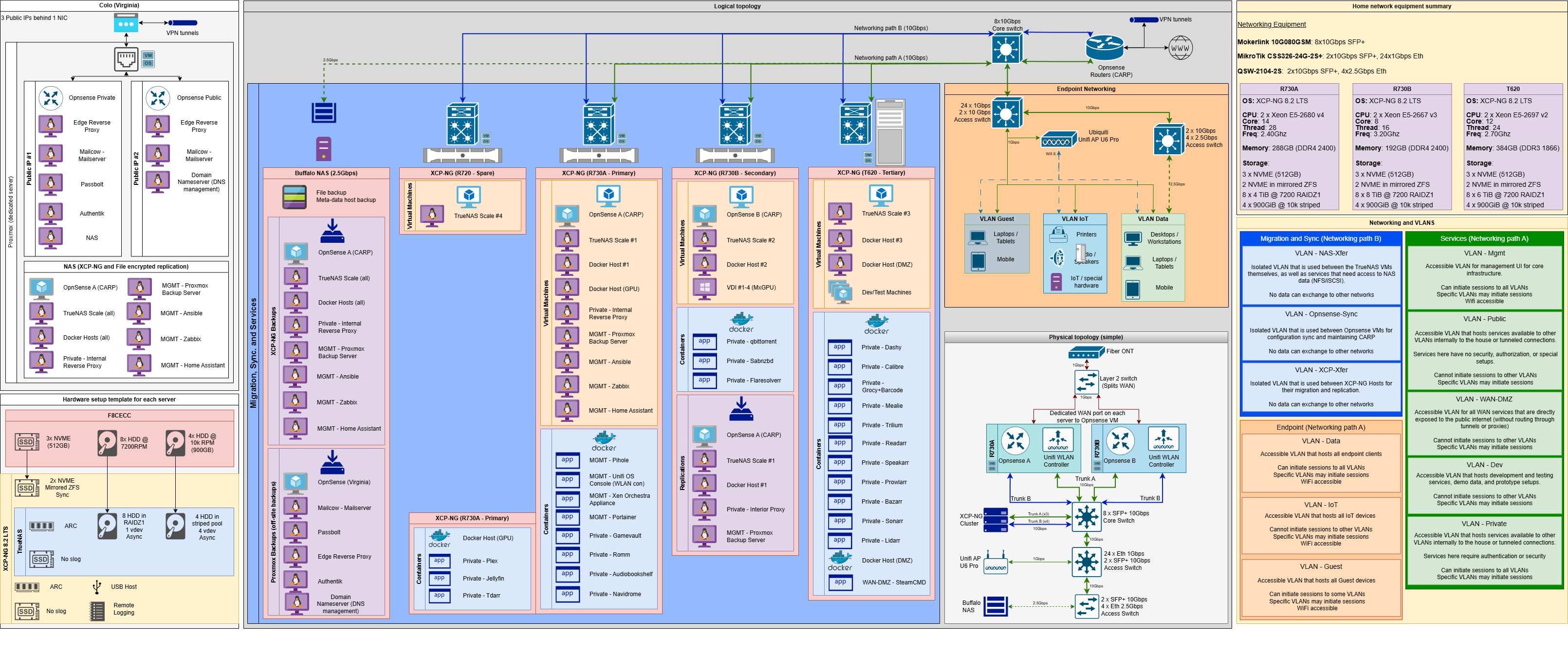
I appreciate that! I used draw.io to create this and although I've made quite a few diagrams as a prior teacher, I don't quite know any standards so I do my best to present it as built.
I've tried GLPI before and I did enjoy it, I also used Snipe-IT alongside a Dymo label printer to great success. I didn't quite keep up on that documentation sadly and most of my equipment details/warranty now fall under Grocy as I'm in that program more than others.
I tend to browse through the Awesome opensource Self-hosted list and see what I can put together and how I can improve. I do use a lot of this in my house, and contains my router now so I'm outta luck if it goes down lol.
-
Couldn't help myself, noticed a few errors and thought of a few items to throw in the diagram lol.
-
Your doc is probably better than what you can find in 90% of the companies we worked with, including ourselves

-
Documentation is the first thing to get pushed to the back burner, same in my area, same in my larger IT department. Never enough time to document things correctly.
I need to get going with Netbox and see if I can make this speed up what I want to document.
-
@olivierlambert I appreciate that! You guys have been foundational in my learning experience with XCP-NG at the core. I'm essentially opensource style or BSD licensing in my setup and I've found everything you all do to be well documented and performance is outstanding from what I can push.
It helps to know this is a good representation! This was the hopeful start to creating more diagrams and trying to setup deep dives of each section; delving into abstraction layers and displaying on a personal website as a type of portfolio addition to a resume. Got caught up in layoffs recently, so as the search goes I've tried to improve and refine what I do have on hand.
It's not the most modern of hardware as It's really been a long process, but I've tried to eek out as much performance and variety as I could. Always learning, sometime brutally lol.
As I create more, I keep going back and updating this one.
-
@Greg_E Netbox does an amazing job and helps you make connections. I do have one setup but not listed here, however I don't have it fully operational at this moment. Been running some devs on a true one pane of glass solution such as Grafana or alternatives and how it feeds in. Haven't quite settled on anything though.
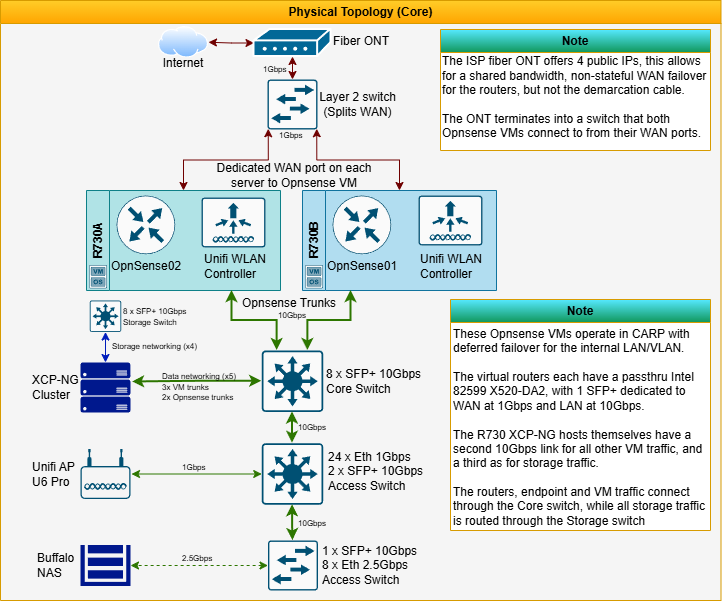
For the diagram above, generally I'll start off with the physical topology and I'll make a list of the hops it would take to get somewhere on the network until I reach an ending point, usually the longest route first. Then just create the basic flowchart, create my branches as necessary.
The format of the diagram is made up of the container shapes in either horizontal or vertical title, and I change the colors. I try to start with warmer or neutral colors at the background container and cooler colors in the foreground. Something I learned during early days of HTML/CSS.
The icon packs I used were Cisco, but had overlap from Rack, CAE and Citrix icon packs
-
Tom Lawrence has a bit hub with all the artwork that he uses, you might want to find that and check it out.
-
I've got some updates on the old diagram, and two new ones to add in!
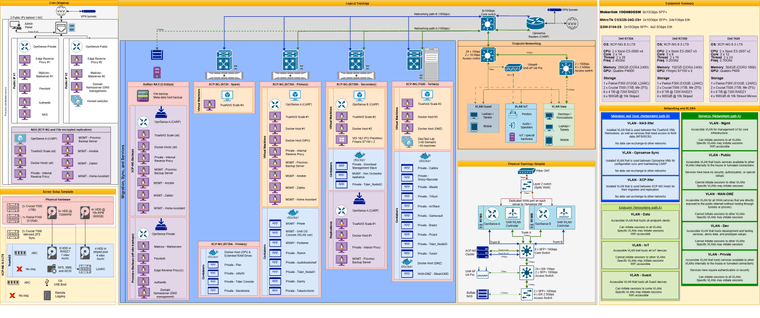
I've migrated over to XCP 8.3 LTS since it's released! Alongside that I've installed a few applications, condensed some others into group names in the chart, and migrated the ZFS pools for OS storage to better NVME hardware, also added L2ARC in front of the HDD storage.
Since MxGPU is no longer supported in the way that it was, I instead had to change the number of VDI max from 4 to 2. Instead of MxGPU, each GPU is PCI-passthru directly to the VMs instead.
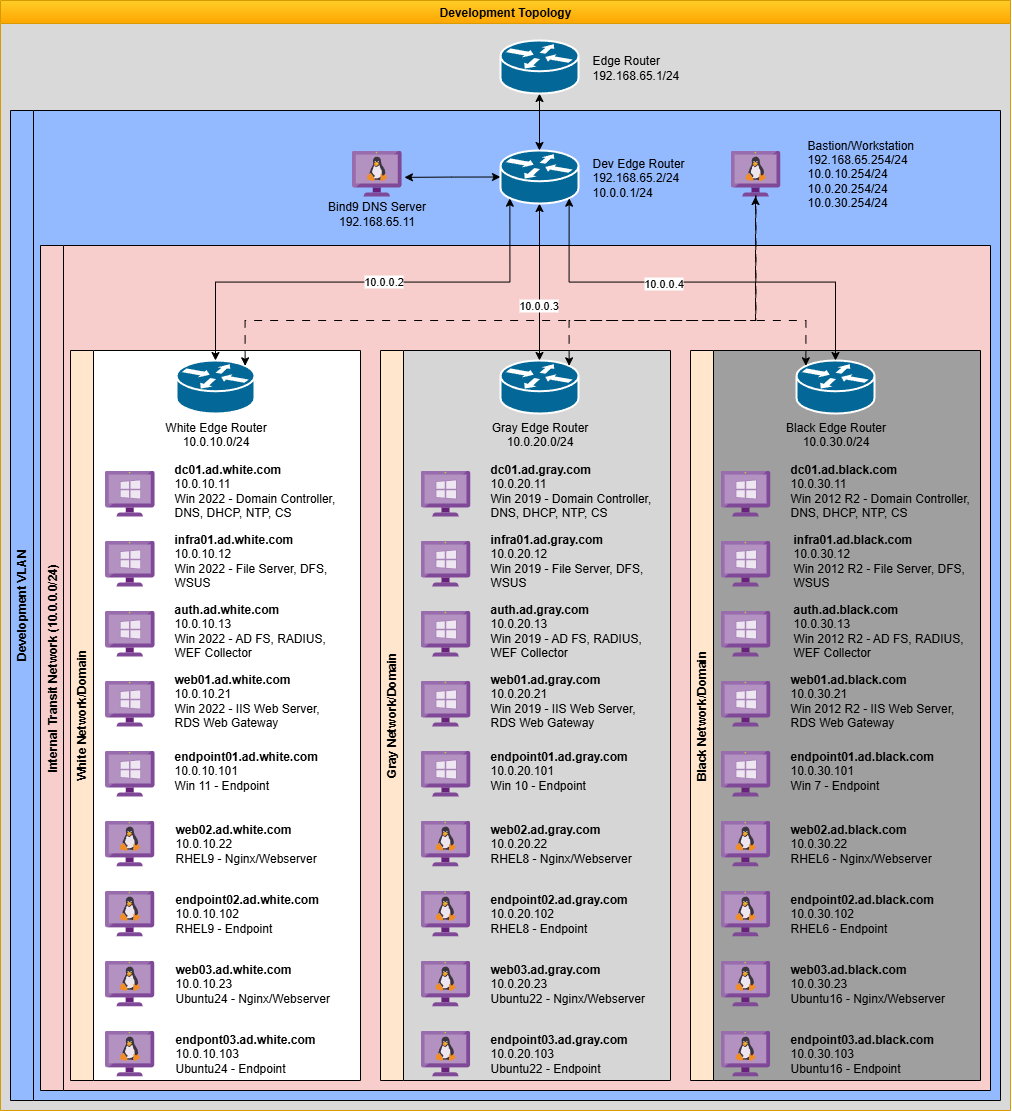
I've also expanded upon how the Dev section is setup, as it has it's own write-up
This environment is composed of three core network zones, designed to mimic a typical hybrid enterprise setup:
Development VLAN
Functions as a proxy-to-internet zone used to hijack or intercept DNS and service calls as needed. It enables testing of redirect logic, hostname spoofing, or simulating cloud resources and CDN endpoints.

Internal Host Transit Network
A dedicated transit layer that links all Opnsense VMs with static routing only, simulating WAN connectivity across isolated customer domains while allowing controlled traffic flows between them.

Domain Networks (White, Gray, Black)
Each domain resides in its own internal network segment with no direct internet access. These simulate fully isolated customer environments. All connectivity is routed through the Opnsense perimeter via the transit network.
Domain, OS Generation, Windows Stack, Linux Stack
White, Modern, Server 2022/Windows 11, RHEL 9, Ubuntu 24
Gray, Prior Gen, Server 2019/Windows 10, RHEL 8, Ubuntu 22
Black, Legacy, Server 2012 R2/Windows 7, RHEL 6, Ubuntu 16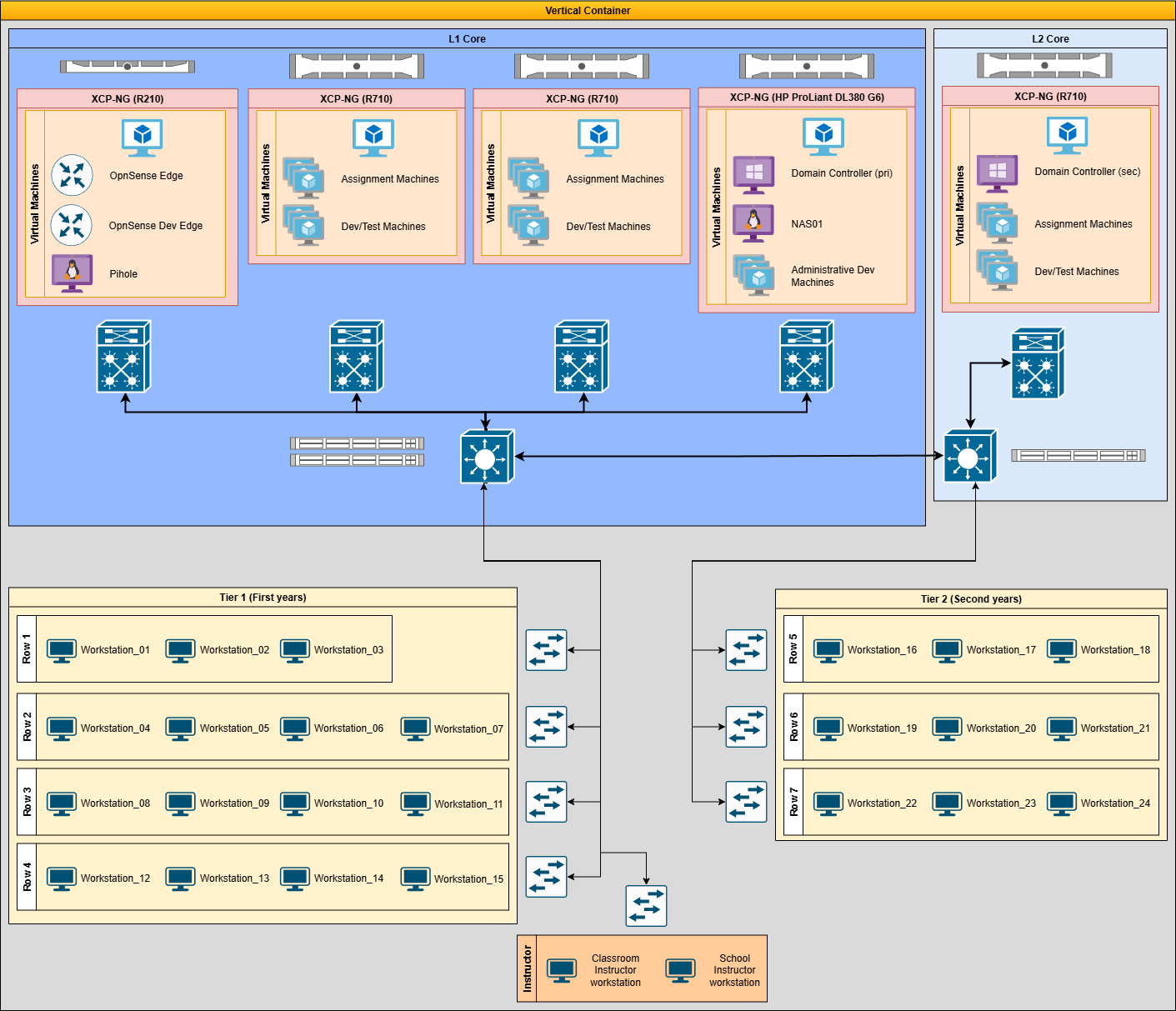
And then I've also setup my old classroom, this was as simpler design used when I taught A+ and Net+ certifications.The first years focused on A+ and we had hardware examples, as well as I created VMs that were broken/infected/improperly configured and general virtualization for anything else. We avoided using the actual workstations in examples lol.
Second years had their own server rack with it's own network gear and server for use, they primarily focused on Net+
Been fun all the way and XCP-NG has made a lot of it possible. Thanks for all ya do!
-
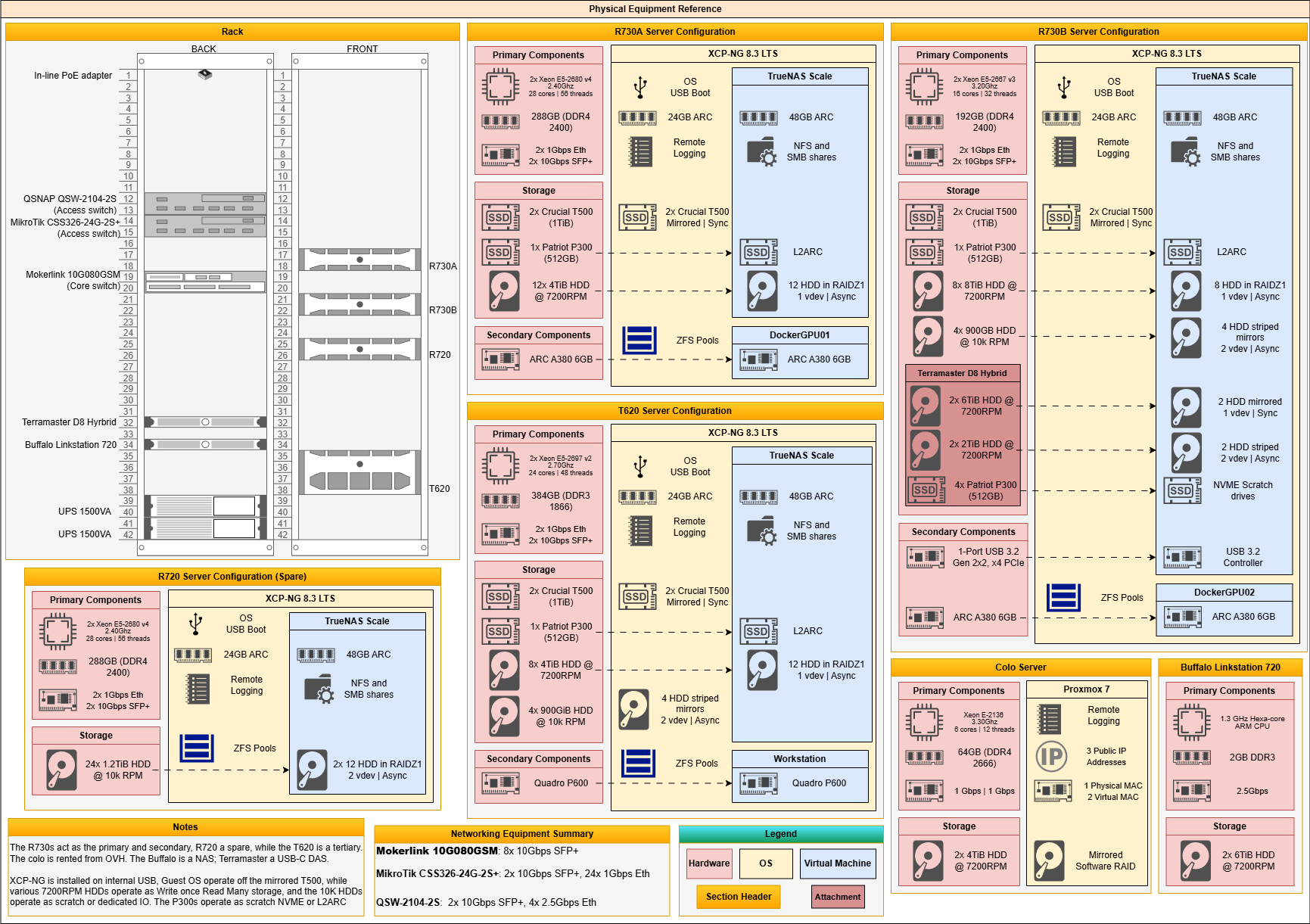
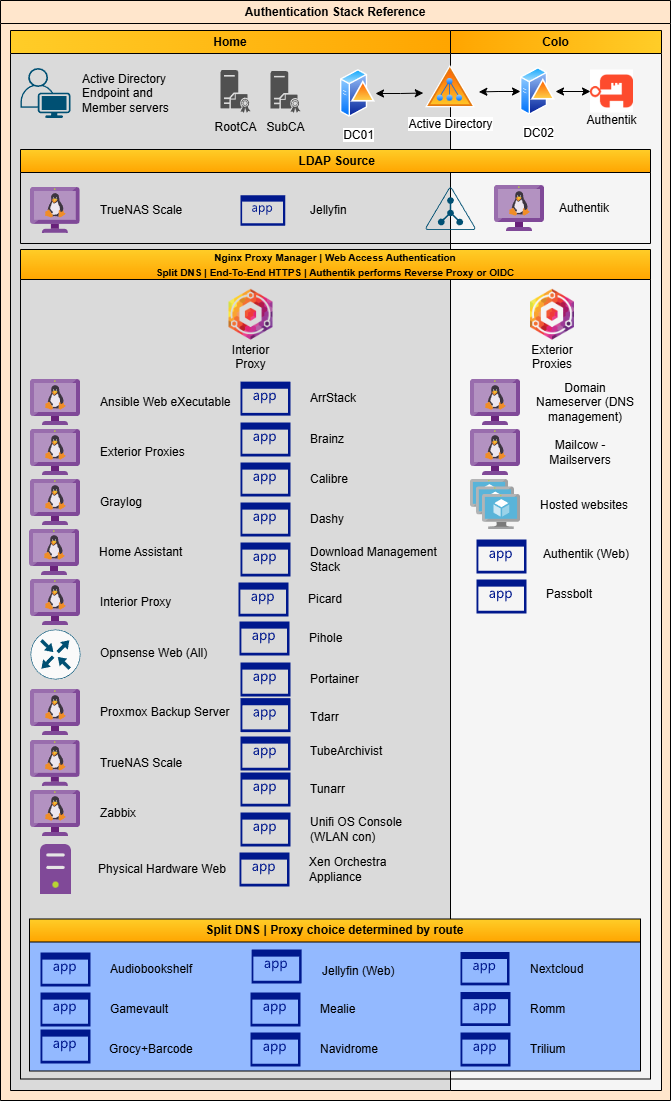
I've had a lot of changes to the homelab and always new projects, as well as started on the diagrams again. A couple of other reference diagrams aren't finished, but here are two that are done!
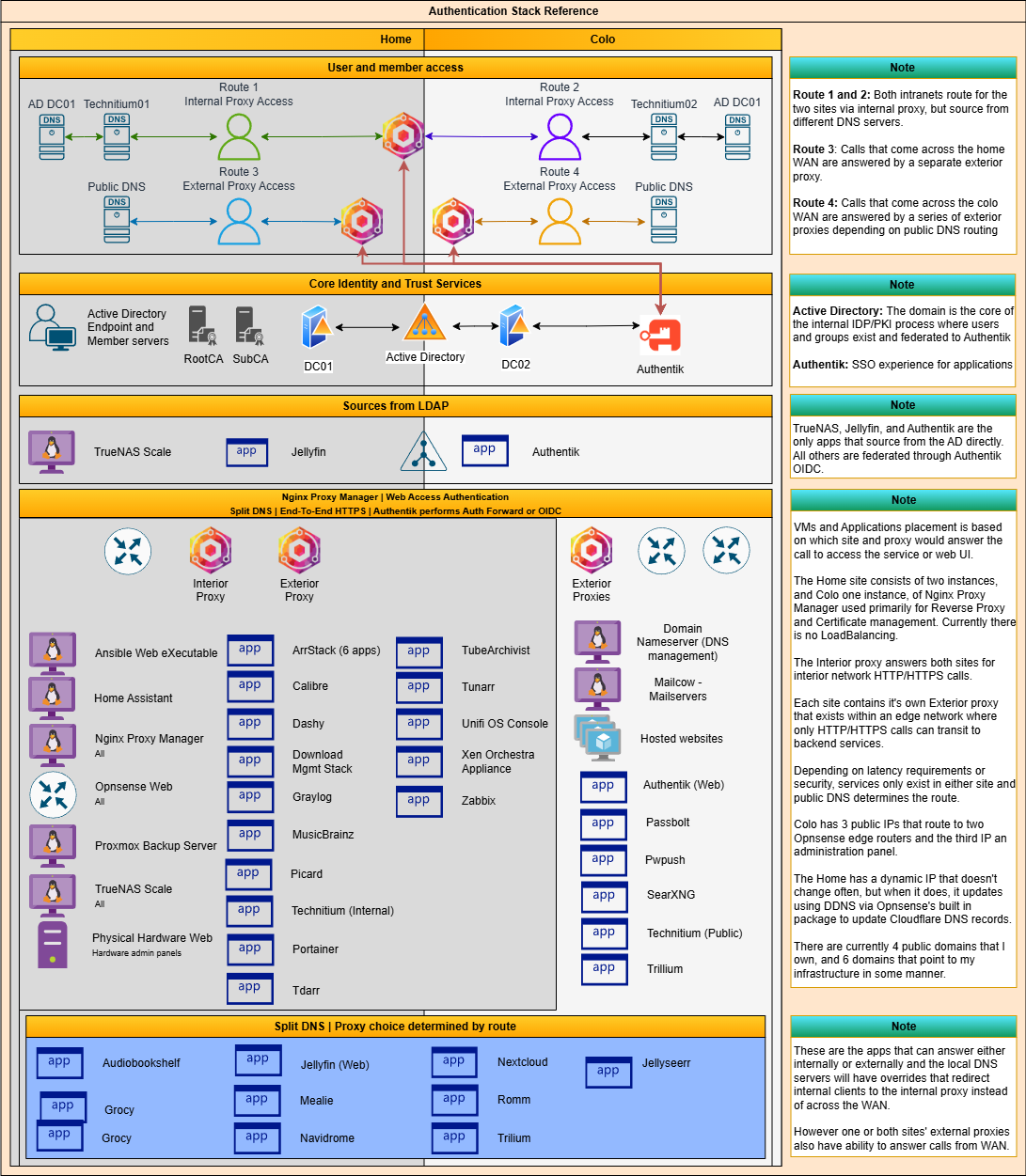
Created a Physical Equipment Reference sheet that expands on the hardware used and how, as well as an Authentication Stack that gives a reference of service access and authentication.
-
I've had a lot of updates happening in the homelab. I've replaced the T620 with an R740, expanded my storage for both HDD and NVME pools. Also did a little min-maxing on the hardware to help separate traffic, decrease some latency and jitter for internet traffic and introducing IDS
There are a lot of additions and modifications, but I guess the other big one is setting up a Dell Precision 5820 with XCP-NG as a studio and prototyping rig. Replaced Ansible with AWX, added some more VMs and migrated others but in all that I've updated the diagrams as well! Will say that XCP-NG offers up the flexibility and performance that I've needed so far. Would love to try out the XOSTOR storage at some point but will have to move around my entire setup haha.
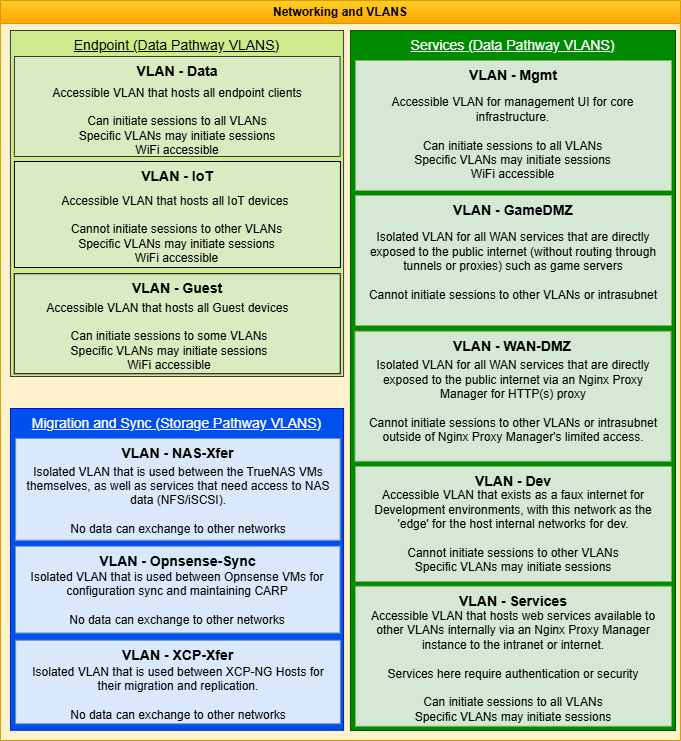
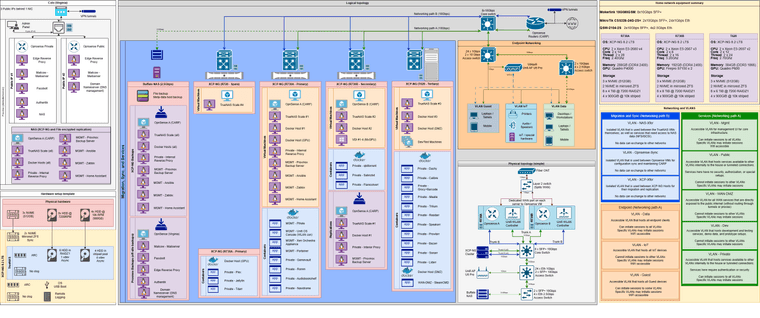
This reference diagram breaks down each VLAN
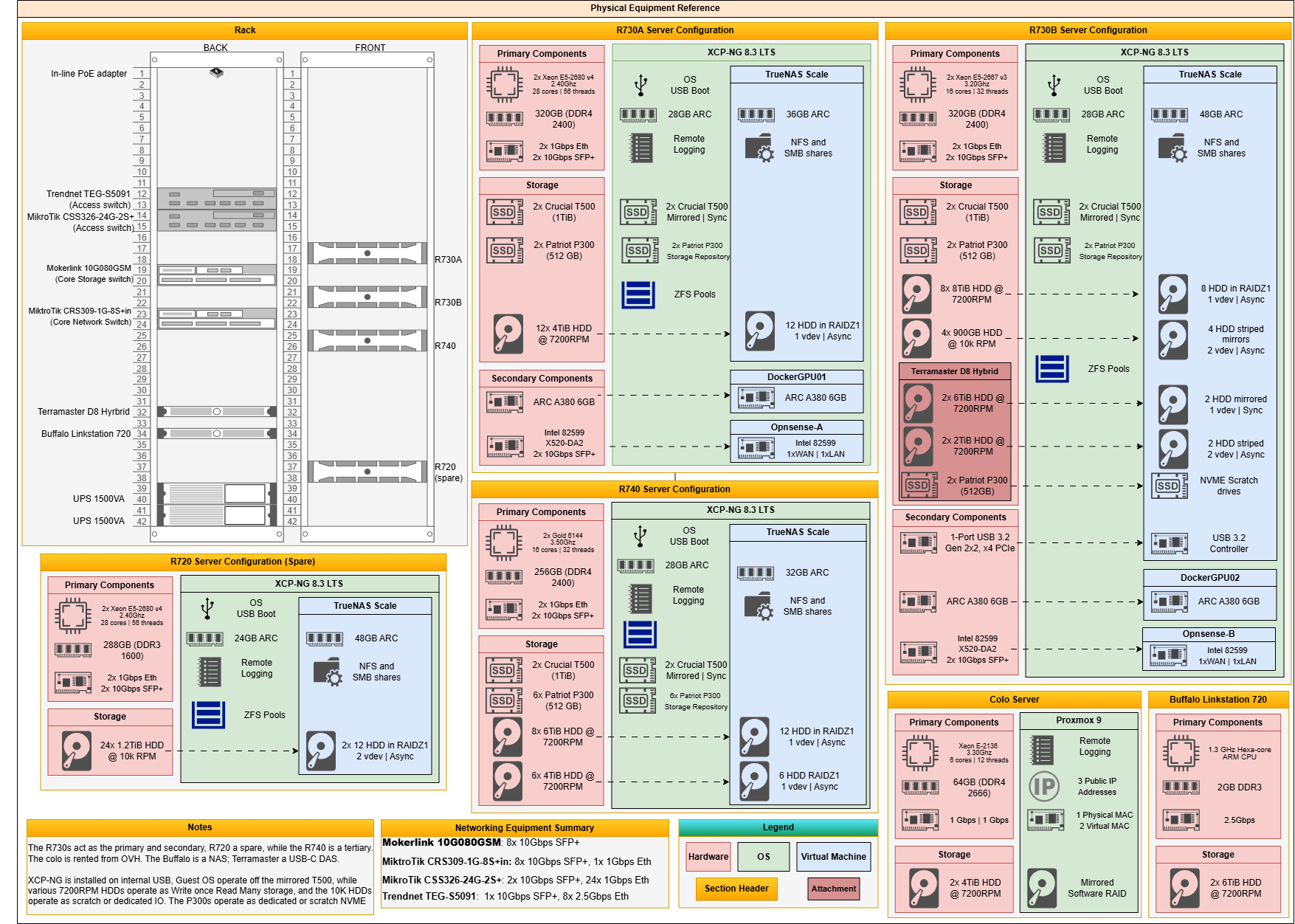
The physical equipment reference diagram gives a breakdown of the server equipment and NAS at both locations, including the home rack. It also shows a basic breakdown of each server configuration.
The physical topology reference diagram gives a simplistic overview of the major networking and server equipment.
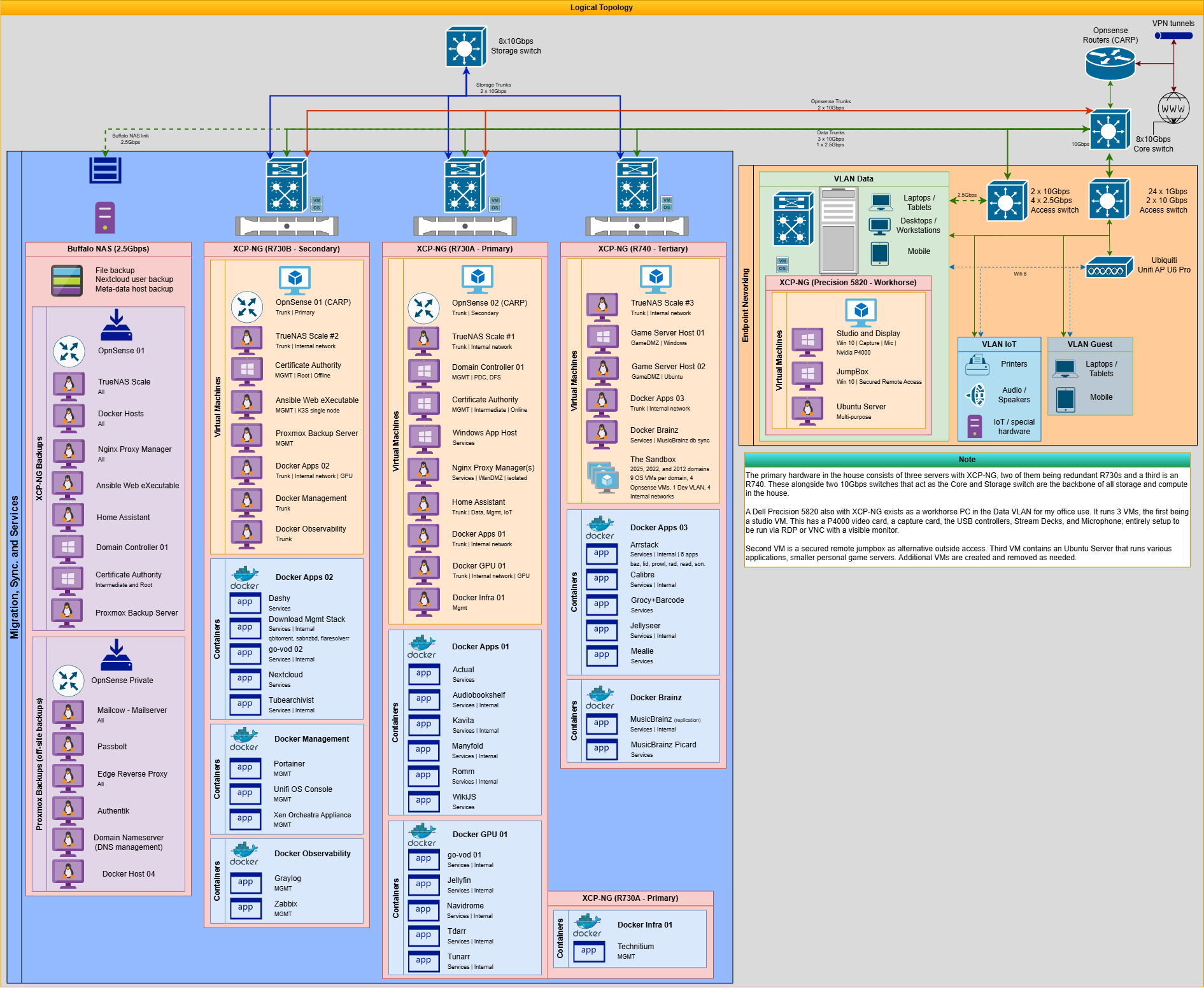
The logical topology reference diagram gives a more in-depth view of the networking, servers, VMs, VLANs and endpoint devices.
The colo reference diagram contains my off-site location with a rented dedicated server
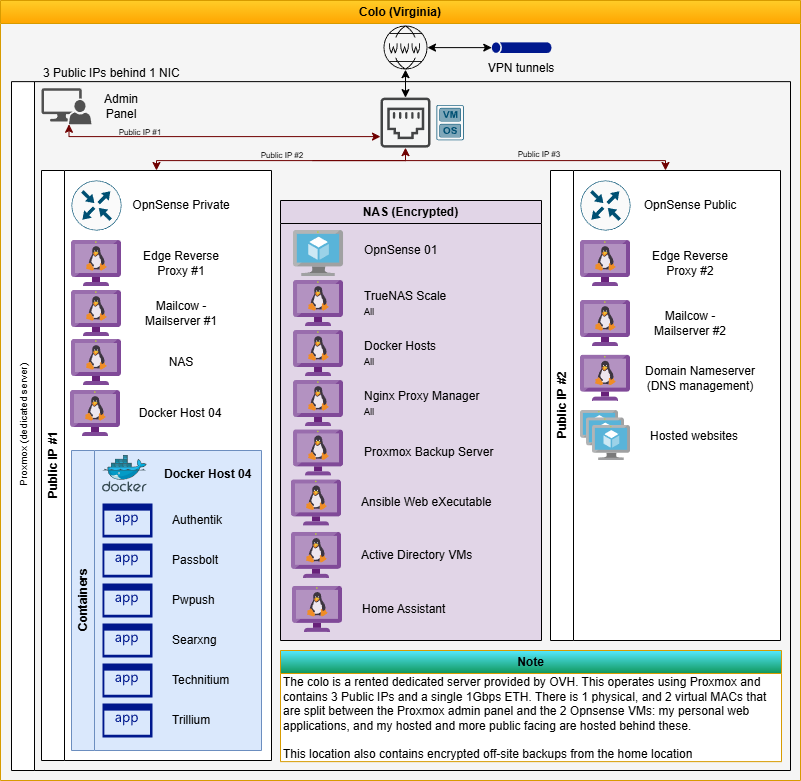
The Authentication reference diagram gives a break down of how user access is sourced or what security route it takes.
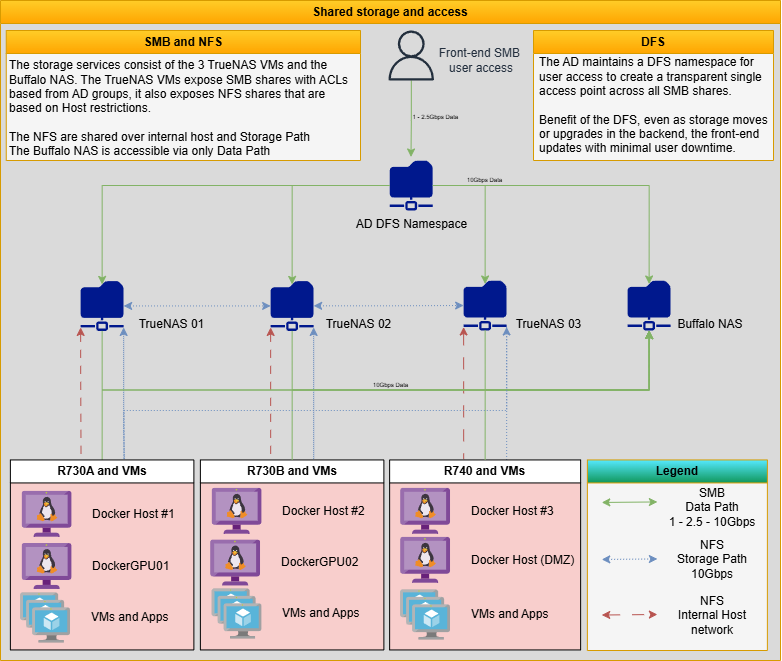
The shared storage and access reference diagram gives a break down of how most hardware interacts with each other in regards to network routing for users, endpoints, and member servers.
-
Finally had a host failure! I run my XCP-NG installations off internal USB and one of those USB finally died.
I had metadata backups but did run into one kerfluffle that slowed me down in setting the node back up. turns out that my XCP-NG had not fully updated. This meant my dbschema in the metadata backup was a mismatch compared to a fresh ISO installation, and a full update.
In the end I had to update XAPI and a few other items selectively to a matching version, perform the restoration, and then run the remainder of the updates to get everything up and running again.
All in all took me about 2-3 hours to restore the host, not XCP-NG's fault but just an issue with my implementation and not expecting the dbschema mismatch.
-
Thanks for the feedback. USB is really really bad for XCP-ng (and not just us but many other hypervisors). I'm not surprised it died.
-
@olivierlambert Np! And that's entirely expected with the USB host, but it's the easiest setup and surprisingly, longer lasting than expected.
Really though as just some measurements, these were Samsung 128GB flash drives as I have them in bulk. In the last ~8 years with XCP-NG this is the first USB host to actually fail, longest one in deployment without being replaced currently is 4 years. I tend to swap em every 5 years. I planned with their failures in mind since a little downtime isn't gonna kill me, but they've surprised me with how long they last.
Will note that logging is shunted elsewhere.
~Submitted the feedback request as well
-
Regarding the restore thing, it's clearly sub optimal, can you submit an improvement feedback directly to https://feedback.vates.tech?

Hello! It looks like you're interested in this conversation, but you don't have an account yet.
Getting fed up of having to scroll through the same posts each visit? When you register for an account, you'll always come back to exactly where you were before, and choose to be notified of new replies (either via email, or push notification). You'll also be able to save bookmarks and upvote posts to show your appreciation to other community members.
With your input, this post could be even better 💗
Register Login