Long backup times via NFS to Data Domain from Xen Orchestra
-
interesting
can you try to do a perfomance test while using block storage ?

This will store backup are multiple small ( typically 1MB ) files , that are easy to deduplicated, and the merge process will be moving / deleting files instead of modifying one big monolithic file per disk. It could sidestep the hydratation process.
This is the mode by default on S3 / azure, and will probably be the mode by default everywhere in the future, given its advantages(Note for later : don't use XO encryption at rest if you need dedup, since even the same block encrypted twice will give different results)
-
@florent said in Long backup times via NFS to Data Domain from Xen Orchestra:
interesting
can you try to do a perfomance test while using block storage ?
This will store backup are multiple small ( typically 1MB ) files , that are easy to deduplicated, and the merge process will be moving / deleting files instead of modifying one big monolithic file per disk. It could sidestep the hydratation process.
This is the mode by default on S3 / azure, and will probably be the mode by default everywhere in the future, given its advantages(Note for later : don't use XO encryption at rest if you need dedup, since even the same block encrypted twice will give different results)
I am not sure if it is a good idea to use that feature as default.
We just switched away from it in our XCP-ng / XO environment as it tanked performance really hard.
The issue is with using NBD, delta backups will open at least 1 data stream per virtual disk. Even with concurrency set to 1 in the backup job there will be a "spam" of small files on the remote when there is a virtual machine with a lot of virtual disks attached to it (around 10 virtual disks).Data blocks feature resulted in transfer speeds to our NAS going down to 300 Mbit/s for VMs that have many disks.
After disabling data blocks feature transfer speed went up to 2.8 Gbit/s.Instead I would like to see brotli compression becoming default for delta backups no matter if data blocks is turned on or not. Also encryption for remotes that do not use data blocks would be awesome. This way people can combine good performance with security.
-
@MajorP93
interesting, Note that this is orthogonal to NBD.
I note that there is probably more work to do to improve the performance and will retest VM with a lot of disk
Performance is really depending on the underlying storage.
compression and encryption can't be done in "legacy mode" , since we won't be able to merge block in place in this case. -
@florent said in Long backup times via NFS to Data Domain from Xen Orchestra:
@MajorP93
interesting, Note that this is orthogonal to NBD.
I note that there is probably more work to do to improve the performance and will retest VM with a lot of disk
Performance is really depending on the underlying storage.
compression and encryption can't be done in "legacy mode" , since we won't be able to merge block in place in this case.I see thanks for the insights.
The problem that we saw could also be solved if you guys would add another config parameter to the delta backup job: disk concurrency per VM.
That way it would be possible to backup only e.g. 2 out of 10 virtual disks at the time. -
@MajorP93 this settings exists (not in the ui )
you can create a configuration file named
/etc/xo-server/config.diskConcurrency.tomlif you use a xoacontaining
[backups] diskPerVmConcurrency = 2 -
@florent said in Long backup times via NFS to Data Domain from Xen Orchestra:
@MajorP93 this settings exists (not in the ui )
you can create a configuration file named
/etc/xo-server/config.diskConcurrency.tomlif you use a xoacontaining
[backups]
diskPerVmConcurrency = 2
That is great. Can we get it as a UI option too?

-
@florent what if we use XO Proxies ?
-
@florent said in Long backup times via NFS to Data Domain from Xen Orchestra:
@MajorP93 this settings exists (not in the ui )
you can create a configuration file named
/etc/xo-server/config.diskConcurrency.tomlif you use a xoacontaining
[backups]
diskPerVmConcurrency = 2
Hey, does this also work for XO from sources users?
It would be great indeed if there was an UI option for this.
best regards
-
@Pilow said in Long backup times via NFS to Data Domain from Xen Orchestra:
@florent what if we use XO Proxies ?
te the conf should be on the proxy is /etc/xo-proxy/
-
@MajorP93 the config should be in ~/.config/xo-server/ of the user running xo-server
It is noted
-
@florent said in Long backup times via NFS to Data Domain from Xen Orchestra:
@MajorP93 the config should be in ~/.config/xo-server/ of the user running xo-server
It is noted
Thanks.
I tried what you said and placed the "config.diskConcurrency.toml" in "~/.config/xo-server/".
However my XO instance seems to not pick up the config. For VMs that have a lot of disks still all disks are being backed up at the same time. (E.g. 9 disks at the same time instead of the 2 defined in the config file).
root@2d4da229555e:~/.config/xo-server# pwd /root/.config/xo-server root@2d4da229555e:~/.config/xo-server# ls -alh total 16K drwxr-xr-x 2 root root 4.0K Nov 18 10:36 . drwxr-xr-x 3 root root 4.0K Nov 17 09:03 .. -rw-r--r-- 1 root root 35 Nov 18 10:36 config.diskConcurrency.toml -rw------- 1 root root 72 Nov 17 09:03 config.z-auto.json root@2d4da229555e:~/.config/xo-server# cat config.diskConcurrency.toml [backups] diskPerVmConcurrency = 2@florent is it also possible to append the [backups] section with the option you specified to the main config.toml file?
-
@florent
Sorry for the late reply, yes, we had previously tried that setting and found that it did not provide any speed increase in our case. One thing to note is that we do have our backup jobs configured to merge backups synchronously, we're starting to test some of our jobs with that setting disabled.We had originally turned it on because we experienced a lot of backup failures due to locking errors. We've since added additional proxies as we've found that the amount of data that a single proxy can backup in a nightly window was the primary bottleneck in our environment.
Since adding the additional proxies we've started disabling the synchronous backup merge for several of our jobs and so far it has been working pretty well and our backup times have been running faster (obviously since the final merge was the vast majority of the time that we observed in our backup steps).
-
Hey,
small update:
while adding the backup section and "diskPerVmConcurrency" option to "/etc/xo-server/config.diskConcurrency.toml" or "~/.config/xo-server/config.diskConcurrency.toml" had no effect for me, I was able to get this working by adding it at the end of my main XO config file at "/etc/xo-server/config.toml".Best regards
-
@MajorP93 that's nice to hear taht it, at least solved the issue
are you using a xoa ? or a compiled fro source ?
what is the user that run the xo service ? -
@florent Unfortunately it is not working. Yesterday when I checked it was actually backing up a VM which had only 2 disks and by mistake I thought it was one of the VMs with a lot of disks attached to it. Sorry for the confusion.
It still looks like this
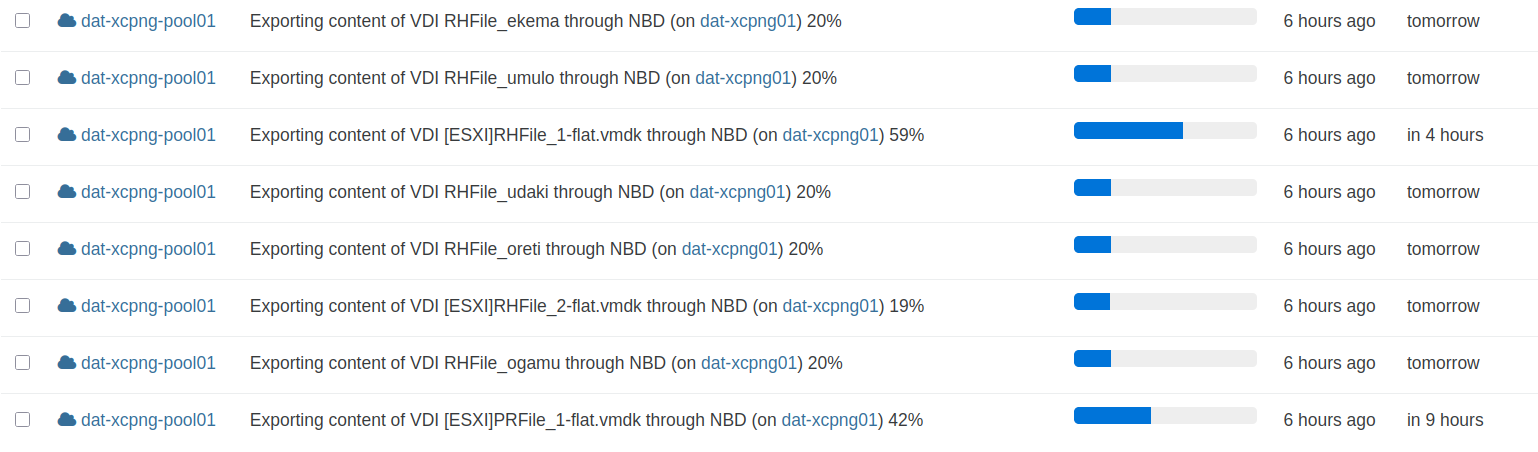
Even though I added to my config file at /etc/xo-server/config.toml:
#=====================================================================

# Configuration for backups
[backups]
diskPerVmConcurrency = 2
Other settings I defined in /etc/xo-server/config.toml are working just fine. E.g. setting HTTP to HTTPS redirection, SSL certificate or similar.
So I think Xen Orchestra (XO from sources) reads my config file. It appears that the backup option "diskPerVmConcurrency" does not have any effect at all. No matter in what file I set it.Is this setting working for anyone else?
-
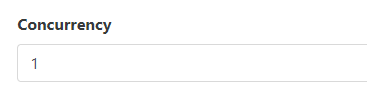
@MajorP93 You need to set concurrency so it only exports one VM at the time.
-
@Forza said in Long backup times via NFS to Data Domain from Xen Orchestra:
@MajorP93 You need to set concurrency so it only exports one VM at the time.
Yeah I know but I want to achieve something else. I want to configure the amount of virtual disks that are being backed up at the time per VM.
I have concurrency set to 2 which works fine for all VMs except the ones that have many disks.
For those I have performance issues because by default Xen Orchestra will backup all virtual disks at the same time... -
@MajorP93 aha, yea. Per disk concurrency is important too.


Hello! It looks like you're interested in this conversation, but you don't have an account yet.
Getting fed up of having to scroll through the same posts each visit? When you register for an account, you'll always come back to exactly where you were before, and choose to be notified of new replies (either via email, or push notification). You'll also be able to save bookmarks and upvote posts to show your appreciation to other community members.
With your input, this post could be even better 💗
Register Login