Xen Orchestra Container Storage Interface (CSI) for Kubernetes
-
Great stuff, looking forward and will try the CSI in the next couple of weeks

@bvitnik There is an old CSI for xcp-ng (5 years old) which directly talks to the Xen-API, but I'd rather have a middleware which as @olivierlambert already stated has ACL's and security build-in.
Eventually you will end up in a broken xen cluster because you have a k8s node with cluster wide privileges to the XenAPI.@olivierlambert Is there any loose roadmap for the CSI?
Cheers,
Jan -
The roadmap depends a lot on the feedback we have on it
 More demand/popular, faster we'll implement stuff
 -
My validation of this was not successful; I used the Quick Start PoC.
Pods eventually went intoCrashLoopBackOffafterErrImagePullandImagePullBackOff.
I created a GitHub token with these permissions:public_repo, read:packages. I also used a token with more permissions (although that was futile) however, I figured at least it required the aforementioned ones.I have since uninstalled via the script but captured the following events from the controller and one of the node pods:
kgp -nkube-system | grep csi*

csi-xenorchestra-controller-748db9b45b-z26h6             1/3     CrashLoopBackOff   31 (2m31s ago)   77m
csi-xenorchestra-node-4jw9z                              1/3     CrashLoopBackOff   18 (42s ago)     77m
csi-xenorchestra-node-7wcld                              1/3     CrashLoopBackOff   18 (58s ago)     77m
csi-xenorchestra-node-8jrlq                              1/3     CrashLoopBackOff   18 (34s ago)     77m
csi-xenorchestra-node-hqwjj                              1/3     CrashLoopBackOff   18 (50s ago)     77m
Pod events:
csi-xenorchestra-controller-748db9b45b-z26h6Normal BackOff 3m48s (x391 over 78m) kubelet Back-off pulling image "ghcr.io/vatesfr/xenorchestra-csi-driver:edge"csi-xenorchestra-node-4jw9z
Normal   BackOff  14m (x314 over 79m)    kubelet  Back-off pulling image "ghcr.io/vatesfr/xenorchestra-csi-driver:edge"
Warning  BackOff  4m21s (x309 over 78m)  kubelet  Back-off restarting failed container node-driver-registrar in pod csi-xenorchestra-node-4jw9z_kube-system(b533c28b-1f28-488a-a31e-862117461964)
I can deploy again and capture more information if needed.
-
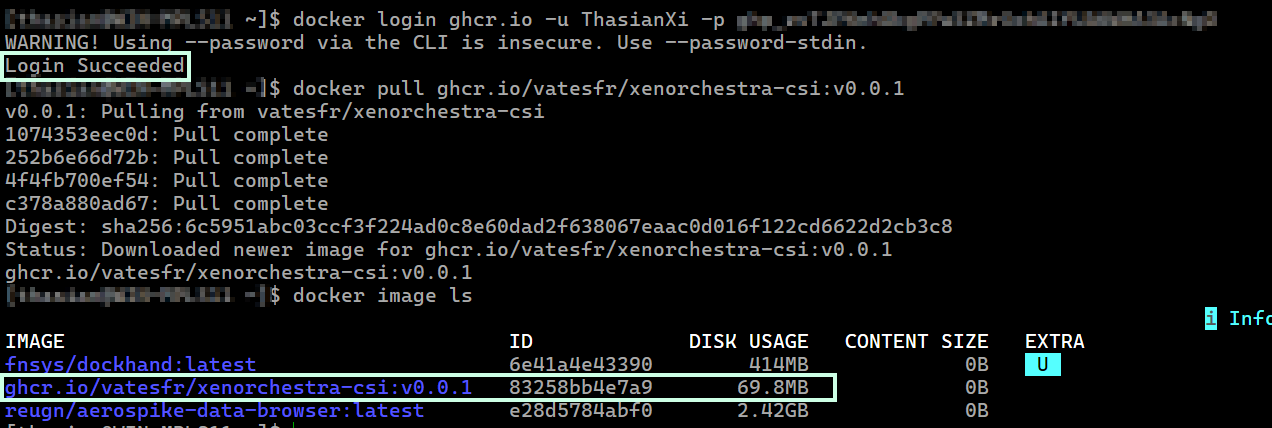
@ThasianXi Hello, thanks for the report. It looks like the pull image step fails. Can you test that the token generated from Github is working and allows to pull the image.
Maybe a simple test on a docker install could ease the verification:
docker login ghcr.io -u USERNAME -p TOKEN
docker pull ghcr.io/vatesfr/xenorchestra-csi:v0.0.1
Also note that only "Classic" persona access token are supported.
-
@nathanael-h
 The image pull was successful to my local computer using the same classic personal access token I generated and set as the
 regcredsecret.

Looking at the documentation again and since I am not using MicroK8s, I tried something different but the result was the same. (the pods never transitioned to a running state).This time, prior to executing the install script, I updated the
kubelet-registration-pathand the volume path in thecsi-xenorchestra-node-single.yamlandcsi-xenorchestra-node.yamlfiles.
(I believe this would be an opportunity to update the README for clarity on what to update based on the Kubernetes platform i.e. MicroK8s vs non-MicroK8s -- I can submit a PR for this, if you like)
excerpts:- --kubelet-registration-path=/var/lib/kubelet/plugins/csi.xenorchestra.vates.tech/csi.sock #- --kubelet-registration-path=/var/snap/microk8s/common/var/lib/kubelet/plugins/csi.xenorchestra.vates.tech/csi.sock ------------------------- volumes: - hostPath: path: /var/lib/kubelet/plugins/csi.xenorchestra.vates.tech type: DirectoryOrCreate name: socket-dirOn the
control-plane:[root@xxxx kubelet]# pwd /var/lib/kubelet [root@xxxx kubelet]# tree plugins plugins └── csi.xenorchestra.vates.techkgp -nkube-system | grep csi csi-xenorchestra-controller-748db9b45b-w4zk4 2/3 ImagePullBackOff 19 (12s ago) 41m csi-xenorchestra-node-6zzv8 1/3 CrashLoopBackOff 11 (3m51s ago) 41m csi-xenorchestra-node-8r4ml 1/3 CrashLoopBackOff 11 (3m59s ago) 41m csi-xenorchestra-node-btrsb 1/3 CrashLoopBackOff 11 (4m11s ago) 41m csi-xenorchestra-node-w69pc 1/3 CrashLoopBackOff 11 (4m3s ago) 41mExcerpt from
/var/log/messages:Feb 18 22:21:44 xxx kubelet[50541]: I0218 22:21:44.474317 50541 scope.go:117] "RemoveContainer" containerID="26d29856a551fe7dfd873a3f8124584d400d1a88d77cdb4c1797a9726fa85408" Feb 18 22:21:44 xxx crio[734]: time="2026-02-18 22:21:44.475900036-05:00" level=info msg="Checking image status: ghcr.io/vatesfr/xenorchestra-csi-driver:edge" id=308f8922-453b-481f-804d-3d85b489b933 name=/runtime.v1.ImageService/ImageStatus Feb 18 22:21:44 xxx crio[734]: time="2026-02-18 22:21:44.476149865-05:00" level=info msg="Image ghcr.io/vatesfr/xenorchestra-csi-driver:edge not found" id=308f8922-453b-481f-804d-3d85b489b933 name=/runtime.v1.ImageService/ImageStatus Feb 18 22:21:44 xxx crio[734]: time="2026-02-18 22:21:44.476188202-05:00" level=info msg="Image ghcr.io/vatesfr/xenorchestra-csi-driver:edge not found" id=308f8922-453b-481f-804d-3d85b489b933 name=/runtime.v1.ImageService/ImageStatus Feb 18 22:21:44 xxx kubelet[50541]: E0218 22:21:44.476862 50541 pod_workers.go:1298] "Error syncing pod, skipping" err="[failed to \"StartContainer\" for \"node-driver-registrar\" with CrashLoopBackOff: \"back-off 5m0s restarting failed container=node-driver-registrar pod=csi-xenorchestra-node-btrsb_kube-system(433e69c9-2da9-4e23-b92b-90918bd36248)\", failed to \"StartContainer\" for \"xenorchestra-csi-driver\" with ImagePullBackOff: \"Back-off pulling image \\\"ghcr.io/vatesfr/xenorchestra-csi-driver:edge\\\"\"]" pod="kube-system/csi-xenorchestra-node-btrsb" podUID="433e69c9-2da9-4e23-b92b-90918bd36248"Any other suggestions in the meantime or if I can collect more information, let me know.
-
@nathanael-h There should be no need to use an access token, because:
a) the personal account does not have access to the vates repo and can therefor not grant any privileges
b) isxenorchestra-csi-drivera public repo and all assets are public availableThe only valid point can be rate limits but as this test setup usually does not invoke a massive load of docker pulls it should be neglectable.
@thasianxi
It looks like a mixup, the Repo / Deployment refers to the github repository name as docker image which is usually the case. Unfortunatly the packages (which are created have a different name) can you replaceghcr.io/vatesfr/xenorchestra-csi-driver:edgewithghcr.io/vatesfr/xenorchestra-csi:edgein the manifest and retry?Cheers
Jan M. -
@jmara Thank you for the input. All pods are running with caveats.

Prior to executing the installation, I updated the image name to
ghcr.io/vatesfr/xenorchestra-csi:edgein the manifests.
After executing the install, I had to manually edit the image name in the DaemonSet, fromghcr.io/vatesfr/xenorchestra-csi-driver:edgetoghcr.io/vatesfr/xenorchestra-csi:edge.
After editing the DaemonSet, the node pods restarted and transitioned to running.However, the controller pod was still attempting to pull this image:
ghcr.io/vatesfr/xenorchestra-csi-driver:edgeand never transitioned to running.
To correct that, I edited the image name in the Deployment, fromghcr.io/vatesfr/xenorchestra-csi-driver:edgetoghcr.io/vatesfr/xenorchestra-csi:edge.Thus after editing the DaemonSet and Deployment, the pods transitioned to running.

kgp -nkube-system | grep csi* csi-xenorchestra-controller-b5b695fb-ts4b9 3/3 Running 0 4m8s csi-xenorchestra-node-27qzg 3/3 Running 0 6m21s csi-xenorchestra-node-4bflf 3/3 Running 0 6m20s csi-xenorchestra-node-8tb5m 3/3 Running 0 6m20s csi-xenorchestra-node-t9m78 3/3 Running 0 6m20s -
Just a follow-up that the PVandPVCcreation was successful.
All pods stable since previous post.
k get pv
NAME              CAPACITY   ACCESS MODES   RECLAIM POLICY   STATUS      CLAIM                        STORAGECLASS          VOLUMEATTRIBUTESCLASS   REASON   AGE
dtw-6m            2Gi        RWO            Retain           Bound       kube-system/xo-csi-test      csi-xenorchestra-sc   <unset>                          10h
k get pvc -nkube-system NAME STATUS VOLUME CAPACITY ACCESS MODES STORAGECLASS VOLUMEATTRIBUTESCLASS AGE xo-csi-test Bound dtw-6m 2Gi RWO csi-xenorchestra-sc <unset> 9hkgp -nkube-system | grep csi* csi-xenorchestra-controller-b5b695fb-ts4b9 3/3 Running 0 43h csi-xenorchestra-node-27qzg 3/3 Running 0 43h csi-xenorchestra-node-4bflf 3/3 Running 0 43h csi-xenorchestra-node-8tb5m 3/3 Running 0 43h csi-xenorchestra-node-t9m78 3/3 Running 0 43h -
Hi,
Thank you for the feedback
There was an error in the Makefile used to build the Docker image for the CSI. The name was incorrect... The fix that we pushed a month ago didn't trigger the CI

I manually ran the CI to rebuild the edge image with the correct name, which is now available at
ghcr.io/vatesfr/xenorchestra-csi-driver:edgeI delete the wrong one (
ghcr.io/vatesfr/xenorchestra-csi:edge). -
-
Is this in prod yet or is it still considered under development?
-
Hi @robfox2, a release candidate version is about to be published. After that, we will wait for feedback before releasing a stable version.
Keep an eye out for the release blog post on https://xen-orchestra.com/blog/tag/release/ -
we have RKE@ managing the cluster via its own CCM and seems xenorchestra is not supporting other external CCM providers and it requires XenOrchestra CCM to be mandatory which we cannot do as RKE2 Managing our clusters.
https://github.com/vatesfr/xenorchestra-csi-driver/blob/main/docs/topology.md#is-the-ccm-mandatory
Problem:
AS RKE2 our CCM, we can't run xen CCM and hence below node objects cannot be managed by xen.
topology.k8s.xenorchestra/pool_id = <uuid>
topology.k8s.xenorchestra/host_id = <uuid>
topology.k8s.xenorchestra/pool_name_label = <name>
topology.k8s.xenorchestra/host_name_label = <name>We tried adding them manually on the nodes, but still the PVC is waiting and complaining

Is there a workaround available for now? or is it something getting released as part of the release cycle?
-
@koushik
I don't kown RKE2. Is it its own CCM which set the node providerID?Regarding the CSI, it needs the labels set by the CCM to know the pool topology. Try to enable only the
cloud-node-label-syncin the CCM:--controllers=cloud-node-label-syncI'm not sure if that's enough. Maybe you'll have an issue with the provider ID, too

-
@Cyrille Thanks for the response.
Regarding the --controllers=cloud-node-label-sync flag: RKE2 does not use an external cloud-controller-manager (CCM) by default unless explicitly configured; it relies on its internal node controllers. Because of this, it won't automatically sync the topology.k8s.xenorchestra/* labels required by your CSI topology setup.
The main issue we are running into: Even though we applied the topology labels to the node objects manually, the XenOrchestra CSI driver's ExternalProvisioning loop is failing with a ProvisioningFailed error (error generating accessibility requirements: no topology key found for node).
This happens because the CSI driver expects the specific node providerID format to match XenServer / XenOrchestra constraints so it can look up and validate those manual topology keys.
Because RKE2 sets its own providerID formatting (providerID: rke2://koushik-xen01), the CSI driver cannot map the node to its Xen pool configuration.
Is there any flag or configuration in the CSI driver to completely bypass the strict CCM/Topology validation logic for non-native cloud setups, or do we have to wait for an update that allows an option like is-the-ccm-mandatory=false?
-
Is there any flag or configuration in the CSI driver to completely bypass the strict CCM/Topology validation logic for non-native cloud setups, or do we have to wait for an update that allows an option like is-the-ccm-mandatory=false?
The CSI is designed to run with the Xen Orchestra provider ID because it enables the CSI node server to identify the VM on which it is running. This also means that the node server itself has no access to the Xen Orchestra API; only the CSI controller server has access.
There are no plans to remove this dependency in the next release. Sorry about your issue, we will investigate and see what we can do about that.
-
@Cyrille Appreciate the help! Please keep posted.
-
Hi @koushik,
Having read the RKE2 documentation, I understand that the only difference between the embedded CCM and the Xo CCM is that the latter does not have the ServiceLB LoadBalancer controller. The Xo CCM does everything else that the embedded CCM does (e.g. clearing the uninitilazed taint and setting the node IP) + it set the right providerID.Disabling the embedded CCM will "only" result in the loss of the load balancer.
I would suggest disabling the RKE2 embedded CCM in order to use the Xo CCM as an external Cloud Controller Manager, as described in the RKE2 documentation. You need also to edit the kubelet configuration and set
--kubelet-arg=cloud-provider=external.You could then use another service to run the load balancer.
-
New releases !
CSI v1.0.0-rc.1
This is the first release candidate for v1.0.0. We're looking for feedback and real-world testing before the final release.
What's new:
- Split controller/node modes — nodes no longer hold Xen Orchestra credentials
- SR selection & live volume migration via VolumeAttributesClass
- A proper XO client timeout flag
- A brand-new Helm chart, with component toggles and provisioning tests
https://github.com/vatesfr/xenorchestra-csi-driver/releases/tag/v1.0.0-rc.1
CCM v1.1.2
The Helm chart can now be configured to disable Role and RoleBinding creation, making it easier to integrate into environments where RBAC resources are managed separately.
We've also bumped dependencies, including CI tooling and go-xo-sdk.
https://github.com/vatesfr/xenorchestra-cloud-controller-manager/releases/tag/v1.1.2
-
@Cyrille We can't disable the embedded CCM. Disabling the embedded CCM in RKE2 impacts core cluster bootstrap behavior because it is a bootstrap-critical component responsible for core node lifecycle management.






Hello! It looks like you're interested in this conversation, but you don't have an account yet.
Getting fed up of having to scroll through the same posts each visit? When you register for an account, you'll always come back to exactly where you were before, and choose to be notified of new replies (either via email, or push notification). You'll also be able to save bookmarks and upvote posts to show your appreciation to other community members.
With your input, this post could be even better 💗
Register Login