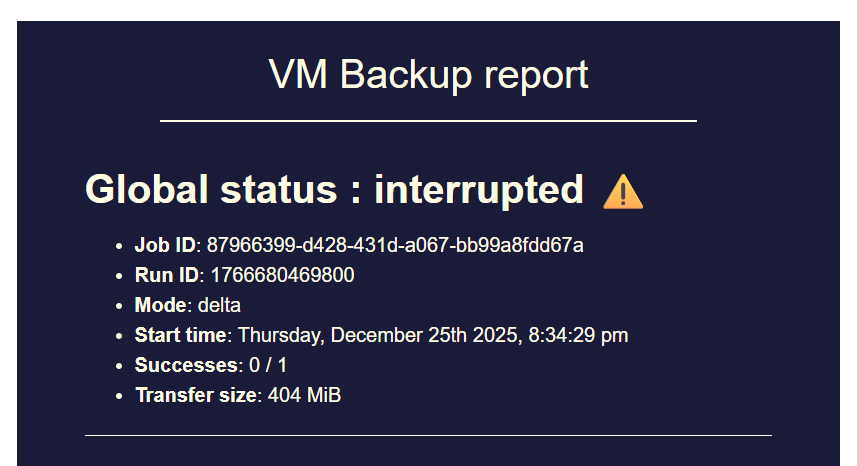
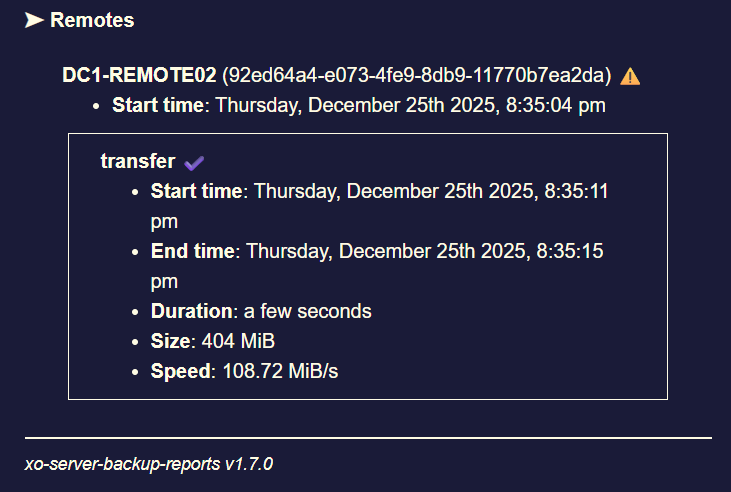
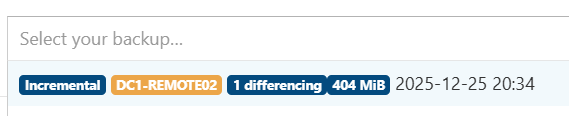
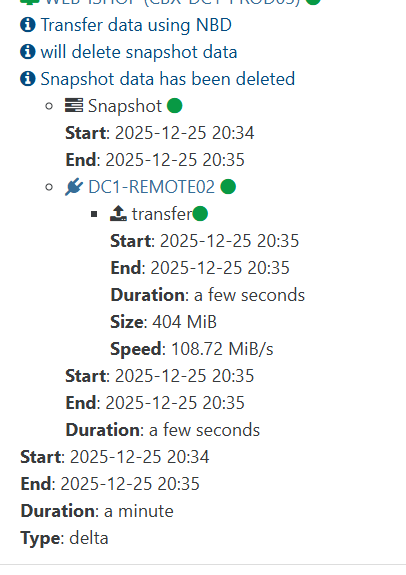
backup mail report says INTERRUPTED but it's not ?

-
@florent said in backup mail report says INTERRUPTED but it's not ?:
@Pilow We pushed a lot of memory fixes to master, would it be possible to test it ?
how so ? I stop my reboot everyday task and check if RAM is still crawling to 8Gb ?
-
memory problems arise on our XOA
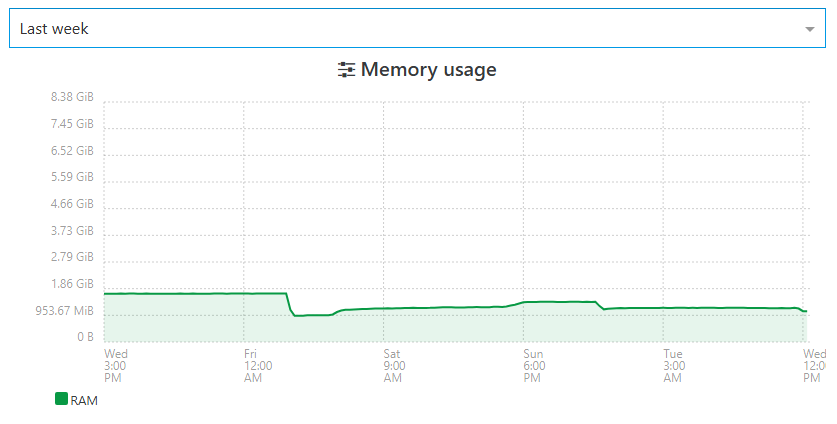
we have a spare XO CE deployed by ronivay script on ubuntu VM that we use only as a spare when main XOA is upgrading/rebooting
same pools/hosts attached, quite a read only XOtotally different behavior

-
@Pilow Which Node JS version does your XO CE instance use?
Could you possibly also check what Node JS version your XOA uses?
As discussed in this thread maybe there are some RAM management differences when comparing XO on different Node JS versions.
I would also be a big fan of Vates recommending (in documentation) XO CE users to use the exact same Node JS version as XOA uses... I feel like that would streamline things. Otherwise it feels like us XO CE users are "beta testers".
//EDIT: @pilow also maybe the totally different RAM usage seen in your screenshots might be related to the XO CE not doing any backup jobs? You mentioned that you use XO CE purely as a read-only fallback instance. During my personal tests it looked like the RAM hogging is related to backup jobs and RAM is not being freed after backups finished.
-
@john.c said in backup mail report says INTERRUPTED but it's not ?:
Are you using NodeJS 22 or 24 for your instance of XO?
here is the node version on our problematic XOA
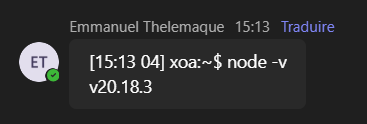
this XOA do NOT manage backup jobs, totally offloaded to XO PROXIESXOA PROXies :
[06:18 04] xoa@XOA-PROXY01:~$ node -v
v20.18.3
and XO CE :
root@fallback-XOA:~# node -v v24.13.0 -
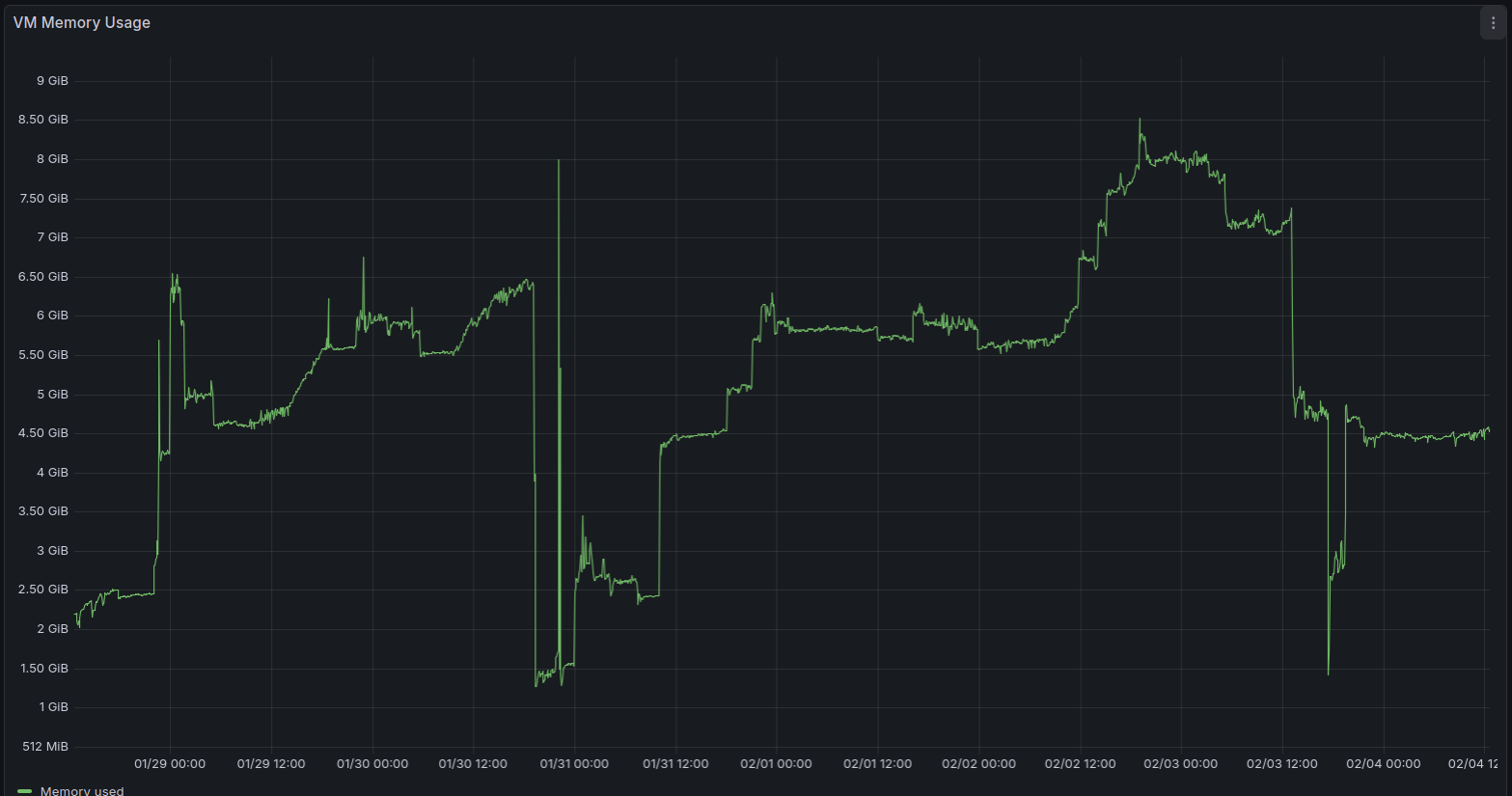
This is the RAM usage of my XO CE instance (Debian 13, Node 24, XO commit fa110ed9c92acf03447f5ee3f309ef6861a4a0d4 / "feat: release 6.1.0")
Metrics are exported via XO openmetrics plugin.
At the spots in the graph where my XO CE instance used around 2GB of RAM it was freshly restarted.
Between 31.01. and 03.02. you can see the RAM usage climbing and climbing until my backup jobs went into "interrupted" status on 03.02. due to Node JS heap issue as described in my error report in post https://xcp-ng.org/forum/post/102160. -
I deployed XOA and used it to create a list of all XO dependencies and their respective versions as this seems to be the baseline that Vates tests against.
I then went ahead and re-deployed my XO CE VM using the exact same package versions that XOA uses.
This resulted in me using Debian 12, kernel 6.1, Node 20, etc.
I hope that this gives my backup jobs more stability.
It would be convenient if we would be able to get this information (validated, stable dependencies) from documentation instead of having to deploy XOA.
Best regards
-
That's precisely the value of XOA and why we are selling it. If you want best tested/stability, XOA is the way to go

-
@olivierlambert Sure, I absolutely get that XO CE comes with absolutely no warranty and XOA is the supported, enterprise grade product.
If the budget was there and if I was to decide on that I would be happy to use it.It might still be a good idea to update your documentation at https://docs.xen-orchestra.com/installation#packages-and-prerequisites to at least align it with the Node JS version that you actually use and test against internally.
(The linked part of documentation advises to use Node 24 while you are shipping Node 20 in XOA.)During testing it looked like running XO on Node 20 behaves quite differently compared to running it on Node 24 when it comes to RAM management. It looks like this got also confirmed by other users in this thread.
XO CE users actually using and testing the versions that you ship might be of value for finding bugs.
I think the documentation should generally advise to use the packages that you target during development in order to make the experience as good as possible for everyone.Just my two cents.
-
Yes, we'll update the doc
-
so, I stopped rebooting my XOA everyday
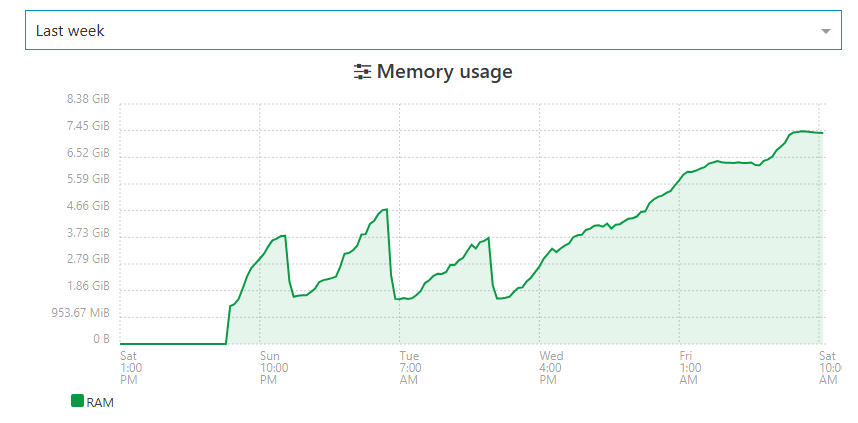
just patched 6.1.1, it restarted xo-server
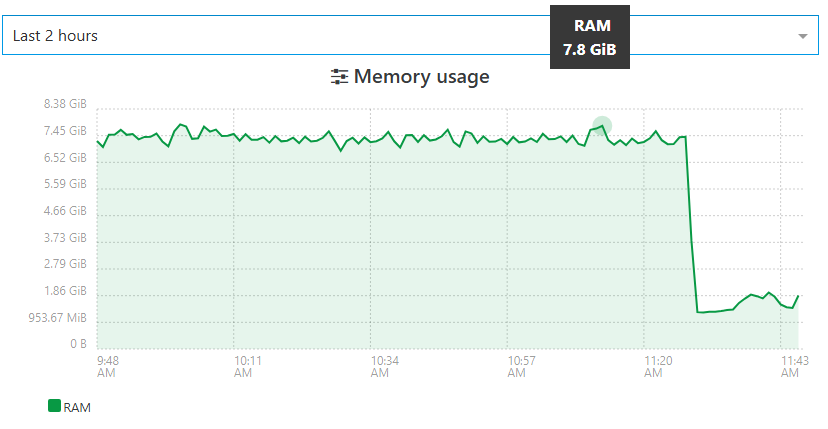
guess I'll have to let it disabled for 48h to see if with new patch, RAM is still ramping up.
will report back. -
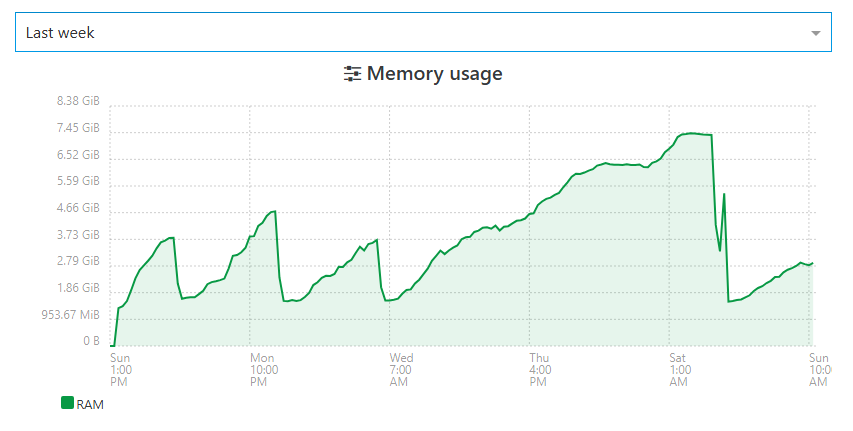
ramp up and stabilization at 2.9Gb RAMneed some 48H more data to confirm the behavior have changed
XOPROXIES have also been upgraded to latests :
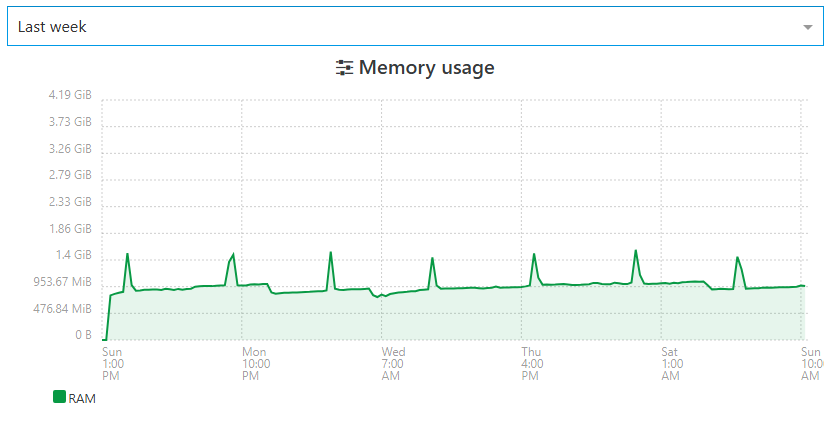
they didnt present any problem of RAM overusage even before
and my 4 proxies are offloading the entire backup jobs from main XOA thats serves only for management -
@Pilow that is a good news
-
@florent
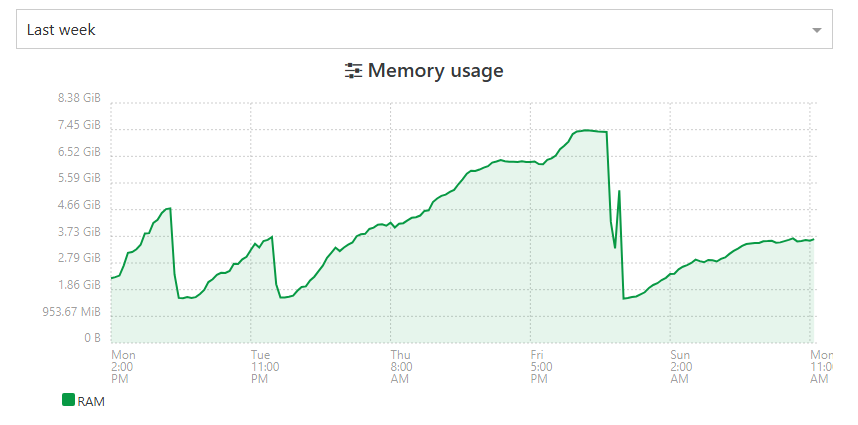
checked this morning, it took another step to 3.63Gb used RAM.the slope is really different than before, stay tuned
-
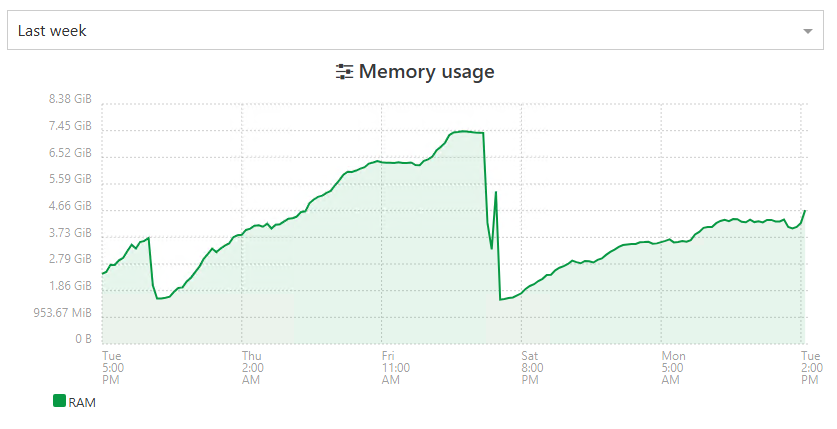
i'm not foreseeing something good happening on this one
still growing -
Xen Orchestra Backup RAM consumption still does not look o.k. in my case... Even after downgrading Node JS to 20 and all other dependencies to their respective versions as used in XOA.
I am currently running XO commit "91c5d98489b5981917ca0aabc28ac37acd448396" / feat: release 6.1.1 so I expected RAM fixes as mentioned by @florent to be there.
Despite all of that backup jobs got terminated again (Xen Orchestra Backup status "interrupted").
Xen Orchestra log shows:
<--- JS stacktrace --->

FATAL ERROR: Reached heap limit Allocation failed - JavaScript heap out of memory
----- Native stack trace -----

 1: 0xb76db1 node::OOMErrorHandler(char const*, v8::OOMDetails const&) [/usr/local/bin/node]
 2: 0xee62f0 v8::Utils::ReportOOMFailure(v8::internal::Isolate*, char const*, v8::OOMDetails const&) [/usr/local/bin/node]
 3: 0xee65d7 v8::internal::V8::FatalProcessOutOfMemory(v8::internal::Isolate*, char const*, v8::OOMDetails const&) [/usr/local/bin/node]
 4: 0x10f82d5  [/usr/local/bin/node]
 5: 0x1110158 v8::internal::Heap::CollectGarbage(v8::internal::AllocationSpace, v8::internal::GarbageCollectionReason, v8::GCCallbackFlags) [/usr/local/bin/node]
 6: 0x10e6271 v8::internal::HeapAllocator::AllocateRawWithLightRetrySlowPath(int, v8::internal::AllocationType, v8::internal::AllocationOrigin, v8::internal::AllocationAlignment) [/usr/local/bin/node]
 7: 0x10e7405 v8::internal::HeapAllocator::AllocateRawWithRetryOrFailSlowPath(int, v8::internal::AllocationType, v8::internal::AllocationOrigin, v8::internal::AllocationAlignment) [/usr/local/bin/node]
 8: 0x10c3b26 v8::internal::Factory::AllocateRaw(int, v8::internal::AllocationType, v8::internal::AllocationAlignment) [/usr/local/bin/node]
 9: 0x10b529c v8::internal::FactoryBase<v8::internal::Factory>::AllocateRawArray(int, v8::internal::AllocationType) [/usr/local/bin/node]
10: 0x10b5404 v8::internal::FactoryBase<v8::internal::Factory>::NewFixedArrayWithFiller(v8::internal::Handle<v8::internal::Map>, int, v8::internal::Handle<v8::internal::Oddball>, v8::internal::AllocationType) [/usr/local/bin/node]
11: 0x10d1e45 v8::internal::Factory::NewJSArrayStorage(v8::internal::ElementsKind, int, v8::internal::ArrayStorageAllocationMode) [/usr/local/bin/node]
12: 0x10d1f4e v8::internal::Factory::NewJSArray(v8::internal::ElementsKind, int, int, v8::internal::ArrayStorageAllocationMode, v8::internal::AllocationType) [/usr/local/bin/node]
13: 0x12214a9 v8::internal::JsonParser<unsigned char>::BuildJsonArray(v8::internal::JsonParser<unsigned char>::JsonContinuation const&, v8::base::SmallVector<v8::internal::Handle<v8::internal::Object>, 16ul, std::allocator<v8::internal::Handle<v8::internal::Object> > > const&) [/usr/local/bin/node]
14: 0x122c35e  [/usr/local/bin/node]
15: 0x122e999 v8::internal::JsonParser<unsigned char>::ParseJson(v8::internal::Handle<v8::internal::Object>) [/usr/local/bin/node]
16: 0xf78171 v8::internal::Builtin_JsonParse(int, unsigned long*, v8::internal::Isolate*) [/usr/local/bin/node]
17: 0x1959df6  [/usr/local/bin/node]
{"level":"error","message":"Forever detected script was killed by signal: SIGABRT"}
{"level":"error","message":"Script restart attempt #1"}
Warning: Ignoring extra certs from `/host-ca.pem`, load failed: error:80000002:system library::No such file or directory
2026-02-10T15:49:15.008Z xo:main WARN could not detect current commit {
  error: Error: spawn git ENOENT
      at Process.ChildProcess._handle.onexit (node:internal/child_process:285:19)
      at onErrorNT (node:internal/child_process:483:16)
      at processTicksAndRejections (node:internal/process/task_queues:82:21) {
    errno: -2,
    code: 'ENOENT',
    syscall: 'spawn git',
    path: 'git',
    spawnargs: [ 'rev-parse', '--short', 'HEAD' ],
    cmd: 'git rev-parse --short HEAD'
  }
}
2026-02-10T15:49:15.012Z xo:main INFO Starting xo-server v5.196.2 (https://github.com/vatesfr/xen-orchestra/commit/91c5d9848)
2026-02-10T15:49:15.032Z xo:main INFO Configuration loaded.
2026-02-10T15:49:15.036Z xo:main INFO Web server listening on http://[::]:80
2026-02-10T15:49:15.043Z xo:main INFO Web server listening on https://[::]:443
2026-02-10T15:49:15.455Z xo:mixins:hooks WARN start failure {
  error: Error: spawn xenstore-read ENOENT
      at Process.ChildProcess._handle.onexit (node:internal/child_process:285:19)
      at onErrorNT (node:internal/child_process:483:16)
      at processTicksAndRejections (node:internal/process/task_queues:82:21) {
    errno: -2,
    code: 'ENOENT',
    syscall: 'spawn xenstore-read',
    path: 'xenstore-read',
    spawnargs: [ 'vm' ],
    cmd: 'xenstore-read vm'
  }
}
XO virtual machine RAM usage climbed again, even after updating to "feat: release 6.1.1" commit. VM has 8GB RAM, they do not fully get exhausted.
Seems to be related to Node heap size.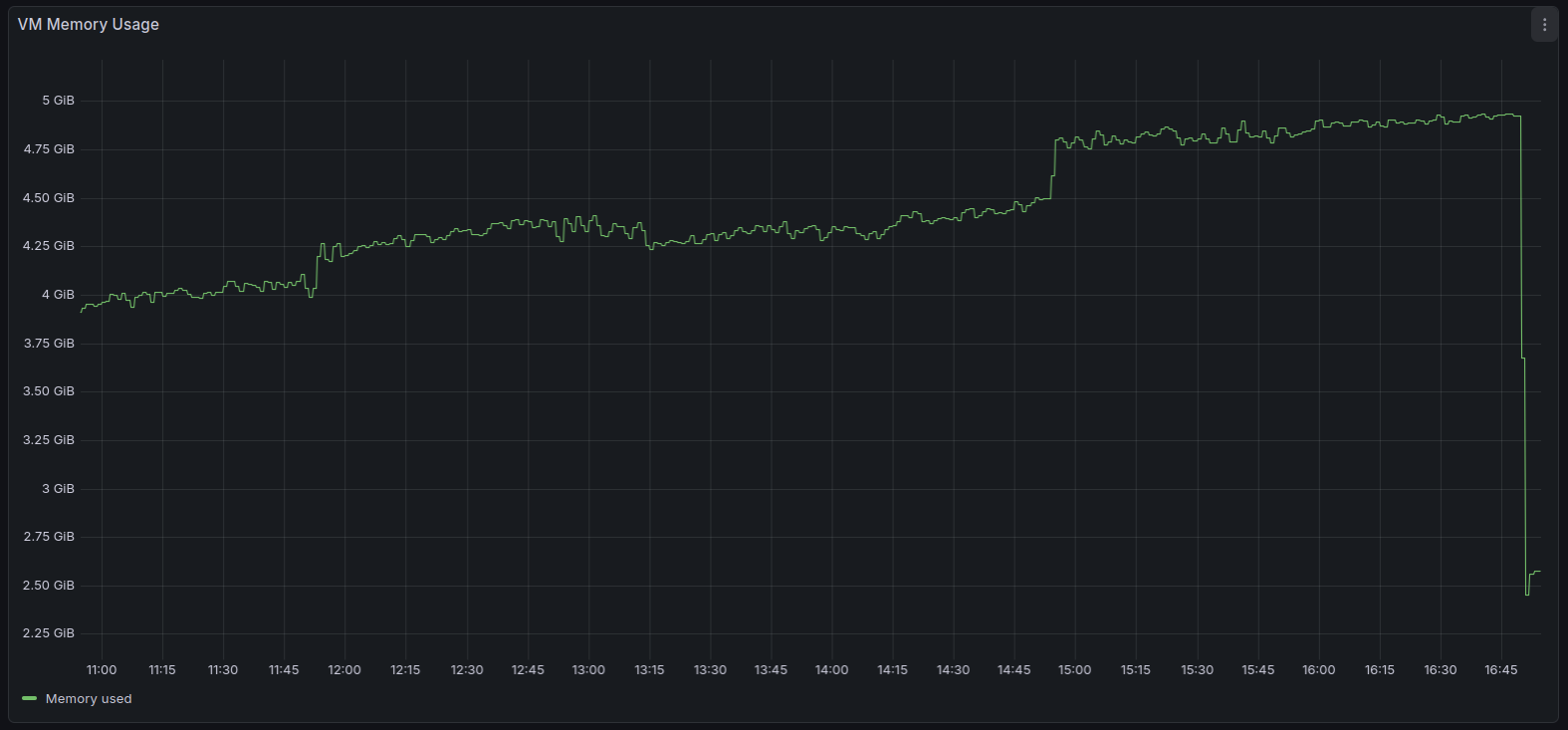
You can see the exact moment when the backup jobs went into status "interrupted" (RAM usage dropped).
I am trying to fix these backup issues and am really running out of ideas...
My backup jobs had been running stable in the past.Something about RAM usage seem to have changed around the release of XO6 as previously mentioned in this thread.
-
@MajorP93 you say to have 8GB Ram on XO, but it OOMkills at 5Gb Used RAM.
did you do those additionnal steps in your XO Config ?
You can increase the memory allocated to the XOA VM (from 2GB to 4GB or 8GB). Note that simply increasing the RAM for the VM is not enough. You must also edit the service file (/etc/systemd/system/xo-server.service) to increase the memory allocated to the xo-server process itself. You should leave ~512MB for the debian OS itself. Meaning if your VM has 4096MB total RAM, you should use 3584 for the memory value below. - ExecStart=/usr/local/bin/xo-server + ExecStart=/usr/local/bin/node --max-old-space-size=3584 /usr/local/bin/xo-server The last step is to refresh and restart the service: $ systemctl daemon-reload $ systemctl restart xo-server -
@Pilow said in backup mail report says INTERRUPTED but it's not ?:
@MajorP93 you say to have 8GB Ram on XO, but it OOMkills at 5Gb Used RAM.
did you do those additionnal steps in your XO Config ?
You can increase the memory allocated to the XOA VM (from 2GB to 4GB or 8GB).
Note that simply increasing the RAM for the VM is not enough.
You must also edit the service file (/etc/systemd/system/xo-server.service)
to increase the memory allocated to the xo-server process itself.

You should leave ~512MB for the debian OS itself. Meaning if your VM has 4096MB total RAM, you should use 3584 for the memory value below.

- ExecStart=/usr/local/bin/xo-server
+ ExecStart=/usr/local/bin/node --max-old-space-size=3584 /usr/local/bin/xo-server
The last step is to refresh and restart the service:

$ systemctl daemon-reload
$ systemctl restart xo-server
Interesting!
I did not know that it is recommended to set "--max-old-space-size=" as a startup parameter for Node JS with the result of (total system ram - 512MB).
I added that, restarted XO and my backup job.I will test if that gives my backup jobs more stability.
Thank you very much for taking the time and recommending the parameter. -
can you remind me the Node version you have, that is exhibiting the problem?
-
@olivierlambert Right now I am using Node JS version 20 as I saw that XOA uses that version aswell. I thought it might be best to use all dependencies at the versions that XOA uses.
I was having the issue with backup job "interrupted" status on Node JS 24 aswell as documented in this thread.
Actually since I downgraded to Node 20 total system RAM usage seems to have decreased by a fair bit which can be seen by comparing the 2 screenshots that I posted in this thread. On first screenshot I was using Node 24 und second screenshot Node 20.
Despite that the issue re-occurred after a few days of XO running.I hope that --max-old-space-size Node parameter as suggested by @pilow solves my issue.
I will report back.Best regards
-
Okay weird, so having a very different RAM usage with Node 24 should be checked when we'll update XOA Node version.


Hello! It looks like you're interested in this conversation, but you don't have an account yet.
Getting fed up of having to scroll through the same posts each visit? When you register for an account, you'll always come back to exactly where you were before, and choose to be notified of new replies (either via email, or push notification). You'll also be able to save bookmarks and upvote posts to show your appreciation to other community members.
With your input, this post could be even better 💗
Register Login