How to ensure Disk replication uses 10 Gb network in XCP-ng XOSTOR cluster?
-
I am creating a 3-node XCP-ng cluster using XOSTOR for shared storage replication. The replication factor is 3. Each node has two network interfaces:
1 Gb management network (host management, pool communication, XOA access only)
- Node1: 192.168.200.161
- Node2: 192.168.200.162
- Node3: 192.168.200.163
10 Gb storage network (intended exclusively for storage replication)
- Node1: 192.168.212.11
- Node2: 192.168.212.12
- Node3: 192.168.212.13
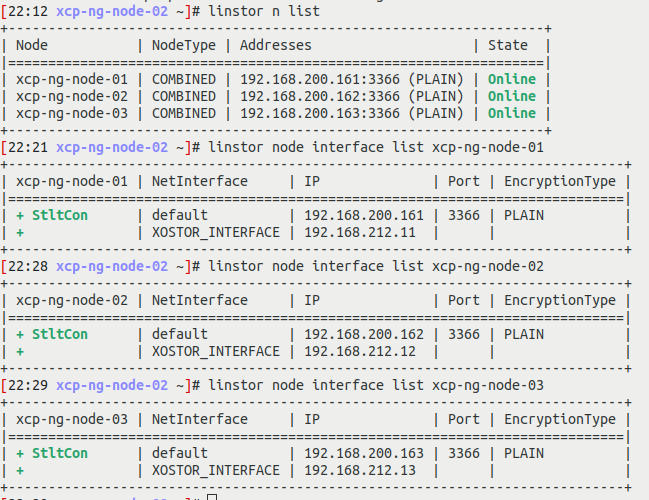
How to ensure that all replication traffic goes to the 10G network. Node 2 is acting as master. linstor commands output is given below ( as an image ).

-
@iamsumeshks as said on reddit, it seems that you are good to go
monitor your nics bandwidth in hosts stats to ensure it goes on the good pif.PREFNIC is the one where DRBD works i guess
-
Adding @Team-Storage for a quick review

-
@iamsumeshks You can confirm that using
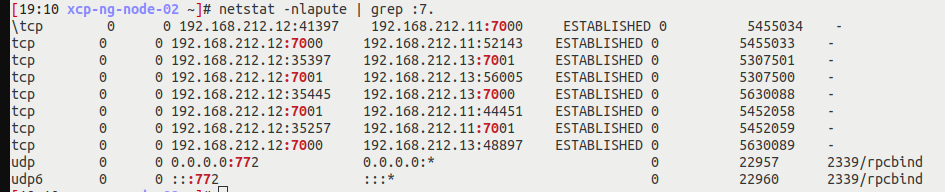
netstat -nlapute | grep :7.Explanation: The DRBD ports are in the range 7000:8000. With this command, you should see the IPs of your PrefNic interface and not the default one, if everything is configured correctly.
-
@ronan-a
Most of the ports ( 7000 to 8000 ) is using 10G network IPs ( 192.168.212.x ). Please find the output from each node below

-
@iamsumeshks So I guess you have two resources in your LINSTOR and they are using your 10Gb network.
-
@ronan-a Thanks



Hello! It looks like you're interested in this conversation, but you don't have an account yet.
Getting fed up of having to scroll through the same posts each visit? When you register for an account, you'll always come back to exactly where you were before, and choose to be notified of new replies (either via email, or push notification). You'll also be able to save bookmarks and upvote posts to show your appreciation to other community members.
With your input, this post could be even better 💗
Register Login