Migrations after updates
-
While testing the latest 8.3 updates (may have been happening before) I noticed my vms will migrate back over to host 1 when it come back online so both host are running equal ran/cpu usage (4 vms) 2 on each host. When i finish updating host 2 and it come back online i expect 2 of vms to migrate back to host2. They do not, but will if i manually migrate them.
My load balancer settings... Is this expected behavior or should i modify my settings?
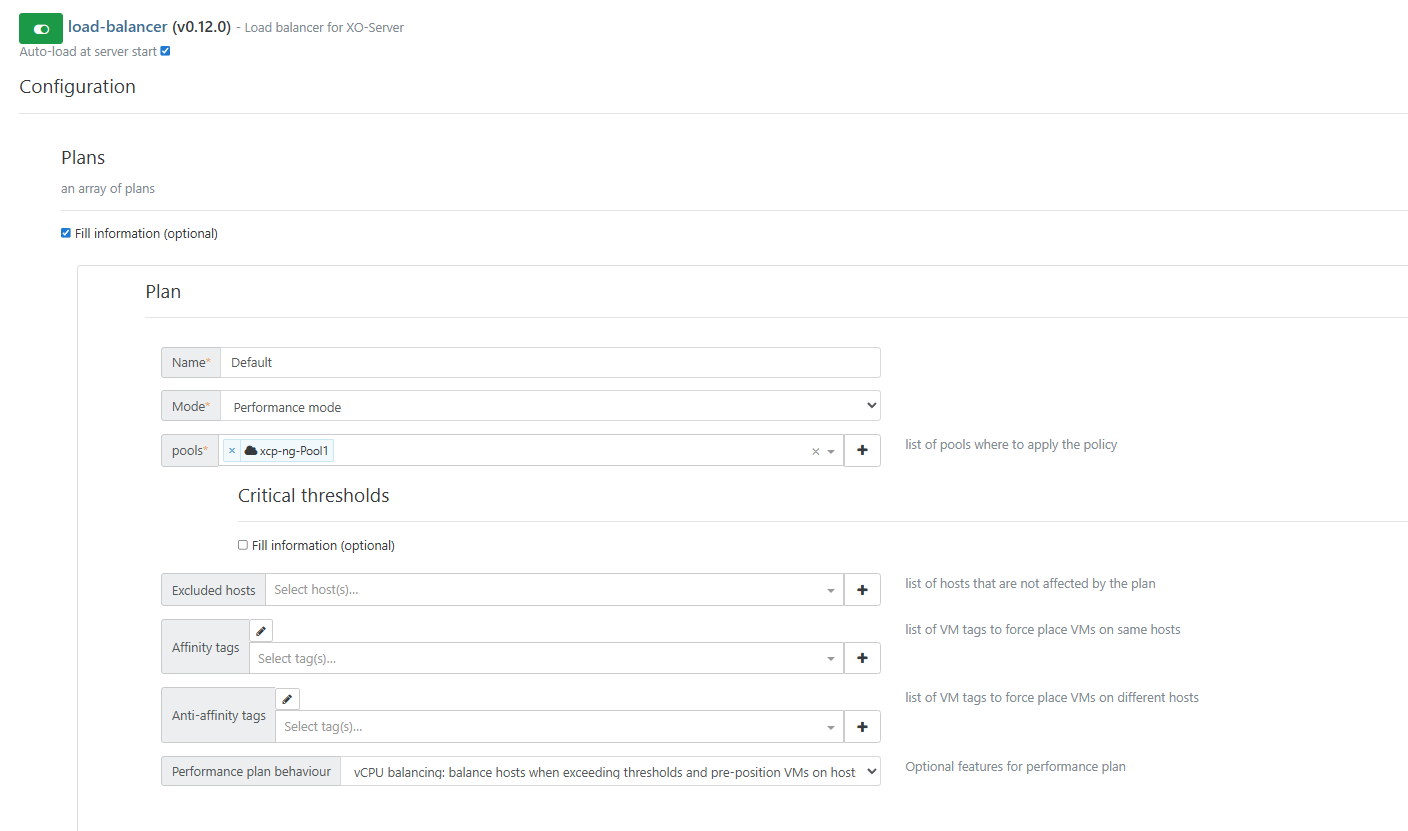

-
@acebmxer Using performance mode should migrate your VM's so all systems are equally "performant" the different modes are outlined here https://docs.xcp-ng.org/management/vm-load-balancing/
As to why your VMs not migrate, I would only be guessing - anyways my guess is that it only polls the system every so often and if your systems are performing well enough nothing gets moved...
-
This reminds me that I have some work to do on my policy, mostly for anti-affinity.
-
ping @bastien-nollet
-
Hi @acebmxer,
I think the reason for this is a feature we recently added that prevents VMs from moving back-and-forth between hosts. VMs now have a cooldown (default 30min) between 2 load-balancer-triggered migrations
Can you try to set the migration cooldown to 0 and tell us if it fixes this behaviour? (in the "Advanced" section of the load balancer configuration)
-
I was playing around with the settings last night and the only way i could get behavior i was looking for was to set free memory limit.
I did try your suggestion this morning. I reconfigured settings back to those in screenshot. Applied your recommendation and then but host 2 in maintenance mode. waited a few minutes. Took out of maintenance mode and vms still sitting on host 1.
I dont seem to have this issue on my work production servers. I guess to little vms and to little load in the home lab. I think in the past i may not have noticed it as I would be doing some other work in a vm or two generating load.
Unless other have different recommendations i think having free memory set to half the host ram will keep this even. Are there any unforeseen issues i should be aware in this config for home lab?
I am used to VMware just spreading vms across all host evenly then shuffling around the load based off cpu accordingly.
-
The wait period will be nice, after an RPU I'm watched VMs bounce back and forth trying to put themselves on another host. It's been a few updates since I noticed that, but a cooldown seems like a good idea, especially one that can be adjusted as you've made this one.
-
All vms still on host 1 after setting Migration cooldown time to 0 this morning.
Maybe bug or just ui bug. When set to 0 save config when you load the page the "Fill information" for Migration Cooldown setting is unchecked but 0 is still applied. If set to 1. and reload the box is check as expected.
-
@acebmxer at the moment I don't know what could cause this behaviour. I'll try to reproduce it during the following days.
I think setting the memory limit to half of the host RAM is fine if you don't expect too much load, but if you're getting a lot of RAM use on your hosts at some point, I'm not sure the load balancer will migrate VMs from a host at 90% RAM use to a host at 60% RAM use, as both exceed the limit.
Also, could you try again to reproduce the bug after changing the "performance plan behaviour" setting to conservative, to see if it changes something? The "vCPU balancing" mode is quite recent, so maybe there's some bug with it that we didn't discover yet.
-
@Greg_E The RPU is supposed to disable the load balancer, but it's possible that when the load balancer restarts at the end of the RPU, it takes into account the host stats during the RPU, which may create some unexpected migrations.
We'll have to investigate on that. Thanks for the feedback.
-
Screen shots from works Load Ballance plug settings...
Latest update using RPU all vms moved off master onto second host. After reboot host 2 moved all vms to master after reboot half the vms moved back over to host 2. This happend on 3 pools with 2 host each.


From home lab with latest changes i tried..... Started with same settings as work....


-
all but 1 vm is on host 2.....
with the current above setting for home lab.

-
Hi @acebmxer,
I've made some tests with a small infrastructure, which helped me understand the behaviour you encounter.
With the performance plan, the load balancer can trigger migrations in the following cases:
- to better satisfy affinity or anti-affinity constraints
- if a host has a memory or CPU usage exceeds a threshold (85% of the CPU critical threshold, of 1.2 times the free memory critical threshold)
- with vCPU balancing behaviour, if the vCPU/CPU ratio differs too much from one host to another AND at least one host has more vCPUs than CPUs
- with preventive behaviour, if CPU usage differs too much from one host to another AND at least one host has more than 25% CPU usage
After a host restart, your VMs will be unevenly distributed, but this will not trigger a migration if there are no anti-affinity constraints to satisfy, if no memory or CPU usage thresholds are exceeded, and if no host has more CPUs than vCPUs.
If you want migrations to happen after a host restart, you should probably try using the "preventive" behaviour, which can trigger migrations even if thresholds are not reached. However it's based on CPU usage, so if your VMs use a lot of memory but don't use much CPU, this might not be ideal as well.
We've received very few feedback about the "preventive" behaviour, so we'd be happy to have yours.

As we said before, lowering the critical thresholds might also be a solution, but I think it will make the load balancer less effective if you encounter heavy load a some point.



Hello! It looks like you're interested in this conversation, but you don't have an account yet.
Getting fed up of having to scroll through the same posts each visit? When you register for an account, you'll always come back to exactly where you were before, and choose to be notified of new replies (either via email, or push notification). You'll also be able to save bookmarks and upvote posts to show your appreciation to other community members.
With your input, this post could be even better 💗
Register Login