Adding new host to pool fails - Stunnel SSL certiticate verification failure
-
-
Just my 2 cents, but with SSL involved time is important: could you check the date is accurate on the two hosts ?
having the output of the following commands might help too:
stat /etc/stunnel/xapi-stunnel-ca-bundle.pemopenssl x509 -in /etc/stunnel/xapi-stunnel-ca-bundle.pem -noout -text
-
Maybe this points at an issue. It looks like the cert file is empty? And this is after I ran that command to refresh the cert. I get this same output for both the pool master and the host I am trying to add.
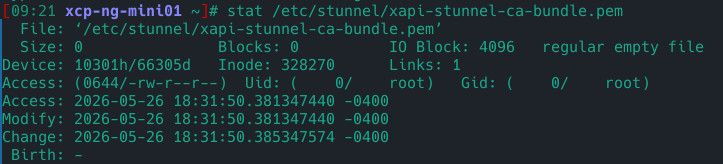
Then the openssl x509 command says it's unable to load the cert or read it. I assume that's because it's empty?
As for the time and date, yes the pool master and this server are in sync. At first, I had forgotten to set the new host to use the NTP pool during setup and Xen Orchestra helpfully yelled at me about that. Haha
-
Yes, if the file is empty, it is expected to the
openssl x509command to fail.
Does is it the same on the master ? -
@semarie
Yes. This screenshot is from the pool master. But, both it and the new host had the same output.For clarity's sake, I have never applied an SSL cert to these hosts. This seems to be whatever built-in certs the system is using and signing.
Is there a way to fix these certs? Was the xe host-refresh-server-certificate host=hostname command not the correct command to fix this?
-
Sorry, but it is outside my competence zone. I prefer to not tell you to try something that I don't know the exact consequences of.
Does someone else could reply ?
-
@semarie I'll try to investigate to help you.
Is it possible to run:
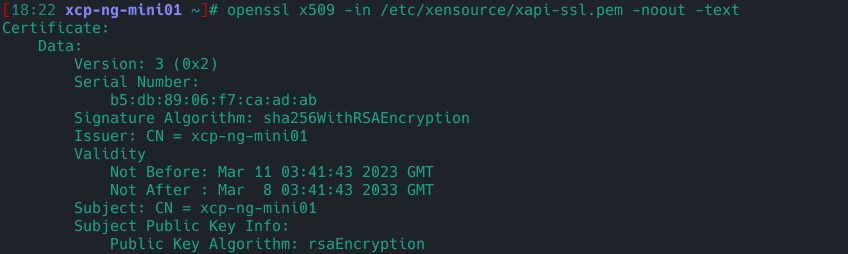
stat /etc/xensource/xapi-pool-tls.pemopenssl x509 -in /etc/xensource/xapi-pool-tls.pem -noout -textstat /etc/xensource/xapi-ssl.pemopenssl x509 -in /etc/xensource/xapi-ssl.pem -noout -text
(This file must exist; if not, I'd like the output of
cat /etc/stunnel/xapi.conf.)
And I'd like the same output for/etc/xensource/xapi-ssl.pem.If the certificate for
/etc/xensource/xapi-pool.tls.pemhas expired or it's empty, you can run:
xe host-refresh-server-certificate host=$(hostname)
If the certificate for/etc/xensource/xapi-ssl.pemhas expired or it's empty, you can run:
xe host-emergency-reset-server-certificateAfter running one of the two commands above, I recommend to do:
xe-toolstack-restart
(This should indeed restart the stunnel@xapi.service)I hope this helps.
-
Here's the output from the pool master.
The xapi-pool-tls cert at least isn't empty.
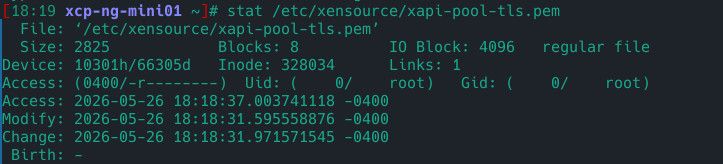
And it still appears to be valid
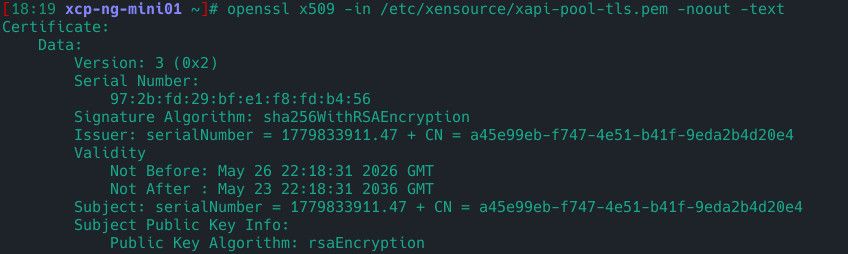
The xapi-ssl cert also looks correct and un-expired

-
@Bryanvh Thank you for your feedback,
Your previous certificates look correct. I have not been able to reproduce the issue on my side, but I will try to diagnose it based on the code.[MASTER]
I have a few preliminary commands. The first one is to retrieve the MASTER_UUID:
cat /etc/xensource-inventory | grep INSTALLATION_UUID | cut -d'=' -f2 | tr -d "'"Then we can compare fingerprints between the master certificate and the one stored for the pool:
openssl x509 -in /etc/xensource/xapi-pool-tls.pem -noout -fingerprint -sha256
openssl x509 -in /etc/stunnel/certs-pool/{MASTER_UUID}.pem -noout -fingerprint -sha256
(please replace {MASTER_UUID} with the value retrieved above)Normally, both fingerprints should match.
Also check that the CA bundle exists and is not empty:
ls -l /etc/stunnel/xapi-pool-ca-bundle.pemIf you previously ran:
xe host-refresh-server-certificate
you should probably run:
xe pool-certificate-sync[JOINER]
Based on the code, the first phase has already been completed. You should therefore have files under/etc/stunnel/certs-pool/, including the master certificate:
openssl x509 -in /etc/stunnel/certs-pool/{MASTER_UUID}.pem -noout -fingerprint -sha256[Additional checks]
Are all hosts synchronized to the same NTP server?date&timedatectl
Are all hosts fully updated to XCP-ng 8.3 and rebooted after updates?
Do you see the same error when joining the pool using XCP-ng (via Console or CLI) instead of Xen Orchestra?
Is there any more detailed error in/var/log/xensource.log?
How many hosts are in your pool?
Is stunnel running correctly on all hosts?systemctl status stunnel@xapiDo certificate chains validate correctly?
openssl verify -CAfile /etc/stunnel/xapi-pool-ca-bundle.pem /etc/stunnel/certs-pool/{MASTER_UUID}.pemRespectfully,
-
@LucienLassalle
I'm not sure if this points toward an issue but, when running the openssl command to check the pool cert using the UUID checked first here, I get this error

I get the same error when trying to check for the pool cert on the host that is trying to join the pool. Even if the pool cert was copied to the joining host, if this points to an issue with that cert, then I suppose that might be the cause of the error?
For the additional questions:
Yes, they are time synchronized and are all using pool.ntp.org
Yes, they are all up to date. 3 of the hosts (the existing pool) were previously on 8.2 but were updated to 8.3 and the new host I am trying to join was set up fresh on 8.3.
Yes, the stunnel service reports that it is running correctly.And, as expected based on the previous error, verifying the cert fails with the same error as shown when trying to check the pool's cert fingerprint.
Here's what I see in the logs after trying to join the host to the pool:
Pool Master

Joining Host

-
@Bryanvh I think I've managed to reproduce the issue. The fact that the master's certificate is missing from /etc/stunnel/certs-pool/ seems to be the problem.
On the master, run
xe host-refresh-server-certificate host=$(hostname)and thenxe pool-certificate-sync.Then, if you run
ls -l /etc/stunnel/certs-pool, you should see a certificate with the same name as your master's UUID. It should end with.pem. If it ends with.new.pem, I recommend copying the certificate, removing the.new(which can apparently cause problems).You should then be able to join the pool from your host.
I hope this worked. Please let me know if it works.
Respectfully, -
Thanks for the quick response and the effort in recreating the issue!
It all played out exactly as you laid it out, even the cert showing up as a .new.pem at first.
Out of curiosity, what in your testing did result in causing this issue? Is it possible that my upgrade from 8.2 to 8.3 may have caused the underlying issue?
-
@Bryanvh Looking at the code, I saw that an exchange was taking place via this certificate.
So when you told me that the master certificate was missing, I tried to put myself in the same situation as you (by removing the certificate) and trying to join the pool.
Having encountered the same error as you, I determined that running these commands fixed the problem.Indeed, I think the upgrade from 8.2 to 8.3 is the cause. To be more precise, a change occurred in the XAPI during the certificate exchange in version 8.2, and I think it's possible that your 8.2 host wasn't up to date when it upgraded to 8.3 (I'm not sure).
In any case, I'm glad your problem is solved.
-
Interesting. I'm not sure I was all the way up to date when I upgraded to 8.3 and it's possible I was a month or two behind. I only upgraded because I ran across a need for the virtualized TPM support (which is cool to see implemented!).
Thanks again for all the effort in looking at this!
-
 L LucienLassalle marked this topic as a question on
-
L LucienLassalle has marked this topic as solved on
-
@Bryanvh No problem

The issue you encountered wasn't very clear. Therefore, I've proposed a change to the XAPI to make the error more explicit (this will likely be implemented in future XAPI releases).
So instead of
SSL Certification failurethe message will be:POOL_JOINING_MASTER_CERTIFICATE_NOT_IN_POOL_BUNDLE.Thank you very much for your patience and for bringing this issue to our attention.
References:
https://github.com/xapi-project/xen-api/pull/7112


Hello! It looks like you're interested in this conversation, but you don't have an account yet.
Getting fed up of having to scroll through the same posts each visit? When you register for an account, you'll always come back to exactly where you were before, and choose to be notified of new replies (either via email, or push notification). You'll also be able to save bookmarks and upvote posts to show your appreciation to other community members.
With your input, this post could be even better 💗
Register Login