V2V in XO 6: a brand new migration wizard, with Auto-pilot docking 🛬
-
V2V in XO 6: a brand new migration wizard, with Auto-pilot docking

Hi everyone

V2V is now in the XO 6 UI! We didn't just port the XO 5 form: we rebuilt it, and it comes with a big new feature, VMs Auto-pilot docking, so your VMware VMs are ready for XCP-ng before their first boot.
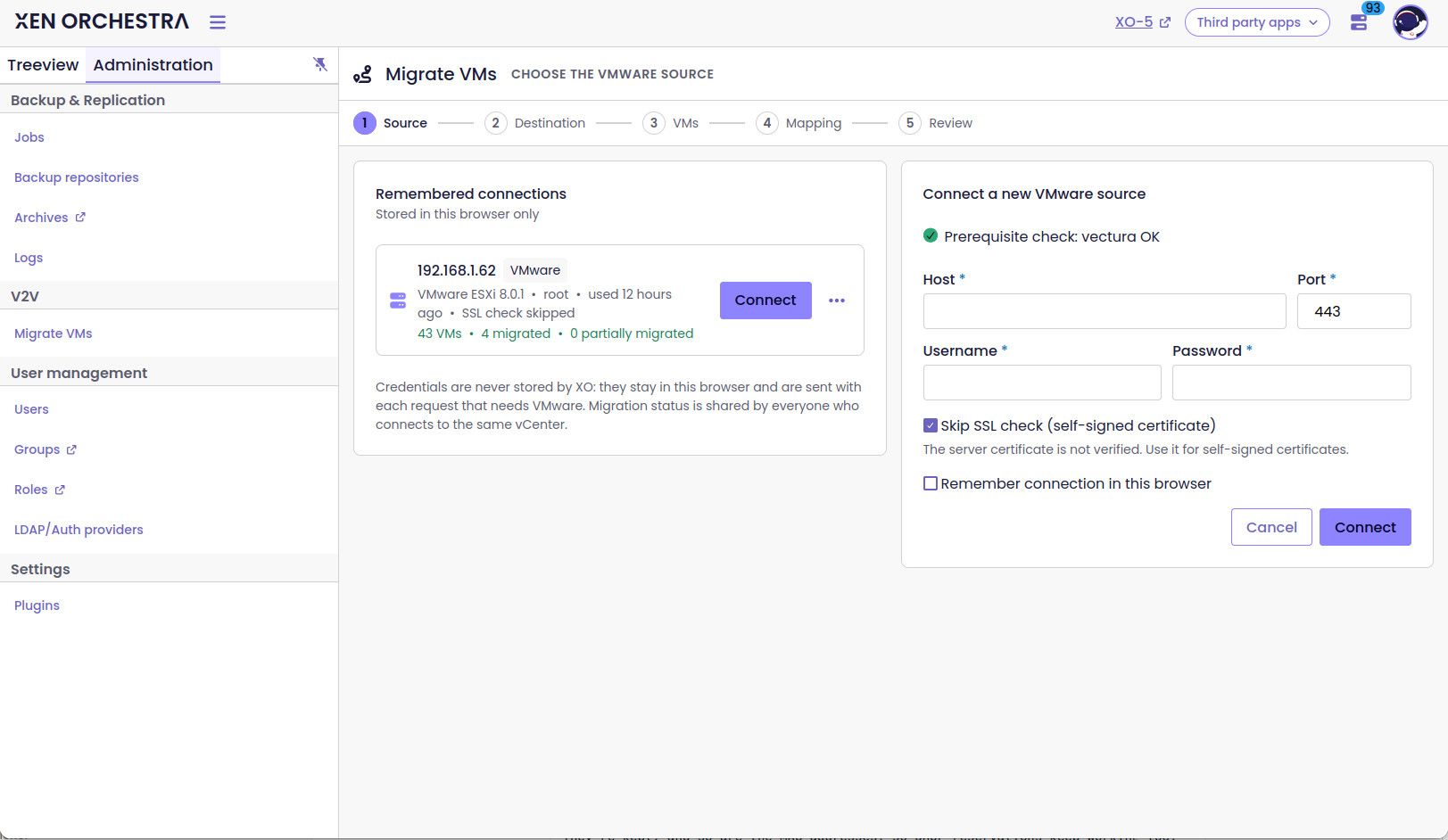
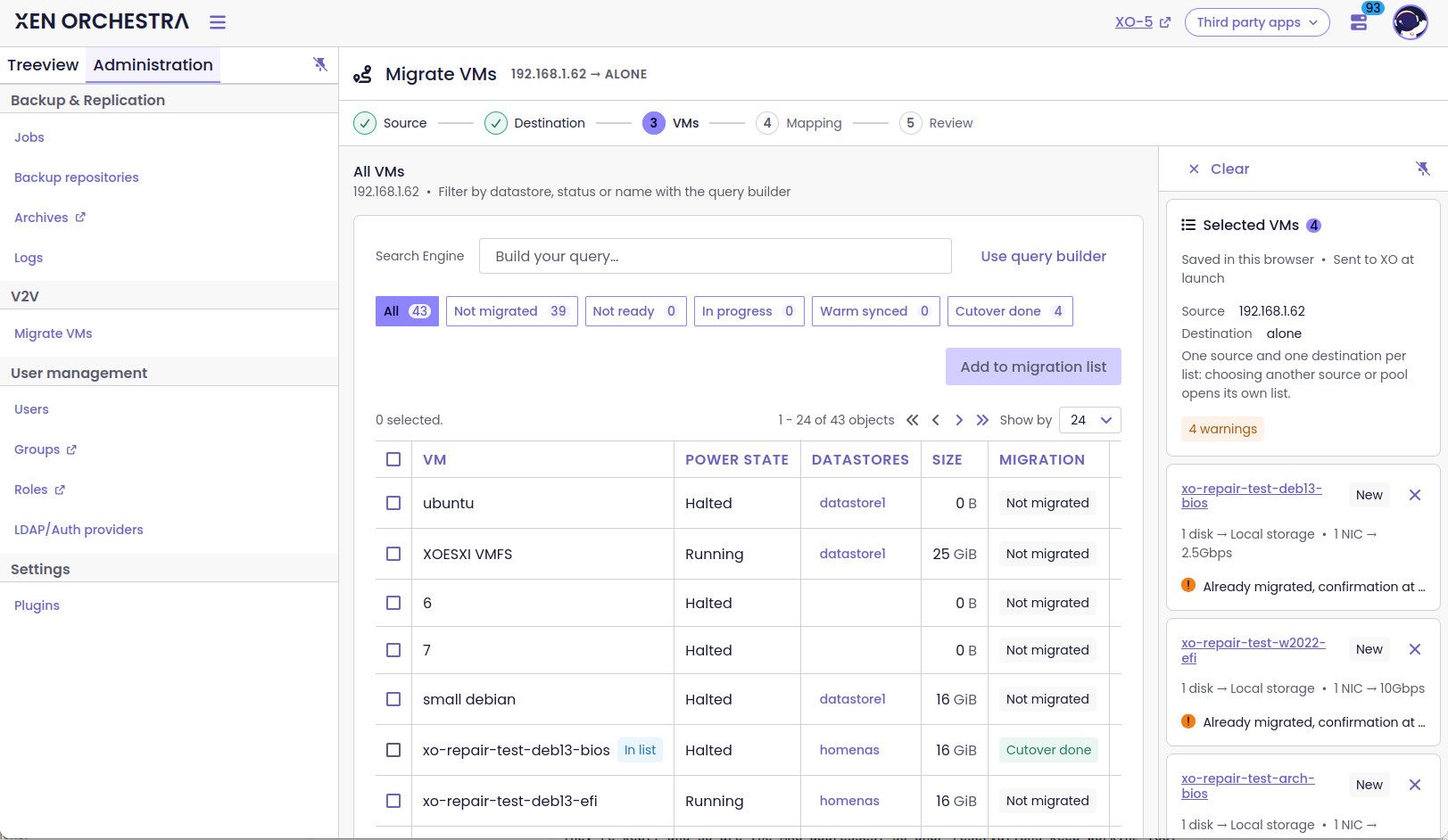
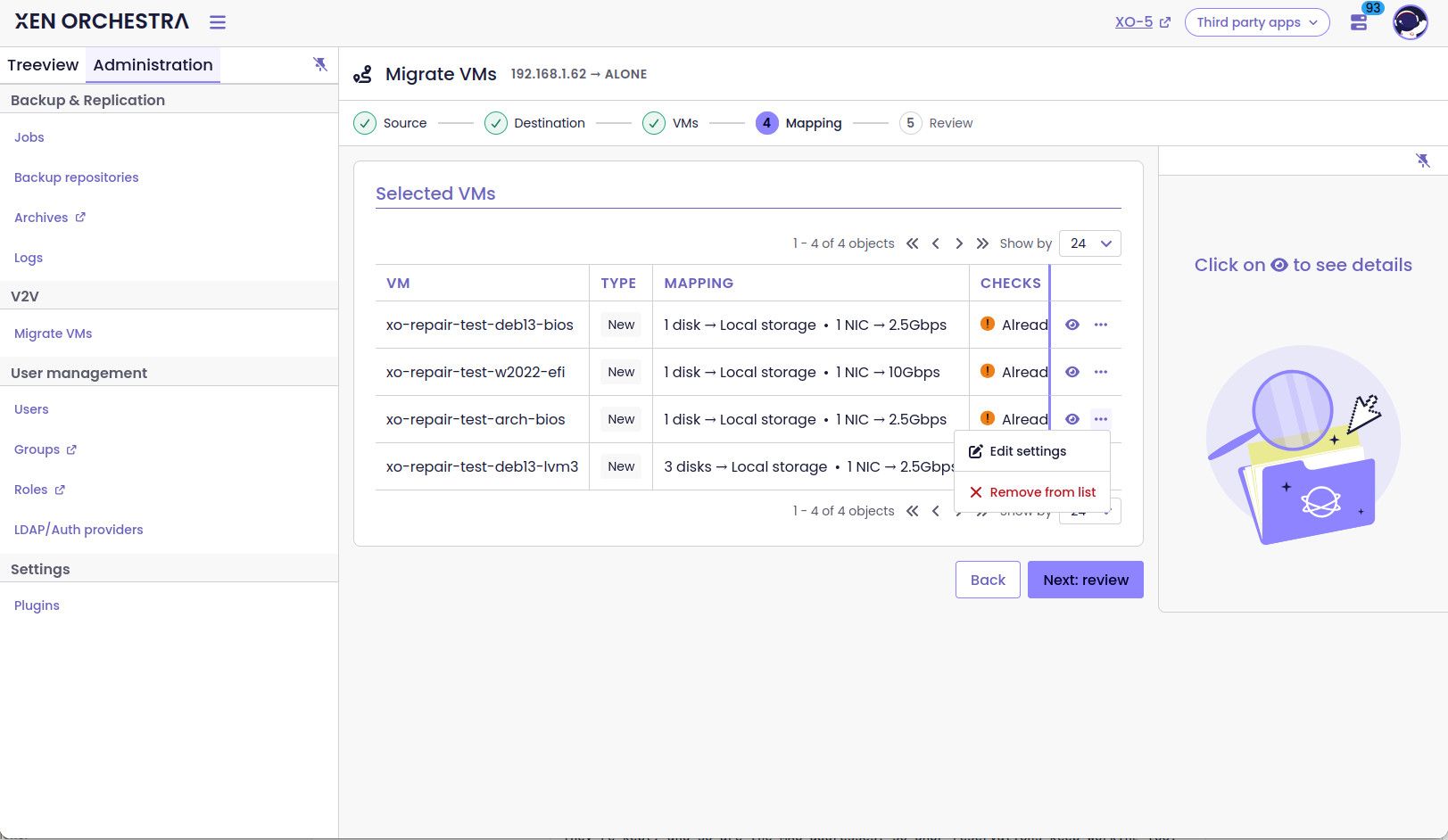
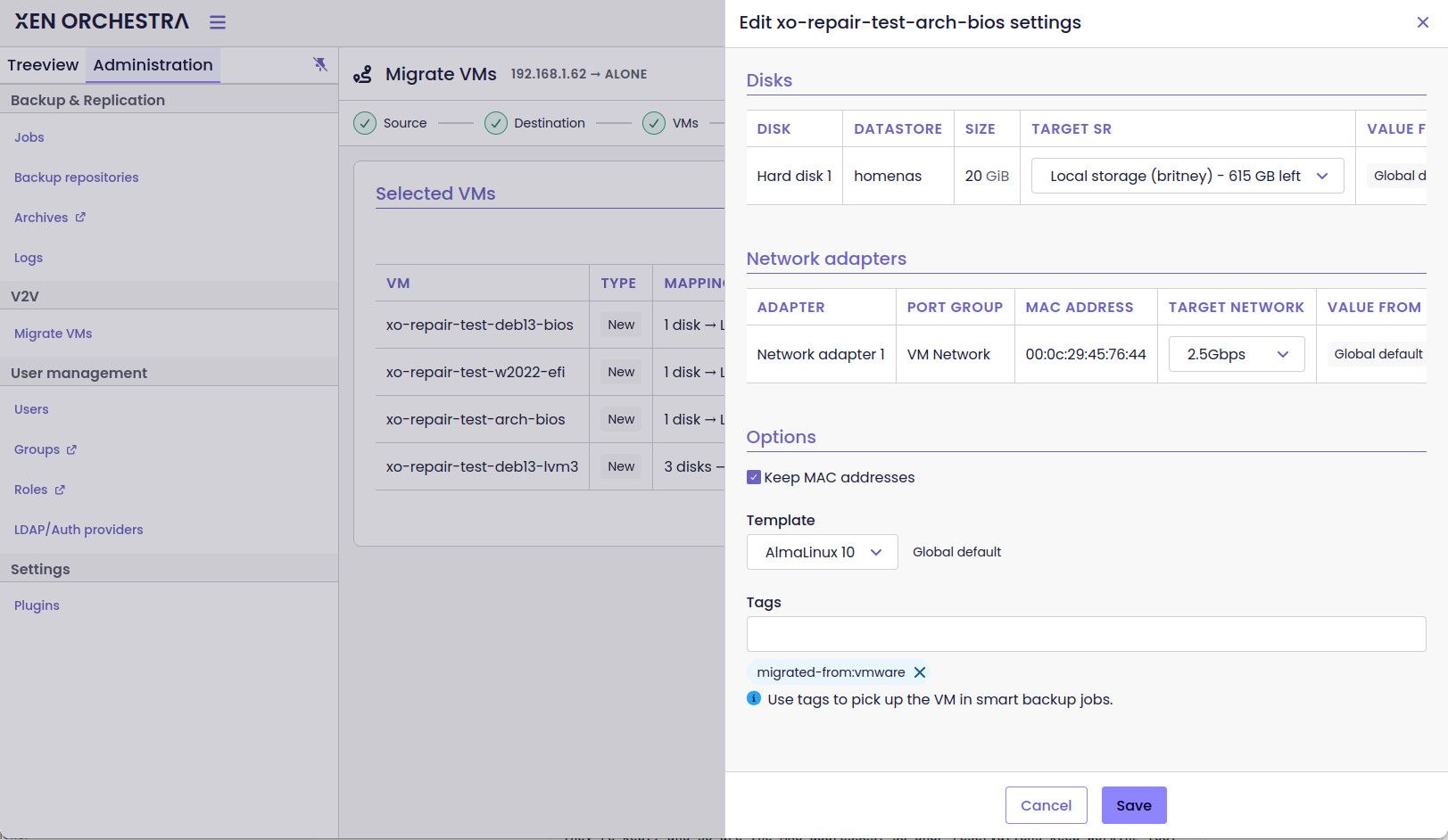
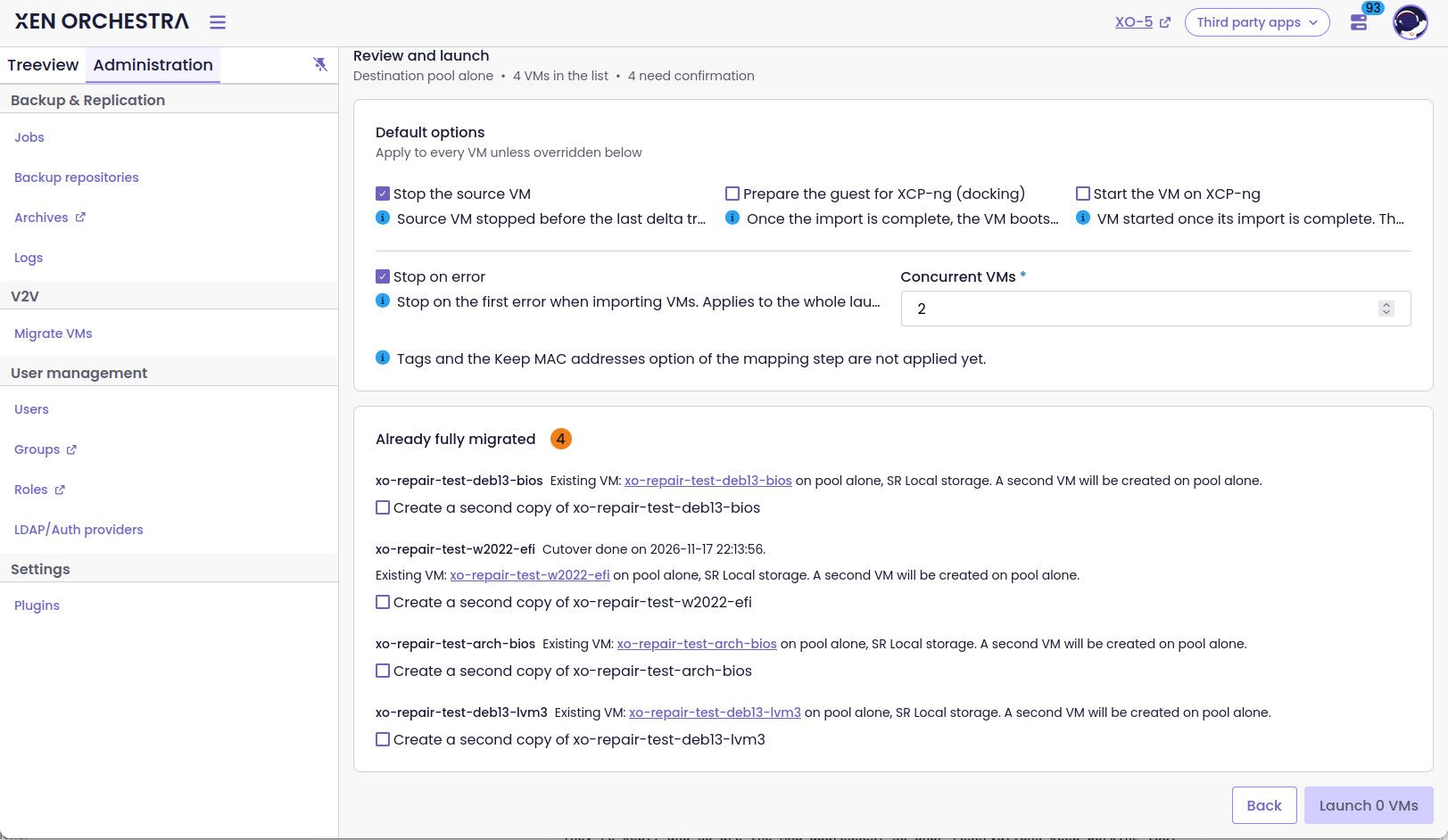
What's new compared to XO 5
- A reworked wizard: step by step, from connecting to your vCenter/ESXi to the final review. Clearer, and harder to get wrong.
- Choices per VM: network, storage and template are picked for each VM, not once for the whole batch. Your Windows Server and your Debian web server don't have to land the same way anymore. The template matters too: it gives the VM the right settings for its OS on the XCP-ng side.
- Start VM after migration: the VM is started once the import is done, no need to come back and click.
- Auto-pilot docking: one checkbox, details below

- Readable tasks: each VM shows the progress of every step. If something goes wrong, the task tells you what and why.
Auto-pilot docking: why?
Moving disks from VMware to XCP-ng is now the easy part. The real pain comes at the first boot: Windows blue screens with
INACCESSIBLE_BOOT_DEVICE, a Linux initramfs without the Xen drivers, VMware Tools still running, NICs renamed and static IPs gone… You know the drill
How it works
Once the import is complete, XO boots the VM on a small live ISO, inside the target VM, so the ISO sees the real XCP-ng virtual hardware.
- Diagnose: the ISO reads the guest disks without touching anything and reports what it plans to do, plus anything blocking.
- Dock: it applies the changes offline (Xen PV drivers in the initramfs, VMware Tools disabled, XCP-ng guest tools installed, network configuration carried over), then powers the VM off.
- First boot: XO starts the VM and follows it through, including the Windows driver and agent install. It also turns Secure Boot back on when the source had it.
What about static IPs?
They're kept, and so are the MAC addresses, so DHCP reservations keep working too.
- Linux: your network configuration is never modified. The ISO only pins the old interface name to the NIC with the same MAC:
ens192staysens192instead of becomingenX0. - Windows: the ISO captures the static configuration and the first boot reapplies it to the new PV adapter with the matching MAC. With several NICs, XO uses what VMware Tools reported to match addresses and adapters. If it can't, the adapters stay in DHCP and the task tells you so.
A few things we care about
- Your VMware VM stays your safe fallback. It is left untouched, apart from Changed Block Tracking, which XO enables to speed up the transfer. Stop source is your call, and it's a clean guest shutdown. If anything goes wrong, just power it back on.
- No guest credentials needed, and nothing is installed in the source OS.
- A failed docking never fails the import. The VM is left halted, the task explains why, and the snapshot taken at the end of the import is your rollback on the XCP-ng side.
What's supported
- Linux: Debian 10/11/12/13, Ubuntu 22.04 / 24.04, the RHEL family (CentOS 7.3, Rocky 8/9/10, Oracle Linux with UEK and RHCK), SLES 15 SP7 / 16, openSUSE Leap 15.6, and Arch (experimental). BIOS and UEFI, LVM across several disks, btrfs with snapper, SELinux enforcing…
- Windows: Server 2016, 2019, 2022 and 2025.
- Older Windows (7 SP1, 2012 R2): docked, but they run without PV drivers.
- Not docked: encrypted system volumes (LUKS, BitLocker), dynamic disks, hibernated VMs or Fast Startup, and no OS found (BSD…).
How to test
Docking is experimental and off by default.
- XO 6: available in [XO from sources / XOA X.Y]. Open the V2V wizard, pick your VMs, then tick Auto-pilot docking and/or Start VM after migration.
- REST API: the
dockingandstartVmoptions ofPOST /rest/v0/pools/:id/actions/import_vms_from_vmware. - The docking ISO must be in an ISO SR of the target pool: link to the ISO. For the most curious, the build system is in
@xen-orchestra/autopilot-docking/scripts/build.sh(building it from a CI needs a privileged runner).
All the details are in PR #10621 and in the V2V migration guide.
We need you!
Weird setups are exactly what we want: exotic partitioning, old distros, multi-NIC Windows with static IPs… And of course, any feedback on the new wizard is welcome. If something goes wrong, the import task holds the full report, so please share it here.
Feel free to react or ask questions!

-
 F florent referenced this topic
-
I'm going to be testing this more extensively during the week.
Quick question.
When/If I choose to remember the connection. Will that save my credentials as well? If so, then I would like to propose that splitting that up to being able to save the connection host/target e.g. vcenter.contoso.lan, and the credentials separately.But in my first try-run.
Docking failed: (I'm surely doing something wrong)
no docking ISO vates-autopilot-docking-<YYYYMMDDTHHMMSSZ>-<commit or version>.iso in the poolError: no docking ISO vates-autopilot-docking-<YYYYMMDDTHHMMSSZ>-<commit or version>.iso in the pool at findDockingIso (file:///opt/xen-orchestra/packages/xo-server/src/xo-mixins/vmware/_docking.mjs:48:19) at MigrateVm.migrationfromEsxi (file:///opt/xen-orchestra/packages/xo-server/src/xo-mixins/vmware/index.mjs:344:7) at file:///opt/xen-orchestra/@xen-orchestra/rest-api/dist/v2v/v2v.service.mjs:69:38 at Task.runInside (/opt/xen-orchestra/@vates/task/index.js:204:22) at Task.run (/opt/xen-orchestra/@vates/task/index.js:188:20) at asyncEach.concurrency.concurrency (file:///opt/xen-orchestra/@xen-orchestra/rest-api/dist/v2v/v2v.service.mjs:67:17)And thanks for enabling auto-start of the VM after the migration has completed!
Hello! It looks like you're interested in this conversation, but you don't have an account yet.
Getting fed up of having to scroll through the same posts each visit? When you register for an account, you'll always come back to exactly where you were before, and choose to be notified of new replies (either via email, or push notification). You'll also be able to save bookmarks and upvote posts to show your appreciation to other community members.
With your input, this post could be even better 💗
Register Login