🛰️ XO 6: dedicated thread for all your feedback!
-
@john.c which is why I use it
 It's been perfect up until yesterday..not sure what's going on. Will check that though @john.c . Thanks!
Your welcome. Also if using a Web Application Firewall (WAF) would be best if you switched it to BunkerWeb, due to them being on Vates VAN! So will be highly tested for support of protecting Xen Orchestra and certified as compatible with such.
-
@john.c Nah..don't use those thankfully. Appreciate it!
-
Ended up being I needed a browser update shrug
-
@john.c Nah..don't use those thankfully. Appreciate it!
Maybe worth you starting to use BunkerWeb especially if the Xen Orchestra has absolutely to be remotely accessible on the internet. Though visibility on the internet is a definite no-no for Xen Orchestra.
Would keep your instance from being hit by vulnerability exploits, like the one currently being actively exploited (https://docs.vates.tech/security-advisories/advisories/2026/vates-sa-2026-062/).
-
Uggg... I just updated yesterday so I better check to see if I need to upgrade again today. Starting to hate AI, and I'm guessing the developers are the same.
That said, not exposed to the internet.
[edit] regarding moving the backup, it was nice to have a front page single click to see the checkmarks on the jobs. Now it's two clicks. I'll adjust my morning routine.
-
Uggg... I just updated yesterday so I better check to see if I need to upgrade again today. Starting to hate AI, and I'm guessing the developers are the same.
That said, not exposed to the internet.
[edit] regarding moving the backup, it was nice to have a front page single click to see the checkmarks on the jobs. Now it's two clicks. I'll adjust my morning routine.
@greg_e It’s just Vates and software in their stack, just imagine what it’s like for developers and maintainers of Debian Linux! What with all the software in the distribution and all of it at times needed updating concurrently.
To help them through these especially tough times may or would be a good idea to make a donation to Debian Linux, and/or other contributions.
-
Is there the ability to Add a Host to a Pool in v6 yet? When I click on the Pool, in the default Dashboard view, there is no 'Add Host' option in the upper right; just Add VM option. Would be beneficial to have that there, as well as a Quick Action item in the navigation tree on the left:
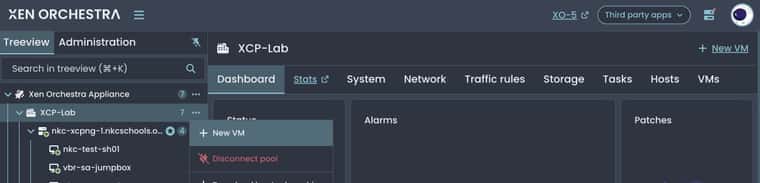
I can add this as a suggestion if desired as well.
Thanks!
-
I've noticed something that's confusing. In the Tasks tab one of my backup jobs suggests that it is only 1% done, when you expand that task then you can see that both parts are complete. Image for reference:
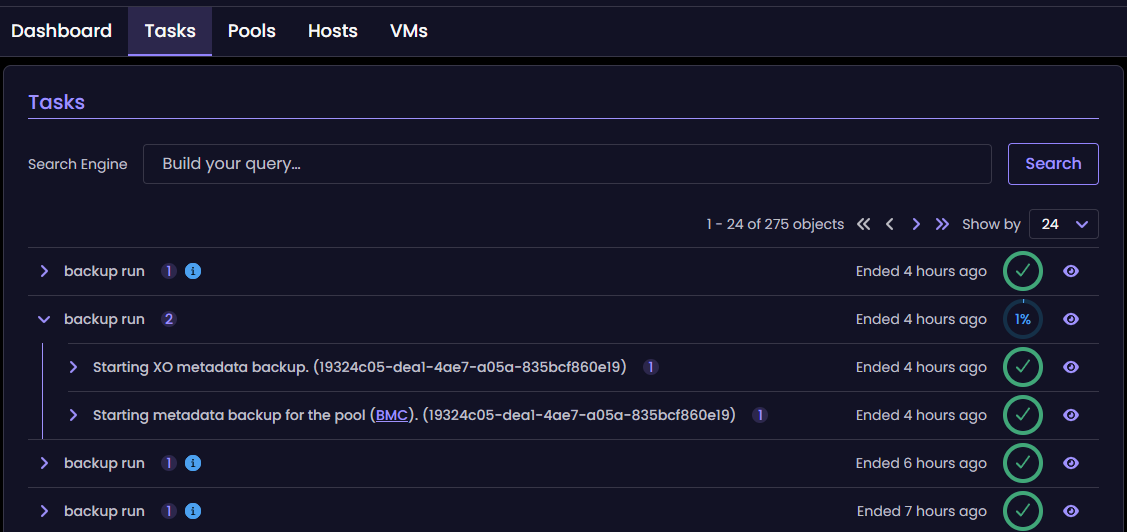
I'm guessing that if I nested other jobs, they would also display like this. I don't nest any other jobs because I want to make sure one finishes before another starts, and I don't have many VMs that I'm backing up (I don't have many VMs total).
I'd request that if all nested jobs were complete, we get a full circle with 100% or just another green check mark.
-
@coolsport00 not in XO 6 yet as far as I can tell. For now it's still done from XO 5: Home > Pools, open the pool, then "Add Hosts" at the top right, once the new host has been added as a server (docs). I believe the XO team already has it on their list for the pool dashboard. If you want to push it, there's a close Feeder request you could vote on, which also asks for a proper add-host form: https://feedback.vates.tech/posts/75/permit-to-add-host-to-pool-with-a-real-form
@Greg_E thanks for the screenshot. It looks like the parent task keeps reporting 1% once the metadata backups underneath it are done. I think that one is known too, but I'll let the XO team confirm.
-
Hi everyone

V2V just landed in the XO 6 UI, and it's more than a port of the XO 5 form:
- Reworked step-by-step wizard
- Network, storage and template picked per VM, not once for the whole batch
- Start VM after migration
- Auto-pilot docking (experimental): XO boots the imported VM on a small live ISO that fixes it before its first boot on XCP-ng. Xen PV drivers in the initramfs, VMware Tools out, guest tools in, static IPs and MACs kept. No more
INACCESSIBLE_BOOT_DEVICE
Your VMware VM stays untouched as a fallback, and a failed docking never fails the import.
All the details (supported OSes, how it works, how to test) are on a topic next to this one : https://xcp-ng.org/forum/topic/12583/v2v-in-xo-6-a-brand-new-migration-wizard-with-auto-pilot-docking
We're especially looking for weird setups: old distros, exotic partitioning, multi-NIC Windows with static IPs… Feedback welcome, here or on the forum!



Hello! It looks like you're interested in this conversation, but you don't have an account yet.
Getting fed up of having to scroll through the same posts each visit? When you register for an account, you'll always come back to exactly where you were before, and choose to be notified of new replies (either via email, or push notification). You'll also be able to save bookmarks and upvote posts to show your appreciation to other community members.
With your input, this post could be even better 💗
Register Login