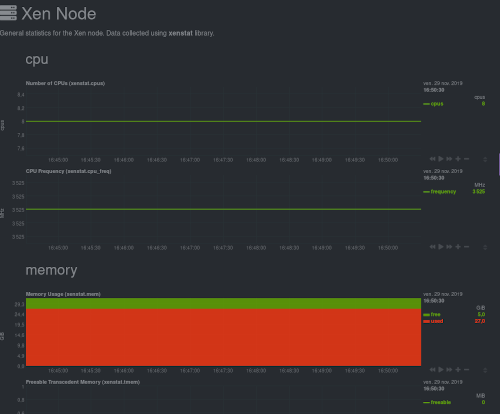
Netdata package is now available in XCP-ng
-
@mike Is your XOA recent?
-
@Danp said in Netdata package is now available in XCP-ng:
@mike Check under Settings > Plugins to be sure the Netdata plugin is active.
I was about to
 because no it wasn't, but attempting to enable it generates the error:
 Netdata is not available on this appliance, please deploy a new one.I guess that answers that! The XOA instance was first installed maybe 18 months ago, so I'm back to my initial question re: backing up the config and importing to a new XOA. Does that keep all of the backup-ng history etc intact?
Thanks all, and happy new year etc.

-
Yes, it should
-
Well, that sort-of worked, but it doesn't copy over any registration info, and my boss with the premium enabled login is off till Monday. Glad I didn't delete the old appliance!
-
You indeed need to re-register the appliance, with the same creds.
-
Quick post to report that it worked, thanks.
-
Thanks for the feedback
-
I know this topic is quite old but I thought I might add a point here to installing Netdata manually.
Installing Netdata manually
If you want to do it your way, no problem Just run yum install netdata-ui on each host you want to monitor and that's it. You can just go on http://host_address:19999 and enjoy all the metrics.These instructions are correct however at least for me in the xcp-ng 8.0 release there is an active firewall in place. You'll need to open the port 19999 within iptables. The config file for iptables is /etc/sysconfig/iptables. Edit the file to open the port and try to be as restrictive if possible possible filtering by source port. Restart the firewall service:
systemctl restart iptables.service
Access can be further restricted as well within the netdata setup as documented here: https://docs.netdata.cloud/web/server/. You can setup psuedo access-control-lists and even add SSL certs if necessary.
-
The netdata-ui package automatically opens the 19999 port. It didn't work for you? Any error message during installation?
-
@stormi said in Netdata package is now available in XCP-ng:
netdata-ui
It does but it's too open, so ones can decide to edit this rule and restrict it further
NETDATA all -- anywhere anywhere
-
I'll try to install package again manually once I upgrade to 8.1. Unfortunately for me on 8.0 the firewall port wasn't opened. I'll report once I upgrade.
-
It may fail to open the port if there are local changes to iptables rules.
-
Hi,
Would pulling the latest version of netdata into each host break anything?
ie running from the cli: bash <(curl -Ss https://my-netdata.io/kickstart.sh) -
Despite being not supported as any dom0 modification, it would probably not include Xen support.
-
@MrMike please use our packages
-
Just being curious, your packages, they use a private registry on the xoa server itself?
-
All RPMs are installed from our public repositories, if that's the question.
- Using XOA to install netdata will install the
netdatapackage to XCP-ng and configure it to stream towards XOA's netdata. - Or,
yum install netdata-uion XCP-ng will get you a working netdata with default settings and will open port 19999
- Using XOA to install netdata will install the
-
I meant about the how netdata centralizes the nodes information on xoa host:
is this how the xoa plugin/packages was configured?
https://learn.netdata.cloud/docs/agent/registry/#run-your-own-registry -
Ping @nraynaud
-
It's using Netdata streaming. Please read Netdata documentation.



Hello! It looks like you're interested in this conversation, but you don't have an account yet.
Getting fed up of having to scroll through the same posts each visit? When you register for an account, you'll always come back to exactly where you were before, and choose to be notified of new replies (either via email, or push notification). You'll also be able to save bookmarks and upvote posts to show your appreciation to other community members.
With your input, this post could be even better 💗
Register Login