File restores from Windows guest backups
-
I'm having an issue with file restores on Windows guest backups. On Linux guests, I can drill down to individual folders and files for my selection, but on my Windows Server 2019 guest I can't. The dialog looks like this:
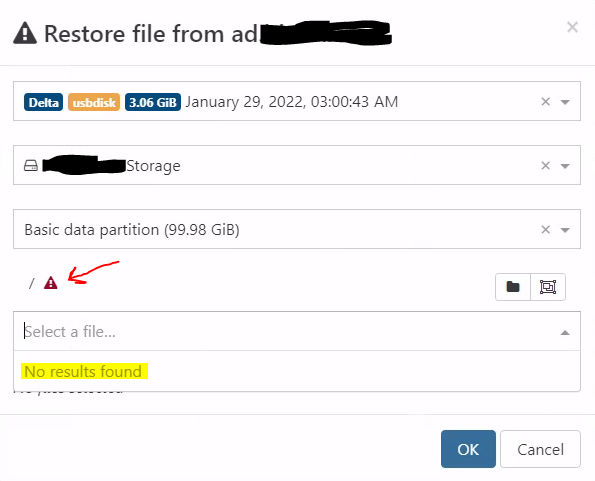
I am curious what the red triangle icon means in the screenshot; I don't see this on the Linux guests. I can't find any documentation on it.
I do get a warning on the file restore screen saying "Only the files of a Delta Backup which are not on an SMB remote can be restored". I am using an SMB remote. However, the Linux guests seem to restore just fine.
Any help appreciated!
XCP-NG 8.2
xo-server 5.86.3
xo-web 5.91.2
(XO compiled from sources at commit 422a2) -
Ah, I found my own solution after a little digging.
A little background. My XO install was built from sources on Debian Bullseye.
Looking through the logs on XO when I attempted a file restore on a Windows machine I see these entries:

After googling that, I ran across this thread, which had the solution:

Windows file restores are working fine now.
@Rocky, rest easy. Your post did help someone in the future.

-
@brantleyhobbs @olivierlambert Is this a needed item in XOA?
-
@thenorthernlight I doubt it's necessary. My XO is built entirely from source. It's probably just missing a dependency in the image I downloaded.
(From here, in case anyone is curious: https://github.com/ronivay/XenOrchestraInstallerUpdater)
Thanks!


Hello! It looks like you're interested in this conversation, but you don't have an account yet.
Getting fed up of having to scroll through the same posts each visit? When you register for an account, you'll always come back to exactly where you were before, and choose to be notified of new replies (either via email, or push notification). You'll also be able to save bookmarks and upvote posts to show your appreciation to other community members.
With your input, this post could be even better 💗
Register Login