XCP-ng
    • Categories
    • Recent
    • Tags
    • Popular
    • Users
    • Groups
    • Register
    • Login

    cannot create a VM from a diskless template without an ISO #274

    Scheduled Pinned Locked Moved Infrastructure as Code
    11 Posts 2 Posters 1.8k Views 2 Watching
    Loading More Posts
    • Oldest to Newest
    • Newest to Oldest
    • Most Votes
    Reply
    • Reply as topic
    Log in to reply
    This topic has been deleted. Only users with topic management privileges can see it.
    • gudge25G Offline
      gudge25
      last edited by gudge25

      hi there
      I am using this template
      https://registry.terraform.io/providers/terra-farm/xenorchestra/latest/docs/resources/vm

      so I created a file main.tf
      with pretty same config from the example
      (only template name is diff because i don't have the one that is in example)

      https://pastebin.com/raw/qGQdCEUq

      Terraform plan ->  OK
      Terraform apply -> 
      Error: cannot create a VM from a diskless template without an ISO │  │   with xenorchestra_vm.bar, │   on main.tf line 33, in resource "xenorchestra_vm" "bar": │   33: resource "xenorchestra_vm" "bar" { │
      
      AtaxyaNetworkA 1 Reply Last reply Reply Quote 0
      • olivierlambertO olivierlambert moved this topic from Xen Orchestra on
      • AtaxyaNetworkA Offline
        AtaxyaNetwork Ambassador @gudge25
        last edited by

        @gudge25 Hi !

        I think it's because of this:

        data "xenorchestra_template" "template" {
            name_label = "Other install media"
        }
        

        You need to put the name of an existing template, as you can see in Home -> Template

        gudge25G 1 Reply Last reply Reply Quote 0
        • gudge25G Offline
          gudge25 @AtaxyaNetwork
          last edited by

          @AtaxyaNetwork
          no it is existing
          e921b511-e85d-4030-a991-e3c00663b067-изображение.png

          gudge25G 1 Reply Last reply Reply Quote 0
          • gudge25G Offline
            gudge25 @gudge25
            last edited by olivierlambert

            @gudge25
            i tried

            data "xenorchestra_template" "template" {
                name_label = "CentOS 7"
            }
            

            and

            data "xenorchestra_template" "template" {
                name_label = "Ubuntu Bionic Beaver 18.04"
            }
            

            same error

            AtaxyaNetworkA 1 Reply Last reply Reply Quote 0
            • AtaxyaNetworkA Offline
              AtaxyaNetwork Ambassador @gudge25
              last edited by

              @gudge25 You have two "type of template"

              • The one used in the VM creation (which handle some parameter for XCP-ng, IIRC)
              • The one used for terraform, which is a VM converted to a template

              If you don't have template for the second use case, you can download it via the hub in XOA, or create a VM, install it and convert it to a template

              Sorry if I wasn't very clear

              gudge25G 1 Reply Last reply Reply Quote 0
              • gudge25G Offline
                gudge25 @AtaxyaNetwork
                last edited by

                @AtaxyaNetwork thanks for reply
                i want to achieve VM creation from
                1-ISO
                and/or
                2-from Network (PXE installation )

                so i need 2 templates

                AtaxyaNetworkA 1 Reply Last reply Reply Quote 0
                • AtaxyaNetworkA Offline
                  AtaxyaNetwork Ambassador @gudge25
                  last edited by

                  @gudge25 Terraform is designed to deploy infrastructure based on VM template. If you need to create VM "manually", you'll need to use a client for XCP-ng, like Xen Orchestra

                  gudge25G 1 Reply Last reply Reply Quote 0
                  • gudge25G Offline
                    gudge25 @AtaxyaNetwork
                    last edited by olivierlambert

                    @AtaxyaNetwork
                    ok for example
                    we have parameter

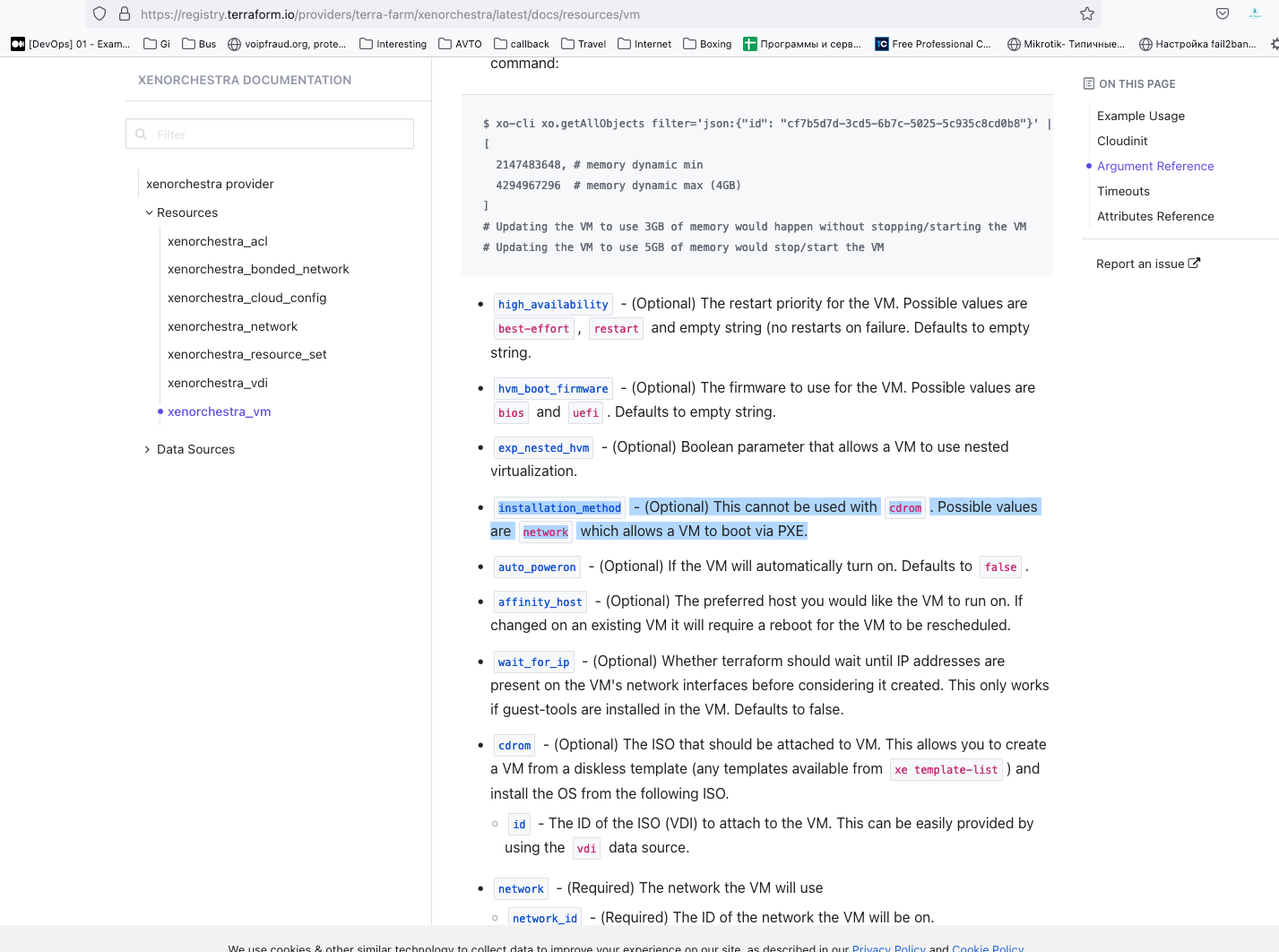
                    installation_method - (Optional) This cannot be used with cdrom. Possible values are network which allows a VM to boot via PXE.

                    so when i add it
                    installation_method = "network"
                    i have another error

                    xenorchestra_vm.bar: Creating...
                    ╷
                    │ Error: jsonrpc2: code 10 message: invalid parameters: {"errors":[{"instancePath":"/installation/repository","schemaPath":"#/properties/installation/properties/repository/minLength","keyword":"minLength","params":{"limit":1},"message":"must NOT have fewer than 1 characters"}]}
                    │ 
                    │   with xenorchestra_vm.bar,
                    │   on main.tf line 33, in resource "xenorchestra_vm" "bar":
                    │   33: resource "xenorchestra_vm" "bar" {
                    │ 
                    ╵
                    
                    AtaxyaNetworkA 1 Reply Last reply Reply Quote 0
                    • AtaxyaNetworkA Offline
                      AtaxyaNetwork Ambassador @gudge25
                      last edited by

                      @gudge25 I didn't find the installation method in the provider documentation 🤔
                      Can you show your full configuration ?

                      gudge25G 2 Replies Last reply Reply Quote 0
                      • gudge25G Offline
                        gudge25 @AtaxyaNetwork
                        last edited by

                        @AtaxyaNetwork

                        https://registry.terraform.io/providers/terra-farm/xenorchestra/latest/docs/resources/vm

                        please
                        f1c63959-664a-418c-9ef7-90d454a6a7b3-изображение.png

                        1 Reply Last reply Reply Quote 0
                        • gudge25G Offline
                          gudge25 @AtaxyaNetwork
                          last edited by

                          @AtaxyaNetwork
                          https://pastebin.com/raw/q6qMn73M

                          and file

                          cloud_config.tftpl file used by the cloudinit templating.

                          #cloud-config
                          hostname: ${hostname}
                          fqdn: ${hostname}.${domain}
                          package_upgrade: true

                          1 Reply Last reply Reply Quote 0

                          Hello! It looks like you're interested in this conversation, but you don't have an account yet.

                          Getting fed up of having to scroll through the same posts each visit? When you register for an account, you'll always come back to exactly where you were before, and choose to be notified of new replies (either via email, or push notification). You'll also be able to save bookmarks and upvote posts to show your appreciation to other community members.

                          With your input, this post could be even better 💗

                          Register Login
                          • First post
                            Last post