Bad Performance CPU? get-cpufreq-para failed
-
Thanks for the Feedback @ all
I have tested some commands from above and discovered something
a good working host system:
iostat -x
Linux 4.19.0+1 (xcpngautewe)    02/27/2024      _x86_64_        (8 CPU)

avg-cpu:  %user   %nice %system %iowait  %steal   %idle
           0.18    0.00    0.34    0.00    0.07   99.41

Device:         rrqm/s   wrqm/s     r/s     w/s    rkB/s    wkB/s avgrq-sz avgqu-sz   await r_await w_await  svctm  %util
nvme0n1           0.04     0.08    2.02    2.50   135.07   202.56   149.24     0.00    0.30    0.27    0.32   0.21   0.10
sda               0.08     0.81    2.29    3.26   126.80   161.85   104.05     0.00    0.57    0.69    0.48   0.29   0.16
dm-0              0.00     0.00    0.00    0.00     0.47     0.00   244.40     0.00    0.81    0.82    0.00   0.81   0.00
dm-1              0.00     0.00    0.00    0.00     0.33     0.00   215.58     0.00    0.86    0.91    0.04   0.86   0.00
dm-2              0.00     0.00    0.00    0.00     0.00     0.00    21.18     0.00    0.19    0.16    0.23   0.19   0.00
dm-3              0.00     0.00    0.21    0.21    12.58    11.83   117.71     0.00    0.71    0.97    0.46   0.33   0.01
tda               0.00     0.00    0.00    0.00     0.00     0.00    39.09     0.00    0.55    0.55    0.00   0.15   0.00
tdb               0.00     0.00    0.00    0.00     0.00     0.00    39.09     0.00    0.55    0.55    0.00   0.15   0.00
in comparison to the slow host system:
iostat -x
Linux 4.19.0+1 (localhost.localdomain)  02/27/2024      _x86_64_        (16 CPU)

avg-cpu:  %user   %nice %system %iowait  %steal   %idle
           0.29    0.00    0.53    0.02    0.03   99.13

Device:         rrqm/s   wrqm/s     r/s     w/s    rkB/s    wkB/s avgrq-sz avgqu-sz   await r_await w_await  svctm  %util
sda               0.14     0.91    6.54    7.67   308.70   284.24    83.43     0.10    7.15    3.08   10.62   2.96   4.21
sdb               0.00     0.00    0.01    0.00     1.33     0.00   254.01     0.00    1.61    1.61    7.25   1.60   0.00
dm-0              0.00     0.00    0.00    0.00     0.54     0.00   253.31     0.00    1.78    1.73   34.50   1.76   0.00
dm-5              0.00     0.00    0.20    0.17    20.11     2.27   119.98     0.00    4.71    0.91    9.28   2.41   0.09
tdc               0.00     0.00    0.00    0.00     0.04     0.00    81.29     0.00   27.58   27.58    0.00   7.40   0.00
sdc               0.00     0.00    0.01    0.00     0.53     0.00   126.86     0.00    4.08    4.08    0.00   2.24   0.00
dm-1              0.00     0.00    1.26    1.76    49.67    39.38    59.01     0.02    5.22    2.67    7.05   4.00   1.21
dm-2              0.00     0.00    0.12    0.14    21.73    24.61   345.21     0.00    9.35    4.45   13.56   3.18   0.09
dm-3              0.00     0.00    0.11    0.00     2.20     0.00    41.97     0.00    0.97    0.97    0.00   0.84   0.01
dm-4              0.00     0.00    0.27    0.00    12.30     0.00    90.10     0.00    3.15    3.15    0.00   2.56   0.07
tda               0.00     0.00    0.00    0.00     0.00     0.00    39.09     0.00    2.42    2.42    0.00   1.28   0.00
tdb               0.00     0.00    0.00    0.00     0.00     0.00    39.09     0.00    0.60    0.60    0.00   0.23   0.00
dm-6              0.00     0.00    0.11    0.10     5.00     4.04    87.11     0.00    6.31    2.74   10.09   3.63   0.08
tdd               0.00     0.00    0.00    0.00     0.00     0.00    39.09     0.00    0.53    0.53    0.00   0.38   0.00
dm-7              0.00     0.00    0.04    0.00     1.96     0.04    88.39     0.00    4.69    4.02   15.47   3.11   0.01
tde               0.00     0.00    0.00    0.00     0.00     0.00    39.09     0.00    0.57    0.57    0.00   0.38   0.00
dm-8              0.00     0.00    0.00    0.00     0.00     0.00    45.15     0.00   11.98    7.87   20.20  10.80   0.00
dm-9              0.00     0.00    0.00    0.00     0.00     0.00    38.85     0.00   12.60    6.04   23.95  11.96   0.00
dm-10             0.00     0.00    0.07    0.04     1.97     1.26    58.93     0.00   10.88    7.96   15.34   2.78   0.03
dm-11             0.00     0.00    0.00    0.00     0.00     0.00    28.84     0.00   12.16   12.16    0.00   7.12   0.00
dm-12             0.00     0.00    0.00    0.00     0.00     0.00    41.06     0.00   10.25   10.25    0.00   6.90   0.00
dm-13             0.00     0.00    0.00    0.00     0.00     0.00    54.52     0.00    5.10    5.10    0.00   5.02   0.00
dm-14             0.00     0.00    0.04    0.00     1.36     0.00    67.46     0.00    4.38    4.38    0.00   2.27   0.01
dm-15             0.00     0.00    0.01    0.00     0.12     0.00    48.19     0.00    7.59    7.59    0.00   6.14   0.00
tdf               0.00     0.00    0.00    0.00     0.00     0.00    39.09     0.00   48.68   48.68    0.00   7.17   0.00
tdg               0.00     0.00    0.00    0.00     0.00     0.00    39.09     0.00   30.45   30.45    0.00   4.98   0.00
tdh               0.00     0.00    0.00    0.00     0.00     0.00    39.09     0.00    1.45    1.45    0.00   0.60   0.00
the columns with the wait timings are much higher than the from the fast host
that’s very strange from my point of view.further the CPU stat does not shows correct values because the fast host was at the time of the command under heavy load with about 80%.
on the slow was some load but there the CPU is much stronger
@bleader: the comand "get-cpufreq-average" gives no output at all.
-
@high-voltages so nothing there hints you to a problem with the drive SDA on the slow "host"?
-
@high-voltages you also can try
xenpm start 10to gather info for 10s and it will print a sumarry at the end, in my case it had each core average frequency, not sure you'll get it too, but you can give it a shot. -
@bleader I am running into the same issue on a pair of Lenovo SR630 V4s with Intel Xeon 6530P CPUs
[08:23 xcpng-dr-2 ~]# xenpm get-cpufreq-para
[CPU0] failed to get cpufreq parameter
Playing with different workload profiles in the bios but so far the server seems to pretty aggressively clock itself down even while CPU intensive tasks like backups are running. I am of course not able to run something like xenpm set-scaling-governor performance either.
EDIT: The solution here is to get "Power/Performance Bias:" to OS Controlled in the servers BIOS. This restores functionality.
-
@flakpyro oh, good to know, thanks for sharing this!
@poddingue this might be worth some investigation to document, but likely would need to gather similar settings for a set of vendors to make it relevant.
-
EDIT: The solution here is to get "Power/Performance Bias:" to OS Controlled in the servers BIOS. This restores functionality.
hey nice !
I did the modification on a slave server and I now have all informations (previously FAILED)
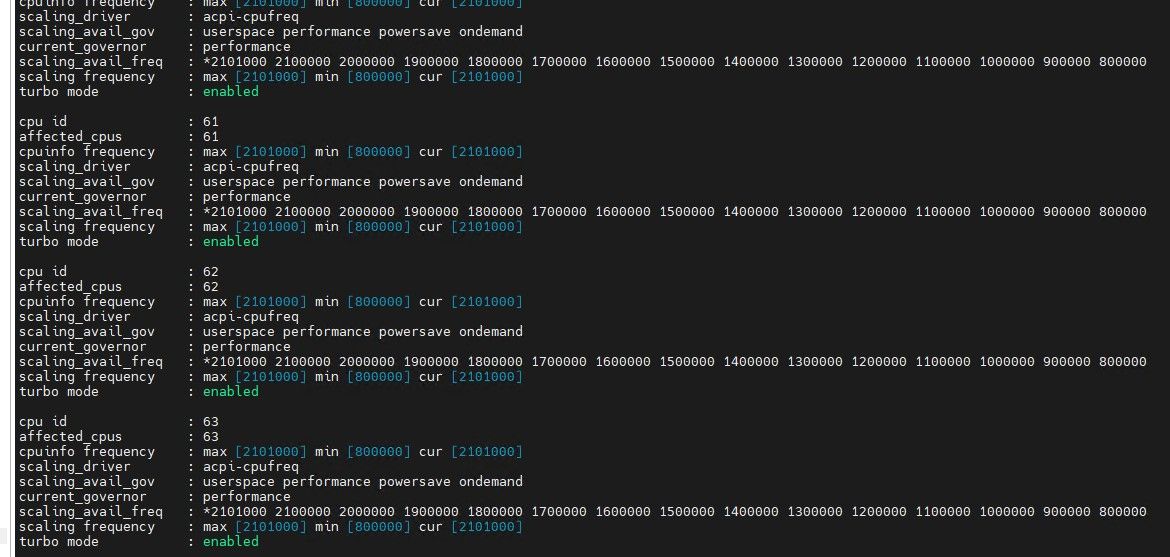
it's an HPE DL380 Gen 11
modified in the iLO web ui, but then needed to reboot hostwas previously on DYNAMIC POWER SAVINGS
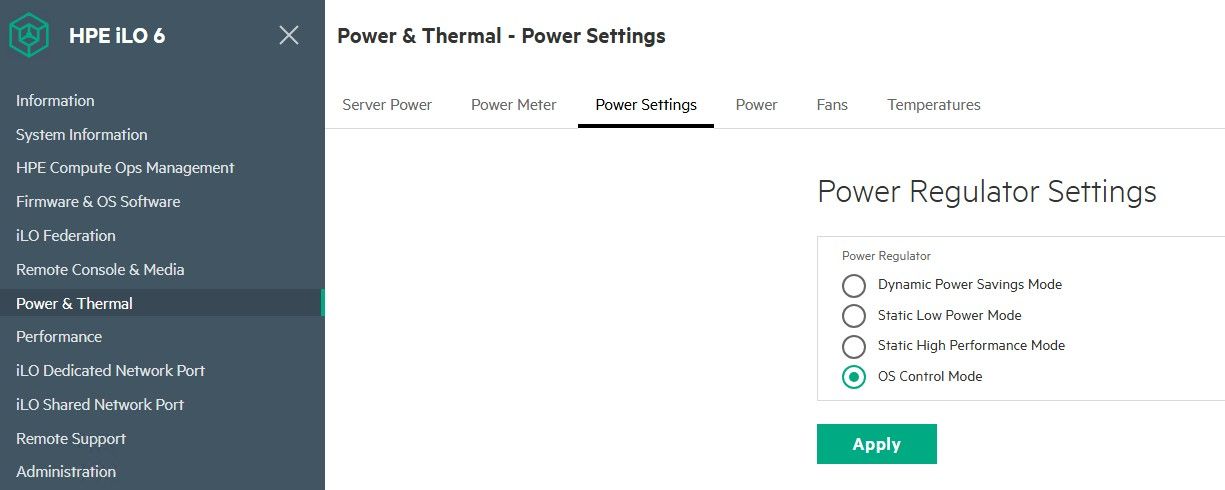
-
On a Lenovo SR630 V4 it took
Power/Performance Biasset toOS Controlled, and on an HPE DL380 Gen 11 it was the iLO Power Regulator moved off Dynamic Power Savings toOS Control Mode, with a host reboot.
Both then returned real values fromxenpm get-cpufreq-parainstead of the failure line.
@bleader is right that two vendors is not enough to document, so if your host works, could you post the vendor, the exact setting name, where it lives, and whether you needed a reboot? Dell, Supermicro and anything AMD are the obvious gaps.
I don't know whether the firmware is withholding p-state control outright or just not publishing the ACPI objects Xen looks for, so I would rather collect settings than write up a mechanism I can't back.Thanks!

-
 P poddingue marked this topic as a question on
-
Adding the Dell answer here so all three vendors sit together, thanks to @flakpyro in another thread. On iDRAC9 it's Configuration, BIOS Settings, System Profile Settings, with System Profile set to
Performance Per Watt (OS); CPU Power Management then showsOS DBPM(https://xcp-ng.org/forum/post/109888). He saw it on a PowerEdge R360, and the host needed a reboot, same as the HPE one (https://xcp-ng.org/forum/post/109898). As far as I can tell from what people reported, the pattern is the same on all three: the setting that hands control to the OS is the one that works, not the "maximum performance" one. Supermicro and AMD hosts are still missing, so if you run one, the setting name and whether it needed a reboot would help. -
@poddingue I have a PowerEdge R6515 which is AMD based an the settings in iDrac look the same as the Intel host i reported. This server is running Ubuntu however so i cannot confirm with results with xenpm
I have an ProLiant DL325 Gen10 which is also AMD based, again running Ubuntu that also has the same " iLO Power Regulator" setting as Intel hosts.
-
@poddingue Indeed, the host has to have control. See for example my old XS article and the two follow-ups on CPU/GPU settings. My initial performance issues were also on Dell servers. The first article is at:
https://github.com/tobiaskreidl/Citrix-Tobias-Kreidl-Collection/blob/XenServer-Articles/A Tale of Two Servers_ How BIOS Settings Can Affect Your Apps and GPU Performance.pdf


Hello! It looks like you're interested in this conversation, but you don't have an account yet.
Getting fed up of having to scroll through the same posts each visit? When you register for an account, you'll always come back to exactly where you were before, and choose to be notified of new replies (either via email, or push notification). You'll also be able to save bookmarks and upvote posts to show your appreciation to other community members.
With your input, this post could be even better 💗
Register Login