VM's from ESXi, live migration not possible
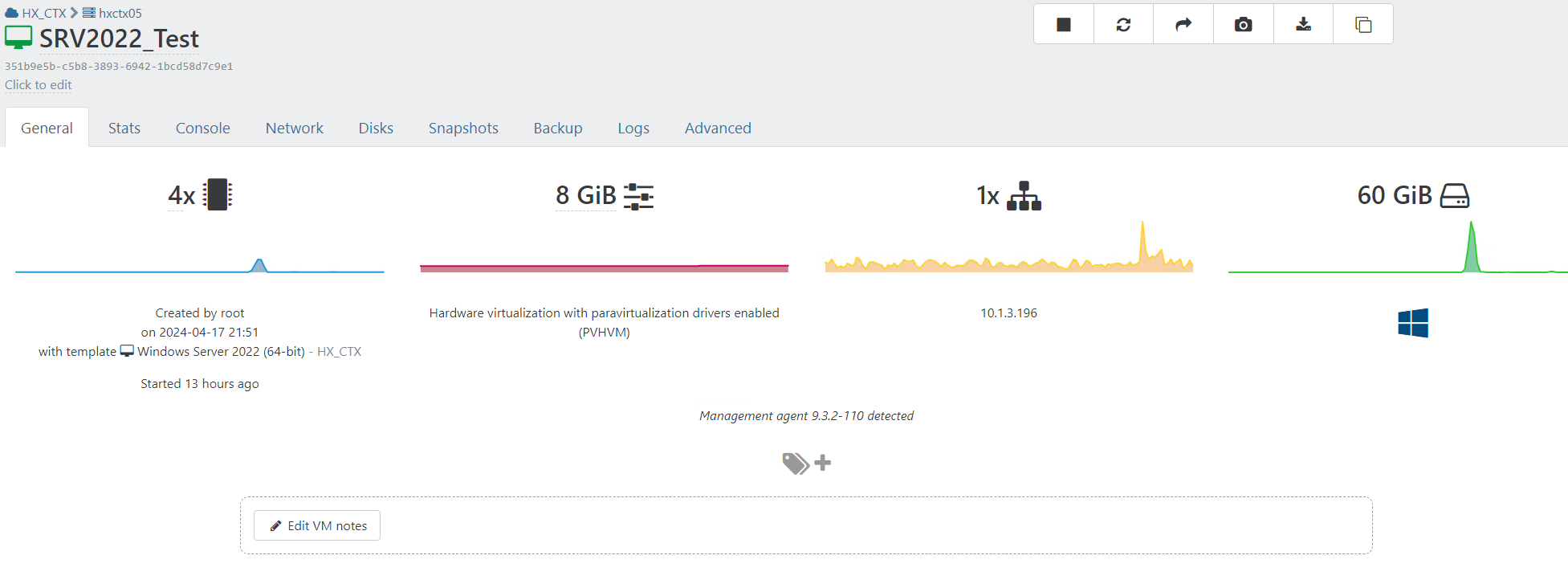
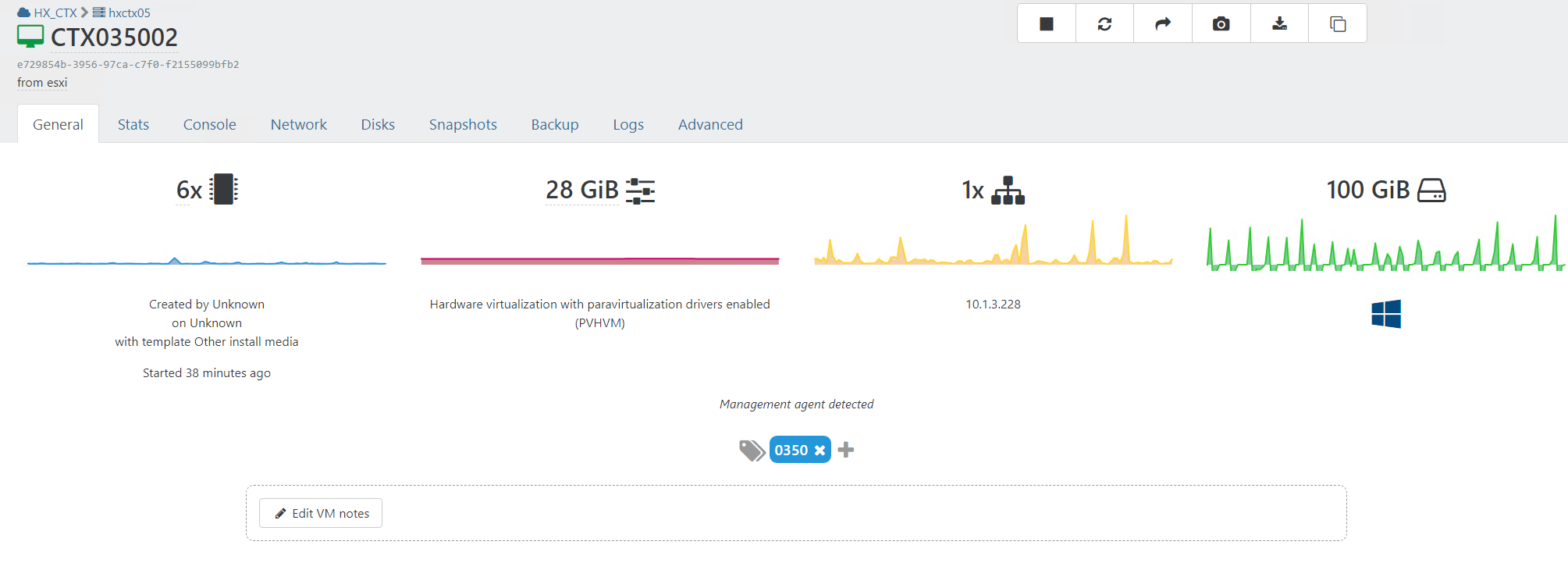
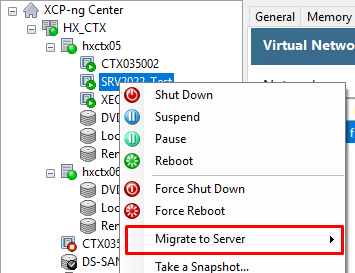
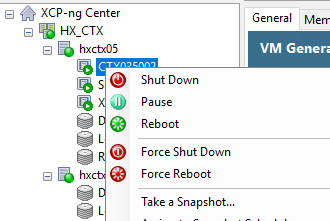
-
Also just tried a warm migration with CTX035001 (also imported from ESXi, like CTX035002) but this doesn't change the ability to live migrate
Output of this VM now is:
[12:05 hxctx05 ~]# xe vm-param-list uuid=60fcb435-4436-5fab-a0f4-00011f534d7a uuid ( RO) : 60fcb435-4436-5fab-a0f4-00011f534d7a name-label ( RW): CTX035001 - Warm migration - (20240418T100016Z) name-description ( RW): user-version ( RW): 1 is-a-template ( RW): false is-default-template ( RW): false is-a-snapshot ( RO): false snapshot-of ( RO): <not in database> snapshots ( RO): snapshot-time ( RO): 19700101T00:00:00Z snapshot-info ( RO): parent ( RO): <not in database> children ( RO): is-control-domain ( RO): false power-state ( RO): running memory-actual ( RO): 30066860032 memory-target ( RO): 30064771072 memory-overhead ( RO): 243269632 memory-static-max ( RW): 30064771072 memory-dynamic-max ( RW): 30064771072 memory-dynamic-min ( RW): 30064771072 memory-static-min ( RW): 1073741824 suspend-VDI-uuid ( RW): <not in database> suspend-SR-uuid ( RW): <not in database> VCPUs-params (MRW): VCPUs-max ( RW): 6 VCPUs-at-startup ( RW): 6 actions-after-shutdown ( RW): Destroy actions-after-reboot ( RW): Restart actions-after-crash ( RW): Restart console-uuids (SRO): 7384aa3f-fd71-db2e-2cee-2db7d64068e3 hvm ( RO): true platform (MRW): timeoffset: 7200; device-model: qemu-upstream-uefi; secureboot: false; videoram: 8; hpet: true; viridian_apic_assist: true; apic: true; device_id: 0002; cores-per-socket: 2; viridian_crash_ctl: true; pae: true; vga: std; nx: true; viridian_time_ref_count: true; viridian_stimer: true; viridian: true; acpi: 1; viridian_reference_tsc: true allowed-operations (SRO): changing_dynamic_range; hard_reboot; hard_shutdown; clean_reboot; clean_shutdown; pause; snapshot current-operations (SRO): blocked-operations (MRW): allowed-VBD-devices (SRO): 1; 2; 3; 4; 5; 6; 7; 8; 9; 10; 11; 12; 13; 14; 15; 16; 17; 18; 19; 20; 21; 22; 23; 24; 25; 26; 27; 28; 29; 30; 31; 32; 33; 34; 35; 36; 37; 38; 39; 40; 41; 42; 43; 44; 45; 46; 47; 48; 49; 50; 51; 52; 53; 54; 55; 56; 57; 58; 59; 60; 61; 62; 63; 64; 65; 66; 67; 68; 69; 70; 71; 72; 73; 74; 75; 76; 77; 78; 79; 80; 81; 82; 83; 84; 85; 86; 87; 88; 89; 90; 91; 92; 93; 94; 95; 96; 97; 98; 99; 100; 101; 102; 103; 104; 105; 106; 107; 108; 109; 110; 111; 112; 113; 114; 115; 116; 117; 118; 119; 120; 121; 122; 123; 124; 125; 126; 127; 128; 129; 130; 131; 132; 133; 134; 135; 136; 137; 138; 139; 140; 141; 142; 143; 144; 145; 146; 147; 148; 149; 150; 151; 152; 153; 154; 155; 156; 157; 158; 159; 160; 161; 162; 163; 164; 165; 166; 167; 168; 169; 170; 171; 172; 173; 174; 175; 176; 177; 178; 179; 180; 181; 182; 183; 184; 185; 186; 187; 188; 189; 190; 191; 192; 193; 194; 195; 196; 197; 198; 199; 200; 201; 202; 203; 204; 205; 206; 207; 208; 209; 210; 211; 212; 213; 214; 215; 216; 217; 218; 219; 220; 221; 222; 223; 224; 225; 226; 227; 228; 229; 230; 231; 232; 233; 234; 235; 236; 237; 238; 239; 240; 241; 242; 243; 244; 245; 246; 247; 248; 249; 250; 251; 252; 253; 254 allowed-VIF-devices (SRO): 1; 2; 3; 4; 5; 6 possible-hosts ( RO): 230365b3-4916-43bc-8a25-65c000b6937e; a235982c-c51a-4578-82bb-51e8c6d37bed domain-type ( RW): hvm current-domain-type ( RO): hvm HVM-boot-policy ( RW): BIOS order HVM-boot-params (MRW): order: cnd; firmware: uefi HVM-shadow-multiplier ( RW): 1.000 PV-kernel ( RW): PV-ramdisk ( RW): PV-args ( RW): PV-legacy-args ( RW): PV-bootloader ( RW): PV-bootloader-args ( RW): last-boot-CPU-flags ( RO): vendor: GenuineIntel; features: 1fcbfbff-f7fa3223-2c100800-00000121-0000000f-009c0fab-00000008-00000000-00001000-bc000400-00000000-00000000-00000000-00000000-00000000-00000000-0c000004-00000000-00000000-00000000-00000000-00000000 last-boot-record ( RO): '' resident-on ( RO): 230365b3-4916-43bc-8a25-65c000b6937e affinity ( RW): <not in database> other-config (MRW): xo:base_delta: 8a757bfb-e932-0284-e955-c3dddd5d1d4d; xo:backup:schedule: one-time; xo:backup:job: 68009e5a-fd8f-481f-94e7-ec11b197a2e3; xo:backup:sr: d47ab4ba-7e64-3ad3-e729-6d15719ca26a; xo:backup:datetime: 20240418T10:00:16Z; xo:backup:vm: 8a757bfb-e932-0284-e955-c3dddd5d1d4d; xo:8a757bfb: {"creation":{"date":"2024-04-18T09:20:43.171Z","template":"1c33af1c-e919-418c-ad45-85d7d6fb604a","user":"00b23cda-6f3e-42a0-ac32-8074336f5363"}}; base_template_name: Windows Server 2022 (64-bit); import_task: OpaqueRef:a775fe45-36e8-435f-8919-21dced27a55a; mac_seed: 154ecbda-6194-7f18-15ed-209815894afa; install-methods: cdrom; xo:copy_of: dc82eb93-fae9-4356-bda2-b71d37dd1440 dom-id ( RO): 21 recommendations ( RO): <restrictions><restriction field="memory-static-max" max="1649267441664"/><restriction field="vcpus-min" min="2"/><restriction field="vcpus-max" max="32"/><restriction field="has-vendor-device" value="true"/><restriction field="allow-network-sriov" value="1"/><restriction field="supports-bios" value="yes"/><restriction field="supports-uefi" value="yes"/><restriction field="supports-secure-boot" value="yes"/><restriction max="255" property="number-of-vbds"/><restriction max="7" property="number-of-vifs"/></restrictions> xenstore-data (MRW): vm-data/mmio-hole-size: 268435456; vm-data: ha-always-run ( RW) [DEPRECATED]: false ha-restart-priority ( RW): blobs ( RO): start-time ( RO): 20240418T10:01:09Z install-time ( RO): 19700101T00:00:00Z VCPUs-number ( RO): 6 VCPUs-utilisation (MRO): 0: 0.014; 1: 0.019; 2: 0.012; 3: 0.014; 4: 0.012; 5: 0.010 os-version (MRO): name: Microsoft Windows Server 2022 Standard|C:\WINDOWS|\Device\Harddisk0\Partition3; distro: windows; major: 10; minor: 0; spmajor: 0; spminor: 0 PV-drivers-version (MRO): PV-drivers-up-to-date ( RO) [DEPRECATED]: true memory (MRO): disks (MRO): VBDs (SRO): 3ff10668-2513-0308-61dc-6cb16eaccd7f networks (MRO): 0/ip: 10.1.3.192; 0/ipv4/0: 10.1.3.192; 0/ipv6/0: fe80:0000:0000:0000:3244:e07f:54d8:e112 PV-drivers-detected ( RO): true other (MRO): platform-feature-xs_reset_watches: 1; platform-feature-multiprocessor-suspend: 1; has-vendor-device: 0; feature-xs-batcmd: 1; feature-wuRebootRequired: 1; feature-updatetime: 1; feature-ts2: 1; feature-ts: 1; data-cant-suspend-reason: {"error":{"class":"GenericError","desc":"State blocked by non-migratable device '0000:00:07.0/nvme'","data":{}},"id":"qmp-000245-21"}; feature-static-ip-setting: 1; feature-shutdown: 1; feature-setcomputername: 1; feature-s4: 1; feature-s3: 1; feature-reboot: 1; feature-poweroff: 1; feature-laptop-slate-mode: 1; feature-balloon: 1; data-ts: 1 live ( RO): true guest-metrics-last-updated ( RO): 20240418T10:01:32Z can-use-hotplug-vbd ( RO): unspecified can-use-hotplug-vif ( RO): true cooperative ( RO) [DEPRECATED]: true tags (SRW): appliance ( RW): <not in database> snapshot-schedule ( RW): <not in database> is-vmss-snapshot ( RO): false start-delay ( RW): 0 shutdown-delay ( RW): 0 order ( RW): 0 version ( RO): 0 generation-id ( RO): 378209165448628250:411053949495876535 hardware-platform-version ( RO): 0 has-vendor-device ( RW): false requires-reboot ( RO): false reference-label ( RO): windows-server-2022-64bit bios-strings (MRO): bios-vendor: Xen; bios-version: ; system-manufacturer: Xen; system-product-name: HVM domU; system-version: ; system-serial-number: ; baseboard-manufacturer: ; baseboard-product-name: ; baseboard-version: ; baseboard-serial-number: ; baseboard-asset-tag: ; baseboard-location-in-chassis: ; enclosure-asset-tag: ; hp-rombios: ; oem-1: Xen; oem-2: MS_VM_CERT/SHA1/bdbeb6e0a816d43fa6d3fe8aaef04c2bad9d3e3d -
@OhSoNoob said in VM's from ESXi, live migration not possible:
data-cant-suspend-reason: {"error":{"class":"GenericError","desc":"State blocked by non-migratable device '0000:00:07.0/nvme'","data":{}},"id":"qmp-000253-22"}
Are you using a PCI passthrough or something in the CTX VM? Because that's the issue here: inside the VM, there's a device that can't be suspended.
-
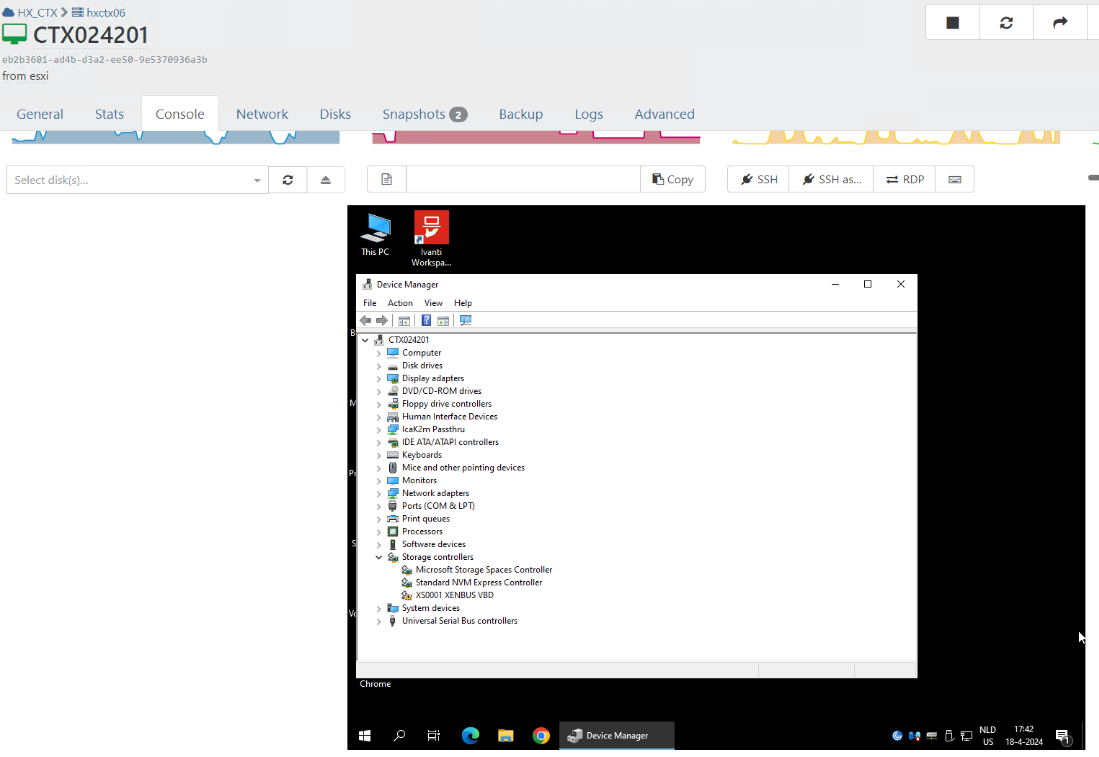
@olivierlambert I am not using any kind of PCI passthrough, but it seems like the storage device for xcp-ng is not using the correct driver.
This is the result of the migrated CTX servers (now using a different server as example, but the result is the same):
With the test server:
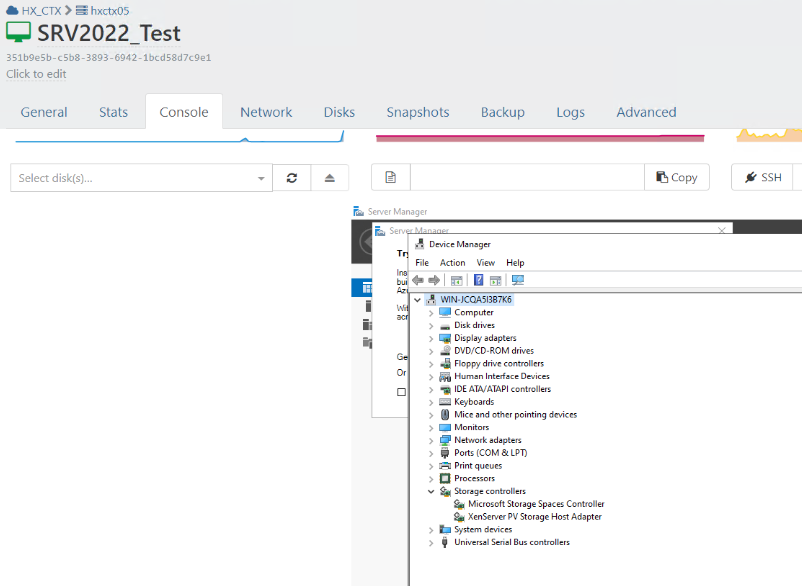
however, just changing the storage driver doesn't seem to work. Any experience or tips with this?
-
Okay so the Xen PV driver for storage isn't working correctly in the problematic VM, so the storage can't be suspended to do a live migration. That's causing your issue

I don't know why the device isn't working correctly (maybe try to reinstall the tools?), but as soon it does, live migrate should work.
-
@olivierlambert The problem with fully installing the tools is our antivirus solution SentinelOne. Simply pausing the agent + reboot gave the XenTools the possibility to install succesfully. After a succesfull installation, enabling the SentinelOne agent again is possible without any other issues regarding the tools or drivers.
-
Oh great news then!!!

So now you can live migrate and such, right?
-
@olivierlambert Yes! Live migration is now available and working. Which is great!
-
Excellent news! Thank you very much for the feedback, it might be helpful for others

Enjoy XCP-ng and XO!
-
 O olivierlambert marked this topic as a question on
-
O olivierlambert has marked this topic as solved on
-
@OhSoNoob said in VM's from ESXi, live migration not possible:
@olivierlambert The problem with fully installing the tools is our antivirus solution SentinelOne. Simply pausing the agent + reboot gave the XenTools the possibility to install succesfully. After a succesfull installation, enabling the SentinelOne agent again is possible without any other issues regarding the tools or drivers.
Thank you for that find, I was in the same boat.
-
Oh wow, I couldn't think it would have been helpful that fast!! I think I might update our documentation page about Windows tools and this issue.
-
-
@olivierlambert said in VM's from ESXi, live migration not possible:
Oh wow, I couldn't think it would have been helpful that fast!! I think I might update our documentation page about Windows tools and this issue.
Yes, take a look at ticket #7723929. There is also something about shrinking a Windows partition using Linux tools and avoid data loss that could be added to the doc.
-
@olivierlambert said in VM's from ESXi, live migration not possible:
Done: https://docs.xcp-ng.org/troubleshooting/windows-pv-tools/#not-all-pv-drivers-are-correctly-installed
wow that was fast, thank you!
-
@glatour Where would you add this in our doc? (the shrink tip)
-
@olivierlambert said in VM's from ESXi, live migration not possible:
@glatour Where would you add this in our doc? (the shrink tip)
There: https://docs.xcp-ng.org/guides/shrink_virtual_drive/ under the Windows VMs part.
-
On it!
-

Hello! It looks like you're interested in this conversation, but you don't have an account yet.
Getting fed up of having to scroll through the same posts each visit? When you register for an account, you'll always come back to exactly where you were before, and choose to be notified of new replies (either via email, or push notification). You'll also be able to save bookmarks and upvote posts to show your appreciation to other community members.
With your input, this post could be even better 💗
Register Login