Error migration
-
I'm trying to do a hot migration and I'm getting this error

This corresponds to a fresh installation with all updates applied to the host and virtual machine.
cat /etc/xensource-inventory
PRIMARY_DISK='/dev/disk/by-id/scsi-36c81f660e9a5c3002eaaac3d13aee5d3'
PRODUCT_VERSION='8.2.1'
DOM0_VCPUS='16'
CONTROL_DOMAIN_UUID='0080ed68-2f17-4f1c-98d6-f02c2f0d7534'
DOM0_MEM='8192'
COMPANY_NAME_SHORT='Open Source'
MANAGEMENT_ADDRESS_TYPE='IPv4'
PARTITION_LAYOUT='ROOT,BACKUP,LOG,BOOT,SWAP,SR'
PRODUCT_VERSION_TEXT='8.2'
PRODUCT_BRAND='XCP-ng'
INSTALLATION_UUID='86cfbc50-258c-4693-9a66-2e37672f5a0d'
PRODUCT_VERSION_TEXT_SHORT='8.2'
BRAND_CONSOLE='XCP-ng Center'
PRODUCT_NAME='xenenterprise'
MANAGEMENT_INTERFACE='xapi0'
COMPANY_PRODUCT_BRAND='XCP-ng'
PLATFORM_VERSION='3.2.1'
BUILD_NUMBER='release/yangtze/master/58'
PLATFORM_NAME='XCP'
BRAND_CONSOLE_URL='https://xcp-ng.org'
BACKUP_PARTITION='/dev/disk/by-id/scsi-36c81f660e9a5c3002eaaac3d13aee5d3-part2'
INSTALLATION_DATE='2024-10-22 22:52:06.556656'
COMPANY_NAME='Open Source'
The virtual machine corresponds to an Almalinux version 9.
-
I think I have found the problem
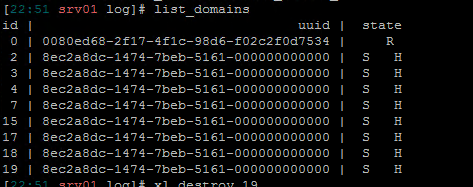
I have restarted xapi and destroyed the processes with the command, example:
xl destroy XX
Once this is done I have updated xe-guest-utilities in the almalinux 9 operating system to the latest version
yum install xe-guest-utilities-latest
After doing all of the above, I have not had the problem again.
XCP people know something similar to this problem
-
I'm not aware of such problem it's like the VM was kept in limbo. You did the right thing with your commands.

Hello! It looks like you're interested in this conversation, but you don't have an account yet.
Getting fed up of having to scroll through the same posts each visit? When you register for an account, you'll always come back to exactly where you were before, and choose to be notified of new replies (either via email, or push notification). You'll also be able to save bookmarks and upvote posts to show your appreciation to other community members.
With your input, this post could be even better 💗
Register Login