XCP-ng
    • Categories
    • Recent
    • Tags
    • Popular
    • Users
    • Groups
    • Register
    • Login
    1. Home
    2. CAPS
    3. Posts
    C Offline
    • Profile
    • Following 0
    • Followers 0
    • Topics 2
    • Posts 3
    • Groups 0

    Posts

    Recent Best Controversial
    • Bringing container visibility back to XO

      Hey all,

      Sorry in advance for the wall of (AI assisted) text. This is something I've been sitting on for a while and come back to every few months to see where it's up to so I thought I'd try and get some constructive discussion happening here in the forums πŸ™‚

      For quite some time now, it seems like the "Docker VM" is probably the most common homelab workload on XCP-ng (not to mention some of those other moxie hypervisors), and right now those users get zero visibility in XO 6. Unfortunately, I've actually seen this result in a few peers steering away from XCP-ng/XOA (their loss...).

      We used to have this feature way back in the pre-covid times, but alas, it is now but a relic. A quick search through the forums surfaces some recurring requests (2361, 2404, 4338, 6845, 7356...) and back in 2019 the answer was already "the Citrix plugin is a dead end, we might use something else" β€” but that something else never quite materialized.
      Meanwhile the broken xscontainer package still ships and the wiki still documents it as a working procedure, so people (i.e me...) keep following the docs into a wall of cryptic tracebacks.
      It's safe to assume I went down this rabbit hole (again...not for the first time...), but eventually I get steered towards patching dom0 Python and downgrading guest sshd crypto, and decide to bail out.
      Nobody should do that in 2026.

      Because upstream XenServer dropped the feature completely, this is a genuine differentiation opportunity rather than legacy maintenance: container visibility in the VM view would be something XCP-ng/XO offers that the commercial upstream simply doesn't (and would also get to parity with that other hypervisor previously alluded to...).

      With XenServer 8 having removed the Container Management supplemental pack entirely, and the old xscontainer package being effectively broken against any modern guest (the paramiko/ssh-rsa issue from topic 6845, plus a couple more bugs...), I wanted to float a proposal for bringing this feature back properly because I think the pieces to do it right now exist and didn't before.

      The short version: instead of resurrecting the Python 2 dom0 plugin, add a container collector to the new Rust xen-guest-agent, publishing container state through XenStore the same way the agent already publishes IPs and OS info.
      XO 6 reads it like any other guest metric and renders a Containers tab on the VM view. No dom0 code, no SSH from the hypervisor into guests, no network path needed between XO and the guest at all.

      The old design required user interaction/modification of dom0 (the worst place for anything needing a modern crypto stack), it needed dom0β†’guest SSH credentials (a trust relationship plenty of admins don't want), and it polled over the network (breaks in segmented setups).

      The new xen-guest-agent dodges all three by design. It's already built around pluggable collectors (OS, kernel, network, memory today) publishing to XenStore, and the README explicitly says you want it "to become more largely useful" with the collection scope still stabilizing and proposals welcome. A containers collector seems like a natural fit:

      • The guest publishes what it chooses β€” opt-in, auditable, no credentials held by anyone
      • Works across any network topology since nothing needs to reach the guest
      • All the code lives in actively-maintained projects (the agent + xo-server/xo-web)
      • And it generalizes for free: the same collector could report "this VM is a k8s worker, kubelet healthy, 14 pods" β€” giving XO a light infra-level view of Kubernetes nodes without pretending to be a k8s dashboard.
      • Complements the existing k8s recipe rather than competing with kubectl/Lens.

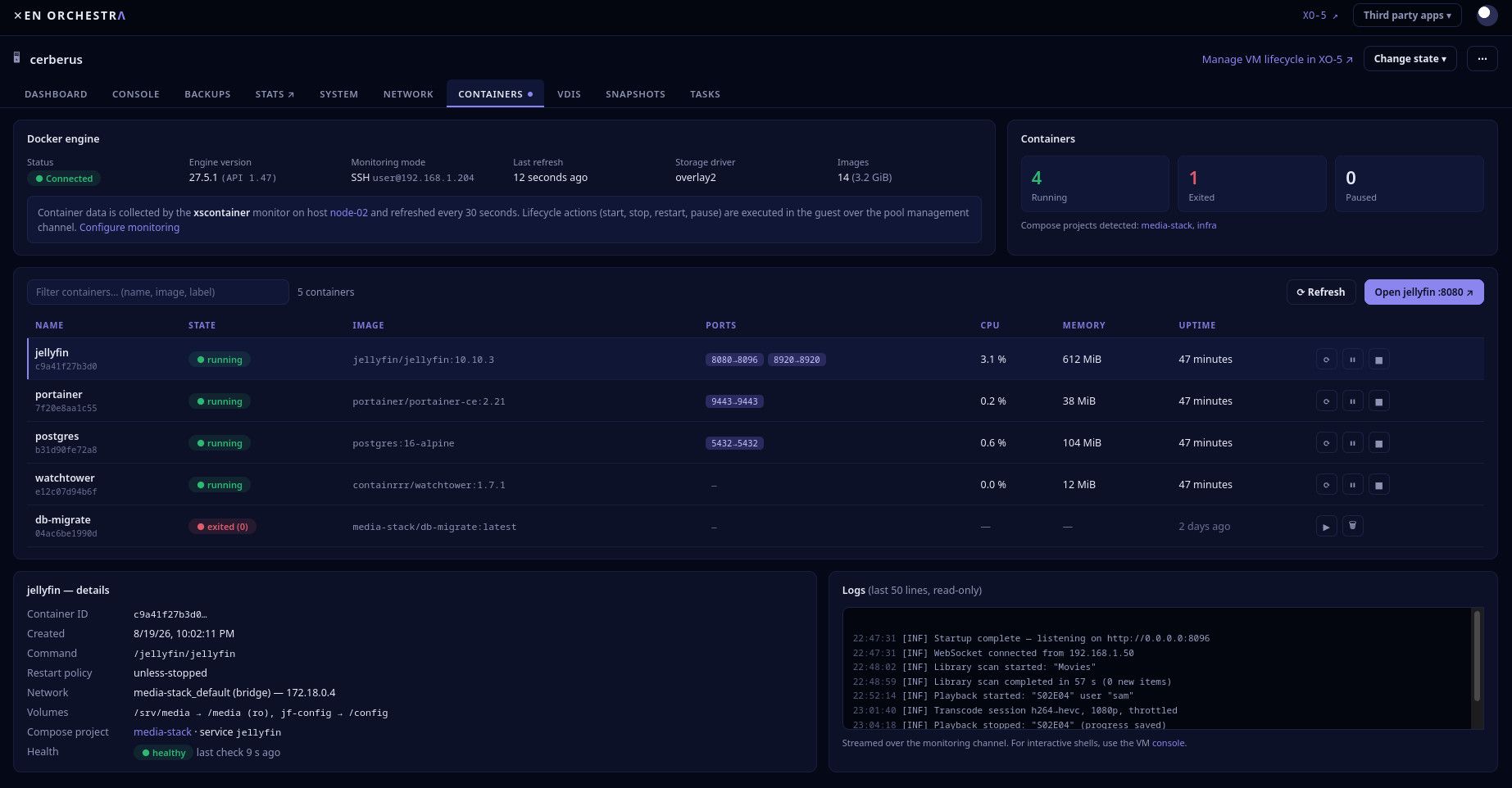
      AI assisted UI Mockup:
      56868b6c-8deb-4ae0-b760-908c169528bd-image.jpeg

      Example draft Schema - the real version belongs in the agent's RFC doc discussion. But to make it concrete:

      data/containers/version      = 1                  # schema version
      data/containers/runtime      = "docker 27.5.1"    # or podman/containerd
      data/containers/updated      = 1755640051         # unix ts of last refresh
      data/containers/summary      = {"running":4,"exited":1,"paused":0,"images":14}
      data/containers/list         = <compact JSON array, one object per container:
                                      id (12 chars), name, image, state, ports,
                                      cpu_pct, mem_bytes, started_at, health,
                                      compose_project?>
      data/containers/k8s          = {"role":"worker","cluster":"...","pods":14,
                                      "kubelet":"healthy"}   # only if applicable
      

      Practical guardrails baked in: summaries not full docker inspect dumps, a size cap on list (truncate + flag if a VM runs hundreds of containers), refresh every 30–60s with writes only on change, and the whole collector behind a feature flag since it needs docker socket access the base agent doesn't. A typical VM's payload is a few KB.
      Lifecycle actions (start/stop/restart) would be nice, but read-only visibility is already most of the value and keeps the security story dead simple.

      Whatever happens with this proposal, what could be done to update/modify the "Docker in XCP-ng" wiki page?
      A "currently broken with modern guests, see topic 6845" banner, or the whole thing just be pulled would be ideal...

      I suppose I'm wondering if there's any interest out there?
      Would you use this?
      Anything missing or wrong in the approach?
      Is anything like this already on the table or in the works? (The guest agent's own README hints at broadening its collection scope, so maybe this is already somewhere on a roadmap β€” happy to be told I'm re-imagining the wheel.)
      Does the agent seem like the right vehicle, or would you approach this differently?

      P.S
      Thank you to the Vates team, and community members for XCP-ng and XO and for keeping them free and open source and awesome and this community is exactly why this ecosystem is worth contributing to.

      posted in Xen Orchestra
      C
      CAPS
    • Guide to Replace Tianocore UEFI Logo

      Disclaimer - I am not a professional; some parts of this guide maybe incorrect and may negatively affect your XCP-NG host. Always ensure you have backups. Do not test on your production hosts - this is for homelabs only. (It is highly recommended to spin up a nested xcpng host if you wish to test this).

      I hope it helps someone πŸ™‚

      The goal of this post is to assist XCP-ng Homelab users change the default TianoCore Logo to something more aesthetically pleasing. This guide leverages docker, so you will need to ensure you have that running on your system.

      On your machine, lets create a new working directory called 'tianocore' - the name doesnt really matter.

      mkdir tianocore
      cd tianocore
      

      Now we're in our working directory, lets clone the xcp-ng-build-env repo from here: https://github.com/xcp-ng/xcp-ng-build-env (note that I'm using the https method with wget), after which we can un-extract the contents, and remove the file we just downloaded:

      wget https://github.com/xcp-ng/xcp-ng-build-env/archive/refs/heads/master.zip
      
      unzip master.zip 
      
      rm master.zip
      

      This should create a folder called "xcp-ng-build-env-master" - lets move into that directory:

      cd xcp-ng-build-env-master
      

      Run the build.sh script and make sure to specify your version. This will create a docker container that contains all the tools we need to create an updated RPM with the new logo

      ./build.sh 8.2
      

      NOTE: if you get any errors trying to run the script, please check your docker config.
      Once the above script has run, and the script steps have executed, you should be back at the command line.

      We are now ready to start the container. Run the following, making sure to modify the -b flag for your build version

      ./run.py -b=8.2 --rm --volume=./data:/data
      

      This will create and pass through a folder call 'data' to the container, which can be accessed in the container. If this works correctly, you should now have a terminal inside the container, and it should look similar to this:

      [builder@0c8bf329eeee ~]$>
      

      If you open another terminal, and check the xcp-ng-build-env-master folder, you should see a new 'data' folder - try placing a file in it.
      Now, go back to your other terminal inside the container; if you then do an "ls /data", you should be able to see the file you copied across!

      Great! We're getting there...

      Now, lets get the edk2 RPM src from here: https://koji.xcp-ng.org/buildinfo?buildID=2495 - make sure you get the correct version (I.E in this guide, we're getting the version for xcp-ng 8.2). This source rpm contains the Tianocore UEFI logo which we want to change:

      wget https://koji.xcp-ng.org/kojifiles/packages/edk2/20180522git4b8552d/1.4.6.xcpng8.2/src/edk2-20180522git4b8552d-1.4.6.xcpng8.2.src.rpm
      

      We now have our Source RPM. We need to extract it, make the changes, zip it back up and then recompile, so lets get to it! Use "rpm2cpio" to unextract the rpm

      rpm2cpio edk2-20180522git4b8552d-1.4.6.xcpng8.2.src.rpm | cpio -idmv
      

      You will see this create a bunch of .patch files, and a .tar.gz file with the same name as our src.rpm.
      We now need to unextract the .tar.gz file to a folder:

      tar -xvf edk2-20180522git4b8552d.tar.gz
      

      Now if we do an "ls" we can see we have extracted the .tar.gz file into a folder (again, with the same name, but missing the .tar.gz suffix).

      The EUFI logo is hiding in the new folder under "MdeModulePkg/Logo" and is called "Logo.bmp".

      At this stage, you need to find and download the new UEFI logo you want, and ensure it's converted into a .bmp bitmap file. Transparency doesn't seem to be supported, but you can use up to 24bit bmp file for full colour! Name the file "Logo.bmp"

      In your other terminal, copy the new .bmp file to the tianocore/xcp-ng-build-env/data folder. Then, from the container, it should be accessible via /data/Logo.bmp

      From within the container, copy the Logo.bmp from our /data/ folder over to the edk2-20180522git4b8552d/MdeModulePkg/Logo/ folder:

      cp /data/Logo.bmp edk2-20180522git4b8552d/MdeModulePkg/Logo/Logo.bmp
      

      Now that we have uploaded our new image, we need to tar up the folder:

      tar -czf edk2-20180522git4b8552d.tar.gz edk2-20180522git4b8552d
      

      (NOTE: this should overwrite the 'old' .tar.gz folder in the same directory with the same name)

      Now, in our current directory, we need to create 2 folders, one called "SOURCES" and one called "SPECS"

      mkdir SOURCES
      
      mkdir SPECS
      

      We now need to move all of our .patch files, as well as the modified .tar.gz files into the SOURCES folder

      mv *.patch SOURCES/
      
      mv *.tar.gz SOURCES/
      

      And finally, we move our edk2.spec file into the SPEC folder

      mv *.spec SPECS/
      

      NOTE: If you wanted to at this stage, you can clean up the directory by removing the edk2 folder and the original source RPM with the following:

        rm -r edk2-20180522git4b8552d/
        rm edk2-20180522git4b8552d-1.4.6.xcpng8.2.src.rpm
      

      We're almost ready to compile, but first, we need to make sure we have all the build dependencies installed:

      sudo yum-builddep SPECS/*.spec -y
      

      We should now be ready to re-compile. This should result in some new folders being created, but we really want the new .rpm package that should be created in a folder called "RPMS" after we run the following command:

      rpmbuild -ba SPECS/*.spec --define "_topdir $(pwd)"
      

      Once the above command has finished compiling (and resulted in an exit 0 code), if we run "ls", we can see that we have our newly created RPMS folder, and if we run 'ls RPMS", we should be able to see a subdirectory called "x86_64", and if we look inside that with "ls RPMS/x86_64/", we can see that we have our new RPM - edk2-20180522git4b8552d-1.4.6.xcpng8.2.x86_64.rpm - WOOHOO!

      Lets copy that new RPM to our data folder so we can access it from our main machine:

      cp RPMS/x86_64/edk2-20180522git4b8552d-1.4.6.xcpng8.2.x86_64.rpm /data/ 
      

      Now if you go to the terminal on you main machine, and check the tianocore/xcp-ng-build-env-master/data folder, we can see the .rpm!

      Now we have the file on our main machine, we need to copy it over to the XCP-NG host with scp:

      scp tianocore/xcp-ng-build-env-master/data/edk2-20180522git4b8552d-1.4.6.xcpng8.2.x86_64.rpm root@<xcp-ng-host-ip>:/tmp
      

      Once the file has copied to the host, ssh to it:

      ssh root@<xcp-ng-host-ip>
      

      Once on the host, cd to the /tmp directory and you should be able to see your .rpm file that was copied over with scp as above.

      Now, to actually apply the new package, we need to tell rpm to update the package and replacefiles, so our new logo takes effect:

      rpm -U --replacefiles --replacepkgs edk2-20180522git4b8552d-1.4.6.xcpng8.2.x86_64.rpm
      

      Once that has run (should be really really quick), head to your XOA, select the host and restart the toolstack (or just run "xe-toolstack-restart" from your ssh sesison)

      Once the toolstack has restarted, try launching a new UEFI VM and you should be greeted with the new Logo! πŸ₯³
      Screenshot from 2024-08-09 19-01-44.png

      posted in XCP-ng
      C
      CAPS
    • RE: "Hardware-assisted virtualization is not enabled on this host" even though platform:exp-nested-hvm=true is set

      Hi XCP team :),

      I believe I might also be affected by this issue.
      I was previously using a Dell 2RU Server 4x CPU's (at work atm, I'll update this post with the exact Dell model and CPU models later as it's powered off at home).

      The ''old'' server was running XCPNG 8.2.1, and I was running Truenas as a VM with LSI HBA and nVidia GPU passed through, and Truenas was working like a charm - I was able to use the kubernetes apps, and create nested VM's (although I didnt use them, I was /able/ to, in a pinch).

      I recently moved to a Dell R740 with 2 x Intel 6136 CPU's running XCPNG 8.3. These CPU's appear to support all required VT-d (with EPT) extensions, IOUMMU and SRV-IOV.
      I've been through the BIOS about a billion times trying to troubleshoot this issue, and have changed the workload profiles and ensured everything relating to virtualisation and performance optimisation is enabled.

      However, now my truenas VM displays an error "Virtualization is not enabled on this system", and I'm unable to use the Kubernetes apps, or create VM's from within Truenas. (I have checked and confirmed that the "nested virtualization" option is definitely enabled for that VM.

      As a test, I installed a new Truenas VM, with nested virtualization enabled.
      After creating the test VM, I can actually click on the Virtualization tab within Truenas, and it doesnt display the same error as before (on the old truenas VM") , but it says your CPU does not support KVM extensions" which I believe to be erroneous.

      I can see within this thread that you suspect ""Xen 4.17" is the issue.
      Can you provide any steps to 'rollback' to a version that might re-enable the nested virtualization feature to work correctly (or point me in the right direction on how to achieve this?)
      Otherwise, is there a supported method to 'downgrade' the XCPNG 8.3 host to 8.2.1?

      Please let me know if you require any additional information or if I can be of help testing anything.

      (thanks again for all your hard work and amazing free and opensource products! can't wait for the v6 UI :D)

      posted in XCP-ng
      C
      CAPS