Yes, I'm from Spain.
Ok, I'll help you.
I supose I have to register in your weblate because my user of this forum doesn't work. It's right?
Yes, I'm from Spain.
Ok, I'll help you.
I supose I have to register in your weblate because my user of this forum doesn't work. It's right?
@olivierlambert
Just to add another weird case of this situation I tell you my SAML-auth-adventures.
I have just migrated a week ago from XOCE to XOA paid support this week and all the process was fine except the auth with the saml plugin.
The commit I had in XOCE was [XO 5d92f - Master 3f604]. I compiled it the first week of this november so it wasn't very outdated.
We use the MSEntraID SAML authentication and it was working fine in XOCE since at least one year ago.
Mi process was like this:
First, I installed XOA and imported the configuration from my old XOCE. Everything was fine and all was imported succesfully (backups, users, acls, etc.), including my plugin configurations.
Note that I reused the https server certificate/private key and used the same IP and the same DNS (beacuse I turned off my XOCE before starting XOA).
Everything was working fine except the saml auth plugin. I had the same "Internal server error" problem.
I looked at the xo-server logs and the error was "invalid document signature" so, as Olivier said, we changed the configuration in MSEntraID to set the "Sign SAML response and assertion" on.
Once we changed the configuration I thought the plugin would work again, but surprisingly not. If I try again SAML validation i still got the "Internal server error".
When i checked again the xo-server logs I saw ahother exception, this time with the error "SAML assertion audience mismatch" and a reference to the issuer configuration of the plugin.
The exact error I got from xo-server logs using "journalctl -u xo-server -f -n 50" was: "xoa xo-server[2370]: Error: SAML assertion audience mismatch. Expected: <id-of-MSEntraID-xo-validation> Received: spn:<id-of-MSEntraID-xo-validation>"I didn't understand this, because the configuration was exactly the same as I had in XOCE. In fact, I turned off XOA and turned on again XOCE just to test the plugin. The result was that in XOCE the plugin worked well.
After many tries and some time of impostor syndrome we found the solution:
I don't know why, but in XOCE compiled at the beginning of november you have to configure the issuer field of the plugin with the <id-of-MSEntraID-xo-validation> (8digit-4digit-4digit-4digit-12digit).
Instead, in XOA deployed also this november, you have to set the issuer field to you XOA URL: https://<xo.company.net>/
I hope this will help, because it was a pain in the neck for us this week.
BTW: @olivierlambert this "Internal server error" coming from an uncatched exception in the plugin was not very descriptive. Even a generic try-catch block just to show in the web interface the error would help...
P.D.: I'm from Spain, so I do my best with my english 
P.D. 2: Great job with all the Vates virtualization stack! You are the best!
Dani
Now we have 76 VMs running on a 3 host pool. Each server has 320 GB of RAM.
Our scenario doesn't need big CPU resources so everything works fine.
@olivierlambert OMG! It's true.
It would be a funny situation if you pay Citrix premium license to virtualize the A100 and it's not compatible 
Next time i'll check HCL first 
Thanks Olivier
Looks like we have to use Linux KVM with this server for now, which is not too good for us (and for me as the BOFH  ) because we have another cluster with XCP-ng.
The thing is f**king my mind is that in other linux distros, like ubuntu for example, everything is detected ok and working properly but in XCP-ng, which is another linux (with modifications, I know), not. I think it's because the lack of vfio but I don't really know.
Now I've made another test using Citrix Hypervisor 8.2 Express edition.
Despite Citrix says only Premium edition has support for Nvidia vGPU let’s try it and see what happens.
IMPORTANT: This is only for testing purposes because of this message in Xen Center:
"Citrix Hypervisor 8.2 has reached End of Life for express customers","Citrix Hypervisor 8.2 reached End of Life for express customers on Dec 13, 2021. You are no longer eligible for hotfixes released after this date. Please upgrade to the latest CR."
In fact, Xen Center doesn’t allow you to install updates and throws an error with the license.
Test 6. Install Citrix Hypervisor 8.2 Express and Driver for Citrix Hypervisor “NVIDIA-GRID-CitrixHypervisor-8.2-525.105.14-525.105.17-528.89” (version 15.2 in the Nvidia Licensing portal).
Install Citrix Hypervisor 8.2 Express
PCI device detected:
# lspci | grep -i nvidia
81:00.0 3D controller: NVIDIA Corporation Device 20b5 (rev a1)
xe host-param-get uuid=<uuid-of-your-server> param-name=chipset-info param-key=iommu
Returns true. Ok.
Xen Center doens't show Nvidia GPU because there is no “GPU” tab!
I think that's because this is the express version and it's only available in Premium edition.
Install Citrix driver and reboot:
rpm -iv NVIDIA-vGPU-CitrixHypervisor-8.2-525.105.14.x86_64.rpm
# lsmod |grep nvidia
nvidia              56455168  19
# lsmod |grep vfio
# dmesg | grep -E “NVRM|nvidia”
[    4.490920] nvidia: module license 'NVIDIA' taints kernel.
[    4.568618] nvidia-nvlink: Nvlink Core is being initialized, major device number 239
[    4.570625] NVRM: PAT configuration unsupported.
[    4.570702] nvidia 0000:81:00.0: enabling device (0000 -> 0002)
[    4.619948] NVRM: loading NVIDIA UNIX x86_64 Kernel Module  525.105.14  Sat Mar 18 01:14:41 UTC 2023
[    5.511797] NVRM: GPU at 0000:81:00.0 has software scheduler DISABLED with policy BEST_EFFORT.
nvidia-smi
Normal output. Correct
nvidia-smi -q
GPU Virtualization Mode
        Virtualization Mode: Host VGPU
        Host VGPU Mode: SR-IOV <-- GOOD
The script /usr/lib/nvidia/sriov-manage is present.
Enable virtual functions with /usr/lib/nvidia/sriov-manage -e ALL
If we now check dmesg | grep -E “NVRM|nvidia” we have same errors as in test 3. Errors probing the PCI ID of the virtual functions failing with error -1.
Again I think this is because /sys/class/mdevbus doesn’t exist.
Quick recap: Same problems as with XCP-ng. There is no vfio mdev devices and there is no vGPU types in Xen Center so we can't launch virtual machines with vGPUS.
Result of the test: FAIL.
@splastunov Yes, your steps are the same as I did but I can see some differences.
The big thing is you can see Nvidia GRID vGPU types in XCP-ng center but I can't.
I have two scenarios:
Maybe it's beacause the type of GPU? With the A100 doesn't work but with yours does? I don't know
Looks like a dead end street.
@olivierlambert I don't have a commercial license of Citrix and I don't know if exists an evaluation one.
Tomorrow I'll try to get some time and install Citrix 8.2 Express, wich is free, but they say vGPU are only available in Premium edition. We'll see.
@splastunov
The license server is needed for the virtual machines to work, but the host driver has to work first. Once you have setup the hypervisor with the driver then you have to deploy the license server, wich can run in a virtual machine in the same hypervisor, and then bind the virtual machines with it using some tokens (is a complicated process, by the way. I think Nvidia made it too difficult).
I've spent almost two days with this, so maybe trees don't let me see the forest 
Test results of XCP-ng 8.2 with Nvidia A100 and Citrix/RHEL drivers
Preface. The way Nvidia drivers work.
First I’m going to write a simplified explanation of how Nvidia drivers work, so we can have the concepts clear and see what we are trying to archieve.
I’ll talk all the time about virtualization of the GPU and the use of Nvidia vCS (virtual Compute Server). vCS is the version of the driver intended for compute workloads, like AI inference, deep learning, high performance computing and so on. The goal is to create a virtual GPU, which is a “slice” of the physical GPU, and then passthrough it to a virtual machine. Then, inside the virtual machine we can use the vGPU as if it were a physical GPU and do our computation tasks. In the end, we will have splitted the physical GPU in various virtual GPUs and passthroughed them to various virtual machines.
Nvidia GRID cards, like the A100, have two modes of operation: MIG (multi-instance GPU) and Time-sliced. MIG is a physical partition of the GPU, made using some hardware present in the card, wich creates isolated instances with separated cores, memory, etc. In the other hand, time-sliced creates more flexible partitions via software. This time-sliced partitions have their own memory but shares the compute cores using an algorithm similar to round-robin.
The way this vGPUs are passed to the virtual machines is using SR-IOV (Single Root Input-Output Virtualization) which is intended to connect PCIe devices to virtual machines having performance similar to native devices. To make use of this, Nvidia creates VFIO (Virtual Function Input-Output) mediated devices, each one with its own PCI ID.
The proccess is like this:
Results of the tests.
Common considerations.
All the drivers have been downloaded from the Nvidia licensing portal.
Each test had been performed in a clean and updated installation of XCP-ng, to avoid errors due to install and uninstall packets and possible conflicts like files not correctly removed by yum.
The driver needs IOMMU (Input/Output Memory Management Unit) enabled in the BIOS and loaded at startup. In Debian style distros you have to configure this in grub config, adding “amd_iommu=on” or “intel_iommu=on” to the command line. In XCP-ng this is not the way you do it, but is not important because if we run the command “xe host-param-get uuid=<uuid-of-your-server> param-name=chipset-info param-key=iommu” the output is “true”, so I assume IOMMU is enabled.
XCP-ng detects the Nvidia A100 but can’t identify the model (A100). I’ve configured this server with Ubuntu server 22.04 (I have the install in other hard drive) and it detects the model correctly, however I think this is only a missing entry in a table with the device IDs and the commercial models so I don’t care about it.
# lspci | grep NVIDIA
XCP-ng: 81:00.0 3D controller: NVIDIA Corporation Device 20b5 (rev a1)
Ubuntu: 81:00.0 3D controller: NVIDIA Corporation GA100 [A100 PCIe 80GB] (rev a1)
Once you have installed the Nvidia driver almost all operations over the GPU card are performed using the command nvidia-smi.
In Linux-kvm distros is necessary to enable virtual functions using the command /usr/lib/nvidia/sriov-manage. In Citrix this file does not exists and the vGPU profiles are magically selectable from the GPU tab in Xen Center.
Test 1. Driver for Citrix Hypervisor “NVIDIA-GRID-XenServer-8.2-450.236.03-450.236.01-454.14” (version 11.2 in the Nvidia licensing portal).
Install driver “NVIDIA-GRID-XenServer-8.2-450.236.03-450.236.01-454.14”. Is a rpm file you can install with “yum install NVIDIA-….rpm”
Reboot
XCP-ng Center only detect the whole GPU, not the vGPU profiles.
The script sriov-manage is not present, so we can’t enable virtual functions in Ubuntu-like way.
The command nvidia-smi detects the Nvidia A100, even with its correct name, but if we query GPU info with “nvidia-smi -q” it tells us is in mode “non SR-IOV”:
GPU Virtualization Mode
        Virtualization Mode: Host VGPU
        Host VGPU Mode: Non SR-IOV <-- BAD THING
# lsmod | grep nvidia
nvidia 19795968 0
i2c_core 20294 2 nvidia,i2c_  <-- NOT PRESENT
dmesg| grep -E "NVRM|nvidia"
No output. We should see some Nvidia related messages. Again a bad thing.
We can manipulate the GPU, create MIG instances and change between MIG and time-sliced modes, but we can’t virtualize them because we don’t have virtual functions and XCP-ng Center doesn't detect vGPU types.
Result of the test: FAIL.
Test 2. Driver for Citrix Hypervisor “NVIDIA-GRID-XenServer-8.2-450.236.03-450.236.01-454.14” (version 11.2 in the Nvidia Licensing portal) installed as a supplemental pack.
In the driver zip file, Nvidia provides the host driver in two formats: RPM file (test 1) and an ISO file for installing as a supplemental pack. In this test we are using the second one, so we can check if there is any difference.
# xe-install-supplemental-pack NVIDIA-vGPU-xenserver-8.2-450.236.03.x86_64.iso
No output messages. Reboot.
dmesg| grep -E "NVRM|nvidia"
Now we have some output so maybe we are in the right direction.
[    4.210201] nvidia: module license 'NVIDIA' taints kernel.
[    4.234741] nvidia-nvlink: Nvlink Core is being initialized, major device number 239
[    4.235330] NVRM: PAT configuration unsupported.
[    4.235400] nvidia 0000:81:00.0: enabling device (0000 -> 0002)
[    4.281760] NVRM: loading NVIDIA UNIX x86_64 Kernel Module  450.236.03  Wed Feb 15 11:28:29 UTC 2023
[    6.806041] NVRM: GPU at 0000:81:00.0 has software scheduler DISABLED with policy NONE.
At this point we are in the same state as in test 1. nvidia-smi works but we don’t have sriov-manage nor virtual functions. XCP-ng Center still not show vGPU types. Result: We can’t assign vGPUs to virtual machines.
If we check xensource.log there is some warnings about xenopsd-xc failed to find vgpu binary in the path. OK, let’s copy the binary from citrix iso and reboot.
Open Citrix 8.2 express iso (free to donwload) and get the vgpu-7.4.8-1.x86_64.rpm from the folder “packages”. Install with yum and reboot.
Now xen is able to find the vgpu binary at startup but we still have the same problems: No virtual functions, no vGPU types in XCP-ng center…
Try to reinstall the driver with vgpu binary copied: Same problems.
Result of the test: FAIL.
Test 3. Driver for Citrix Hypervisor “NVIDIA-GRID-CitrixHypervisor-8.2-525.105.14-525.105.17-528.89” (version 15.2 in the Nvidia Licensing portal).
GPU Virtualization Mode
        Virtualization Mode: Host VGPU
        Host VGPU Mode: SR-IOV <-- GOOD
# lsmod | grep nvidia
nvidia 19795968 0
i2c_core 20294 2 nvidia,i2c_  <-- NOT PRESENT
The script /usr/lib/nvidia/sriov-manage now is present in the system. Don’t lose the hope.
XCP-ng Center only detect the whole GPU, not the vGPU profiles.
If we enable virtual functions with sriov-manage there is no error in the output, but if we check dmesg | grep -E “NVRM|nvidia” there are many errors:
[09:19 gpu01 administracion]# dmesg|grep -E "NVRM|nvidia"
[    4.057501] nvidia: module license 'NVIDIA' taints kernel.
[    4.146715] nvidia-nvlink: Nvlink Core is being initialized, major device number 239
[    4.148611] NVRM: PAT configuration unsupported.
[    4.148740] nvidia 0000:81:00.0: enabling device (0000 -> 0002)
[    4.199270] NVRM: loading NVIDIA UNIX x86_64 Kernel Module  525.105.14  Sat Mar 18 01:14:41 UTC 2023
[    5.106436] NVRM: GPU at 0000:81:00.0 has software scheduler DISABLED with policy BEST_EFFORT.
[   89.893828] NVRM: GPU at 0000:81:00.0 has software scheduler DISABLED with policy BEST_EFFORT.
[  101.562403] NVRM: GPU at 0000:81:00.0 has software scheduler DISABLED with policy BEST_EFFORT.
[  420.977413] NVRM: GPU at 0000:81:00.0 has software scheduler DISABLED with policy BEST_EFFORT.
[  426.885197] NVRM: GPU at 0000:81:00.0 has software scheduler DISABLED with policy BEST_EFFORT.
[  428.310527] NVRM: GPU at 0000:81:00.0 has software scheduler DISABLED with policy BEST_EFFORT.
[  520.759001] NVRM: GPU 0000:81:00.0: UnbindLock acquired
[  521.392111] NVRM: Ignoring probe for VF 0000:81:00.4
[  521.392117] nvidia: probe of 0000:81:00.4 failed with error -1
[  521.392493] NVRM: Ignoring probe for VF 0000:81:00.5
[  521.392496] nvidia: probe of 0000:81:00.5 failed with error -1
[  521.392848] NVRM: Ignoring probe for VF 0000:81:00.6
[  521.392850] nvidia: probe of 0000:81:00.6 failed with error -1
[  521.393207] NVRM: Ignoring probe for VF 0000:81:00.7
[  521.393211] nvidia: probe of 0000:81:00.7 failed with error -1
[  521.393572] NVRM: Ignoring probe for VF 0000:81:01.0
[  521.393575] nvidia: probe of 0000:81:01.0 failed with error -1
[  521.393965] NVRM: Ignoring probe for VF 0000:81:01.1
[  521.393968] nvidia: probe of 0000:81:01.1 failed with error -1
[  521.394318] NVRM: Ignoring probe for VF 0000:81:01.2
[  521.394321] nvidia: probe of 0000:81:01.2 failed with error -1
[  521.394697] NVRM: Ignoring probe for VF 0000:81:01.3
[  521.394700] nvidia: probe of 0000:81:01.3 failed with error -1
[  521.395032] NVRM: Ignoring probe for VF 0000:81:01.4
[  521.395035] nvidia: probe of 0000:81:01.4 failed with error -1
[  521.395489] NVRM: Ignoring probe for VF 0000:81:01.5
[  521.395494] nvidia: probe of 0000:81:01.5 failed with error -1
[  521.395860] NVRM: Ignoring probe for VF 0000:81:01.6
[  521.395863] nvidia: probe of 0000:81:01.6 failed with error -1
[  521.396234] NVRM: Ignoring probe for VF 0000:81:01.7
[  521.396237] nvidia: probe of 0000:81:01.7 failed with error -1
[  521.396587] NVRM: Ignoring probe for VF 0000:81:02.0
[  521.396589] nvidia: probe of 0000:81:02.0 failed with error -1
[  521.396951] NVRM: Ignoring probe for VF 0000:81:02.1
[  521.396954] nvidia: probe of 0000:81:02.1 failed with error -1
[  521.397337] NVRM: Ignoring probe for VF 0000:81:02.2
[  521.397339] nvidia: probe of 0000:81:02.2 failed with error -1
[  521.397690] NVRM: Ignoring probe for VF 0000:81:02.3
[  521.397693] nvidia: probe of 0000:81:02.3 failed with error -1
[  521.398085] NVRM: Ignoring probe for VF 0000:81:02.4
[  521.398088] nvidia: probe of 0000:81:02.4 failed with error -1
[  521.398432] NVRM: Ignoring probe for VF 0000:81:02.5
[  521.398439] nvidia: probe of 0000:81:02.5 failed with error -1
[  521.398809] NVRM: Ignoring probe for VF 0000:81:02.6
[  521.398812] nvidia: probe of 0000:81:02.6 failed with error -1
[  521.399151] NVRM: Ignoring probe for VF 0000:81:02.7
[  521.399154] nvidia: probe of 0000:81:02.7 failed with error -1
[  521.483491] NVRM: GPU at 0000:81:00.0 has software scheduler DISABLED with policy BEST_EFFORT.
Result of the test: FAIL.
Test 4. Driver for RHEL 7.9
XCP-ng is based on CentOS 7.5: https://xcp-ng.org/docs/release-8-2.html
Looking in the Nvidia licensing portal there is a driver for RHEL 7.9. This is the closest driver to XCP-ng version so let’s try it.
# yum install NVIDIA-vGPU-rhel-7.9-525.105.14.x86_64.rpm
Reboot
lsmod |grep nvidia
No output.
lsmod |grep vfio
No output.
dmesg |grep nvidia
No output.
nvidia-smi
Error: NVIDIA-SMI has failed because it couldn't communicate with the NVIDIA driver. Make sure that the latest NVIDIA driver is installed and running
Looks very bad for now. Let’s check XCP-ng Center:
Surprise! In the GPU tab we can see the vGPU types, named by its subsystem id (“Device <hex_number>”). All this vGPU types correspond to the MIG types and time-sliced types supported by the A100.
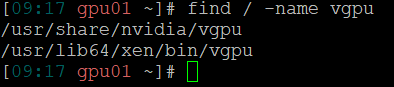
If we navigate the file system to /usr/share/nvidia/vgpu/ there is a xml file called vgpuConfig.xml in which we can found the mappings between the hex subsystem ids and the names of the profiles. For example, the id 1591 corresponds to the profile GRID A100D-1-10C.
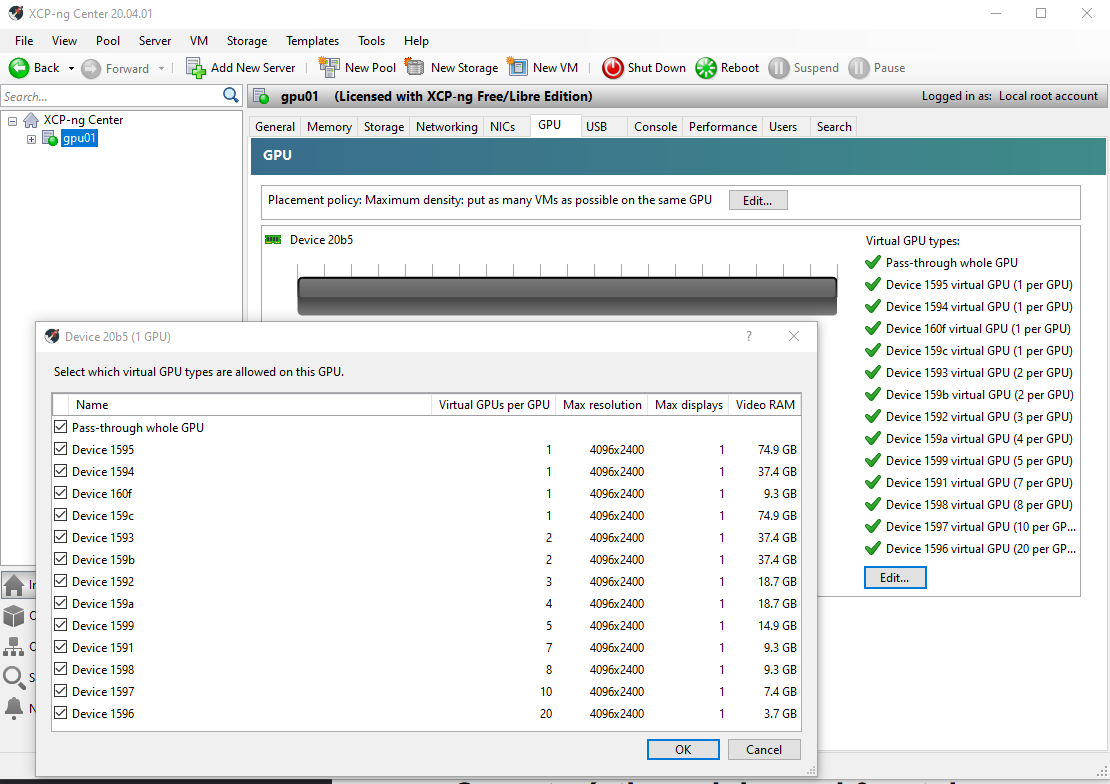
If we list supported vGPU types with the xen command we can see all of them and its uuids:
xe pgpu-param-list uuid=<uuid-of-your-pgpu>
Ok. Let’s try to create a virtual machine and assign one of this vGPU to it:
Internal error: Can’t rebind PCI 0000:81:00.0 driver
I think XCP-ng is trying to assign the vGPU using the PCI ID of the whole card, not the PCI ID of the vGPU, wich makes sense because we still don’t have virtual functions nor mdev devices.
At this time the vGPUs detected by XCP-ng Center don’t work and the Nvidia driver is not loaded so we are stuck.
Result of the test: FAIL.
Test 5. From the end of test 4, go back to test 3 (Citrix driver) and try to get a hybrid.
We are at the end of test 4, vGPU types are in XCP-ng Center and the driver can’t load. Well, lets install the Citrix driver over the RHEL driver and see what happens.
Install driver
yum install NVIDIA-vGPU-CitrixHypervisor-8.2-525.105.14.x86_64.rpm
Error. Yum complains about transaction check errors with some packet conflicts.
We have to uninstall first the RHEL driver. Ok, nothing to lose right now, so here we go.
# yum remove NVIDIA-vGPU-rhel.x86_64
# yum install NVIDIA-vGPU-CitrixHypervisor-8.2-525.105.14.x86_64.rpm
Reboot
The vGPU profiles have gone from XCP-ng Center. We are at the same point as in the test 3.
Result of the test: FAIL.
Hello everybody,
I've made some tests with XCP-ng and the Nvidia A100 card using distinct drivers. For now I've tried Citrix drivers and RHEL drivers.
This post is a quick summary and then I'm going to write another post, much longer, with detailed results.
Question: Does it works?
Answer: NO 

I think the options we have for now to virtualize the GPU are Linux KVM (free), RHEL (paid), Citrix (paid) and VMWare (paid).
However, my knowledge only reaches here so if someone have any idea I'll be pleased to hear it.
@olivierlambert if you wan't me to test something please tell me. We will use the server in production next academic year (in fact a bit sooner because teachers need to prepare the classes) but is in testing phase right now so maybe I can help.
Dani
As I wrote in other @wyatt-made post I'm going to test It next week in a server with a Nvidia A100.
Hope i can help.
Stay in touch.
Dani
@wyatt-made thanks a lot. What a qick response!!
I'll check your post.
My plan is to install xcp in the A100 server Next week and test It. I will post the results in the forum and maybe will help @olivierlambert and the rest of the community.
Dani
Hi everyone,
I'm interested too in the use of Nvidia GRID in XCP-ng because we have a cluster with 3 XCP-ng servers and now a new one with a GPU Nvidia A100. It would be great if I could use it in a new XCP-ng pool, because it's an excellent tool and we already have the knowledge.
Our plan is to virtualize the A100 80 GB GPU so we can use it in various virtual machines, with "slices" of 10/20 GB, for compute tasks (AI, Deep learning, etc.).
So I have two questions:
You are doing a great great job at Vates. Keep going!
Dani