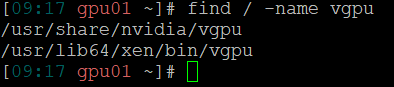
As I wrote in other @wyatt-made post I'm going to test It next week in a server with a Nvidia A100.
Hope i can help.
Stay in touch.
Dani
D
Offline
-
RE: Nvidia MiG Support
-
RE: Largest Stack?
Now we have 76 VMs running on a 3 host pool. Each server has 320 GB of RAM.
Our scenario doesn't need big CPU resources so everything works fine. -
RE: nVidia Tesla P4 for vgpu and Plex encoding
Hi everyone,
I'm interested too in the use of Nvidia GRID in XCP-ng because we have a cluster with 3 XCP-ng servers and now a new one with a GPU Nvidia A100. It would be great if I could use it in a new XCP-ng pool, because it's an excellent tool and we already have the knowledge.
Our plan is to virtualize the A100 80 GB GPU so we can use it in various virtual machines, with "slices" of 10/20 GB, for compute tasks (AI, Deep learning, etc.).
So I have two questions:- The trick copying this vgpu executable can be dangerous when updating the XCP-ng server? Maybe overwriten, deleted or something.
- Do you have plan of supporting nvidia vGPU soon? We still can use Qemu over Ubuntu or other Linux with this drivers and everything works ok but XCP-ng is more professional than qemu IMHO.
You are doing a great great job at Vates. Keep going!
Dani
-
RE: Translations
Yes, I'm from Spain.
Ok, I'll help you.I supose I have to register in your weblate because my user of this forum doesn't work. It's right?
-
RE: SAML Auth with Azure AD
@olivierlambert
Just to add another weird case of this situation I tell you my SAML-auth-adventures.I have just migrated a week ago from XOCE to XOA paid support this week and all the process was fine except the auth with the saml plugin.
The commit I had in XOCE was [XO 5d92f - Master 3f604]. I compiled it the first week of this november so it wasn't very outdated.We use the MSEntraID SAML authentication and it was working fine in XOCE since at least one year ago.
Mi process was like this:
-
First, I installed XOA and imported the configuration from my old XOCE. Everything was fine and all was imported succesfully (backups, users, acls, etc.), including my plugin configurations.
Note that I reused the https server certificate/private key and used the same IP and the same DNS (beacuse I turned off my XOCE before starting XOA). -
Everything was working fine except the saml auth plugin. I had the same "Internal server error" problem.
I looked at the xo-server logs and the error was "invalid document signature" so, as Olivier said, we changed the configuration in MSEntraID to set the "Sign SAML response and assertion" on. -
Once we changed the configuration I thought the plugin would work again, but surprisingly not. If I try again SAML validation i still got the "Internal server error".
When i checked again the xo-server logs I saw ahother exception, this time with the error "SAML assertion audience mismatch" and a reference to the issuer configuration of the plugin.
The exact error I got from xo-server logs using "journalctl -u xo-server -f -n 50" was: "xoa xo-server[2370]: Error: SAML assertion audience mismatch. Expected: <id-of-MSEntraID-xo-validation> Received: spn:<id-of-MSEntraID-xo-validation>"I didn't understand this, because the configuration was exactly the same as I had in XOCE. In fact, I turned off XOA and turned on again XOCE just to test the plugin. The result was that in XOCE the plugin worked well. -
After many tries and some time of impostor syndrome we found the solution:
I don't know why, but in XOCE compiled at the beginning of november you have to configure the issuer field of the plugin with the <id-of-MSEntraID-xo-validation> (8digit-4digit-4digit-4digit-12digit).
Instead, in XOA deployed also this november, you have to set the issuer field to you XOA URL: https://<xo.company.net>/
I hope this will help, because it was a pain in the neck for us this week.
BTW: @olivierlambert this "Internal server error" coming from an uncatched exception in the plugin was not very descriptive. Even a generic try-catch block just to show in the web interface the error would help...
P.D.: I'm from Spain, so I do my best with my english

P.D. 2: Great job with all the Vates virtualization stack! You are the best!Dani
-
-
RE: Largest Stack?
Now we have 76 VMs running on a 3 host pool. Each server has 320 GB of RAM.
Our scenario doesn't need big CPU resources so everything works fine. -
RE: Nvidia MiG Support
@olivierlambert OMG! It's true.
It would be a funny situation if you pay Citrix premium license to virtualize the A100 and it's not compatible
Next time i'll check HCL first
Thanks Olivier
-
RE: Nvidia MiG Support
Looks like we have to use Linux KVM with this server for now, which is not too good for us (and for me as the BOFH
 ) because we have another cluster with XCP-ng.
The thing is f**king my mind is that in other linux distros, like ubuntu for example, everything is detected ok and working properly but in XCP-ng, which is another linux (with modifications, I know), not. I think it's because the lack of vfio but I don't really know.
-
RE: Nvidia MiG Support
Now I've made another test using Citrix Hypervisor 8.2 Express edition.
Despite Citrix says only Premium edition has support for Nvidia vGPU let’s try it and see what happens.
IMPORTANT: This is only for testing purposes because of this message in Xen Center:
"Citrix Hypervisor 8.2 has reached End of Life for express customers","Citrix Hypervisor 8.2 reached End of Life for express customers on Dec 13, 2021. You are no longer eligible for hotfixes released after this date. Please upgrade to the latest CR."
In fact, Xen Center doesn’t allow you to install updates and throws an error with the license.Test 6. Install Citrix Hypervisor 8.2 Express and Driver for Citrix Hypervisor “NVIDIA-GRID-CitrixHypervisor-8.2-525.105.14-525.105.17-528.89” (version 15.2 in the Nvidia Licensing portal).
-
Install Citrix Hypervisor 8.2 Express
-
PCI device detected:
# lspci | grep -i nvidia 81:00.0 3D controller: NVIDIA Corporation Device 20b5 (rev a1)-
xe host-param-get uuid=<uuid-of-your-server> param-name=chipset-info param-key=iommu
Returns true. Ok. -
Xen Center doens't show Nvidia GPU because there is no “GPU” tab!
I think that's because this is the express version and it's only available in Premium edition. -
Install Citrix driver and reboot:
rpm -iv NVIDIA-vGPU-CitrixHypervisor-8.2-525.105.14.x86_64.rpm- List nvidia loaded modules. Missing i2c. Bad thing.
# lsmod |grep nvidia nvidia 56455168 19- List vfio loaded modules. Nothing. Bad thing.
# lsmod |grep vfio- Check dmesg. This looks normal.
# dmesg | grep -E “NVRM|nvidia” [ 4.490920] nvidia: module license 'NVIDIA' taints kernel. [ 4.568618] nvidia-nvlink: Nvlink Core is being initialized, major device number 239 [ 4.570625] NVRM: PAT configuration unsupported. [ 4.570702] nvidia 0000:81:00.0: enabling device (0000 -> 0002) [ 4.619948] NVRM: loading NVIDIA UNIX x86_64 Kernel Module 525.105.14 Sat Mar 18 01:14:41 UTC 2023 [ 5.511797] NVRM: GPU at 0000:81:00.0 has software scheduler DISABLED with policy BEST_EFFORT.-
nvidia-smi
Normal output. Correct -
nvidia-smi -q
GPU Virtualization Mode Virtualization Mode: Host VGPU Host VGPU Mode: SR-IOV <-- GOOD-
The script /usr/lib/nvidia/sriov-manage is present.
-
Enable virtual functions with /usr/lib/nvidia/sriov-manage -e ALL
If we now check dmesg | grep -E “NVRM|nvidia” we have same errors as in test 3. Errors probing the PCI ID of the virtual functions failing with error -1.
Again I think this is because /sys/class/mdevbus doesn’t exist.
Quick recap: Same problems as with XCP-ng. There is no vfio mdev devices and there is no vGPU types in Xen Center so we can't launch virtual machines with vGPUS.
Result of the test: FAIL.
-
-
RE: Nvidia MiG Support
@splastunov Yes, your steps are the same as I did but I can see some differences.
The big thing is you can see Nvidia GRID vGPU types in XCP-ng center but I can't.
I have two scenarios:- With Citrix drivers I don't have vGPU types in XCP-ng center, so I can't assign them to virtual machines.
- With RHEL drivers XCP-ng center shows vGPU types (with hex names, no commercial names) but the Nvidia driver doesn't load (no nvidia-smi). If I try to assign one of the vGPUs to a virtual machine it won't start throwing the error "can't rebind 0000:81:00.0 driver", wich is the PCI id of the whole card, not the virtual GPU.
Maybe it's beacause the type of GPU? With the A100 doesn't work but with yours does? I don't know
Looks like a dead end street. -
RE: Nvidia MiG Support
@olivierlambert I don't have a commercial license of Citrix and I don't know if exists an evaluation one.
Tomorrow I'll try to get some time and install Citrix 8.2 Express, wich is free, but they say vGPU are only available in Premium edition. We'll see. -
RE: Nvidia MiG Support
@splastunov
The license server is needed for the virtual machines to work, but the host driver has to work first. Once you have setup the hypervisor with the driver then you have to deploy the license server, wich can run in a virtual machine in the same hypervisor, and then bind the virtual machines with it using some tokens (is a complicated process, by the way. I think Nvidia made it too difficult).I've spent almost two days with this, so maybe trees don't let me see the forest