XCP-ng
    • Categories
    • Recent
    • Tags
    • Popular
    • Users
    • Groups
    • Register
    • Login
    1. Home
    2. Kraken89
    3. Topics
    K
    Offline
    • Profile
    • Following 0
    • Followers 0
    • Topics 3
    • Posts 13
    • Groups 0

    Topics

    • K

      Unable to import Backup Config from Community Edition to XOA Deployed Appliance

      Watching Ignoring Scheduled Pinned Locked Moved Xen Orchestra
      4
      0 Votes
      4 Posts
      114 Views
      K
      Ok I think I have resolved the issue. It appears that if you do not activate either a paid license or the trial, it fails with the import because many of the features are not active until you enable the license and then update the XOA appliance. Once I activated the trial and then updated the appliance again, I was able to successfully import the backup. My hesitation with activating the license before importing the config as the licenses are bound and I didn't want to have to redo the setup if the config did not import. Again, it looks like I need to activate the license first and then I can import the config.
    • K

      Question about Continuous Replication/ Backups always doing Full Backups

      Watching Ignoring Scheduled Pinned Locked Moved Backup
      16
      1
      0 Votes
      16 Posts
      804 Views
      K
      @tsukraw No worries! Just glad that we can all help each other out!
    • K

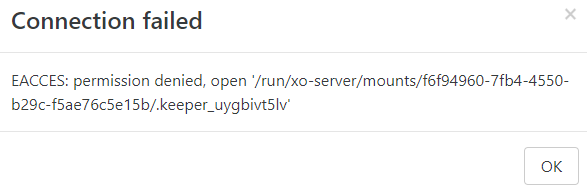
      Unable to mount NFS share in XOA

      Watching Ignoring Scheduled Pinned Locked Moved Xen Orchestra
      4
      3
      0 Votes
      4 Posts
      4k Views
      H
      @olivierlambert could this error be more verbose? I think this error should say: Cannot write file .keeper_uygbivt5lv on remote <whatever the remote name/address> NFS is mounted but XOA cannot write to mounted dir. This happens in NFSv4 as default when sec=sys on NFS server (that is the default).