The past year 2022 was again an exciting year with numerous innovations in XCP-ng and Xen Orchestra as well as good and helpful discussions in the forum. I am excited about what the new year brings and wish everyone a good start for 2023.
 G
Offline
G
Offline
-
A wonderful new year for everybody
-
RE: Can I just say thanks?
I second that! While not a commercial user, I really like the community and the active participation of the Vates team helping novice homelab user with patience and commercial user with in-depth knowledge alike. Keep rocking!
-
RE: Backup reports on Microsoft Teams
You could at least send the backup reports (requires
backup-reportsandtransport-emailplugin on XOA) to a Microsoft Teams channel of your choice (Channel - More options - Get email adress). -
RE: XCP-ng 8.2 updates announcements and testing
@gduperrey Updated my two host playlab without a problem. Installed and/or update guest tools (now reporting
7.30.0-11) on some mainstream Linux distros worked as well as the usual VM operations in the pool. Looks good
-
RE: XCP-ng 8.2 updates announcements and testing
@bleader Update worked well on my two node homelab and everything looks and works normal after reboot. I did some basic stuff like VM and Storage migration, but nothing in depth. Let's see how things work out.
-
RE: XCP-ng 8.2 updates announcements and testing
@bleader Updated my homelab without any issues
-
RE: XCP-ng 8.2 updates announcements and testing
@stormi Did not even know the problem existed
 . Anyway, added a new (second) DNS server (9.9.9.9) to the DNS server list via
 xsconsoleand rebooted the host (XCP-ng 8.2.0 fully patched).Before update: DNS 9.9.9.9 did not persist, only the previous settings are shown
After update: DNS 9.9.9.9 did persist the reboot and is listed together with the previous settingsDeleting DNS 9.9.9.9 worked as well, so the
xsconsoleupdate worked for me. -
RE: XCP-ng 8.2 updates announcements and testing
@stormi Updated my two host playlab (8.2.0 fully patched, the third host currently serves as a Covid-19 homeoffice workstation) with no error. Rebooted and ran the usual tests (create, live migrate, copy and delete a linux and a windows 10 VM as well as create / revert snapshot (with/without ram) ). Fooled myself with a
VM_LACKS_FEATUREerror on the windows 10 VM until I realized that I forgot to install the Guest tools - I need more sleep. Will try a restore after tonights backup.
Edit: restore from backup worked as well
-
A great and happy new year
A great and happy new year 2022 to everybody! Another year has passed and the XCP-ng community continues to rock! Stay optimistic and healthy (never hurts
 ).
). -
Nvidia P40s with XCP-ng 8.3 for inference and light training
Being curious about Large Language Models (LLMs) and machine learning, I wanted to add GPUs to my XCP-ng homelab. Finding the right GPU in June 2024 was not easy, given the numerous options and constraints, including a limited budget. My primary setup consists of two HP ProDesk 600 G6 running my 24/7 XCP-ng cluster with shared storage. My secondary setup features a set of Dell R210 II and Dell R720 servers, which I use for memory-intensive tasks. The Dell R720 can hold up to two full-sized GPU which lead to my first requirement: a GPU must fit into the Dell R720.
With R720 compatibility as a requirement, gaming GPUs (RTX 2080, 3080/3090, 4080/4090) were not an option. Additionally, they are expensive and do not all come with a lot of VRAM memory. But I admit that those are more powerful compared to what I came up with.
Since I want to test different LLMs with various parameter sizes, my minimum memory size requirement was 24GB VRAM. That clearly reduced the GPU options again, even for compatible low power (~70W) GPUs like the Nvidia RTX A2000 (12GB) or the Nvidia Tesla T4 (16GB).
My budget limit for getting started was around €300 for one GPU. That narrowed down my search to the Nvidia Tesla P40, a Pascal architecture GPU that, when released in 2016, cost around $5,699. In Europe, the P40 is available on Ebay for around €300 to €500, and I was very lucky to get two P40s for around €510 in total. Seeing two P40s on Ebay in the US for $299 with no delivery option for Europe was a painful experience though.
However, I had to make two compromises with the P40, which may be a problem in the future. First, the P40 is lacking Tensor Cores, which are essential for deep learning training compared to FP32 training. Additionally, the P40 is limited by its CUDA compute capability of 6.1, which is lower than that of newer GPUs like the H100 (9.0). At some point, software tools might stop supporting the P40.
To install a second GPU I had to swap the Dell R720 riser card #3 from 2 PCIe x8 slots with a 150W power connector to a 1 PCIe x16 slot with a 225W power connector. Like the K80/M40/M60/P100 the P40 has a 8-pin EPS connector, so you need a special power cable that can be sourced from Ebay. Using the standard Dell general-purpose GPU cable risks damaging the GPU or motherboard. Yesterday, the last part arrived so today is install day.
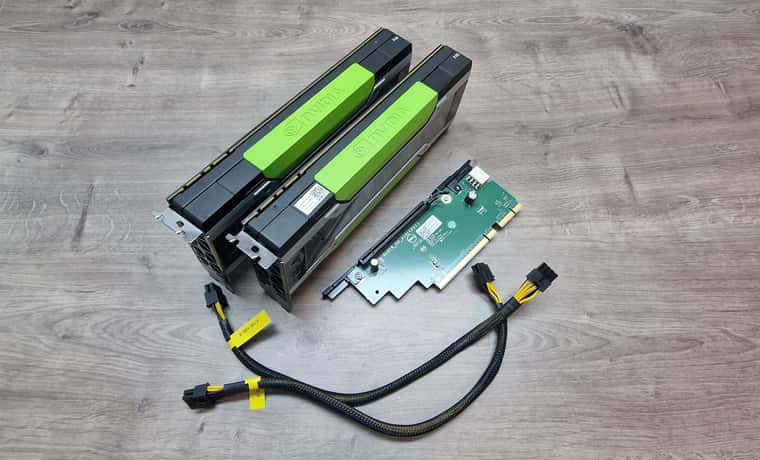
The process of swapping riser #3, installing the two P40 GPUs, and connecting the power cables was straightforward.. During boot, the server checks PCI devices and updates the inventory, which might take some minutes. After the initial fan ramp-up, the fan speed dropped back to normal and the Dell R720 idles at about 126W with both GPUs installed.
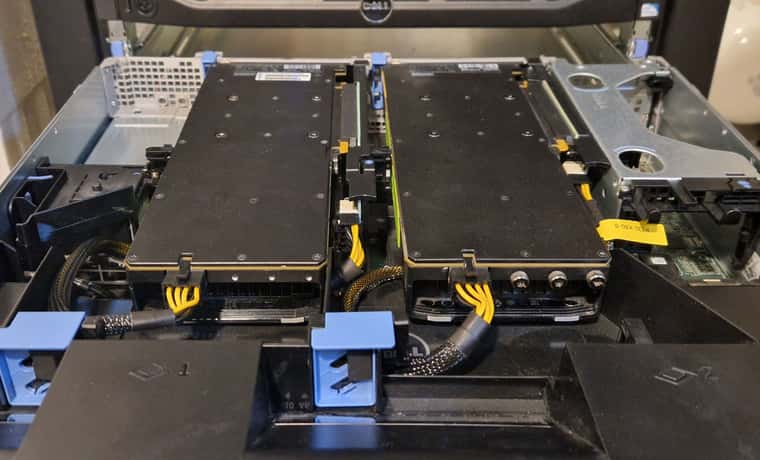
Next step was installing and updating XCP-ng 8.3 beta, which was as easy as installing the GPUs. Adding the host to XO from source and activating the PCI pass-through in the hosts advanced view required a reboot, but after that I could setup an Ollama VM to run LLMs and another Open WebUI VM to chat with the LLMs. With 48 GB of VRAM, I can run
llama3-70bwith some headroom and about 6 tokens/sec whilellama3-8bis much smaller and answers with 23 tokens/sec on this setup.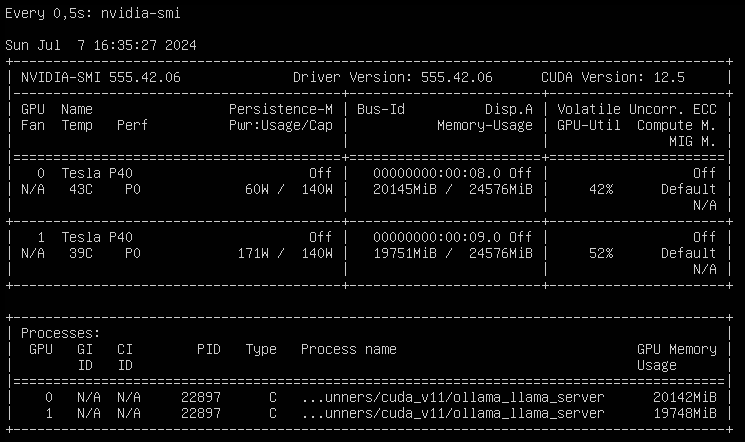
So what are the next steps? On one hand, I want to setup a development environment for
Phytonand API based usage of LLMs (not only local LLMs, but also cloud based LLMs like ChaGPT or Claude). That will be fun, since I have zero experience with that. On the other hand, I will setup more GPU supported services like Perplexica or AUTOMATIC1111 or whisper. Apart from that, I will also try to improve my prompt engineering skills and learn about LLM multi agent frameworks.The best thing on this setup is that XCP-ng 8.3 beta provides a robust foundation for running Large Language Models (LLMs) and other AI workloads on one machine. Looking forward to the release candidate!
-
RE: GPU Passthrough
@coolsport00 Yes, I am using the GPUs with llama-swap to serve qwen3.8-27b and qwen3.6-35b for local inference with Bifrost as an AI gateway for local and cloud AI provider. Never tried vGPU myself.
-
RE: GPU Passthrough
I am running NVIDIA P40s on a DELL R720/R730 and a NVIDIA A2000 12GB on a DELL Optiplex 9010 in my playlab. Getting the GPUs to be accessible for VMs was quite easy: shutdown the XCP-ng host, install the GPUs, start the host again, activate the GPU in the advanced settings of the host in the PCI Devices section (“Passthrough enabled”). The host will restart at this point after displaying a warning. That's it – the GPU can now be assigned to a VM in the VMs advanced settings. I do use the GPUs for AI workloads under Debian though, so your use case might vary.
-
Can’t Reach iDRAC via OS-to-iDRAC Pass-Through on XCP-ng + Debian 12 VM
Hi everyone, I’m currently working with XCP-ng 8.3 (fully updated) on a Dell PowerEdge R720 in my homelab, and I’m trying to access the iDRAC interface of the same server from a Debian 12 VM using ipmitool. I want to use the OS-to-iDRAC Pass-Through feature (USB NIC) to allow the VM to communicate directly with the iDRAC, so I can run ipmitool commands like power status, fan control, etc., from within the VM without going over the network (which is segmented off).
What is working
- The iDRAC Pass-Through feature is enabled in the iDRAC web interface under: iDRAC Settings → Network → OS to iDRAC Pass-Through (USB NIC set to the IP: 169.254.0.1)
- The iDRAC network test confirms it’s working.
- The pass-through interface (PIF) appears in XCP-ng’s host network list as idrac.
- I’ve attached it to a Debian 12 VM, where it shows up as enX1.
- The VM has correctly assigned 169.254.0.2/24 via /etc/network/interfaces.
Despite the correct IP assignment, I cannot ping 169.254.0.1 from the VM:
# Output of ip a (shortened)
3: enX1: <BROADCAST,MULTICAST,UP,LOWER_UP> mtu 1500 qdisc mq state UP group default qlen 1000
    link/ether d6:24:9e:46:de:64 brd ff:ff:ff:ff:ff:ff
    inet 169.254.0.2/24 brd 169.254.0.255 scope global enX1
ping 169.254.0.1 # Output: # From 169.254.0.2 icmp_seq=1 Destination Host Unreachable # (repeats)And ipmitool fails with:
ipmitool -I lanplus -H 169.254.0.1 -U <user> -P <password> power status
# Error: Unable to establish IPMI v2 / RMCP+ session
Tested the same as a bare metal setup on another R720 with Debian 12 and that worked as expected. I have a distinct feeling that I have asked this question before, but unfortunately I can't find the post anymore.
Any insights, tips, or similar experiences would be greatly appreciated!
-
RE: XCP-ng 8.3 updates announcements and testing
@gduperrey Works on my play-/homelab (HP ProDesk 600 G6, Dell Optiplex 9010). Can't update my Dell R720s GPU cluster at the moment, though.
-
RE: XCP-ng 8.3 updates announcements and testing
@stormi Updated the usual suspects (HP ProDesk 600 G6, Dell Optiplex 9010, Dell R720) with no problem. Host run as expected.
-
RE: XCP-ng 8.3 updates announcements and testing
@stormi Update two pools with a total of six host (HP ProDesk 600 G6 and Dell Optiplex 9010) and two Dell R720 with GPUs. Update went smooth and no issues running for two days now (with backup and restore)
-
RE: XCP-ng 8.3 updates announcements and testing
@Greg_E You need to update all members of a pool, starting with the pool coordinator (including reboot if needed), followed by each member.
-
RE: XCP-ng 8.3 updates announcements and testing
@gduperrey Updated two Dell R720 servers (dual E5-2640v2, 128GB RAM, with GPUs) and a Dell R730 server (dual E5-2690v4, 512GB RAM, with GPUs) without issues. The services (VMs) are working as expected, so we'll see how the systems perform over the next few days
-
RE: XCP-ng 8.3 updates announcements and testing
@gduperrey Installed on some R720s with GPUs and everything works as expected. Looks good
Edit: also installed the update on my playlab hosts and a Dell PowerEdge R730. Again no issues and all hosts and VMs are up again.
-
RE: Some questions about vCPUs and Topology
@jasonnix Not an expert on this topic, but my understanding is that 1 vCPU can be understood as 1 CPU core or - when available - 1 CPU thread. Since vCPU's are used for resource allocation by the hypervisor, vCPU overprovisioning can make things more complicated.
VMs or memory-sensitive applications sometimes make memory locality (NUMA) decisions based on the topology of the vCPUs (sockets/cores) presented by the hypervisor, which is why you can choose different topologies. You can read more on NUMA affinity in the XCP-ng documentation. In a homelab, you rarely have to worry about this and as a rule of thumb, you can use virtual sockets with 1 core for the amount of vCPUs you need (which is the standard for XCP-ng and VMware ESXi).
Sometimes it still makes sense to keep the number of sockets low and the number of cores high, as sockets or cores can be a licensing metric that determine license costs. However, most manufacturers already take this into account in their terms and conditions.
In a somewhat (over-) simplified form: socket/core topologies can be used in some special scenarios to optimize memory efficiency and performance or to optimize licensing costs.