XCP-ng
    • Categories
    • Recent
    • Tags
    • Popular
    • Users
    • Groups
    • Register
    • Login
    1. Home
    2. jcdick1
    J Offline
    • Profile
    • Following 0
    • Followers 0
    • Topics 16
    • Posts 36
    • Groups 0

    jcdick1

    @jcdick1

    0
    Reputation
    4
    Profile views
    36
    Posts
    0
    Followers
    0
    Following
    Joined
    Last Online

    jcdick1 Unfollow Follow

    Latest posts made by jcdick1

    • RE: Ghost PCI device - how to remove?

      @acebmxer

      Yeah, it does not show up as an available device in XOA or XCP-ng Center. Just listed when running lspci

      posted in Hardware
      J
      jcdick1
    • Ghost PCI device - how to remove?

      At one point there was a 10GbE NIC in one of my servers, but has since been removed. A GPU has been installed, but the system is showing the old nic still sitting at 07:00.0 which is also the GPU.

      What would be the best way to get rid of this ghost nic from the system so that I can effectively get this GPU assigned?

      Thanks!

      posted in Hardware
      J
      jcdick1
    • OPNsense in VM - VIF discrepancies

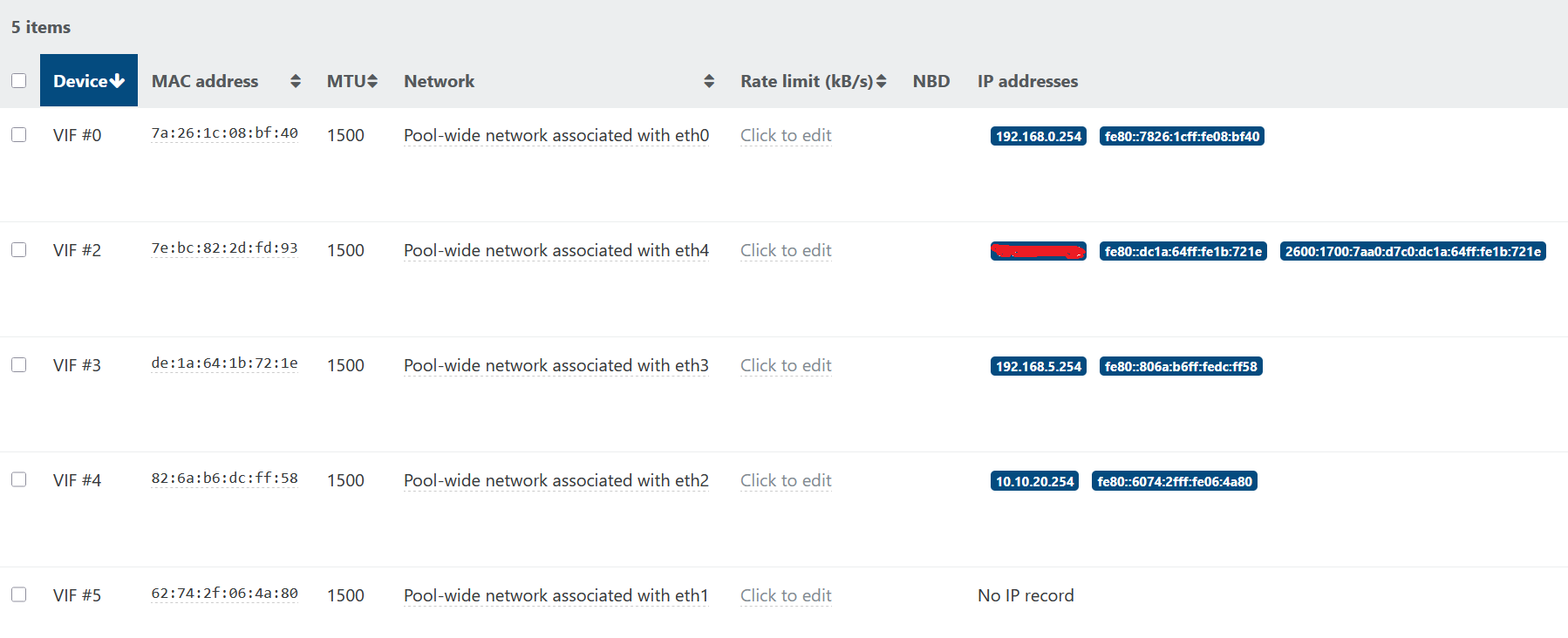
      I've got my OPNsense (FreeBSD) router running in a VM on XCP, and it does have the xe-guest-utilities installed. I'm trying to figure out an issue on one of the interfaces, and I noticed a weird discrepancy in XO with this VM. The MAC addresses and such for the interfaces being used by the VM are all off.

      It seems that VIF #0 is the only one coming up correctly.

      Unfortunately, I don't think the FreeBSD or OPNsense teams have a maintainer for the xe-guest-utilities package, and so what they distribute is showing as 6.2.1-76888 in XO.

      XOA_guest_discrepancies.png

      I don't know if this is what is causing my network issue, but I thought it strange.

      posted in Management
      J
      jcdick1
    • RE: Networking disparity between guest OS and XO

      @fohdeesha

      I tried a full shutdown. I let it go full "red" before clicking the start icon. XO is still reporting very different MAC and IP assignments from what the guest OS has configured. Is it perhaps due to the tools that OPNsense packages?

      posted in Xen Orchestra
      J
      jcdick1
    • Networking disparity between guest OS and XO

      I have my router (OPNsense) running in a VM on XCP 8.2 and there seems to be a disparity between what XO is reporting from the guest utils and what the guest OS itself is saying.

      In the guest OS, interface with MAC ending in 72:1e is my WAN interface, getting a DHCP address from my ISP. In XO, that interface is a static IP.

      Here are two example interface assignments in the guest OS:

      XO issue 1.png

      Here is how each of those is configured:

      XO issue 2.png

      XO issue 3.png

      Here is how XO is reporting them:

      XO issue 4.png

      That interface with the Jumbo Frames configured should be a 10.10.10.X address, per the OS config. That 192.168.5.X is on a completely different interface in the OS, and the MAC X:X:X:X:72:1e should be having the address currently shown on X:X:X:X:fd:93

      Any suggestions? Because resolving networking issues when I can't get the information sources to align is problematic.

      Thanks!

      posted in Xen Orchestra
      J
      jcdick1
    • Restore missing network to host

      I have a couple of networks created for VLAN tagging purposes. These networks show on the Pool networking tab. They also appear on the two hosts that aren't the master. They are missing from the master node's network tab. Now, I can't migrate any VMs that have interfaces on these networks to the master host.

      Is there a way to recreate those networks on just the one host? Being the master that is missing them, I'm afraid they'll disappear altogether at some point and those VMs will have issues.

      Thanks!

      posted in Xen Orchestra
      J
      jcdick1
    • RE: Not a real issue, just looking for some knowledge ...

      @olivierlambert Fair enough. I will bring the disk for this VM onto the local SR for patching and rebooting my file server that hosts the NFS SR, just to be on the safe side.

      I was hoping I could minimize the downtime by live-migrating the disk onto the host running it, but get the same error about PCI hardware as if I were trying to migrate the whole VM to another host.

      But as far as you know, there is no technical reason for why it wouldn't work, like there is for live-migrating between hosts with passed-through hardware.

      posted in Xen Orchestra
      J
      jcdick1
    • Not a real issue, just looking for some knowledge ...

      I have a VM that has a GPU assigned via PCIe passthrough, with its disk on an NFS SR. I understand why I can't live migrate a VM that utilizes PCIe passthrough.

      But what is it that prevents migrating just the virtual disk to the local SR on the host running that VM?

      posted in Xen Orchestra
      J
      jcdick1
    • RE: Transport-email and Google SMTP

      @Darkbeldin I wasn't sure about turning on two-factor. I went through that process and generated the "app password" and it seems to be working.

      Thanks for the info!

      posted in Xen Orchestra
      J
      jcdick1
    • Transport-email and Google SMTP

      With Google essentially shutting off "less secure app access" in May, is there anything on the horizon for the email plugin to still function with Google's SMTP? I noticed my alerts stopped working, and when I checked my Google dashboard for the account that sends the alerts, Google had shut off the "less secure 3rd party apps access" automatically, and turning it back on was accompanied by a warning that it was being turned off permanently on May 20, 2022.

      posted in Xen Orchestra
      J
      jcdick1