• Auto-Start VMs Problems

    2
    0 Votes
    2 Posts
    2k Views
    olivierlambertO
    Shutdown the host properly and report if those VM boots. Try to disable/enable power on via Xen Orchestra, there's an issue in XCP-ng Center with this setting.
  • [Solved] Passing multiple devices to one VM...

    2
    0 Votes
    2 Posts
    1k Views
    J
    RTFM https://xcp-ng.org/docs/compute.html#pci-passthrough You can also passtrough multiple devices. If you wanted to passtrough another device at 00:19.0 just append it to the parameter. [root@xen ~]# xe vm-param-set other-config:pci=0/0000:04:01.0,0/0000:00:19.0 uuid=<vm uuid>
  • 0 Votes
    4 Posts
    3k Views
    M
    @xTITUS-MAXIMUSx Thanks for the tip. I went to the bios and enabled the Intel Virtualization Technology and I thought I was done. After further research I recognized there are two steps to Enable the Intel Virtualization Technology. https://us.informatiweb.net/tutorials/it/bios/enable-iommu-or-vt-d-in-your-bios.html Advanced >> CPU configuration >> Intel Virtualization Technology >> Enable Advanced >> System Agent Configuration >> VT-d >> Enable
  • /dev/xvda not appearing in guest

    21
    0 Votes
    21 Posts
    12k Views
    K
    It seems I got a kernel panic for some other reason with 5.4.21. It's all working now, thanks.
  • Xen hypervisor features.

    4
    -2 Votes
    4 Posts
    1k Views
    olivierlambertO
    Please take time to read carefully the previous link I send. If you can't spot it, re-read it slowly, you might see this link: https://xenbits.xen.org/docs/unstable/support-matrix.html
  • IOMMU with NVIDIA quadro

    4
    0 Votes
    4 Posts
    2k Views
    olivierlambertO
    It should work, yes.
  • XcpNG - Xen kernel crash (FATAL TRAP: vector = 2 (nmi))

    19
    0 Votes
    19 Posts
    8k Views
    olivierlambertO
    Hi @mauricio_hps This is a XCP-ng forum, please try with XCP-ng https://xcp-ng.org
  • Ubuntu 18.04 get to read only mode system

    5
    0 Votes
    5 Posts
    2k Views
    stormiS
    @talbaror by the way you can find discussion about all this, and what users have tried, etc., at: https://xcp-ng.org/forum/topic/2496/xcp-ng-nfs-timeout-values-and-storage-node-active-standby-failover https://github.com/xcp-ng/xcp/issues/334
  • Max allowable deviation in top "st" parameter

    9
    0 Votes
    9 Posts
    2k Views
    M
    5% sounds too much for me, but I'll check it in some populated pools (with host's cpu below 80%) to have a better idea.
  • Losing Time on multiple VM machines

    2
    0 Votes
    2 Posts
    670 Views
    jtbw911J
    @Otis2772 Where is your time synchronization coming from? Time differences can be caused by a slew of things including power settings (VM or not), CPU availability, networking connectivity, etc. Are they all the same OS or different OSes?
  • noob question about clustering

    4
    0 Votes
    4 Posts
    2k Views
    olivierlambertO
    64 hosts tops. But in general, people tends to use around 16 to 20 hosts max in a pool. Don't forget about support
  • 0 Votes
    4 Posts
    2k Views
    olivierlambertO
    Check dmesg in the VM
  • installing Openwrt on xcp-ng

    7
    1
    0 Votes
    7 Posts
    4k Views
    M
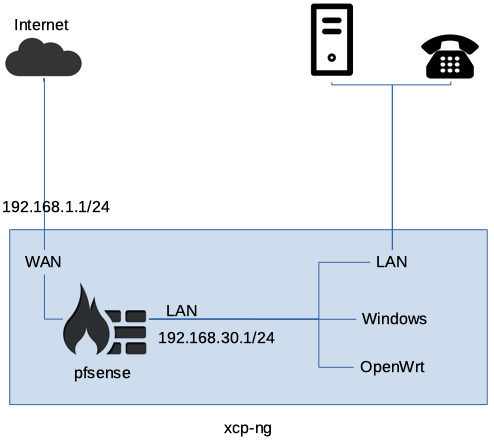
    I am back to the office and I am troubleshooting different settings and connection setups. I appreciate all your input. The issue is configuring the right NIC0/NIC1/WAN/ and LAN. Once I am done I post my setting. Thanks again for everyone.
  • win 2019 vm-checkpoint failed on xcp-ng 7.6

    Solved
    4
    0 Votes
    4 Posts
    2k Views
    olivierlambertO
    Wow, didn't know it was possible to violate those rules!
  • Migrating docker host to new XCP host not working.

    5
    0 Votes
    5 Posts
    2k Views
    P
    Yep.. that did it... started it on the older host, and can now migrate it backwards and forwards with on issues... Thanks Olive... as always. Peter.
  • domU hang on Xen v4.7

    4
    0 Votes
    4 Posts
    1k Views
    I
    @r1 @olivierlambert Hello! There is nothing in any logs at all, on either the Dom_0 or Dom_U at the time of the crash, the journal on the Dom_U stops updating at the instant of the freeze and only resumes after it has been destroyed and re-started. We are in the process of moving sites to HVM, that is an ongoing part of our plan, 1 down... We've not tried running a screen session, but that is a very good idea, and we'll do that - thanks! I don't believe we've tried running in debug mode either, so will pursue that too. Thanks for the advice, I appreciate it - I know it isn't anything even remotely related to your work, but as an XCP-ng user personally, I wasn't sure where else to try. Thanks, Mark

  • Question about hardware interrupts going exclusively to VCPU0

    6
    0 Votes
    6 Posts
    2k Views
    olivierlambertO
    Also you might use http://irqbalance.github.io/irqbalance/ to help "spreading" the load on various CPUs.
  • Nested virtualization

    2
    0 Votes
    2 Posts
    1k Views
    olivierlambertO
    In XO: Advanced tab of the VM. Enable nested virt, then boot the VM. That's it!
  • Can't start or shutdown VM's after storage was powered off

    5
    0 Votes
    5 Posts
    3k Views
    ForzaF
    In FreeNAS. exports file you should have fsid=123, with a unique number for each exported path. If not it can cause a problem if the nfs server is rebooted while the pool is up. https://linux.die.net/man/5/exports https://www.suse.com/support/kb/doc/?id=000017897 The stale mounts are in xcp-ng. But this is just a theory. During the power outage. Did all xcp-ng hosts and the FreeNAS as boxes go down? How did you boot up? You wrote you set up fresh servers?
  • CPU Topology (Windows Specifically) only ever shows 2 sockets

    6
    0 Votes
    6 Posts
    3k Views
    J
    Okay, this makes sense, thank you for the clarification. The reason I was asking I've been having crazy issues with xcp-ng on my server with VMs crashing all the time on boot etc and have been trying to troubleshoot and just wanted to look into this as I've done every other thing I can possibly think of. thanks again!