Issues joining pool with less pif on the newest host
-
@afmart_dei I'd be surprised that you can't add this host to the pool because it has a different number of PIFs... more likely than not the version mismatch is what is getting you hung up here.
Is there anyway to update everything to the same level, once that is done then you should be able to add this host to the pool.
As for Windows XP, CentOS 4 (CentOS 4 was EoL'd in 2012.... only 14 years ago) so that's likely gonna be a hard no. XP was in 2014.. likely the same boat.
The issue likely being that no one wants to program on old ass OS's to support something that the original dev no longer supports.
-
I had similar issues recently. But not exacly the same. I was able to add second host to pool but was not able to work because in my case eth0 was host managment, eth4 storage, eth5 migration, eth 7 vm network. My second host at the time did not have eht7
Then i further messed myself up by using second host as its own pool attached to same storage and when down hill form there, but was an easy fix.
-
@DustinB The issue is lack of pool resources to have all prod machines up, if i can't join the new host withou update, i'll have to schedule some downtime.
-
Update:
I'm having issues resetting the network on the new host, but looks like the issue is eth6 and eth7 are the fiber ports.I'm going to reinstall the new host and reorder the eth2 and eth3 to eth6 and eth7, then try to rejoin.
-
Update 2:
Renaming eth2 to eth6 and eth7 worked like a charm.Had to do a fresh install because the emergency network restart didn't work.
it's hard to tell which PIF belong to each bond on XO (at least on source-compiled version), needed to use old xcp-center to figure it out.
This thread can be closed.still having some network issues :S
-
Update 3:
On a fresh install, after renaming eth2 and eth3 to eth6 and eth7 in order to match the active interfaces on the pool, and joining the pool, something happens and the new host dom0 loses the networking interfaces.
Trying to do an emergency network reboot does nothing, the network doesn't come up, and doing any xe command returns nothing.Seems like not having 2 interfaces to match all 8 interfaces on the other hosts is an real issue.
Any feedback or recommendations are welcome. The docs don't cover this, but is it possible to delete unused networks associated with non-used PIF?
-
Ping @Team-XAPI-Network
-
The issue seems to be synchronizing the network configurations.
The pool management is configured for bond1 (eth6+ eth7), that is set for LACP, both switch ports are already configured for LACP.
Bond0 (eth0 +1) is created, but bond 1 fails, and management interface is never assigned to Bond1.
Network 2 and 3 are active on the pool even if never used.
-
@afmart_dei could you share the
/var/log/xensource.logof the joining host ? ideally the whole part after the host started (you could look at the file before rebooting and strip all lines before the last line you saw) -
Update 4:
Hello,
After a few tries, i reattempted to re-add the host to the pool, this time capturing the logs in another terminal and this time it seems to have worked.
I think i followed the same steps the previous time, but maybe i did something different, like using pif-scan to introduce the reordered interfaces.This is how I've managed to get it to work:
All hosts on version 8.2.1 all up to date.
On the new host disconnected the management, remove pif, reorder the interfaces, reboot, add interfaces manually (used pif-introduce, not pif-scan), reboot, re-enable management, join pool.
ifconfig eth2 down
ifconfig eth3 down
xe pif-list device=eth2
xe pif-list device=eth3
xe pif-forget uuid=9104e54c-6c82-5d83-b9fc-1d2b73d5d6f1
xe pif-forget uuid=27abec81-6861-796e-9abe-3b2653444c8f

interface-rename --update eth6=14:23:f2:24:5a:80 eth7=14:23:f2:24:5a:81

reboot now

interface-rename --list
ifconfig eth6 up
ifconfig eth7 up

xe host-list

xe pif-introduce device=eth6 host-uuid=edfaf68e-2c28-4486-8939-723bf2c72820 mac=14:23:f2:24:5a:80
xe pif-introduce device=eth7 host-uuid=edfaf68e-2c28-4486-8939-723bf2c72820 mac=14:23:f2:24:5a:81

reboot now
I'm still baffled why it worked now, I've tried a few time with all the host up to date, and was planning to source a dual nic pcie card, to solve this issue. However on this host the the bond id doesnt match the pool ...
on poll:
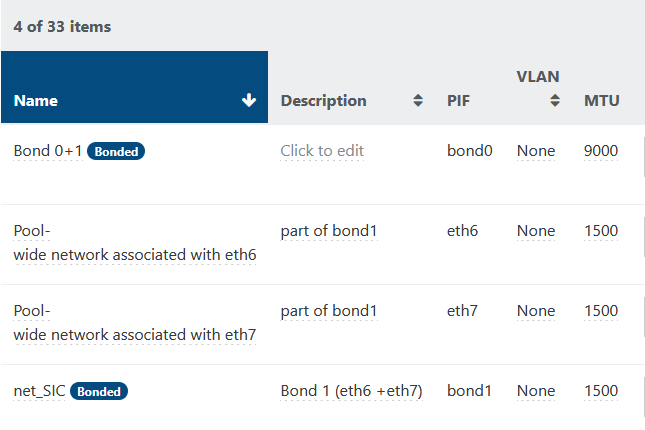
on the new host:
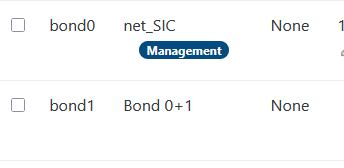 xensource_error_log.txt
xensource.log also presents lots of errors, so I'm going to leave it running over the weekend, and will try to add the necessary data for our SR on monday.
what is the best way to send the full log file?
-
when a new host join an existing pool, it starts by configuring the management interface. so the first bound created is the management one (as
bond0) even if the master of the pool has it asbond1.while doing some tests with 8.3 I got problems too, but not systematically (as you, it seems).
I will send to you a PM regarding
xensource.log -
@semarie This pool is still on 8.2.1, we are trying to add this host in order upgrade with little to no downtime.



Hello! It looks like you're interested in this conversation, but you don't have an account yet.
Getting fed up of having to scroll through the same posts each visit? When you register for an account, you'll always come back to exactly where you were before, and choose to be notified of new replies (either via email, or push notification). You'll also be able to save bookmarks and upvote posts to show your appreciation to other community members.
With your input, this post could be even better 💗
Register Login