Backup Error - Invalid RFC7231 date-time value
-
Hi all,
I've had a VM with a backup job to S3 storage get this error (the same error also appears on retry):
"Invalid RFC7231 date-time value 2026-09-15T16:44:47Z. Deserialization error: to see the raw response, inspect the hidden field {error}.$response on this object."
Host and VM time are correct. S3 remote test works.
Other backups to the same bucket, different folder and different remote do work.
The snapshot gets created but is deleted after around 5-10seconds on the retry.
I can make a new remote to a new folder in the bucket and attempt other troubleshooting steps, just thought I'd mention this one in case it helps others because I did not find much of a record for it in the documentation or searches.Has anyone seen the error before? Let me know if you need more info on this.
Thanks,
J
-
Hi,
What's your S3 provider?
-
@olivierlambert Hey Olivier, thanks for replying! We are using Wasabi buckets.
-
I have found that making a new remote to the same bucket with a different directory gave the same error. I also tried restarting Xen Orchestra in case there was an old task that was stuck etc.
I have managed to get this backup to work via the same newer remote but targeting a new bucket with one directory inside.
Odd because the other older bucket jobs are working. Worth noting other potential factors on the older bucket; there is a lifecycle policy in place on the older wasabi bucket. This reduced Wasabi's versioning files within a time period where no available restores were listed in Xen Orchestra. We have object lock and versioning turned on for immutable backups in Wasabi. The backups in that bucket were not being reduced automatically by Xen Orchestra and the size had gone over 100TB when retention was 15 backups total & should've started dropping the older files. The bucket size has since reduced down to about 40TB now and we're looking to further optimise the backups across our whole infra.
If there are other suggestions I can go test them later but just noting what we're doing and how I've worked around the issue to keep the backup running when getting this error.
-
That's weird. Adding @Team-XO-Backend in the loop including @julienxovates
-
@JL457 Hi,
For now it looks like Wasabi is not sending us the correct date format, which is strange because we support this provider and don't usually have issues.
In order to allow us to investigate further, could you send us the full backup job logs ?
You can find them by clicking on the failed backup status and then on the download logs button:
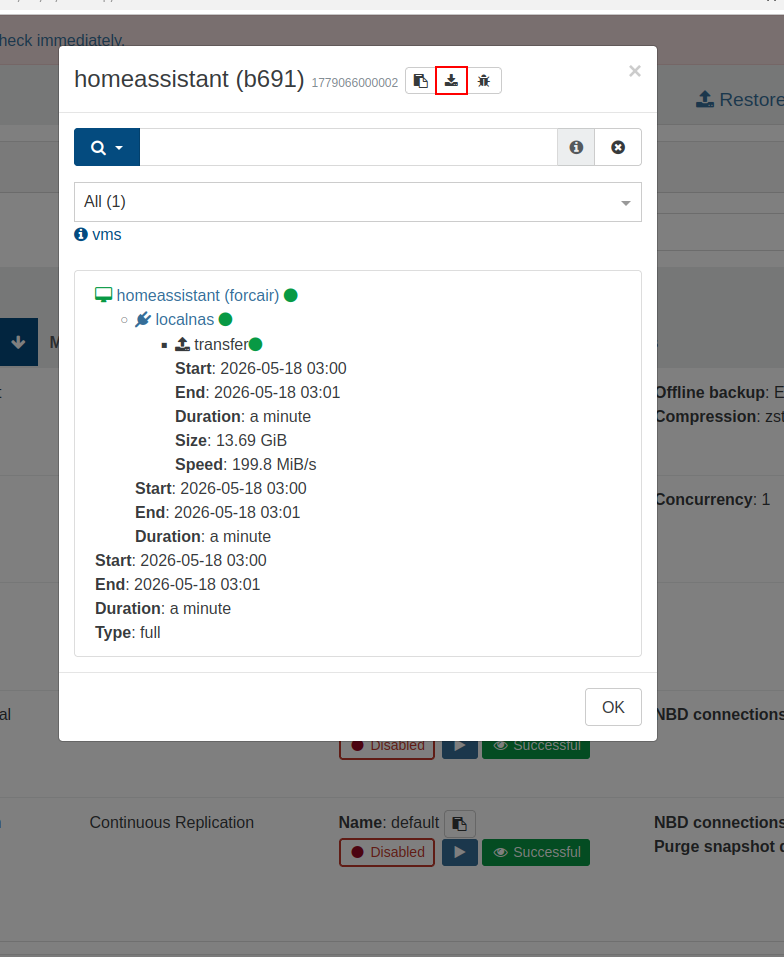
Relevant XO logs would also help.
If you are a client, also don't hesitate to open a ticket with an open support tunnel.
Thanks.


Hello! It looks like you're interested in this conversation, but you don't have an account yet.
Getting fed up of having to scroll through the same posts each visit? When you register for an account, you'll always come back to exactly where you were before, and choose to be notified of new replies (either via email, or push notification). You'll also be able to save bookmarks and upvote posts to show your appreciation to other community members.
With your input, this post could be even better 💗
Register Login