ASUS NUC NUC14MNK-B LAN problems
-
Hello,
I have a problem with the LAN connection on my NUC I want to run XCP-ng on.
The NIC in that device is the RTL8125BG-CG, 2.5G.The status lights on the NIC are on until I´m trying to send a package to the device or trying to do something network related in the device (for example ping to XCP-ng or ping from XCP-ng), in that moment the light on the NIC will go off for a few seconds go back on again and go off again.
In the logs I found the following:
Feb 15 22:18:48 xcp-ng-nuc-01 kernel: [   41.454249] r8125: eth0: link down
Feb 15 22:18:51 xcp-ng-nuc-01 kernel: [   44.902253] r8125: eth0: link up
Feb 15 22:19:04 xcp-ng-nuc-01 kernel: [   57.582241] r8125: eth0: link down
Feb 15 22:19:08 xcp-ng-nuc-01 kernel: [   61.074237] r8125: eth0: link up
Feb 15 22:19:20 xcp-ng-nuc-01 kernel: [   73.454273] r8125: eth0: link down
Feb 15 22:19:23 xcp-ng-nuc-01 kernel: [   76.946250] r8125: eth0: link up
Feb 15 22:20:24 xcp-ng-nuc-01 kernel: [  137.454219] r8125: eth0: link down
Feb 15 22:20:27 xcp-ng-nuc-01 kernel: [  140.898166] r8125: eth0: link up
Feb 15 22:20:34 xcp-ng-nuc-01 kernel: [  147.438230] r8125: eth0: link down
Feb 15 22:20:37 xcp-ng-nuc-01 kernel: [  150.890227] r8125: eth0: link up
Feb 15 22:20:50 xcp-ng-nuc-01 kernel: [  163.566212] r8125: eth0: link down
Feb 15 22:20:53 xcp-ng-nuc-01 kernel: [  167.026222] r8125: eth0: link up
Feb 15 22:21:00 xcp-ng-nuc-01 kernel: [  173.550207] r8125: eth0: link down
Feb 15 22:21:03 xcp-ng-nuc-01 kernel: [  177.014173] r8125: eth0: link up
Feb 15 22:21:22 xcp-ng-nuc-01 kernel: [  195.566219] r8125: eth0: link down
Feb 15 22:21:25 xcp-ng-nuc-01 kernel: [  199.030213] r8125: eth0: link up
Feb 15 22:21:32 xcp-ng-nuc-01 kernel: [  205.550218] r8125: eth0: link down
Feb 15 22:21:35 xcp-ng-nuc-01 kernel: [  209.006211] r8125: eth0: link up
Feb 15 22:21:48 xcp-ng-nuc-01 kernel: [  221.422184] r8125: eth0: link down
Feb 15 22:21:51 xcp-ng-nuc-01 kernel: [  224.882217] r8125: eth0: link up
Feb 15 22:22:04 xcp-ng-nuc-01 kernel: [  237.550210] r8125: eth0: link down
Feb 15 22:22:07 xcp-ng-nuc-01 kernel: [  240.998114] r8125: eth0: link up
Feb 15 22:22:50 xcp-ng-nuc-01 kernel: [  283.374203] r8125: eth0: link down
Feb 15 22:22:53 xcp-ng-nuc-01 kernel: [  286.898193] r8125: eth0: link up
Feb 15 22:23:06 xcp-ng-nuc-01 kernel: [  299.502191] r8125: eth0: link down
Feb 15 22:23:09 xcp-ng-nuc-01 kernel: [  302.970201] r8125: eth0: link up
Feb 15 22:23:22 xcp-ng-nuc-01 kernel: [  315.374200] r8125: eth0: link down
Feb 15 22:23:25 xcp-ng-nuc-01 kernel: [  319.014201] r8125: eth0: link up
Feb 15 22:23:38 xcp-ng-nuc-01 kernel: [  331.502303] r8125: eth0: link down
Feb 15 22:23:42 xcp-ng-nuc-01 kernel: [  335.210190] r8125: eth0: link up
Feb 15 22:27:36 xcp-ng-nuc-01 kernel: [  569.582127] r8125: eth0: link down
Feb 15 22:27:40 xcp-ng-nuc-01 kernel: [  573.062138] r8125: eth0: link up
Feb 15 22:27:46 xcp-ng-nuc-01 kernel: [  579.566147] r8125: eth0: link down
Feb 15 22:27:50 xcp-ng-nuc-01 kernel: [  583.162141] r8125: eth0: link up
Feb 15 22:28:02 xcp-ng-nuc-01 kernel: [  595.438125] r8125: eth0: link down
Feb 15 22:28:05 xcp-ng-nuc-01 kernel: [  598.854128] r8125: eth0: link up
Feb 15 22:28:18 xcp-ng-nuc-01 kernel: [  611.566156] r8125: eth0: link down
Feb 15 22:28:21 xcp-ng-nuc-01 kernel: [  614.990136] r8125: eth0: link up
I hope that someone has an idea how this can be fixed.
-
@paha Hi
Try to install "r8125-module" by running
yum install r8125-moduleReboot your XCP-ng node afterwards
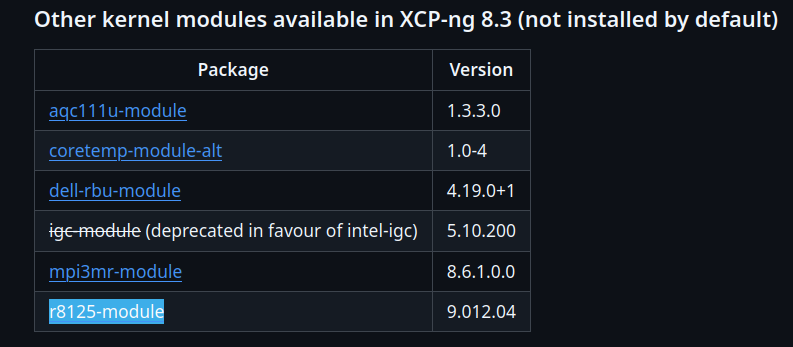
//EDIT: Hmm I just checked on one of my XCP-ng nodes, r8125-module seems to be installed by default (despite me not using Realtek NIC).
So installing it as suggested before will most probably have no impact in your case.From own experience I can say that Realtek NICs have been causing issues on Linux systems for a long time. You could try to use a different NIC, maybe even via USB adapter.
I purchased a NIC with robust driver support on Linux on Amazon for 15$ for a private machine.
Intel based NIC would be your best bet I guess.If trying a different NIC is no option your issue could possibly be fixed by XCP-ng team updating r8125 driver to latest upstream version (which seems to be 9.016.01 as of now)
//EDIT2: another thing you should check first is disabling all sorts of energy saving options for your NIC in BIOS. PCI/PCIe ASPM being the most important one. I remembered that ASPM had been causing issues on Realtek NIC on one of my systems in the past.
The issue you described (NIC connecting and disconnecting repeatedly) could be caused by some sort of energy saving feature bug. -
-
@Andrew Thank you! That driver works.
-
@olivierlambert as the driver provided by @andrew is based on upstream r8125 version 9.016.01 and seems to solve the issue of user @paha I was wondering: are there any plans to update the driver to latest upstream version in official XCP-ng package repository?
-
@MajorP93 @olivierlambert I think 8.3 has reached LTS so I don't think the drivers are getting major upgrades (it's up to Vates). It seams reasonable to add the 8125 alt driver and new 8126/8127 drivers as an installable option.
Realtek keeps releasing new chips and new versions of the existing chips (like the 8125 in @paha machine) that don't work with the existing older drivers. It's an ongoing issue even with mainline Linux kernels.
-
We do upgrade drivers, especially via alt, it's pretty safe (LTS doesn't mean frozen drivers). @stormi could confirm.
-
I had the same issue on the ASUS PRIME B850M-A CSM and fixed it by updating the r8125 driver from version 9.012.04 to version 9.017.01.
-
Making sure we got @Team-OS-Platform-Release in the loop
-
-
@olivierlambert I have a full Realtek 8125/8126/8127 update to replace the existing r8125 driver, as required to support newer chips.
The new 8125 driver drops the 8126 support but you just install the 8126 if needed (requires newer 8125 driver to avoid module conflicts).
-
Drivers are actually in @Team-Hypervisor-Kernel scope nowadays





Hello! It looks like you're interested in this conversation, but you don't have an account yet.
Getting fed up of having to scroll through the same posts each visit? When you register for an account, you'll always come back to exactly where you were before, and choose to be notified of new replies (either via email, or push notification). You'll also be able to save bookmarks and upvote posts to show your appreciation to other community members.
With your input, this post could be even better 💗
Register Login