XCP-ng
    • Categories
    • Recent
    • Tags
    • Popular
    • Users
    • Groups
    • Register
    • Login

    VM backup retry - status failed despite it was done on second attempt
    Scheduled Pinned Locked Moved Backup
    11 Posts 5 Posters 1.8k Views 5 Watching
    Loading More Posts
    • Oldest to Newest
    • Newest to Oldest
    • Most Votes
    Reply
    • Reply as topic
    Log in to reply
    This topic has been deleted. Only users with topic management privileges can see it.
    • olivierlambertO Offline
      olivierlambert Vates πŸͺ Co-Founder CEO
      last edited by

      Another one @lsouai-vates

      1 Reply Last reply Reply Quote 0
      • lsouai-vatesL Offline
        lsouai-vates Vates πŸͺ Product team @icompit
        last edited by

        @icompit Hello, thanks for the report.

        I am asking XO Team... @florent FYI

        1 Reply Last reply Reply Quote 0
        • lsouai-vatesL Offline
          lsouai-vates Vates πŸͺ Product team @icompit
          last edited by

          @icompit hello again and sorry for the late answer...

          The current backup logging system is being reworked: instead of using a custom task system and compiling logs on the fly, it will soon rely on the generic task system and store precompiled logs.

          As part of this change, the logic that currently causes a backup job to appear as "failed" β€” even when a retry succeeded β€” will be deprecated. So while fixing this specific issue now would be technically easy, it might introduce regressions and won’t be relevant once the new system is in place.

          In short: this will be naturally fixed by the upcoming logging overhaul. Thanks for your patience!

          I 1 Reply Last reply Reply Quote 0
          • I Offline
            icompit @lsouai-vates
            last edited by

            @lsouai-vates
            Sure, I understand issues might be related to changes of backup processing under the hood.
            I hope my report going to help with identification of bugs.
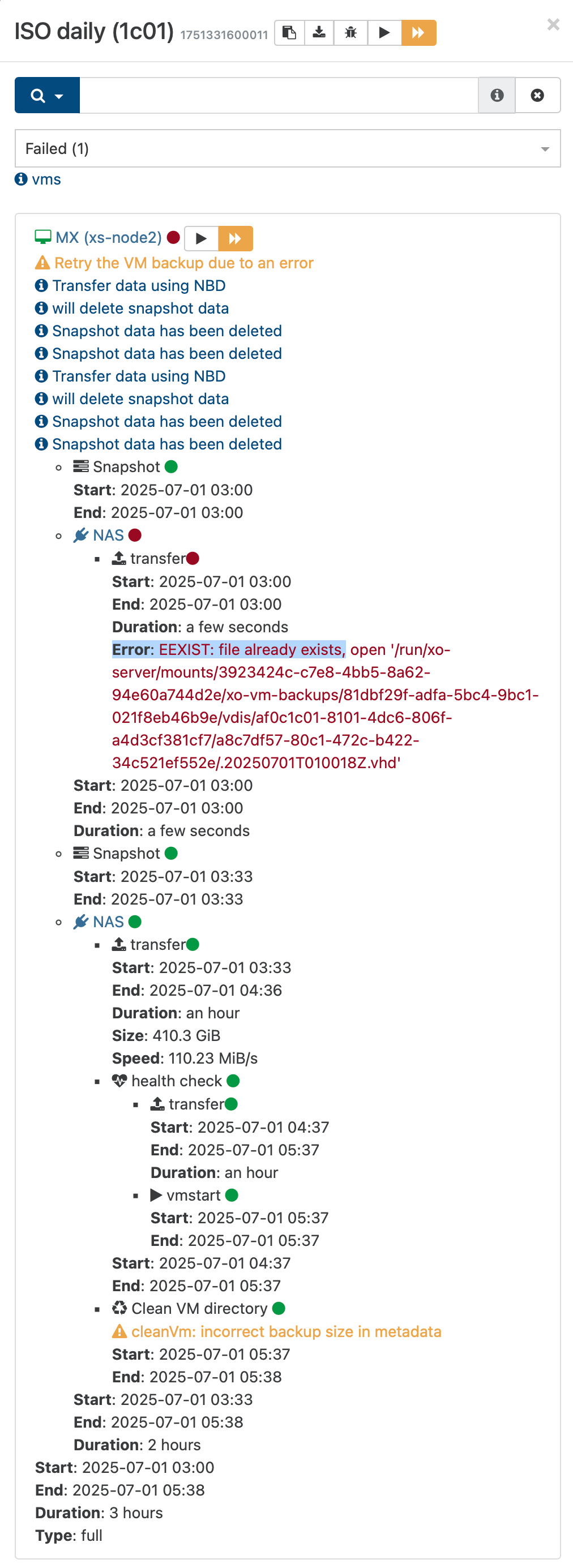
            Does the EEXIST error are also related with this?

            lsouai-vatesL Bastien NolletB 2 Replies Last reply Reply Quote 0
            • I Offline
              icompit
              last edited by

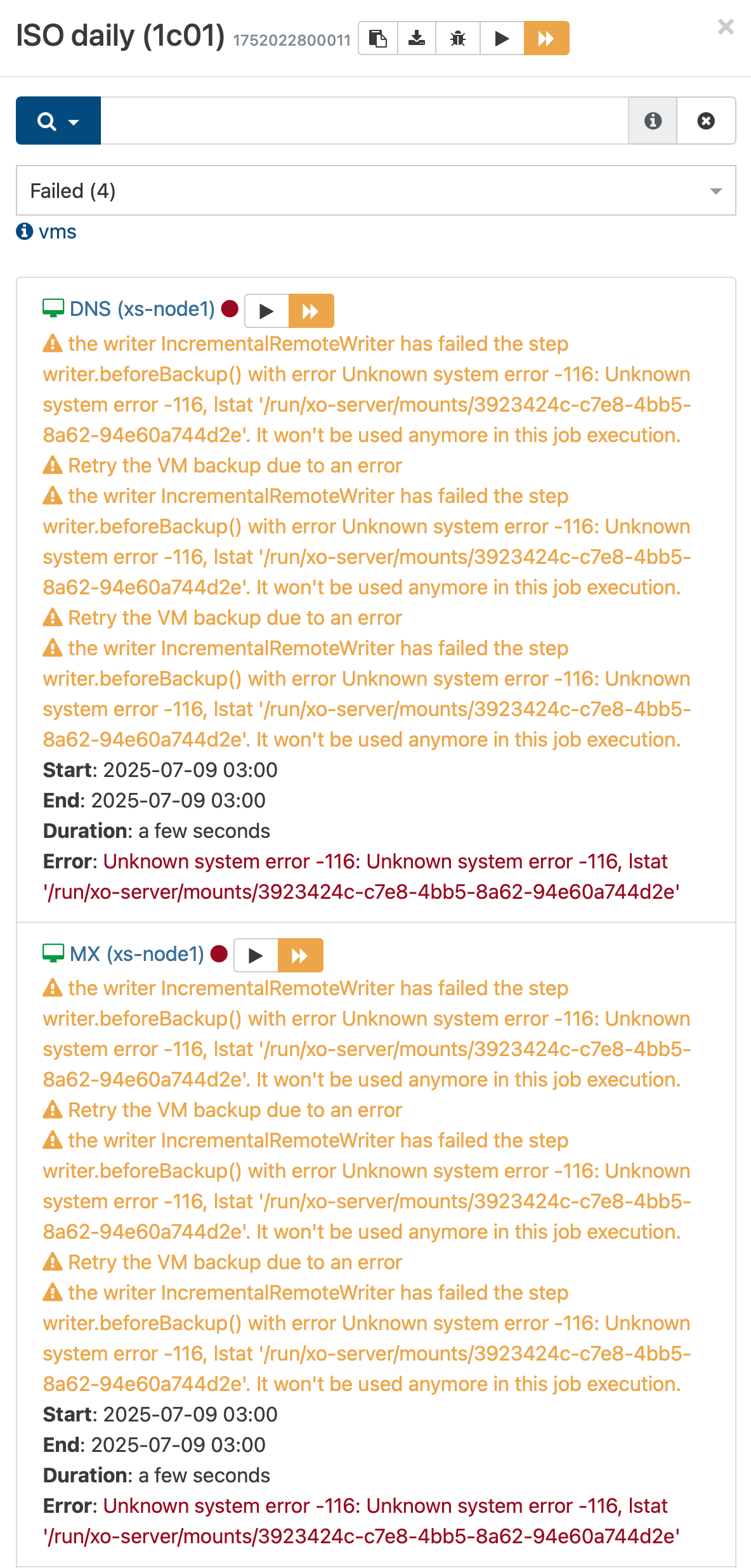
              From today morning... 😐

              09b65ad7-7aae-4315-bb25-8c2065ae7cd4-image.png

              5ab5cf1e-a642-4213-878c-d2d9155a6873-image.png

              Yesterday all was ok.

              49a0e71a-0d86-4eb3-a923-00437b4cb352-image.png

              1 Reply Last reply Reply Quote 0
              • lsouai-vatesL Offline
                lsouai-vates Vates πŸͺ Product team @icompit
                last edited by

                @icompit @Bastien-Nollet can you help to answer?

                1 Reply Last reply Reply Quote 0
                • Bastien NolletB Offline
                  Bastien Nollet Vates πŸͺ XO Team @icompit
                  last edited by

                  @icompit The EEXIST error has appeared with @florent's recent work on backups. I think he's investigating this problem, but he his on vacations now, and will be back in two weeks.

                  If this causes too much trouble for you, for the moment I would recommend you to go back to a previous XO version.

                  I'm not familiar with the new "Unknown system error" you got. Could you give us the log of that backup job execution?

                  I 1 Reply Last reply Reply Quote 0
                  • I Offline
                    icompit @Bastien Nollet
                    last edited by

                    @Bastien-Nollet here is the log..
                    2025-07-09T01_00_00.011Z - backup NG.json.txt

                    Bastien NolletB 1 Reply Last reply Reply Quote 0
                    • Bastien NolletB Offline
                      Bastien Nollet Vates πŸͺ XO Team @icompit
                      last edited by

                      @icompit Thank you.

                      It seems that the backup process fails to get the file lock on the backup directory. Have you modified anything on your remote recently?

                      Also, could you tell me if this is happening on all of this job's runs, all of your backup runs, or if it only happened once on this specific backup job execution?

                      1 Reply Last reply Reply Quote 0
                      • poddingueP Online
                        poddingue Vates πŸͺ
                        last edited by poddingue

                        Both things reported here look fixed in 6.7: the retry succeeding but the job still showing as failed (PR #10129), and the EEXIST: file already exists error, which happened when a job got recreated after a crash (PR #10139).

                        Curious if upgrading clears it for you all too.

                        1 Reply Last reply Reply Quote 0

                        Hello! It looks like you're interested in this conversation, but you don't have an account yet.

                        Getting fed up of having to scroll through the same posts each visit? When you register for an account, you'll always come back to exactly where you were before, and choose to be notified of new replies (either via email, or push notification). You'll also be able to save bookmarks and upvote posts to show your appreciation to other community members.

                        With your input, this post could be even better πŸ’—

                        Register Login
                        • First post
                          Last post