🛰️ XO 6: dedicated thread for all your feedback!
-
Thanks!
-
Maybe I missed this somewhere...but in XO6 > Quick Actions, is it planned to add a Migration option there? I think that is a needed high action item. I don't see Migrate anywhere in XO6 (yet). BTW, I'm going through all the XO 6.x updates posts. I've not yet finished reading through them, so apologies if it was mentioned in one that I haven't read yet

-
@coolsport00 you mean migrate VM ? it's not yet there in XO6, but we'll bring it soon (hopefully in the next 2 months).
-
@julienXOvates Ok, great. Sounds good...thank you Julien!
Also, do you all have GPU passthrough yet? I'm really needing that function for a VDI setup i have. Thanks!
-
@coolsport00 It looks like it is supported https://xcp-ng.org/forum/topic/11034/gpu-passthrough/19#
-
Hello everyone! We need you!
We're currently designing the XO 6 UI for non-admin users, and some choices are genuinely hard to make. If you'd like to give us your opinion, here's a 30-second survey with 2 questions we couldn't settle ourselves: https://survey.vates.tech/s/cms4nrqb4005wrw01021ru6dy
Thanks!

-
Hello everyone! We need you!
We're currently designing the XO 6 UI for non-admin users, and some choices are genuinely hard to make. If you'd like to give us your opinion, here's a 30-second survey with 2 questions we couldn't settle ourselves: https://survey.vates.tech/s/cms4nrqb4005wrw01021ru6dy
Thanks!
Thank you with presenting us with a choice. I have made my comments and offered a 3rd option.
-
Hello, I hope this is the correct place to report this issue.
Short version:
When an XO-managed NFS remote became unreachable, XOA Web UI would not become operational. Once the NFS server became reachable again, the UI immediately recovered.
Investigation and Findings
We just updated our XOA to ver. 6.8.2, and discovered that if an NFS remote becomes unavailable, XOA Web UI does not load correctly and appears unavailable to users. This has not been an issue with previous versions.
We had some network changes in our environment, and because of that the network to one of our NFS remotes broke for some time. The XOA UI would not load at all, despite being up before our network broke the connection to the NFS.
Checking logs, we observed repeated warnings such as:
TimeoutError: operation timed outfor the remote.
Additionally, XOA reported:
Setting up /v5
Setting up /v6
Setting up /
and:
Web server listening on http://[::]:80
Web server listening on https://[::]:443
which suggests the web service itself started.
Also,
xoa checkreported all fine.However, as long as our NFS was unreachable, no user could not access a functional Web UI, either v6 or v5.
Root Cause
One of the configured NFS remotes was unavailable:
172.24.44.140:/mnt/Storage01/vm-iso-storeAfter connectivity to the NFS server (172.24.44.140) was restored, the Web UI immediately became operational again.
Before connectivity was restored:
- df -h was hanging for an extended period.
- XOA Web UI was unavailable.
- xoa check did not identify the problem.
- Multiple remote timeout errors appeared in the logs.
After NFS connectivity returned:
- df -h completed immediately.
- XOA Web UI became available again.
- No manual XO intervention was required.
We expect an unavailable NFS remote (an ISO repository) should mark the remote as unavailable, and allow XO/XOA Web UI to load normally.
If this is not the correct place for this type of bug report, please feel free to move it or point me to the appropriate location. I wanted to make sure the issue was reported and documented.
Thanks.
-
@MihaiAmbrosie Sorry Mihai...just now seeing your response. I'm looking at this now. I'll need to test it all out. I hope it works!


-
@pdonias Filled out Pierre! Thanks for allowing us to provide feedback!
-
And sadly...the documentation for GPU passthrough states currently, due to proprietary code in Xenserver (blah!), NVIDIA is not (yet) supported

-
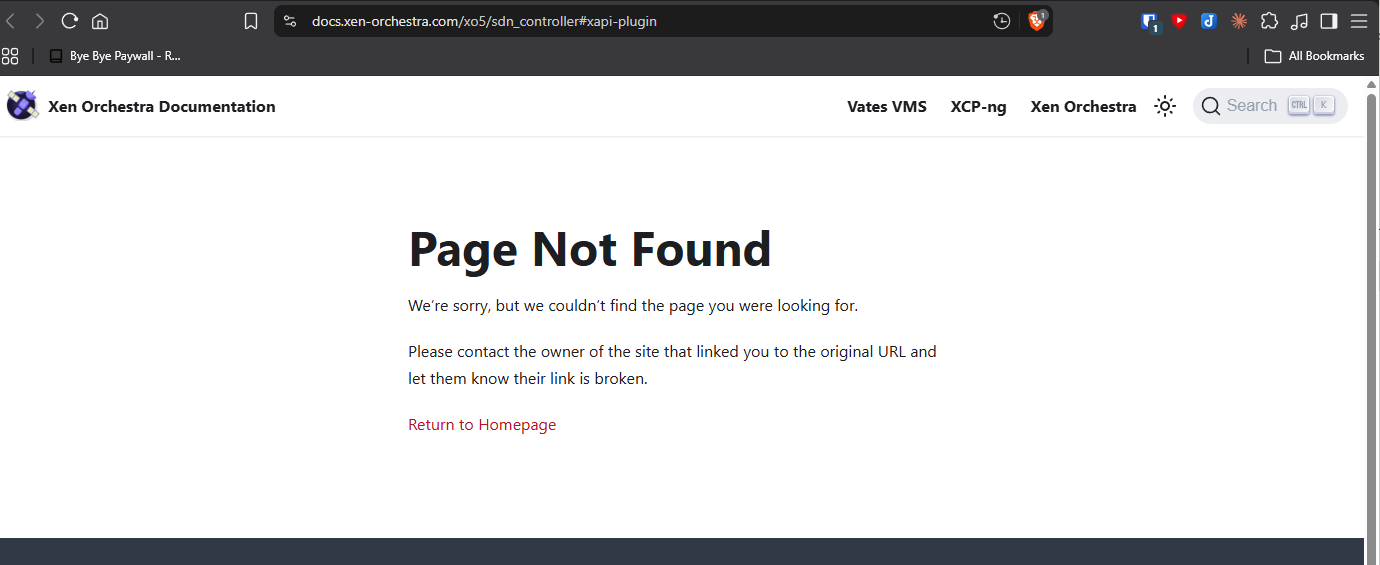
SDN controller documentation link - page not found...
XO from sources latest
commit - 280c0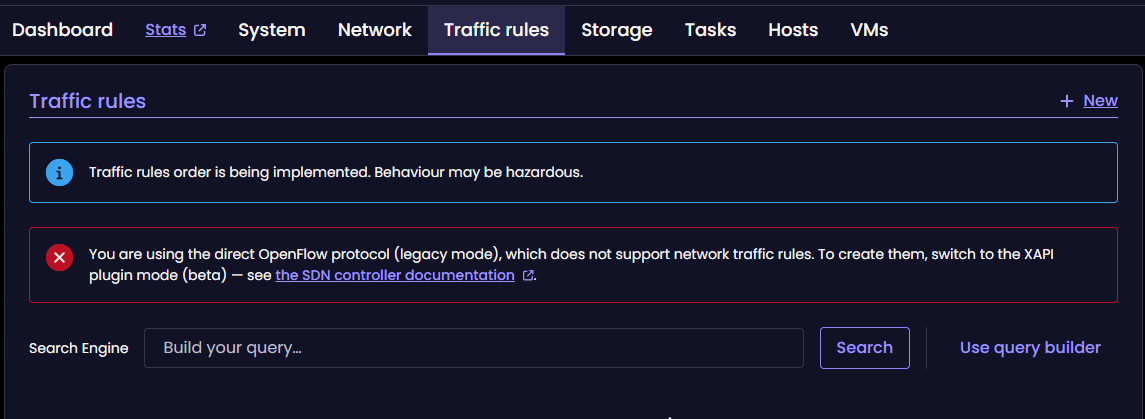
-
Hi Vates Dev folks. I have a suggestion on the XO6 UI - when you click an object in the left navigation pane, then select a view on the right (VMs, Storage, or Network for example), can you make the various column headers sortable? Would be nice to be able to sort column headers when wanting to look for various data in a given view. Thanks!
-
This post is deleted! -
This post is deleted! -
SDN controller documentation link - page not found...
XO from sources latest
commit - 280c0Hi @acebmxer,
Can you check again if issue is still present ? (we fixed some redirections in the last few days) -
Hi Vates Dev folks. I have a suggestion on the XO6 UI - when you click an object in the left navigation pane, then select a view on the right (VMs, Storage, or Network for example), can you make the various column headers sortable? Would be nice to be able to sort column headers when wanting to look for various data in a given view. Thanks!
Hi, Thanks, and yes we have this in our backlog, and also the multi-selection in tables for bulk edition. We'll keep you posted.
-
Yes verified links working correctly now.
-
@julienXOvates Great, thanks Julien!
-
@julienxovates - you have any "insider info" on when virtual GPU (vGPU) passthrough will be able to be implemented? Not regular GPU passthrough, but virtual...and with NVIDIA. (my preference) I guess I can use some other card (recommendations appreciated) until it is supported. Is that moreso on the Citrix Xen side of your OS, or some other road block?
Second question - when do you all plan to implement V2V in XO6?..specifically V2V from VMW. That would be a nice & strong add-in imo.
Thanks.




Hello! It looks like you're interested in this conversation, but you don't have an account yet.
Getting fed up of having to scroll through the same posts each visit? When you register for an account, you'll always come back to exactly where you were before, and choose to be notified of new replies (either via email, or push notification). You'll also be able to save bookmarks and upvote posts to show your appreciation to other community members.
With your input, this post could be even better 💗
Register Login