XCP-ng
    • Categories
    • Recent
    • Tags
    • Popular
    • Users
    • Groups
    • Register
    • Login

    Problem with file level restore from delta backup from LVM parition

    Scheduled Pinned Locked Moved Xen Orchestra
    53 Posts 9 Posters 23.1k Views 5 Watching
    Loading More Posts
    • Oldest to Newest
    • Newest to Oldest
    • Most Votes
    Reply
    • Reply as topic
    Log in to reply
    This topic has been deleted. Only users with topic management privileges can see it.
    • olivierlambertO Offline
      olivierlambert Vates πŸͺ Co-Founder CEO
      last edited by

      @julien-f will take a look when he can πŸ™‚ (or @badrAZ )

      1 Reply Last reply Reply Quote 0
      • L Offline
        lukas
        last edited by

        Hello, any news on that ?

        1 Reply Last reply Reply Quote 0
        • olivierlambertO Offline
          olivierlambert Vates πŸͺ Co-Founder CEO
          last edited by

          We don't have other reports of failed restore on LVM, so it slipped out of the radar.

          Ideally, a support ticket might be better to keep it in the TODO πŸ™‚

          1 Reply Last reply Reply Quote 0
          • O Offline
            othmar
            last edited by othmar

            Hi

            I have the same issue.
            Log:

            backupNg.listFiles
            {
              "remote": "b7f45be2-dcd5-4126-8c07-97cd98c0e08a",
              "disk": "xo-vm-backups/f7c45148-210c-1b0f-5de8-40e1f6384db9/vdis/e51ca8db-ddcc-4ec7-8621-98a9b7a94507/2840c32c-7c9e-4ee1-906a-214464b183b7/20200119T170746Z.vhd",
              "path": "/"
            }
            {
              "command": "mount --options=loop,ro --source=/tmp/tmp-11237QOS1hgR2FZB/vhdi2 --target=/tmp/tmp-11236LS1KLJD2Iem",
              "exitCode": 32,
              "stdout": "",
              "stderr": "mount: /tmp/tmp-11236LS1KLJD2Iem: unknown filesystem type 'LVM2_member'.",
              "failed": true,
              "timedOut": false,
              "isCanceled": false,
              "killed": false,
              "message": "Command failed with exit code 32: mount --options=loop,ro --source=/tmp/tmp-11237QOS1hgR2FZB/vhdi2 --target=/tmp/tmp-11236LS1KLJD2Iem",
              "name": "Error",
              "stack": "Error: Command failed with exit code 32: mount --options=loop,ro --source=/tmp/tmp-11237QOS1hgR2FZB/vhdi2 --target=/tmp/tmp-11236LS1KLJD2Iem
                at makeError (/opt/xen-orchestra/node_modules/execa/lib/error.js:56:11)
                at handlePromise (/opt/xen-orchestra/node_modules/execa/index.js:114:26)
                at <anonymous>"
            } 
            

            Also 2 Disks . Disk 1 list ok , Disk 2 did not work
            Server is a Cent OS 7
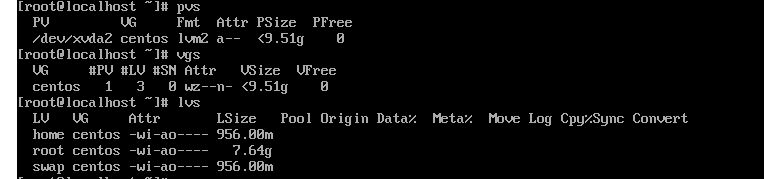
            LVM:

            []# pvs
              PV         VG        Fmt  Attr PSize    PFree
              /dev/xvda2 centos    lvm2 a--   <29,00g    0
              /dev/xvdb  mysqldata lvm2 a--  <120,00g    0
            []# vgs
              VG        #PV #LV #SN Attr   VSize    VFree
              centos      1   2   0 wz--n-  <29,00g    0
              mysqldata   1   1   0 wz--n- <120,00g    0
            []# lvs
              LV        VG        Attr       LSize    Pool Origin Data%  Meta%  Move Log Cpy%Sync Convert
              root      centos    -wi-ao----  <26,00g
              swap      centos    -wi-ao----    3,00g
              mysqldata mysqldata -wi-ao---- <120,00g
            

            Device file /dev/mysqldata/mysqldata
            Current status Mounted on /mysqldata as xfs
            Hope it helps.

            1 Reply Last reply Reply Quote 0
            • olivierlambertO Offline
              olivierlambert Vates πŸͺ Co-Founder CEO
              last edited by

              XFS? That might be the reason why, I don't remember that we support XFS for file level restore.

              1 Reply Last reply Reply Quote 0
              • O Offline
                othmar
                last edited by othmar

                Hi
                Also not working on XO Server

                
                $ df -Th
                Filesystem                          Type      Size  Used Avail Use% Mounted on
                udev                                devtmpfs  3,9G     0  3,9G   0% /dev
                tmpfs                               tmpfs     795M 1020K  794M   1% /run
                /dev/mapper/ubuntu--vg-ubuntu--lv   ext4      3,9G  3,6G   74M  99% /
                tmpfs                               tmpfs     3,9G     0  3,9G   0% /dev/shm
                tmpfs                               tmpfs     5,0M     0  5,0M   0% /run/lock
                tmpfs                               tmpfs     3,9G     0  3,9G   0% /sys/fs/cgroup
                /dev/loop0                          squashfs   90M   90M     0 100% /snap/core/8268
                /dev/loop1                          squashfs   89M   89M     0 100% /snap/core/7270
                /dev/xvda2                          ext4      976M   77M  832M   9% /boot
                tmpfs                               tmpfs     795M     0  795M   0% /run/user/1000
                
                
                  PV         VG        Fmt  Attr PSize    PFree
                  /dev/loop2 mysqldata lvm2 a--  <120,00g      0
                  /dev/xvda3 ubuntu-vg lvm2 a--   <19,00g <15,00g
                
                
                  VG        #PV #LV #SN Attr   VSize    VFree
                  mysqldata   1   1   0 wz--n- <120,00g      0
                  ubuntu-vg   1   1   0 wz--n-  <19,00g <15,00g
                
                  LV        VG        Attr       LSize    Pool Origin Data%  Meta%  Move Log Cpy%Sync Convert
                  mysqldata mysqldata -wi-a----- <120,00g
                  ubuntu-lv ubuntu-vg -wi-ao----    4,00g


                Here is no XFS πŸ˜‰

                1 Reply Last reply Reply Quote 0
                • olivierlambertO Offline
                  olivierlambert Vates πŸͺ Co-Founder CEO
                  last edited by

                  @badrAZ or someone else of XO team will try to reproduce the issue. They are under heavy lot for a bunch of new exciting features, so it might take time to test.

                  1 Reply Last reply Reply Quote 0
                  • badrAZB Offline
                    badrAZ
                    last edited by badrAZ

                    Hi,

                    After testing a file restore on a LVM partition, i don't got the issue.

                    a5c17913-5700-471a-b8d2-82766b2395e0-image.png

                    @lukas @othmar I need please the output of lvscan. Thank you πŸ™‚

                    O 1 Reply Last reply Reply Quote 0
                    • L Offline
                      lukas
                      last edited by

                      lvscan
                        ACTIVE            '/dev/ftp/ftp' [100.00 GiB] inherit
                      

                      Mounted as ext4

                      /dev/mapper/ftp-ftp on /home/ftp type ext4 (rw,relatime,data=ordered)
                      

                      System is debian 8.11

                      1 Reply Last reply Reply Quote 0
                      • O Offline
                        othmar @badrAZ
                        last edited by othmar

                        @badrAZ

                        lvscan
                          ACTIVE            '/dev/ubuntu-vg/ubuntu-lv' [4,00 GiB] inherit
                          ACTIVE            '/dev/mysqldata/mysqldata' [<120,00 GiB] inherit
                        
                        pvscan
                          PV /dev/xvda3   VG ubuntu-vg       lvm2 [<19,00 GiB / <15,00 GiB free]
                          PV /dev/loop2   VG mysqldata       lvm2 [<120,00 GiB / 0    free]
                          Total: 2 [138,99 GiB] / in use: 2 [138,99 GiB] / in no VG: 0 [0   ]
                        
                        fdisk -l
                        Disk /dev/loop0: 89,1 MiB, 93417472 bytes, 182456 sectors
                        Units: sectors of 1 * 512 = 512 bytes
                        Sector size (logical/physical): 512 bytes / 512 bytes
                        I/O size (minimum/optimal): 512 bytes / 512 bytes
                        
                        Disk /dev/loop1: 88,5 MiB, 92778496 bytes, 181208 sectors
                        Units: sectors of 1 * 512 = 512 bytes
                        Sector size (logical/physical): 512 bytes / 512 bytes
                        I/O size (minimum/optimal): 512 bytes / 512 bytes
                        
                        Disk /dev/loop2: 120 GiB, 128849018880 bytes, 251658240 sectors
                        Units: sectors of 1 * 512 = 512 bytes
                        Sector size (logical/physical): 512 bytes / 512 bytes
                        I/O size (minimum/optimal): 512 bytes / 512 bytes
                        
                        Disk /dev/xvda: 20 GiB, 21474836480 bytes, 41943040 sectors
                        Units: sectors of 1 * 512 = 512 bytes
                        Sector size (logical/physical): 512 bytes / 512 bytes
                        I/O size (minimum/optimal): 512 bytes / 512 bytes
                        Disklabel type: gpt
                        Disk identifier: 4EBCD4D4-BC5A-4F08-971C-AFB438AC5912
                        
                        Device       Start      End  Sectors Size Type
                        /dev/xvda1    2048     4095     2048   1M BIOS boot
                        /dev/xvda2    4096  2101247  2097152   1G Linux filesystem
                        /dev/xvda3 2101248 41940991 39839744  19G Linux filesystem
                        
                        Disk /dev/mapper/ubuntu--vg-ubuntu--lv: 4 GiB, 4294967296 bytes, 8388608 sectors
                        Units: sectors of 1 * 512 = 512 bytes
                        Sector size (logical/physical): 512 bytes / 512 bytes
                        I/O size (minimum/optimal): 512 bytes / 512 bytes
                        
                        Disk /dev/mapper/mysqldata-mysqldata: 120 GiB, 128844824576 bytes, 251650048 sectors
                        Units: sectors of 1 * 512 = 512 bytes
                        Sector size (logical/physical): 512 bytes / 512 bytes
                        I/O size (minimum/optimal): 512 bytes / 512 bytes
                        
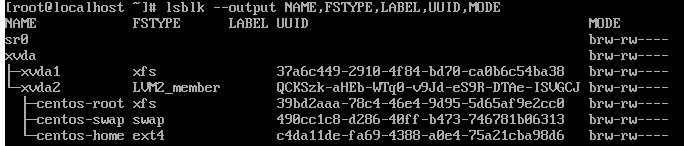
                        sudo lsblk --output NAME,FSTYPE,LABEL,UUID,MODE
                        NAME                      FSTYPE      LABEL UUID                                   MODE
                        loop0                     squashfs                                                 brw-rw----
                        loop1                     squashfs                                                 brw-rw----
                        loop2                     LVM2_member       lBivVu-YQOo-du2R-8DvU-3Igy-Kbk6-7MLtZU brw-rw----
                        └─mysqldata-mysqldata     xfs               c0875768-6bc8-49e5-85e9-fed64b469344   brw-rw----
                        sr0                                                                                brw-rw----
                        xvda                                                                               brw-rw----
                        β”œβ”€xvda1                                                                            brw-rw----
                        β”œβ”€xvda2                   ext4              e79dd49b-ed47-41b0-9b8a-720875dbdaf0   brw-rw----
                        └─xvda3                   LVM2_member       qNEetu-q1qF-AO2t-Eufa-OuoK-9Cy4-hjAstI brw-rw----
                          └─ubuntu--vg-ubuntu--lv ext4              c1b5b0fa-42d1-494a-b2d0-4125c579a660   brw-rw----
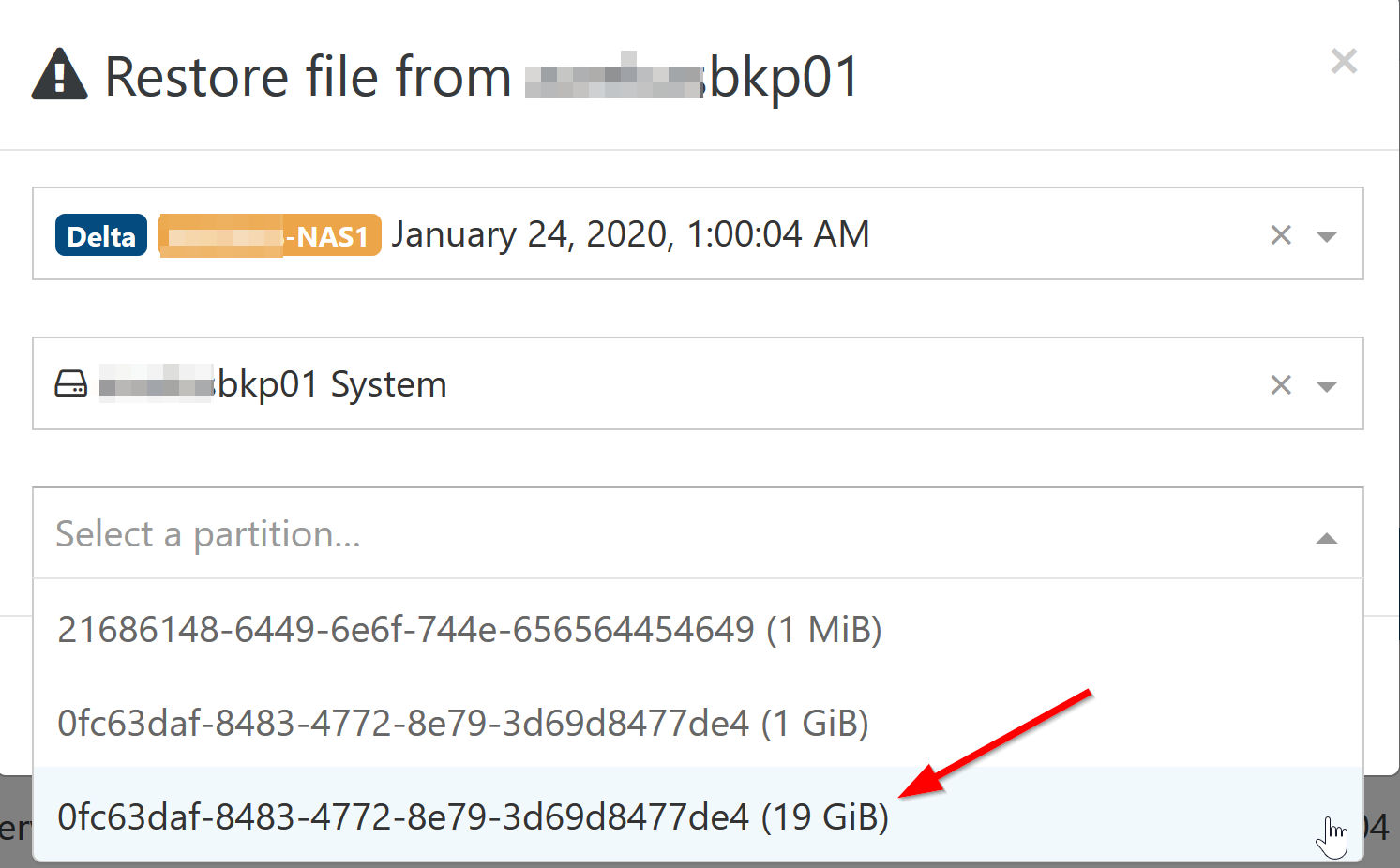
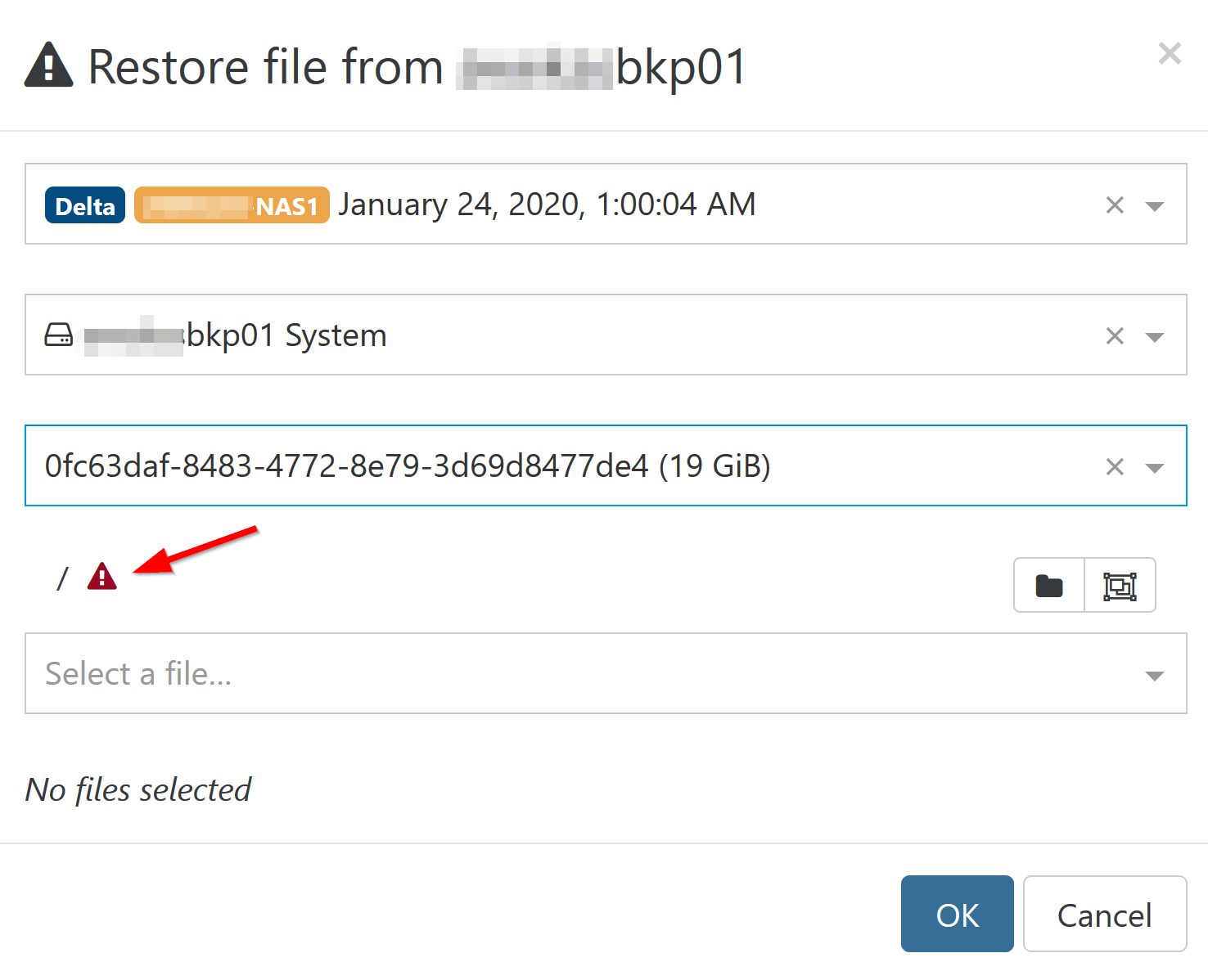


                        2020-01-24 13_36_35-Backup.png
                        2020-01-24 13_37_23-Backup.png

                        1 Reply Last reply Reply Quote 0
                        • badrAZB Offline
                          badrAZ
                          last edited by

                          I tested this functionality on ext4 and xfs and it works for me.

                          6dab6902-06e6-4e59-a70e-1dd1b56704aa-image.png

                          Unfortunately, i need to reproduce this issue in our lab to be able to investigate more.

                          1 Reply Last reply Reply Quote 0
                          • olivierlambertO Offline
                            olivierlambert Vates πŸͺ Co-Founder CEO
                            last edited by

                            Same problem with XOA @othmar ?

                            O 1 Reply Last reply Reply Quote 0
                            • O Offline
                              othmar @olivierlambert
                              last edited by

                              @olivierlambert

                              I did not have a XOA i have the xo-server 5.54.0 community edition on ubunto server.

                              DanpD 1 Reply Last reply Reply Quote 0
                              • DanpD Offline
                                Danp Pro Support Team @othmar
                                last edited by

                                @othmar Install XOA in trial mode and then retest to see if the issue is present with it.

                                O 1 Reply Last reply Reply Quote 0
                                • O Offline
                                  othmar @Danp
                                  last edited by

                                  @Danp
                                  yes it's the same on XOA in trial mode latest patched.

                                  1 Reply Last reply Reply Quote 0
                                  • L Offline
                                    lukas
                                    last edited by

                                    It's same here. Problem is in community version and in xoa trial.

                                    1 Reply Last reply Reply Quote 0
                                    • olivierlambertO Offline
                                      olivierlambert Vates πŸͺ Co-Founder CEO
                                      last edited by

                                      There's obviously something different between the VMs you use and ours for tests. Would you be able to provide a VM export so we can deploy it on our side, backup it and see why file restore doesn't work?

                                      1 Reply Last reply Reply Quote 0
                                      • S Offline
                                        shadowdao
                                        last edited by

                                        I am seeing the same issue with LVM restores. Exists between Trial and Community editions.

                                        backupNg.listFiles
                                        {
                                          "remote": "c6f2b11a-4065-4a8b-b75f-e16bf2aeb5f5",
                                          "disk": "xo-vm-backups/8a0d70df-9659-b307-43f4-fc37133d9d66/vdis/2dcbfc0b-5d0a-4f84-b7ec-e89b1747e0b4/47f611b1-7c83-4319-9fcf-aad09a025edc/20200319T145807Z.vhd",
                                          "path": "/",
                                          "partition": "ea853d6d-01"
                                        }
                                        {
                                          "command": "mount --options=loop,ro,offset=1048576 --source=/tmp/tmp-458p174rEvrE3fU/vhdi1 --target=/tmp/tmp-458llR4TibV7F12",
                                          "exitCode": 32,
                                          "stdout": "",
                                          "stderr": "mount: /tmp/tmp-458llR4TibV7F12: failed to setup loop device for /tmp/tmp-458p174rEvrE3fU/vhdi1.",
                                          "failed": true,
                                          "timedOut": false,
                                          "isCanceled": false,
                                          "killed": false,
                                          "message": "Command failed with exit code 32: mount --options=loop,ro,offset=1048576 --source=/tmp/tmp-458p174rEvrE3fU/vhdi1 --target=/tmp/tmp-458llR4TibV7F12",
                                          "name": "Error",
                                          "stack": "Error: Command failed with exit code 32: mount --options=loop,ro,offset=1048576 --source=/tmp/tmp-458p174rEvrE3fU/vhdi1 --target=/tmp/tmp-458llR4TibV7F12
                                            at makeError (/opt/xen-orchestra/node_modules/execa/lib/error.js:56:11)
                                            at handlePromise (/opt/xen-orchestra/node_modules/execa/index.js:114:26)
                                            at <anonymous>"
                                        } 
                                        
                                        1 Reply Last reply Reply Quote 0
                                        • olivierlambertO Offline
                                          olivierlambert Vates πŸͺ Co-Founder CEO
                                          last edited by

                                          Do you have a VG using multiple PVs?

                                          1 Reply Last reply Reply Quote 0
                                          • S Offline
                                            shadowdao
                                            last edited by

                                            That one does not. I assumed that was the case for another one that had the issue, and working to move the VMs to VHDs that are not on LVM.

                                            # pvdisplay
                                              --- Physical volume ---
                                              PV Name               /dev/xvda2
                                              VG Name               centos
                                              PV Size               79.51 GiB / not usable 3.00 MiB
                                              Allocatable           yes
                                              PE Size               4.00 MiB
                                              Total PE              20354
                                              Free PE               16
                                              Allocated PE          20338
                                              PV UUID               zkCwDd-03ZP-LhLO-drIw-5fpY-Bf7f-J99g0U

                                            
                                            1 Reply Last reply Reply Quote 0

                                            Hello! It looks like you're interested in this conversation, but you don't have an account yet.

                                            Getting fed up of having to scroll through the same posts each visit? When you register for an account, you'll always come back to exactly where you were before, and choose to be notified of new replies (either via email, or push notification). You'll also be able to save bookmarks and upvote posts to show your appreciation to other community members.

                                            With your input, this post could be even better πŸ’—

                                            Register Login
                                            • First post
                                              Last post