XCP-ng
    • Categories
    • Recent
    • Tags
    • Popular
    • Users
    • Groups
    • Register
    • Login

    Hourly Error: "fs_usage"

    Scheduled Pinned Locked Moved Solved Xen Orchestra
    11 Posts 3 Posters 2.7k Views 1 Watching
    Loading More Posts
    • Oldest to Newest
    • Newest to Oldest
    • Most Votes
    Reply
    • Reply as topic
    Log in to reply
    This topic has been deleted. Only users with topic management privileges can see it.
    • DanpD Offline
      Danp Pro Support Team @markhaines
      last edited by

      @markhaines Have you checked under Settings > Remotes to see if any of the remotes are out of disk space?

      You could also look under Dashboard > Health.

      M 1 Reply Last reply Reply Quote 0
      • M Offline
        markhaines @Danp
        last edited by

        @danp I don't have any remotes configured, i have 1 x 500GB disk for install and 1 x 1TB SSD for VM storage - both of which have plenty of room.

        1 Reply Last reply Reply Quote 0
        • olivierlambertO Offline
          olivierlambert Vates 🪐 Co-Founder CEO
          last edited by olivierlambert

          This message is coming from your host. It's your system partition. Do a df -h on the host to see what's going on.

          M 1 Reply Last reply Reply Quote 0
          • M Offline
            markhaines @olivierlambert
            last edited by markhaines

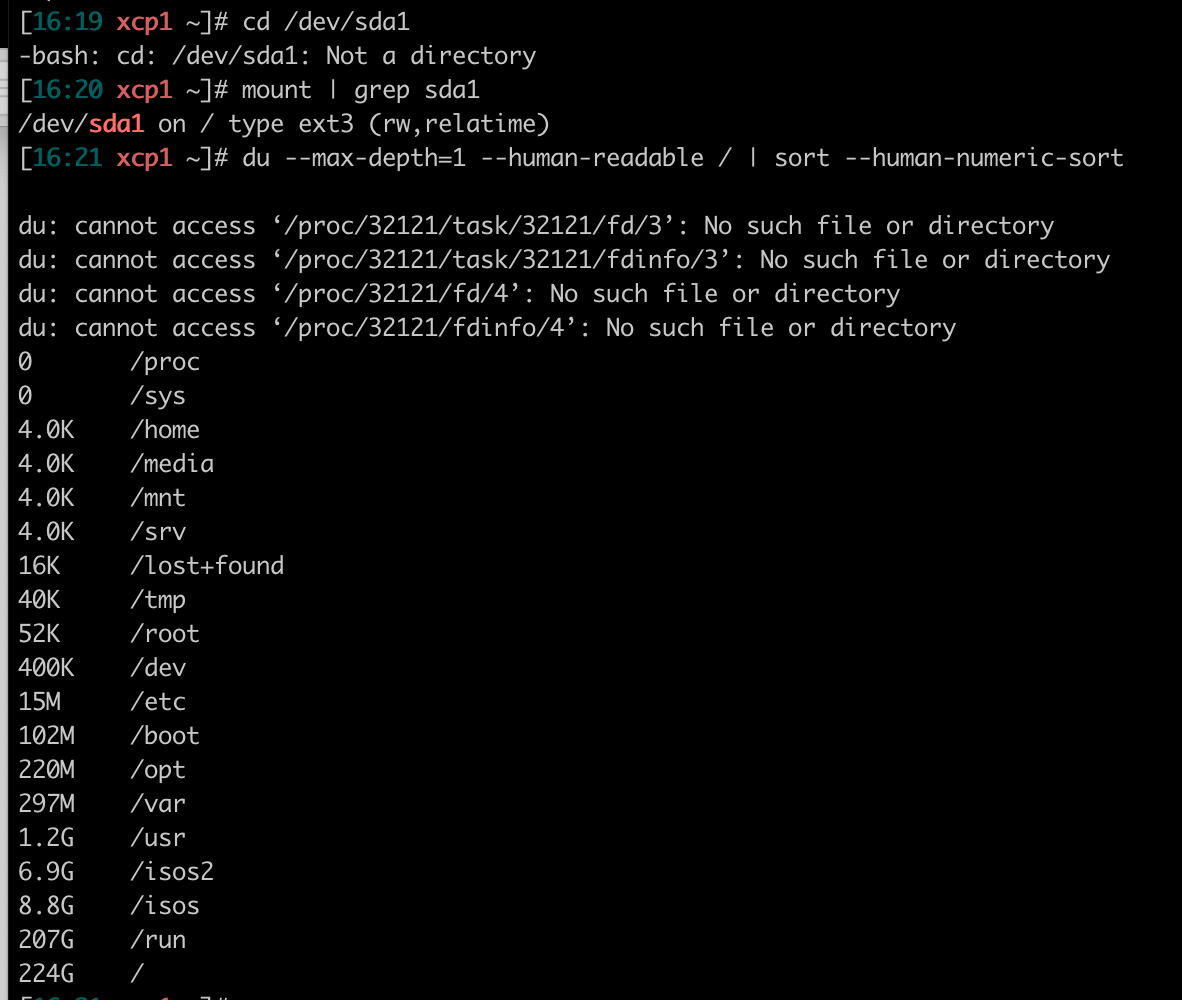
            @olivierlambert thanks for the pointer - so it looks like sda1 at 18GB is 100% full. Did some digging - found this: https://askubuntu.com/questions/506074/how-to-clean-up-dev-sda1-as-its-full. Followed the instructions and this is the result - not sure what to do next?
            CleanShot 2021-05-25 at 16.22.16@2x.png

            1 Reply Last reply Reply Quote 0
            • olivierlambertO Offline
              olivierlambert Vates 🪐 Co-Founder CEO
              last edited by

              You are eating all the space with your local ISO storage repositories. Remove some isos there and/or use a network share for your ISOs.

              M 1 Reply Last reply Reply Quote 0
              • M Offline
                markhaines @olivierlambert
                last edited by

                @olivierlambert ah ok - can i not move them over to the 1TB SSD drive? Can move them to a NFS share if needed but would prefer to keep them local if possible

                1 Reply Last reply Reply Quote 0
                • olivierlambertO Offline
                  olivierlambert Vates 🪐 Co-Founder CEO
                  last edited by

                  You need a dedicated space for that. As ISOs aren't written really often, you can even use an USB key.

                  M 1 Reply Last reply Reply Quote 0
                  • M Offline
                    markhaines @olivierlambert
                    last edited by

                    @olivierlambert ok thanks. If I installed another SSD I have spare could I use that?

                    1 Reply Last reply Reply Quote 0
                    • olivierlambertO Offline
                      olivierlambert Vates 🪐 Co-Founder CEO
                      last edited by

                      Sure 🙂 Just get some space for that if you want.

                      1 Reply Last reply Reply Quote 0
                      • M Offline
                        markhaines
                        last edited by

                        Have created an SMB share and shoved them all there - problem seems to have gone away. Thanks for the help!


                        1 Reply Last reply Reply Quote 1

                        Hello! It looks like you're interested in this conversation, but you don't have an account yet.

                        Getting fed up of having to scroll through the same posts each visit? When you register for an account, you'll always come back to exactly where you were before, and choose to be notified of new replies (either via email, or push notification). You'll also be able to save bookmarks and upvote posts to show your appreciation to other community members.

                        With your input, this post could be even better 💗

                        Register Login
                        • First post
                          Last post