Problem with file level restore from delta backup from LVM parition
-
Hi again, apologies for my tardiness. I've switched to Ubuntu server rather than Debian and all appears to be well again. I can only assume that it is an environment/dependency issue in Debian.
-
Hi,
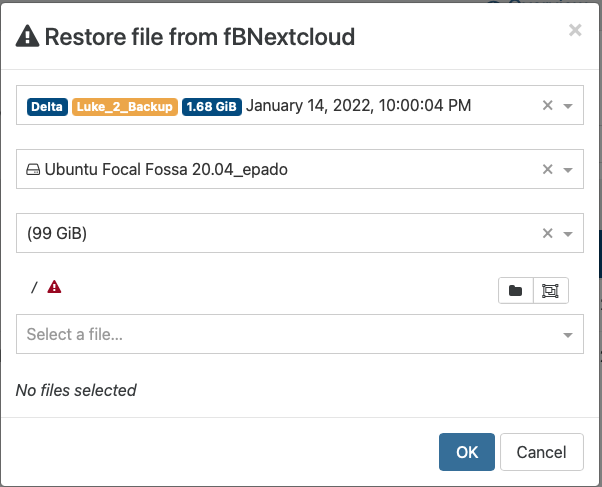
i have the same Problem - im using Ubuntu 20.04 with logic volumes (LVM). If I restore a file it only shows the red triangle. Is there any solution?
backupNg.listFiles { "remote": "9f5e3132-e828-4aef-b083-1053891ce2e7", "disk": "/xo-vm-backups/e28ecb04-027c-00cf-8c30-6977d1f15490/vdis/7d5759ec-475d-428a-a945-57fde5c89562/c83dbbd2-9333-4a6d-aee2-e807c97f4b4b/20220114T210004Z.vhd", "path": "/", "partition": "f80fbe2e-0ce9-448a-a56a-42f73bbb6373" } { "killed": false, "code": 32, "signal": null, "cmd": "mount --options=loop,ro,sizelimit=106297294848,offset=1075838976 --source=/tmp/y7s1u7vrnrf/vhdi10 --target=/tmp/xysii549sk9", "message": "Command failed: mount --options=loop,ro,sizelimit=106297294848,offset=1075838976 --source=/tmp/y7s1u7vrnrf/vhdi10 --target=/tmp/xysii549sk9 mount: /tmp/xysii549sk9: unknown filesystem type 'LVM2_member'. ", "name": "Error", "stack": "Error: Command failed: mount --options=loop,ro,sizelimit=106297294848,offset=1075838976 --source=/tmp/y7s1u7vrnrf/vhdi10 --target=/tmp/xysii549sk9 mount: /tmp/xysii549sk9: unknown filesystem type 'LVM2_member'. at ChildProcess.exithandler (child_process.js:383:12) at ChildProcess.emit (events.js:400:28) at ChildProcess.emit (domain.js:475:12) at ChildProcess.patchedEmit [as emit] (/opt/xo/xo-builds/xen-orchestra-202201061020/@xen-orchestra/log/configure.js:118:17) at maybeClose (internal/child_process.js:1058:16) at Process.ChildProcess._handle.onexit (internal/child_process.js:293:5) at Process.callbackTrampoline (internal/async_hooks.js:130:17)" } -
Are you testing on latest XO virtual Appliance with XO also up to date?
-
xo-server 5.86.3 and xo-web 5.91.2
I also have tested it with the latest XOA. -
Are you using multiple disks under the same VG or LV?
-
Currently im using only one Disk

Disk /dev/xvda: 100 GiB, 107374182400 bytes, 209715200 sectors Units: sectors of 1 * 512 = 512 bytes Sector size (logical/physical): 512 bytes / 512 bytes I/O size (minimum/optimal): 512 bytes / 512 bytes Disklabel type: gpt Disk identifier: B6D16CF5-BE38-48B8-8B94-CDB24AF856B2 Device Start End Sectors Size Type /dev/xvda1 2048 4095 2048 1M BIOS boot /dev/xvda2 4096 2101247 2097152 1G Linux filesystem /dev/xvda3 2101248 209713151 207611904 99G Linux filesystem Disk /dev/mapper/ubuntu--vg-ubuntu--lv: 95 GiB, 102005473280 bytes, 199229440 sectors Units: sectors of 1 * 512 = 512 bytes Sector size (logical/physical): 512 bytes / 512 bytes I/O size (minimum/optimal): 512 bytes / 512 bytes -
sudo vgdisplay --- Volume group --- VG Name ubuntu-vg System ID Format lvm2 Metadata Areas 1 Metadata Sequence No 2 VG Access read/write VG Status resizable MAX LV 0 Cur LV 1 Open LV 1 Max PV 0 Cur PV 1 Act PV 1 VG Size <99,00 GiB PE Size 4,00 MiB Total PE 25343 Alloc PE / Size 24320 / 95,00 GiB Free PE / Size 1023 / <4,00 GiB VG UUID wOYD6e-1NVY-7pFx-WeGO-wuyV-S0cv-yFuqQo -
Please use the correct Markdown syntax, I won't edit all your posts everytime

-
sudo lvdisplay --- Logical volume --- LV Path /dev/ubuntu-vg/ubuntu-lv LV Name ubuntu-lv VG Name ubuntu-vg LV UUID GPwPas-j3FS-O1M8-jzbT-DSNT-Abxy-c7RJZ6 LV Write Access read/write LV Creation host, time ubuntu-server, 2021-12-11 19:16:50 +0000 LV Status available open 1 LV Size 95,00 GiB Current LE 24320 Segments 1 Allocation inherit Read ahead sectors auto - currently set to 256 Block device 253:0 -
ou sorry

-
I thought that the system change it automatically
I didn't realize that you change it 
-
How long ago did you test with a fresh XOA?
-
about 3 hours - I updated everything an tested a file restore
-
Okay weird then. If you have support, please open a support ticket. If you don't, create an issue on Github
-
Thank you. I will do this - If I am successful - I will post it here
-
@wuchererbe Found any success ? I am facing similar issues mentioned here (XO from sources).
-
@ilidza can you check if you have the same issue with XOA?
-
@ilidza no unfortunately not
 I opend a github issue. Here the link - Maybe you can ad something.
https://github.com/vatesfr/xen-orchestra/issues/6097
@olivierlambert i have tried it on XOA - the same Issue.
-
 J JamfoFL referenced this topic on

Hello! It looks like you're interested in this conversation, but you don't have an account yet.
Getting fed up of having to scroll through the same posts each visit? When you register for an account, you'll always come back to exactly where you were before, and choose to be notified of new replies (either via email, or push notification). You'll also be able to save bookmarks and upvote posts to show your appreciation to other community members.
With your input, this post could be even better 💗
Register Login