File Restore Fails
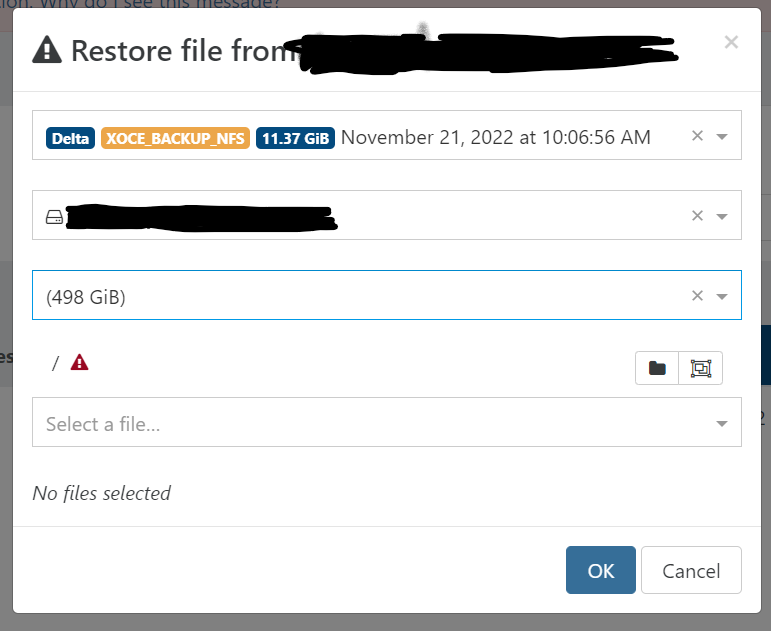
-
Yes, I have tested file restore successfully, when I was using SMB shares, but it never seemed 100% reliable and would error with larger files.
I also had issues installing the latest updates to XO, using the Updater script from Jarli01 on Github. Basically it wouldn't start the server, so I ran the updater again and it seemed to work fine, but it's bugged me since. Perhaps there is a missing or outdated dependency?
-
I can't tell about 3rd party scripts

Can you try with XOA and see if you have the same results?
-
@NeilGrevitt I would suggest rebuilding your install with the following commands --
cd /opt/xen-orchestra
rm -rf node_modules
yarn
yarn build
Then you can try starting the service with
sudo systemctl start xo-server.service -
@olivierlambert I understand. I do have an XOA install, but no subscription, which I thought excludes Delta Backups. Thanks for your help!
-
@NeilGrevitt Feel free to ask for a trial, I can unlock it for 15 days

-
@olivierlambert Thanks, that would be great. My XOA instance is already registered to a previous colleague. Can I just re-register myself? Which account do I use to register XOA? Thanks!!
-
@NeilGrevitt I don't know if this is related to your issue, but figured I mention it here, just in case it helps!
I had the same issue a while back, where my restores would run and complete successfully, and I could even restore full systems, but would receive that same "red triangle with exclamation point" error from your screen shot when trying to restore individual files.
There was even a previous posting here in the forum about that issue:
File Restore Not Working Little Red TriangleIn this particular case, it turned out XO was missing the nfs-common library. The solution was running the following code:
apt-get install ntfs-3gAgain... your issue may be totally different! However, when I looked at your error it jogged my memory of seeing this same thing on my install and figured it couldn't hurt to pass it along, just in case.
I hope you are able to get to the bottom of the issue, no matter the cause!
-
@NeilGrevitt I also found this posting which has the exact, same error message about the "unknown filesystem type 'LVM2_member'" that you have:
Vatesfr GitHub 6097That was open back in January and closed by @julien-f just five days ago. Since this is on the GitHub site, there may be a patch out there that addresses this. Maybe this will jog @julien-f and he'll be able to see if this is relevant to your issue.
-
@NeilGrevitt Last one, then I'll stop bugging you! Also found this posting here in the forum with your identical issue, down the text in the log files:
Problem With File Level Resstore From Delta Backup From LVM PartitionThere's a lot of back and forth in that post, and the final entries are the original poster opening the GitHub case #6097 I mentioned above. In neither case do I see any solutions... but imagine something came up since GitHub case #6097 was listed as closed.
Sorry I can't be more assistance other than digging up other similar cases, but hopefully all of the resources I've added here will help the bigger brains than I point you to a solution.
-
@JamfoFL No worries about bugging me! I seriously appreciate the assistance!
I'll look at it more tomorrow, but an initial check suggests that ntfs-3g is installed. I may end up raising this issue through the GitHub installer people. I also had another error relating to Yarn and Apt that got in the way of updates.
Cheers, Neil
-
@NeilGrevitt Whilst migrating my other backups to NFS, I noticed that one of the VM backups is able to perform file restores successfully.
The successful VM is Ubuntu 22.04.1 LTS, but has been upgraded multiple times and was originally a flavour of 18.x LTS somewhere along it's life.
The unsuccessful VM is Ubuntu 20.04.5 LTS that I believe was installed at this version.
The only difference I can see is the output of lvscan, which does point to an issue with LVM!
Successful VM:
:~$ sudo lvscan
:~$Unsuccesful VM:
:~$ sudo lvscan
ACTIVE '/dev/ubuntu-vg/ubuntu-lv' [<19.00 GiB] inheritNot sure where to go now but thought it worth reporting!



Hello! It looks like you're interested in this conversation, but you don't have an account yet.
Getting fed up of having to scroll through the same posts each visit? When you register for an account, you'll always come back to exactly where you were before, and choose to be notified of new replies (either via email, or push notification). You'll also be able to save bookmarks and upvote posts to show your appreciation to other community members.
With your input, this post could be even better 💗
Register Login