Xen Orchestra Update Failed - Error: ENOSPC: no space left on device
-
Good-day folks,
I trust you're all doing well. So today, I attempted to update my Xen Orchestra instance (built from sources) and it failed. When I checked the install log, I found the following error:
Error: ENOSPC: no space left on device, writeSo I ran df -h to confirm available disk space and this is what it showed:
Filesystem      Size  Used Avail Use% Mounted on
udev            3.9G     0  3.9G   0% /dev
tmpfs           794M  528K  793M   1% /run
/dev/xvda1      8.9G  8.1G  334M  97% /
tmpfs           3.9G     0  3.9G   0% /dev/shm
tmpfs           5.0M     0  5.0M   0% /run/lock
tmpfs           794M     0  794M   0% /run/user/1000
I then ran du -aBm / 2>/dev/null | sort -nr | head -n 10 to see the top 10 largest folders and this is what I see:
8255M   /
4794M   /usr
2853M   /usr/local
2649M   /usr/local/share/.cache/yarn/v6
2649M   /usr/local/share/.cache/yarn
2649M   /usr/local/share/.cache
2649M   /usr/local/share
2332M   /opt/xo
2332M   /opt
2240M   /opt/xo/xo-builds
Based on this, my conclusion is that I can possibly free up space by clearing the yarn cache. But I'm scared I might break something by doing that.
Is it possible to increase the disk size of the Xen Orchestra VM? It's currently set to only 10GB. If so, how do I do that?
-
@kagbasi-wgsdac Hi !
You have 2 options:
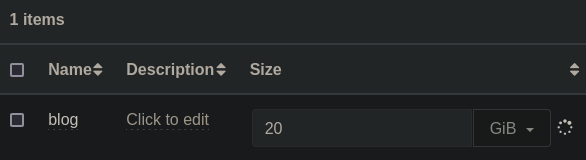
You can deploy a XOA, connect your host, shutdown the XO VM and resize via the GUI (tab "Disks")
Alternatively, you can connect to your host (via SSH), and do the following:- Get the uuid of your XO VM:
xe vm-list - Get the VDI uuid of your VM
xe vm-disk-list uuid=<uuid you just retrieve> - shut the VM
xe vm-shutdown uuid=<uuid of your VM> - and resize the disk
xe vdi-resize uuid=<vdi uuid> size=<0GiB (for example)
I just tested the commands, let me know if it's working for you

- Get the uuid of your XO VM:
-
Cleaning the cache won't remove anything important. You can also increase the size of your XO VM disk as @AtaxyaNetwork showed
-
Don't you still need to enlarge the partition within the VM? I've been using this method recently after using XO to increase the disk size.
-
@Danp Yeah you need to grow the partition in the VM, I forgot to mention that, sorry
-
Thank you all for your quick responses. I was able to resize the disk from 9GB to 50GB, following the instructions given. I believe the following output is confirmation:
root@WGSDAC-SV-XO1:~# lsblk
NAME    MAJ:MIN RM  SIZE RO TYPE MOUNTPOINT
sr0      11:0    1 1024M  0 rom
xvda    202:0    0   50G  0 disk
├─xvda1 202:1    0    9G  0 part /
├─xvda2 202:2    0    1K  0 part
└─xvda5 202:5    0  975M  0 part [SWAP]
Unfortunately, I think resizing the root partition is more involved so I need to take my time with it. A quick Googling around and I've found tutorials which suggest that I can only grow a partition if it's the last. Which means I'll have to delete xvda2 and xvda5.
-
@kagbasi-wgsdac You could try running
sudo resize2fs /dev/xvda1, which should expand the partition for you. -
@Danp I tried it, and the OS gave me a slap on the wrist...lol

root@WGSDAC-SV-XO1:~# resize2fs /dev/xvda1
resize2fs 1.46.2 (28-Feb-2021)
The filesystem is already 2371072 (4k) blocks long.  Nothing to do!
So I cleaned out the yarn cache as well as the apt cache, and this has jointly reclaimed about 3GiB of space.
root@WGSDAC-SV-XO1:~# df -h
Filesystem      Size  Used Avail Use% Mounted on
udev            3.9G     0  3.9G   0% /dev
tmpfs           794M  528K  793M   1% /run
/dev/xvda1      8.9G  5.3G  3.1G  63% /
tmpfs           3.9G     0  3.9G   0% /dev/shm
tmpfs           5.0M     0  5.0M   0% /run/lock
tmpfs           794M     0  794M   0% /run/user/1000
Gonna attempt the XO update again and see if it succeeds, while I study up on doing the partition resize safely. Please keep the suggestions coming - they're quite helpful in growing my knowledge of Linux.
-
You may need to extend the partition first using
growpart.



Hello! It looks like you're interested in this conversation, but you don't have an account yet.
Getting fed up of having to scroll through the same posts each visit? When you register for an account, you'll always come back to exactly where you were before, and choose to be notified of new replies (either via email, or push notification). You'll also be able to save bookmarks and upvote posts to show your appreciation to other community members.
With your input, this post could be even better 💗
Register Login