XCP-ng
    • Categories
    • Recent
    • Tags
    • Popular
    • Users
    • Groups
    • Register
    • Login

    GPU support and Nvidia Grid vGPU

    Scheduled Pinned Locked Moved Compute
    34 Posts 10 Posters 14.7k Views 9 Watching
    Loading More Posts
    • Oldest to Newest
    • Newest to Oldest
    • Most Votes
    Reply
    • Reply as topic
    Log in to reply
    This topic has been deleted. Only users with topic management privileges can see it.
    • E Offline
      EspenU @olivierlambert
      last edited by

      @olivierlambert Would that mean that the vgpu binary should be taken from XS8 as well when using XCP-ng 8.3?
      During testing I tried using that binary in XCP-ng 8.2, and it didn't work (VMs would no boot). I had to use the one from Citrix Hypervisor 8.2.

      1 Reply Last reply Reply Quote 0
      • msupportM Offline
        msupport @olivierlambert
        last edited by msupport

        @olivierlambert
        I have tested the Nvidia XenServer version 17.0.

        1 Reply Last reply Reply Quote 0
        • olivierlambertO Offline
          olivierlambert Vates 🪐 Co-Founder CEO
          last edited by

          I don't know all the versions, but I can tell that:

          • XCP-ng 8.2 == XS 8.2
          • XCP-ng 8.3 == XS 8

          So be sure to use the right/matching binary first 🙂

          msupportM 2 Replies Last reply Reply Quote 0
          • msupportM Offline
            msupport @olivierlambert
            last edited by

            @olivierlambert
            I have found the solution. I will test the whole thing again tomorrow with a clean installation with rc1.

            tjkreidlT 1 Reply Last reply Reply Quote 2
            • olivierlambertO Offline
              olivierlambert Vates 🪐 Co-Founder CEO
              last edited by

              Oh great! Keep us posted!!

              1 Reply Last reply Reply Quote 0
              • tjkreidlT Offline
                tjkreidl Ambassador @msupport
                last edited by

                @msupport Please write up all the steps involved, as this would be very useful documentation for anyone else wanting to accomplish this. Many have delayed switching to XCP-ng because of not being able to make use of NVIDIA GPUs.

                1 Reply Last reply Reply Quote 0
                • olivierlambertO Offline
                  olivierlambert Vates 🪐 Co-Founder CEO
                  last edited by

                  It works on 8.2 already even if it's not official at all 😉

                  1 Reply Last reply Reply Quote 0
                  • msupportM Offline
                    msupport
                    last edited by

                    Installation instructions XCP-NG (RC1) Nvidia M10 | A16 GPU

                    1. install XCP-NG 8.3 RC1
                    2. download XenServer Driver Nvidia 17.1 (NVIDIA-GRID-XenServer-8-550.54.16-550.54.15-551.78)
                    3. unzip driver and copy host driver (NVIDIA-vGPU-xenserver-8-550.54.16.x86_64.iso) I used winscp to copy the driver to the tmp directory.
                    4. download XenServer iso file (https://www.xenserver.com/downloads | XenServer8_2024-06-03.iso)
                    5. copy the file (vgpu-7.4.13-1.xs8.x86_64.rpm) in the packages directory ! Do not use CitrixHypervisor-8.2.0-install-cd file vgpu-7.4.8-1.x86_64
                    6. unpack file vgpu-7.4.13-1.xs8.x86_64
                    7. copy the file \usr\lib64\xen\bin\vgpu (size 129KB) to \usr\lib64\xen\bin\ on your XCP-NG host (chmod 755)
                    8. (putty) /tmp/ xe-install-supplemental-pack NVIDIA-vGPU-xenserver-8-550.54.16.x86_64.iso
                    9. reboot
                    10. install guest driver on the VM client (551.78_grid_win10_win11_server2022_dch_64bit_international.exe)
                    11. token file from Nvidia (C:\Program Files\Nvidia Corporation\vGPU Licensing\ClientConfigToken*.tok)

                    Nvidia drivers 17.2 and 17.3 do not work yet (Guest driver crashes)
                    I will stay tuned and inform you about new findings

                    Have fun

                    tjkreidlT 1 Reply Last reply Reply Quote 4
                    • msupportM Offline
                      msupport @olivierlambert
                      last edited by

                      @olivierlambert
                      Thanks for the hint, that helped me a lot

                      1 Reply Last reply Reply Quote 1
                      • olivierlambertO Offline
                        olivierlambert Vates 🪐 Co-Founder CEO
                        last edited by

                        Thank you very much!

                        1 Reply Last reply Reply Quote 0
                        • tjkreidlT Offline
                          tjkreidl Ambassador @msupport
                          last edited by

                          @msupport Many thanks for your write-up! Have you experienced any issues communicating with the NVIDIA license server?

                          msupportM 1 Reply Last reply Reply Quote 0
                          • F Offline
                            fatek
                            last edited by

                            I also used instructions from @msupport

                            https://xcp-ng.org/forum/topic/8987/vgpu-nvidia-tesla-p4-xcp-ng-8-3-beta-2?_=1721015408249

                            1 Reply Last reply Reply Quote 0
                            • msupportM Offline
                              msupport @tjkreidl
                              last edited by

                              @tjkreidl
                              Nvidia licence server works perfectly so far

                              1 Reply Last reply Reply Quote 1
                              • Tristis OrisT Offline
                                Tristis Oris Top contributor
                                last edited by Tristis Oris

                                i can't find where to get this new nvidia driver. Tesla V100.

                                upd
                                looks the only way is license portal https://nvid.nvidia.com/. sad.

                                msupportM 1 Reply Last reply Reply Quote 0
                                • msupportM Offline
                                  msupport @Tristis Oris
                                  last edited by

                                  @Tristis-Oris
                                  The driver version 17.1 worked for me, 17.2 and 17.3 crashed the Windows drivers
                                  https://we.tl/t-VozEeV8TFB

                                  Tristis OrisT T 2 Replies Last reply Reply Quote 0
                                  • Tristis OrisT Offline
                                    Tristis Oris Top contributor @msupport
                                    last edited by

                                    @msupport thank you. Will try to play with it.

                                    msupportM 1 Reply Last reply Reply Quote 0
                                    • msupportM Offline
                                      msupport @Tristis Oris
                                      last edited by

                                      @Tristis-Oris
                                      The download will be available for 3 days...

                                      1 Reply Last reply Reply Quote 0
                                      • M Offline
                                        mgformula1
                                        last edited by olivierlambert

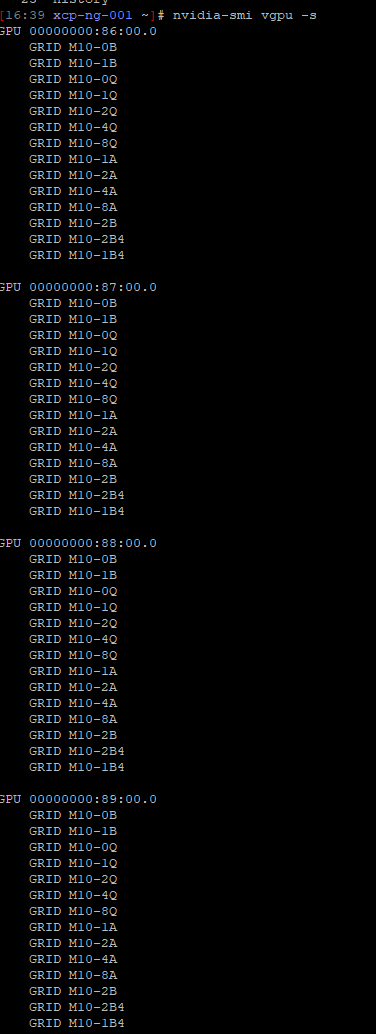
                                        i have followed the documentation however for some reason the VMs wont power on with a vGPU profile attached. We are testing with NVidia M10 GPUs. I'm using xcp-ng 8.3 and NVidia host driver 17.1, also tried 17.2 and 17.3

                                        This is the error

                                        {
                                          "id": "0m369opsm",
                                          "properties": {
                                            "method": "vm.start",
                                            "params": {
                                              "id": "b8c94655-5801-21ee-7eb0-788a58b57736",
                                              "bypassMacAddressesCheck": false,
                                              "force": false
                                            },
                                            "name": "API call: vm.start",
                                            "userId": "2c8c735d-5369-4a91-8433-b9f94e6eb394",
                                            "type": "api.call"
                                          },
                                          "start": 1730921023894,
                                          "status": "failure",
                                          "updatedAt": 1730921066138,
                                          "end": 1730921066138,
                                          "result": {
                                            "code": "FAILED_TO_START_EMULATOR",
                                            "params": [
                                              "OpaqueRef:f3f7d9f6-9dc7-772e-ddfe-c1ed19f1aeff",
                                              "vgpu",
                                              "Device.Dm.start_vgpu: emulator failed to start for domain 1"
                                            ],
                                            "call": {
                                              "method": "VM.start",
                                              "params": [
                                                "OpaqueRef:f3f7d9f6-9dc7-772e-ddfe-c1ed19f1aeff",
                                                false,
                                                false
                                              ]
                                            },
                                            "message": "FAILED_TO_START_EMULATOR(OpaqueRef:f3f7d9f6-9dc7-772e-ddfe-c1ed19f1aeff, vgpu, Device.Dm.start_vgpu: emulator failed to start for domain 1)",
                                            "name": "XapiError",
                                            "stack": "XapiError: FAILED_TO_START_EMULATOR(OpaqueRef:f3f7d9f6-9dc7-772e-ddfe-c1ed19f1aeff, vgpu, Device.Dm.start_vgpu: emulator failed to start for domain 1)\n    at Function.wrap (file:///usr/local/lib/node_modules/xo-server/node_modules/xen-api/_XapiError.mjs:16:12)\n    at file:///usr/local/lib/node_modules/xo-server/node_modules/xen-api/transports/json-rpc.mjs:38:21\n    at runNextTicks (node:internal/process/task_queues:60:5)\n    at processImmediate (node:internal/timers:447:9)\n    at process.callbackTrampoline (node:internal/async_hooks:128:17)"
                                        

                                        host output
                                        360af704-caaa-42d5-8e14-60e047d31103-image.png

                                        M 1 Reply Last reply Reply Quote 0
                                        • M Offline
                                          mgformula1 @mgformula1
                                          last edited by

                                          i also performed a clean install of 8.2, same power on issue when a vGPU profile is attached.

                                          1 Reply Last reply Reply Quote 0
                                          • T Offline
                                            timemaster5 @msupport
                                            last edited by

                                            @msupport said in GPU support and Nvidia Grid vGPU:

                                            @Tristis-Oris
                                            The driver version 17.1 worked for me, 17.2 and 17.3 crashed the Windows drivers
                                            https://we.tl/t-VozEeV8TFB

                                            May I ask for a re-up? For some reason, I don't see version 17 in my Nvidia Licensing Portal 😞 The latest is 16

                                            Tristis OrisT 1 Reply Last reply Reply Quote 0

                                            Hello! It looks like you're interested in this conversation, but you don't have an account yet.

                                            Getting fed up of having to scroll through the same posts each visit? When you register for an account, you'll always come back to exactly where you were before, and choose to be notified of new replies (either via email, or push notification). You'll also be able to save bookmarks and upvote posts to show your appreciation to other community members.

                                            With your input, this post could be even better 💗

                                            Register Login
                                            • First post
                                              Last post


