XCP-ng
    • Categories
    • Recent
    • Tags
    • Popular
    • Users
    • Groups
    • Register
    • Login

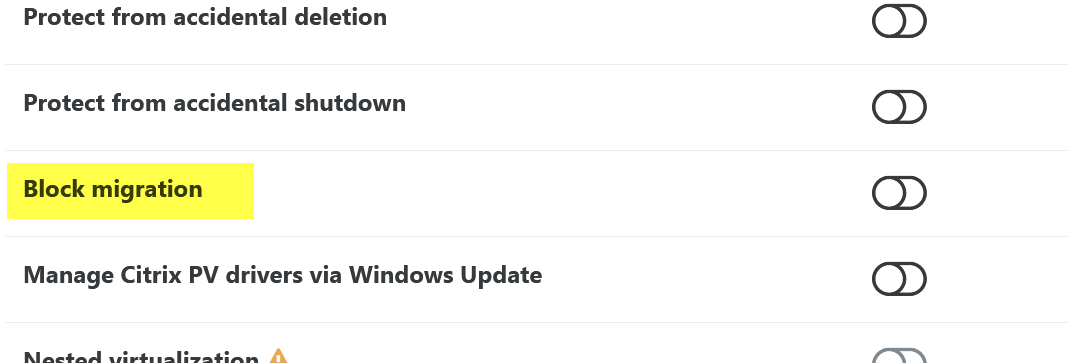
    "Block migraton" option on the VM´s Advanced tab
    Scheduled Pinned Locked Moved Management
    20 Posts 9 Posters 2.8k Views 6 Watching
    Loading More Posts
    • Oldest to Newest
    • Newest to Oldest
    • Most Votes
    Reply
    • Reply as topic
    Log in to reply
    This topic has been deleted. Only users with topic management privileges can see it.
    • D Online
      DustinB
      last edited by

      If I had my choice, Prevent Migration is more understandable.

      Disable Migration, while it means the same thing, doesn't naturally come out of the English language.

      1 Reply Last reply Reply Quote 3
      • olivierlambertO Offline
        olivierlambert Vates 🪐 Co-Founder CEO
        last edited by

        Food for thoughts @thomas-dkmt

        thomas-dkmtT 1 Reply Last reply Reply Quote 1
        • thomas-dkmtT Offline
          thomas-dkmt Vates 🪐 Docs & Knowledge Team @olivierlambert
          last edited by

          @olivierlambert @DustinB Thanks! It's always helpful to have a native speaker's perspective.

          D 1 Reply Last reply Reply Quote 0
          • D Online
            DustinB @thomas-dkmt
            last edited by

            @thomas-dkmt said in "Block migraton" option on the VM´s Advanced tab:

            @olivierlambert @DustinB Thanks! It's always helpful to have a native speaker's perspective.

            Happy to help, worth noting that if a setting like this is enabled on a given VM, there should also be some sort of visual indication on the home screen of XO to annotate that these VMs won't move unless this is disabled.

            A 1 Reply Last reply Reply Quote 1
            • A Offline
              abudef @DustinB
              last edited by

              Done
              https://github.com/vatesfr/xen-orchestra/commit/dba08f0fac866c76700a3785a178743770159883

              0 MathieuRA committed to vatesfr/xen-orchestra
              feat(xo-web/vm): rename 'block migration' to 'disable migration' (#8492)
              
              Introduced by 11a801c
              Related to #8222
              D 1 Reply Last reply Reply Quote 0
              • D Online
                DustinB @abudef
                last edited by

                @abudef The English translation is meant to be "Prevent Migration".

                I think some lines were crossed ha.

                J 1 Reply Last reply Reply Quote 0
                • J Offline
                  john.c @DustinB
                  last edited by

                  @DustinB said in "Block migraton" option on the VM´s Advanced tab:

                  @abudef The English translation is meant to be "Prevent Migration".

                  I think some lines were crossed ha.

                  I agree it really needs to actually read "Prevent Migration", that will then make it pretty clear.

                  1 Reply Last reply Reply Quote 0
                  • D Online
                    DustinB
                    last edited by

                    Looks to be correct on the current release of XO from Source and reads as "Prevent Migration"

                    1 Reply Last reply Reply Quote 0
                    • P Offline
                      panzersrmm
                      last edited by panzersrmm

                      Hi! Is there a VM parameter that saves this "Block migration" UI button?

                      I wasn't able to identify which one it is with command:

                      xe vm-param-list uuid=<VMuuid>
                      

                      Thank you!

                      A 1 Reply Last reply Reply Quote 0
                      • olivierlambertO Offline
                        olivierlambert Vates 🪐 Co-Founder CEO
                        last edited by

                        I never remember the exact option myself, we should document it @thomas-dkmt

                        In the meantime, @Team-XAPI-Network can give the answer 🙂

                        1 Reply Last reply Reply Quote 1
                        • A Offline
                          andriy.sultanov Vates 🪐 XAPI & Network Team @panzersrmm
                          last edited by andriy.sultanov

                          @panzersrmm

                          @panzersrmm said in "Block migraton" option on the VM´s Advanced tab:

                          Hi! Is there a VM parameter that saves this "Block migration" UI button?

                          I wasn't able to identify which one it is with command:

                          xe vm-param-list uuid=<VMuuid>
                          

                          Thank you!

                          How do you mean? Is the XO option not persistent?

                          XO sets these parameters:

                          # xe vm-list uuid=$UUID params=blocked-operations
                          blocked-operations (MRW)    : pool_migrate: true; migrate_send: true
                          

                          Which you can set like this yourself:

                          # xe vm-param-set uuid=$UUID blocked-operations:migrate_send=true
                          # xe vm-param-set uuid=$UUID blocked-operations:pool_migrate=true
                          
                          P 1 Reply Last reply Reply Quote 1
                          • olivierlambertO Offline
                            olivierlambert Vates 🪐 Co-Founder CEO
                            last edited by

                            It is persistent but people usually want to modify it manually in some cases 🙂 Thanks @andriy.sultanov !

                            1 Reply Last reply Reply Quote 0
                            • P Offline
                              panzersrmm @andriy.sultanov
                              last edited by

                              @andriy.sultanov said in "Block migraton" option on the VM´s Advanced tab:

                              @panzersrmm

                              @panzersrmm said in "Block migraton" option on the VM´s Advanced tab:

                              Hi! Is there a VM parameter that saves this "Block migration" UI button?

                              I wasn't able to identify which one it is with command:

                              xe vm-param-list uuid=<VMuuid>
                              

                              Thank you!

                              How do you mean? Is the XO option not persistent?

                              XO sets these parameters:

                              # xe vm-list uuid=$UUID params=blocked-operations
                              blocked-operations (MRW)    : pool_migrate: true; migrate_send: true
                              

                              Which you can set like this yourself:

                              # xe vm-param-set uuid=$UUID blocked-operations:migrate_send=true
                              # xe vm-param-set uuid=$UUID blocked-operations:pool_migrate=true
                              

                              @andriy.sultanov Thank you for your answer! That's what I was looking for. I was looking directly at the VM parameters, with

                              xe vm-param-list uuid=$UUID
                              

                              and I was directly searching for "blocked_migration". Now I know what to look for.

                              @olivierlambert Thank you for pinging the appropriate team for the answer.

                              1 Reply Last reply Reply Quote 2
                              • P panzersrmm referenced this topic on

                              Hello! It looks like you're interested in this conversation, but you don't have an account yet.

                              Getting fed up of having to scroll through the same posts each visit? When you register for an account, you'll always come back to exactly where you were before, and choose to be notified of new replies (either via email, or push notification). You'll also be able to save bookmarks and upvote posts to show your appreciation to other community members.

                              With your input, this post could be even better 💗

                              Register Login
                              • First post
                                Last post
