VM migration time
-
The network throughput is really weird. What NIC are you using? Also, double check you have MTU 9000 everywhere, this is usually a can of worm when not correctly configured.
-
@olivierlambert See the settings:
- Network for pool:

- Network for host 1 of Pool:

- Network for host 2 of Pool:

-
Switch Dell: MTU 9216
-
MTU on all Storage SCSI interfaces:
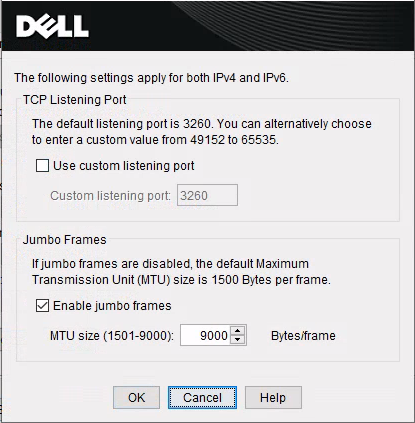
-
I will try to list more information.
-
What NIC do you have in your servers @cairoti ?
-
For me, it is normal to only see 400mbps when migrating from one NFS storage server to another NFS storage server. This is also on a 10gbe network and the drives are fast enough to benchmark a Windows VM up to 6gbps. MTU only 1500.
Under the same storage servers and ESXi8.02, I get faster speeds and I think this is because they use nconnect=4 as the default for NFS connections. I need to do more work with ESXi and the whole vSphere system before rendering firm conclusions, but this might be a thing.
Truenas Scale 24.10.x on both storage servers, both with spinning SATA drives for the array.
-
@nikade Broadcom NetXtreme II BCM57810 10 Gigabit Ethernet
-
The Broadcom cards can be a problem, is it possible to swap out for Intel cards?
-
+1 for swapping the Broadcom NIC's - We're using only Intel for a numerous of reasons, one being performance issues in the past.
Havent tried Broadcom in like 10 years but I remember a lot of issues with dropped packets and driver problems. -
@nikade @olivierlambert I created two Linux VMs and ran the below bandwidth and disk tests:
Testing using Dell Storage Network and local server volumes:
# iperf -c IPServer -r -t 600 -i 60
------------------------------------------------------------
Server listening on TCP port 5001
TCP window size:  128 KByte (default)
------------------------------------------------------------
------------------------------------------------------------
Client connecting to IPServer, TCP port 5001
TCP window size: 16.0 KByte (default)
------------------------------------------------------------
[  1] local IPClient port 54762 connected with IPServer port 5001 (icwnd/mss/irtt=14/1448/1321)
[ ID] Interval       Transfer     Bandwidth
[  1] 0.0000-60.0000 sec  51.6 GBytes  7.39 Gbits/sec
[  1] 60.0000-120.0000 sec  50.9 GBytes  7.28 Gbits/sec
[  1] 120.0000-180.0000 sec  51.2 GBytes  7.33 Gbits/sec
[  1] 180.0000-240.0000 sec  49.1 GBytes  7.03 Gbits/sec
[  1] 240.0000-300.0000 sec  50.8 GBytes  7.27 Gbits/sec
[  1] 300.0000-360.0000 sec  48.8 GBytes  6.99 Gbits/sec
[  1] 360.0000-420.0000 sec  51.7 GBytes  7.41 Gbits/sec
[  1] 420.0000-480.0000 sec  49.2 GBytes  7.05 Gbits/sec
[  1] 480.0000-540.0000 sec  50.1 GBytes  7.17 Gbits/sec
[  1] 540.0000-600.0000 sec  50.0 GBytes  7.16 Gbits/sec
[  1] 0.0000-600.0027 sec   503 GBytes  7.21 Gbits/sec
[  2] local IPClient port 5001 connected with IPServer port 33924
[ ID] Interval       Transfer     Bandwidth
[  2] 0.0000-60.0000 sec  50.8 GBytes  7.28 Gbits/sec
[  2] 60.0000-120.0000 sec  51.4 GBytes  7.36 Gbits/sec
[  2] 120.0000-180.0000 sec  52.4 GBytes  7.51 Gbits/sec
[  2] 180.0000-240.0000 sec  50.3 GBytes  7.21 Gbits/sec
[  2] 240.0000-300.0000 sec  50.4 GBytes  7.22 Gbits/sec
[  2] 300.0000-360.0000 sec  51.0 GBytes  7.30 Gbits/sec
[  2] 360.0000-420.0000 sec  50.6 GBytes  7.24 Gbits/sec
[  2] 420.0000-480.0000 sec  50.4 GBytes  7.22 Gbits/sec
[  2] 480.0000-540.0000 sec  50.1 GBytes  7.18 Gbits/sec
[  2] 540.0000-600.0000 sec  50.9 GBytes  7.29 Gbits/sec
[  2] 0.0000-600.0125 sec   508 GBytes  7.28 Gbits/sec
Test using Dell Storage volumes and networking:
# iperf -c IPServer -r -t 600 -i 60
------------------------------------------------------------
Server listening on TCP port 5001
TCP window size:  128 KByte (default)
------------------------------------------------------------
------------------------------------------------------------
Client connecting to IPServer, TCP port 5001
TCP window size: 16.0 KByte (default)
------------------------------------------------------------
[  1] local IPClient port 50006 connected with IPServer port 5001 (icwnd/mss/irtt=14/1448/4104)
[ ID] Interval       Transfer     Bandwidth
[  1] 0.0000-60.0000 sec  33.7 GBytes  4.82 Gbits/sec
[  1] 60.0000-120.0000 sec  33.3 GBytes  4.77 Gbits/sec
[  1] 120.0000-180.0000 sec  33.4 GBytes  4.78 Gbits/sec
[  1] 180.0000-240.0000 sec  36.1 GBytes  5.16 Gbits/sec
[  1] 240.0000-300.0000 sec  36.7 GBytes  5.25 Gbits/sec
[  1] 300.0000-360.0000 sec  32.8 GBytes  4.69 Gbits/sec
[  1] 360.0000-420.0000 sec  33.4 GBytes  4.78 Gbits/sec
[  1] 420.0000-480.0000 sec  34.5 GBytes  4.93 Gbits/sec
[  1] 480.0000-540.0000 sec  35.3 GBytes  5.05 Gbits/sec
[  1] 540.0000-600.0000 sec  34.3 GBytes  4.91 Gbits/sec
[  1] 0.0000-600.0239 sec   343 GBytes  4.92 Gbits/sec
[  2] local IPClient port 5001 connected with IPServer port 52714
[ ID] Interval       Transfer     Bandwidth
[  2] 0.0000-60.0000 sec  35.7 GBytes  5.12 Gbits/sec
[  2] 60.0000-120.0000 sec  31.6 GBytes  4.53 Gbits/sec
[  2] 120.0000-180.0000 sec  30.3 GBytes  4.34 Gbits/sec
[  2] 180.0000-240.0000 sec  35.1 GBytes  5.02 Gbits/sec
[  2] 240.0000-300.0000 sec  37.9 GBytes  5.42 Gbits/sec
[  2] 300.0000-360.0000 sec  37.5 GBytes  5.37 Gbits/sec
[  2] 360.0000-420.0000 sec  37.5 GBytes  5.37 Gbits/sec
[  2] 420.0000-480.0000 sec  37.1 GBytes  5.31 Gbits/sec
[  2] 480.0000-540.0000 sec  33.9 GBytes  4.86 Gbits/sec
[  2] 540.0000-600.0000 sec  35.0 GBytes  5.00 Gbits/sec
[  2] 0.0000-600.0036 sec   352 GBytes  5.03 Gbits/sec
Dell storage disk testing for each VM:
dd if=/dev/zero of=/tmp/teste1.img bs=1G count=1 oflag=dsync
1+0 records in
1+0 records out
1073741824 bytes (1,1 GB, 1,0 GiB) copied, 15,3566 s, 69,9 MB/s
dd if=/dev/zero of=/tmp/teste1.img bs=1G count=1 oflag=dsync 1+0 records in 1+0 records out 1073741824 bytes (1,1 GB, 1,0 GiB) copied, 19,0043 s, 56,5 MB/sServer local disk test for each VM:
dd if=/dev/zero of=/tmp/teste1.img bs=1G count=1 oflag=dsync
1+0 records in
1+0 records out
1073741824 bytes (1,1 GB, 1,0 GiB) copied, 6,88148 s, 156 MB/s
dd if=/dev/zero of=/tmp/teste1.img bs=1G count=1 oflag=dsync 1+0 records in 1+0 records out 1073741824 bytes (1,1 GB, 1,0 GiB) copied, 5,83594 s, 184 MB/s -
@Greg_E At this time we do not have the financial resources to purchase new boards.
-
I think this may be like my benchmarks, the benchmarks show decent speed to disk, but migration from server to server to local to server are just SLOW.



Hello! It looks like you're interested in this conversation, but you don't have an account yet.
Getting fed up of having to scroll through the same posts each visit? When you register for an account, you'll always come back to exactly where you were before, and choose to be notified of new replies (either via email, or push notification). You'll also be able to save bookmarks and upvote posts to show your appreciation to other community members.
With your input, this post could be even better 💗
Register Login