New install - Login screen blank
-
Hello, I installed XO from source. My login page looks like this.
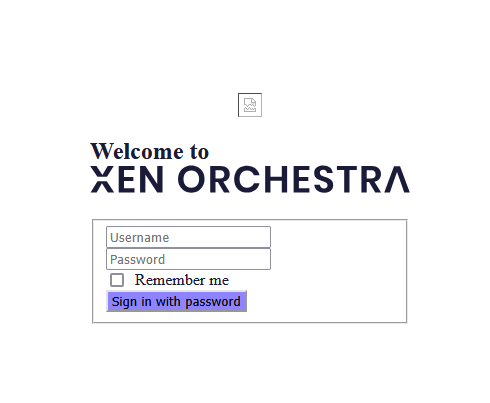
My terminal window stops here and never completes. I let it sit here all night hoping it was doing something. But nothing happened. I know there is more to the process after you start it.

I have tried many times
git pull --ff-only
yarn
yarn buildrm -rf node_modules
yarn
yarn buildI nuked the other VM after the first time this happened. So this is the second clean VM and I'm stuck. It's definitely not started all the way but I don't know how to troubleshoot it. Any ideas?
-
Hi,
We need more logs (output from when you start xo-server) and also build logs ideally. What's your Node and npm version?
-
@raider600 I've seen the same login screen from time to time where it doesn't look correct.
I've rebooted the system to address the issue and it's always come up successfully.
-
@olivierlambert Thank you. I believe I found the server logs... I dont know where to find the build logs.
Node - v22.14.0
npm - 10.9.2#!/usr/bin/env node import appConf from 'app-conf'; import execPromise from 'exec-promise'; import get from 'lodash/get.js'; import highland from 'highland'; import levelup from 'level-party'; import ndjson from 'ndjson'; import parseArgs from 'minimist'; import sublevel from 'subleveldown'; import util from 'util'; import { forEach } from './utils.mjs'; import globMatcher from './glob-matcher.mjs'; const getLogs = (db, args) => { let stream = highland(db.createReadStream({ reverse: true })); if (args.since) { stream = stream.filter(({ value }) => value.time >= args.since); } if (args.until) { stream = stream.filter(({ value }) => value.time <= args.until); } const fields = Object.keys(args.matchers); if (fields.length > 0) { stream = stream.filter(({ value }) => { for (const field of fields) { const fieldValue = get(value, field); if (!args.matchers[field](fieldValue)) { return false; } } return true; }); } return stream.take(args.limit); }; const deleteLogs = (db, args) => new Promise(resolve => { let nDeleted = 0; let nRunning = 1; const cb = () => { if (--nRunning === 0) { console.log(nDeleted.toLocaleString(), 'deleted entries'); resolve(); } }; const deleteEntry = key => { ++nDeleted; ++nRunning; db.del(key, cb); }; getLogs(db, args).each(({ key }) => { deleteEntry(key); }).done(cb); }); const GC_KEEP = 2e4; const gc = (db, args) => new Promise((resolve, reject) => { let keep = GC_KEEP; let count = 1; const cb = () => { if (--count === 0) { resolve(); } }; const stream = db.createKeyStream({ reverse: true }); const deleteEntry = key => { ++count; db.del(key, cb); }; let onData = keep !== 0 ? () => { if (--keep === 0) { stream.removeListener('data', onData); onData = deleteEntry; stream.on('data', onData); } } : deleteEntry; const onEnd = () => { console.log('end'); removeListeners(); cb(); }; const onError = error => { console.log('error'); removeListeners(); reject(error); }; const removeListeners = () => { stream.removeListener('data', onData).removeListener('end', onEnd).removeListener('error', onError); }; stream.on('data', onData).on('end', onEnd).on('error', onError); }); async function printLogs(db, args) { let stream = getLogs(db, args); if (args.json) { stream = highland(stream.pipe(ndjson.stringify())).each(value => { process.stdout.write(value); }); } else { stream = stream.each(value => { console.log(util.inspect(value, { depth: null })); }); } return new Promise(resolve => { stream.done(resolve); }); } function helper() { console.error(` xo-server-logs --help, -h Display this help message. xo-server-logs [--json] [--limit=<limit>] [--since=<date>] [--until=<date>] [<pattern>...] Prints the logs. --json Display the results as new line delimited JSON for consumption by another program. --limit=<limit>, -n <limit> Limit the number of results to be displayed (default 100) --since=<date>, --until=<date> Start showing entries on or newer than the specified date, or on or older than the specified date. <date> should use the format \`YYYY-MM-DD\`. <pattern> Patterns can be used to filter the entries. Patterns have the following format \`<field>=<value>\`, \`<field>\` or \`!<field>\`. xo-server-logs --gc Remove all but the ${GC_KEEP}th most recent log entries. xo-server-logs --delete <predicate>... Delete all logs matching the passed predicates. For more information on predicates, see the print usage. xo-server-logs --repair Repair/compact the database. This is an advanced operation and should be used only when necessary and offline (xo-server should be stopped). `); } function getArgs() { const stringArgs = ['since', 'until', 'limit']; const args = parseArgs(process.argv.slice(2), { string: stringArgs, boolean: ['delete', 'help', 'json', 'gc', 'repair'], default: { limit: 100, json: false, help: false }, alias: { limit: 'n', help: 'h' } }); const patterns = {}; for (let value of args._) { value = String(value); const i = value.indexOf('='); if (i !== -1) { const field = value.slice(0, i); const pattern = value.slice(i + 1); const fieldPatterns = patterns[field]; if (fieldPatterns === undefined) { patterns[field] = [pattern]; } else if (Array.isArray(fieldPatterns)) { fieldPatterns.push(pattern); } else { throw new Error('cannot mix existence with equality patterns'); } } else { const negate = value[0] === '!'; if (negate) { value = value.slice(1); } if (patterns[value]) { throw new Error('cannot mix existence with equality patterns'); } patterns[value] = !negate; } } const mustExists = value => value !== undefined; const mustNotExists = value => value === undefined; args.matchers = {}; for (const field in patterns) { const values = patterns[field]; args.matchers[field] = values === true ? mustExists : values === false ? mustNotExists : globMatcher(values); } forEach(stringArgs, arg => { if (args[arg] instanceof Array) { throw new Error(`error: too many values for ${arg} argument`); } }); ['since', 'until'].forEach(arg => { if (args[arg] !== undefined) { args[arg] = Date.parse(args[arg]); if (isNaN(args[arg])) { throw new Error(`error: bad ${arg} timestamp format`); } } }); if (isNaN(args.limit = +args.limit)) { throw new Error('error: limit is not a valid number'); } return args; } execPromise(async function main() { const args = getArgs(); if (args.help) { helper(); return; } const config = await appConf.load('xo-server', { appDir: new URL('..', import.meta.url).pathname, ignoreUnknownFormats: true }); if (args.repair) { const require = (await import('module')).createRequire(import.meta.url); const { repair } = require(require.resolve('level', { paths: [require.resolve('level-party')] })); await new Promise((resolve, reject) => { repair(`${config.datadir}/leveldb`, error => { if (error) { reject(error); } else { resolve(); } }); }); return; } const db = sublevel(levelup(`${config.datadir}/leveldb`, { valueEncoding: 'json' }), 'logs', { valueEncoding: 'json' }); return args.delete ? deleteLogs(db, args) : args.gc ? gc(db) : printLogs(db, args); }); //# sourceMappingURL=logs-cli.mjs.map -
@DustinB Ive restarted a few times though no dice. It's almost like something isnt unpacking or running.

-
@raider600 said in New install - Login screen blank:
@DustinB Ive restarted a few times though no dice. It's almost like something isnt unpacking or running.
In the URL does it show /v6 at the tail end?
-
@DustinB said in New install - Login screen blank:
@raider600 said in New install - Login screen blank:
@DustinB Ive restarted a few times though no dice. It's almost like something isnt unpacking or running.
In the URL does it show /v6 at the tail end?
Im just using the ip address. no https either. So no i dont think it has a v6 at the end. but im also not 100% sure i know what you mean. lol
-
@raider600
I also had this issue some week ago
Unfortunately I don't remember what I did to fix it.
But I would try the--forceoptionI am running XO as root
sudo su -
cd ~/xen-orchestra/
git checkout .
git pull --ff-only
yarn
yarn build --force
yarn run turbo run build --filter @xen-orchestra/web
systemctl restart xo-server.service
cd -
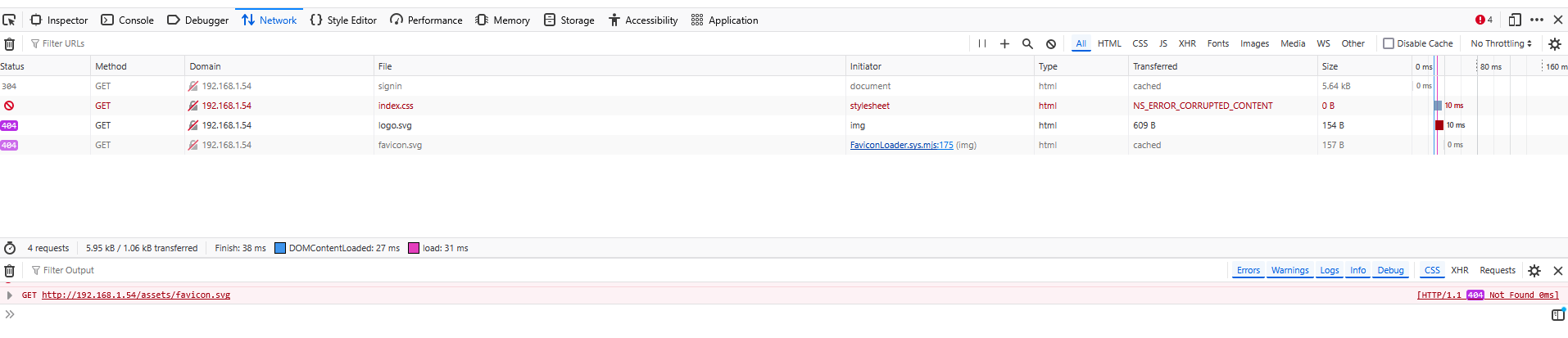
@ph7 Thanks for that. but it didnt work. funny when trying to restart the xo-server.service it fails and says service not found. Im only trying to get it to run with yarn start in the packages/xo-server dir. Here is a screen shot of the networking tab in the developer window of the browser. looks like its missing some stuff. hah
-
@raider600 The xo-server.service doesn't exist unless you create in yourself when using XO from sources. XOA takes care of this for you.
-
@Danp Well I dont think I ever got to that step. haha. This is bumming me out. I want to use XOA. But I need proof of concept before we buy it.
-
@raider600 You can always go to https://vates.tech/deploy and install XOA, then start a free trial to perform your POC.

-
@raider600 To piggyback off of DanP, they've been very good about extending our trial while we were evaluating our options to migrate off of VMware!
-
This is solved. What I ended up doing was installing ubuntu and doing the whole install as root. Thanks for the help, I hope I can use XOA in the future!



Hello! It looks like you're interested in this conversation, but you don't have an account yet.
Getting fed up of having to scroll through the same posts each visit? When you register for an account, you'll always come back to exactly where you were before, and choose to be notified of new replies (either via email, or push notification). You'll also be able to save bookmarks and upvote posts to show your appreciation to other community members.
With your input, this post could be even better 💗
Register Login