Export VM / Host Details to CSV
-
@Tomcatter from Xen Orchestra I can't think of any way, but from the xe command line you likely could.
-
Likely easier by using the REST API I suppose. Let me ping @MathieuRA for example
-
@olivierlambert Thank you Olivier, Is there any update on the example?
-
Let me ping @lsouai-vates this time then

-
@Tomcatter Hello!
In the rest-api doc you have this endpoint: https://github.com/vatesfr/xen-orchestra/blob/master/packages/xo-server/docs/rest-api.md#vm-export
Maybe start with this and create a script to convert result to CSV/Excel?Does it help you?
-
@lsouai-vates (for reference i opened an issue a while ago about this https://github.com/vatesfr/xen-orchestra/issues/6600)
-
This could be done with XO Powershell too (eventually).
-
@AtaxyaNetwork thanks for the info!
@Tomcatter so as indicated: "This feature request is already planned in XoLite V0.2 ,(csv & json) for end of March." I invite you to check at Xen orchestra blogspot on https://xen-orchestra.com/blog/
Have a good day!
-
End of March 2025? does this mean it should be available very soon (if not already)?
-
@Tomcatter yes it was already implemented in XO-Lite
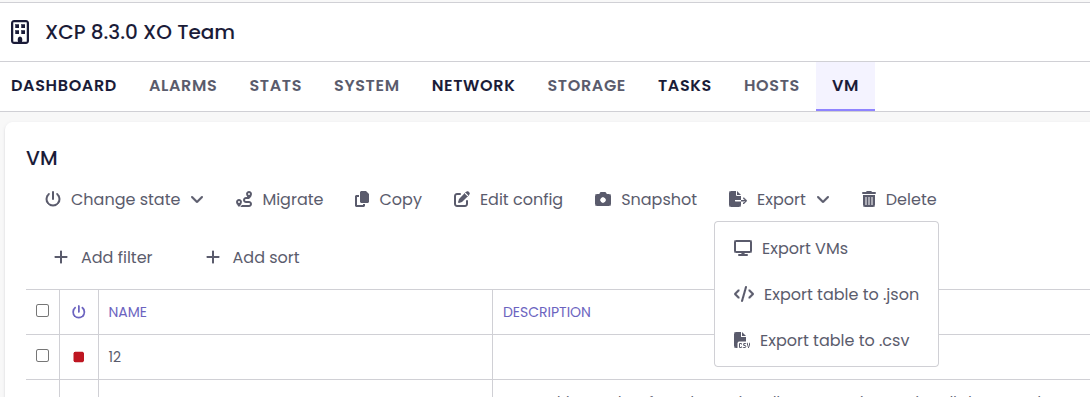
You can find it from the pool view. (click on a pool on the treeview and then on the VM tab)
It is also planned for XO-6, it is in our backlog for next features.
Does it respond to your questions?
-
This post is deleted!



Hello! It looks like you're interested in this conversation, but you don't have an account yet.
Getting fed up of having to scroll through the same posts each visit? When you register for an account, you'll always come back to exactly where you were before, and choose to be notified of new replies (either via email, or push notification). You'll also be able to save bookmarks and upvote posts to show your appreciation to other community members.
With your input, this post could be even better 💗
Register Login