Question about Continuous Replication/ Backups always doing Full Backups
-
since I had my problem fixed in
https://xcp-ng.org/forum/topic/11969/timestamp-lost-in-continuous-replication/22
I tested myf5468commit similar to Your setup with 2 Hosts in the same pool and local storage, ranCRwith retention of 2 from 1 host to the other and it worked as expected.
One full and then delta. -
@florent I updated XO to master 60ba5, and still having the issue.
I don't see any errors in the backup log. It just says
"isFull": truefor the ones stuck on full backups.The XO log just reports:
Mar 24 16:26:47 xo1 xo-server[21199]: 2026-03-24T20:26:47.315Z xo:backups:worker INFO starting backup
Mar 24 16:26:52 xo1 xo-server[21199]: 2026-03-24T20:26:52.359Z xo:xapi:xapi-disks INFO export through vhd
Mar 24 16:26:54 xo1 xo-server[21199]: 2026-03-24T20:26:54.410Z xo:xapi:xapi-disks INFO export through vhd
Mar 24 16:29:22 xo1 xo-server[21199]: 2026-03-24T20:29:22.250Z xo:backups:worker INFO backup has ended
Note, it reports two
export through vhdand does two full backups and one delta. -
@florent Hello,
So I am not sure what changed but it looks like the continuous replication should be working as intending now. I did reconfigure the schedule a last time before I posted last and let it run. I can see where it was still doing the full backups and where I stopped it by restarting the XOA. It seems then after the reboot and saving the schedule again it appears to working.
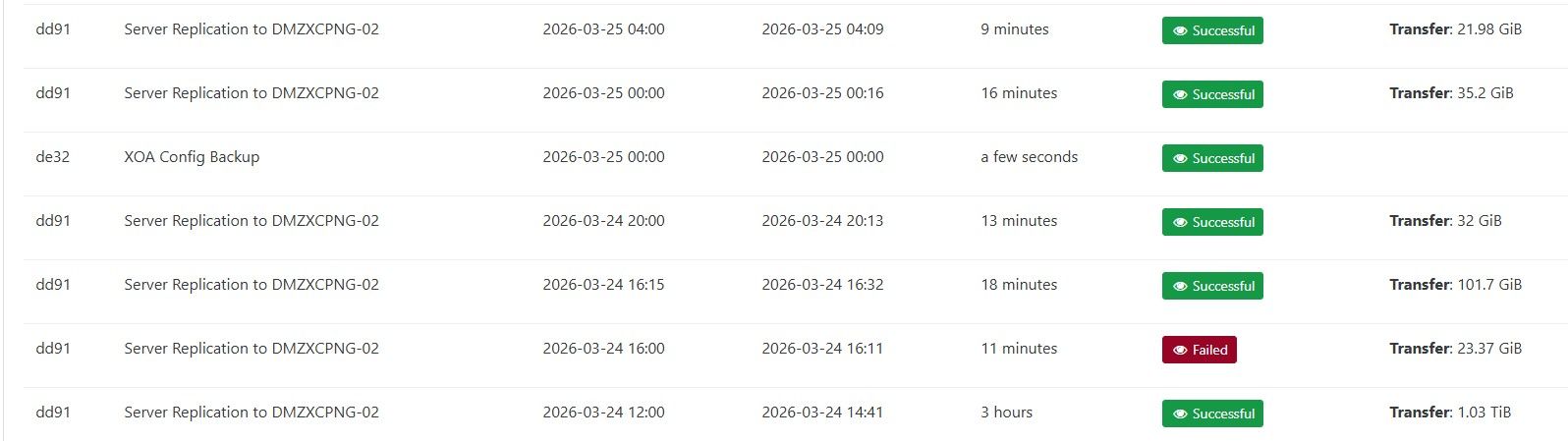
It is now showing delta backups and the transfers are much smaller.
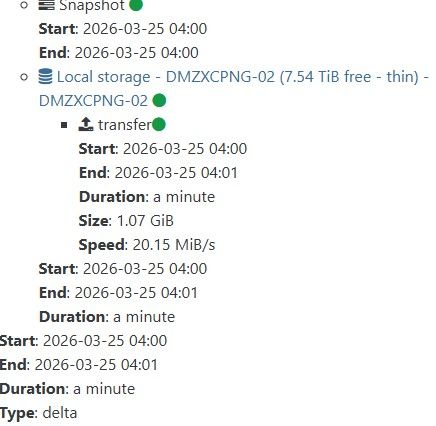
I wish I had a better idea what would have caused it to work but I will continue to monitor it. I would say for now my issue is resolved.
-
@Kraken89 I will look into the transition from the previous system to the new one
maybe that's the key
-
I thought I was having a similar issue but mine might be slightly different.
This is the first time I am trying to configure CR so it's very possible I am not setting things correctly. I have two separate pools currently.
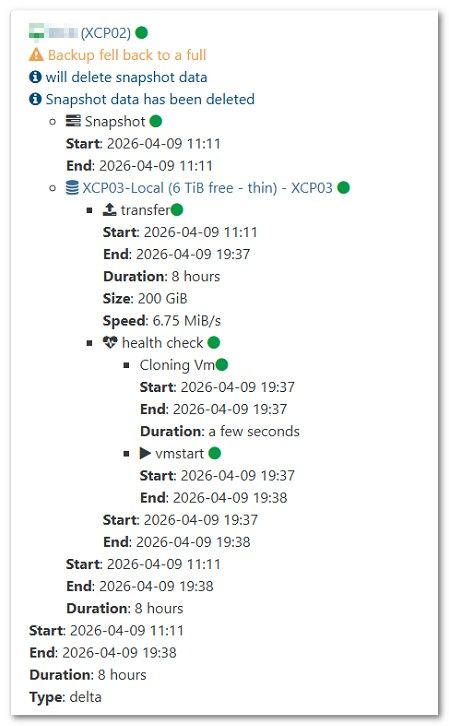
When I run the replication job, it shows type: Delta
However, the size is the full size the VM each time which is 200GB.Since it is a delta shouldn't the size just be showing the change data?
The two pools are physically at different sites, so the throughput is not optimal, but i never expected a delta run to take 8 hours. the full took the same 8 hours.
-
@tsukraw It's running a full, not a delta. Do you have Use NBD enabled?
-
But at the bottom it has Type: Delta
Which I took as running a delta?Yes, I have NBD enabled. Should I try disabling it?
Here a side-by-side comparison.I do see the message at the top saying "backup fell back to a full"
Does this imply that the delta function didn't work, and it is truly a full again?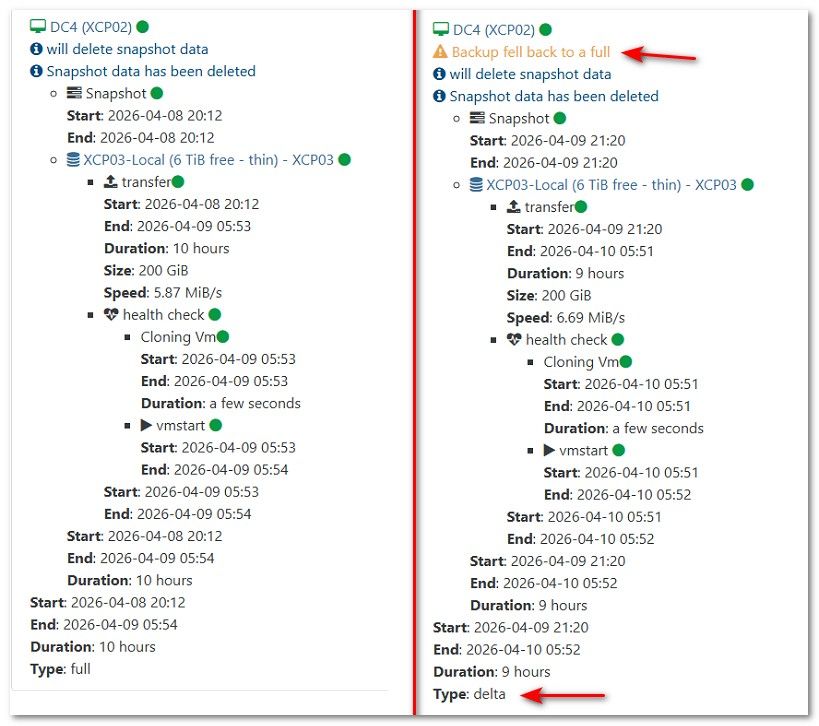
-
@kraken89
Sorry, didn't mean to hijack your post
-
@tsukraw The type delta at the bottom is a known bug... Do you have NBD Connection enabled on a network interface (Check the pool network)?
-
Thank you Andrew
Such a noob here when it comes to XCP, learning as we go.
I couldn't find any guide out there for configuration of CR so was shooting from the hp on how it worked.You were correct that NBD Connection was not setup on the Pool network.
Since you seem to be an expert in this CR field. Mind if I ask a question.
For the Full backup interval what do you typically set this to?
In our case we have around 4TB of data (Approx 25VMs) we are going to have on CR over a 1Gbps link between locations, so we can't be doing full copies to often. -
@tsukraw It's not your fault, it's a bug (@florent, two bugs) in XO. Backup should fall back to non-NBD and warn there is a network issue, second it should not say delta at the bottom when it's doing a full backup. Known issues, I hit both last month without warnings...
I do hourly CR and I have the full interval set to 168 (once a week). You could set it longer if you have a slow link but backups are reliable. The full backup on CR is more of a data integrity issue. Deltas are just updates to the existing data. If there is a data problem with a delta then the copy is no longer 100% correct. The full backup (assuming it makes it over to the other site) ensures a full fresh copy without relying on past deltas being correct.
If you do CR nightly then setting full to 30 would be once a month. It would be nice to have a skew option to have full backups automatically done on some VMs but not all at the same time.
-
@tsukraw No worries! Just glad that we can all help each other out!

Hello! It looks like you're interested in this conversation, but you don't have an account yet.
Getting fed up of having to scroll through the same posts each visit? When you register for an account, you'll always come back to exactly where you were before, and choose to be notified of new replies (either via email, or push notification). You'll also be able to save bookmarks and upvote posts to show your appreciation to other community members.
With your input, this post could be even better 💗
Register Login