Backups Fail with ENOENT: no such file or directory
-
I had a similar issue and mine was resolved by changing the quota size, apparantly my disk was getting bigger.
Also the ETIMEDOUT could show that your backup job runs into a timeout somewhere - maybe the backup job timeout?
-
Had major issues with backups a while ago, it was due to the firmware of the NIC in the physical server. We found out by moving our XO vm to another physical host and then error went away, moving it back made it come back.
-
@jvanabra Hi,
Can you provide the complete logs from your backup job please? We changed a lot of things in backup recently but we did not have this kind of error.
Regards, -
Your chain seems to have an issue. Can you recreate your snapshot to reset the chain?
Furthermore, can you check the option "merge backup synchronously" to see what is happening in merging part.PS: in case you have a license, feel free to open a ticket.
-
@pierrebrunet I did try the "merge synchronously" option, but that didn't change anything.
Can you expand on "your chains have an issue?" I understand the concept of chains, but in this particular case the situation is:
- Fresh install of XCP
- Brand new VM that has never been backed up before (though was built originally on another pool). There was no previously existing snapshot.
- New install of XO targeting a new NFS server with a ne backup job
There shouldn't be any chain involved as literally everything is brand new.
I cleaned up:
- Removed the snapshots from the VMs
- Unmounted the NFS
- Cleaned up the filesystem on NFS
- Remounted NFS
- Created a new backup job
- Left NFS with v4.2, enabled synchronous merge
- Restarted the job
- Same failure
Some thing I noticed: When kicking off the job, the VHD appears in the NFS filesystem:
/var/run/xo-server/mounts/d806298f-85cf-4565-bb7e-9fad479b941f/xo-vm-backups/e5f62657-8efb-3c2c-3397-2bfe01df5f0d/vdis/c82e4cd1-a0ee-4d7e-9e57-c77d8102593e# ls -alh 82c9959a-b4fa-46a1-a6ea-8cfbbeca864f/.1777916466905.20260504T174106Z.vhd
In this example, this vhd file was 951mb.
It remains there for about one minute, then disappeared. Shortly later the backup job fails, but I notice the snapshot remains, owned by control domain. That never seems to disappear.
I think it's worth noting that I have imported several test VMs, as well as copied VMs cross-pool (from somewhere else to this pool) so it seems like the normal import/export mechanisms work properly.
If you let me know what logs you'd like, I'm happy to upload them.
-
@jvanabra "merge synchronously" option is there for log purpose. When you click on your backup job you can get all logs from this job here:
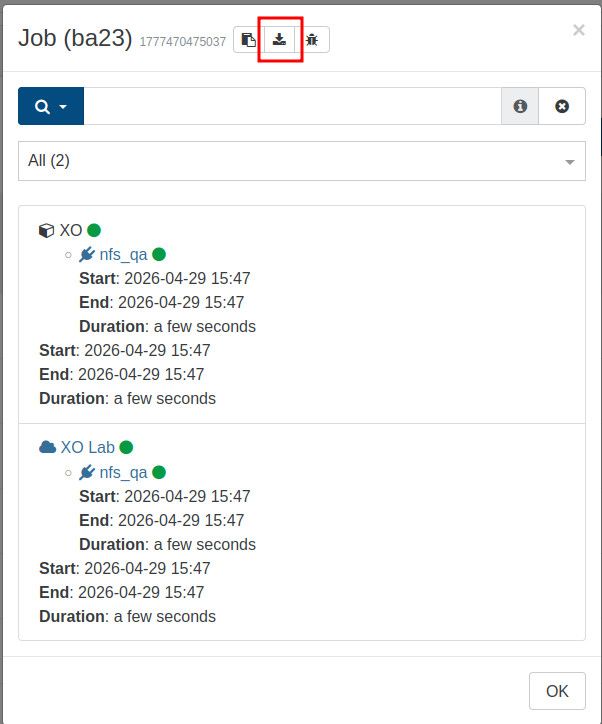
-
@pierrebrunet sorry for the delay in responding... I scored some time out of the office.

Before replying, I rebuilt the XO server using the latest version and created a new backup identical to the last. Just wanted to be sure this issue wasn't fixed... I've attached the log.
-
I updated XO again - just thought I would add the API error details:
Error: ENOENT: no such file or directory, open '/run/xo-server/mounts/d806298f-85cf-4565-bb7e-9fad479b941f/xo-vm-backups/645b7426-0b09-e192-40ea-4f6c36e35c23/vdis/8190942e-8b0d-4044-95b6-6b8d91a463f7/7b86306a-fffa-4528-b946-d0bc60dcb609/20260527T000011Z.vhd'
From:
at NfsHandler.addSyncStackTrace (/opt/xen-orchestra/@xen-orchestra/fs/dist/local.js:21:26)
at NfsHandler._openFile (/opt/xen-orchestra/@xen-orchestra/fs/dist/local.js:154:35)
at /opt/xen-orchestra/@xen-orchestra/fs/dist/utils.js:29:26
at new Promise (<anonymous>)
at NfsHandler.<anonymous> (/opt/xen-orchestra/@xen-orchestra/fs/dist/utils.js:24:12)
at loopResolver (/opt/xen-orchestra/node_modules/promise-toolbox/retry.js:83:46)
at new Promise (<anonymous>)
at loop (/opt/xen-orchestra/node_modules/promise-toolbox/retry.js:85:22)
at NfsHandler.retry (/opt/xen-orchestra/node_modules/promise-toolbox/retry.js:87:10)
at NfsHandler._openFile (/opt/xen-orchestra/node_modules/promise-toolbox/retry.js:103:18)The error in XO remains:
Error: ENOENT: no such file or directory, stat '/run/xo-server/mounts/d806298f-85cf-4565-bb7e-9fad479b941f/xo-vm-backups/645b7426-0b09-e192-40ea-4f6c36e35c23/vdis/8190942e-8b0d-4044-95b6-6b8d91a463f7/c1e95b3b-cca1-457a-a0d4-0a37924c8170/20260527T181636Z.alias.vhd'
What's bizarre is that I absolutely nuked the path
/run/xo-server/mounts/d806298f-85cf-4565-bb7e-9fad479b941f/xo-vm-backups
with
rm -rf /run/xo-server/mounts/d806298f-85cf-4565-bb7e-9fad479b941f/xo-vm-backups
so that there was nothing left behind. After starting the job, XO rebuilds the path fine:
ls -al /run/xo-server/mounts/d806298f-85cf-4565-bb7e-9fad479b941f/xo-vm-backups/645b7426-0b09-e192-40ea-4f6c36e35c23/vdis/8190942e-8b0d-4044-95b6-6b8d91a463f7/c1e95b3b-cca1-457a-a0d4-0a37924c8170/
total 13
drwxr-xr-x 3 3001 3001 3 May 27 18:16 .
drwxr-xr-x 4 3001 3001 4 May 27 18:16 ..
drwxr-xr-x 2 3001 3001 2 May 27 18:18 databut it is correct, the file 20260527T181636Z.alias.vhd never appears.
To be, this proves the NFS is 100% fine... XO can mount, test, write, and delete from the mount just fine. But I don't know why it doesn't create the *alias.vhd file.
-
@jvanabra Hi,
From the first log file you uploaded, I see there is a timeout issue during the transfer. It is this part which triggers a bug (thank you for highlighting that!) where an alias is missing because the directory itself is not present.
There may be two causes to this: either your SR is under a lot of pressure and makes some timeouts, or there is a firewall or network config making timeouts after 72s -
@pierrebrunet I inadvertently found more information yesterday. I installed an old e492b commit on a new machine, configured identically to the original, and got a different error but the same effect. The new error is:
xcp xo backup Error: read ETIMEDOUT
That lead me to this page:
https://xcp-ng.org/forum/topic/10799/backup-timeout-error
I moved the XO machine onto the same subnet as XCP, leaving the storage behind in a different network. This fixed the issue, at least on commit e492b ... I have not yet tried it on the new release... however I am pretty confident it will be successful.
If I'm honest, I think this is a tuning issue between XO and XCP. XO is now mounting an NFS share across this subnet boundary and that mount is not having any sort of performance issue, but for some reason XO times out transferring the same data from dom0? That seems off to me.
It's not a probem moving XO to the other subnet, so I've done that, but maybe this deserves a look in the future.

Hello! It looks like you're interested in this conversation, but you don't have an account yet.
Getting fed up of having to scroll through the same posts each visit? When you register for an account, you'll always come back to exactly where you were before, and choose to be notified of new replies (either via email, or push notification). You'll also be able to save bookmarks and upvote posts to show your appreciation to other community members.
With your input, this post could be even better 💗
Register Login