XCP-ng
    • Categories
    • Recent
    • Tags
    • Popular
    • Users
    • Groups
    • Register
    • Login

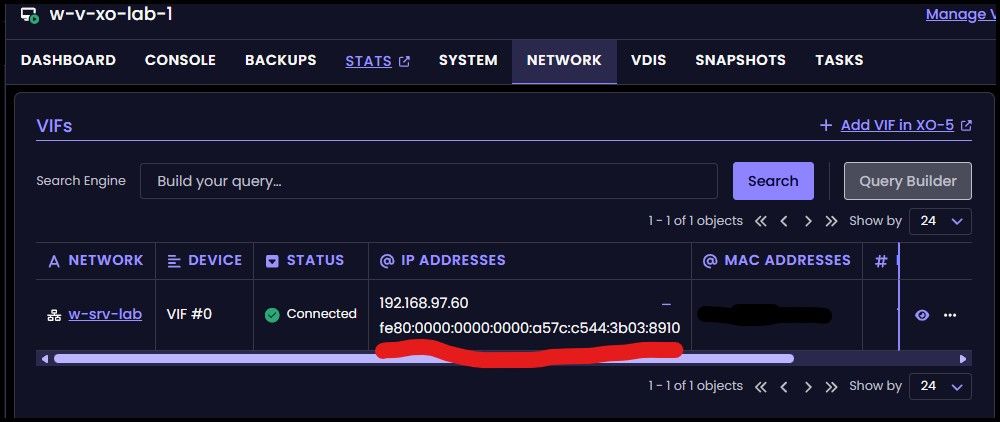
    (Windows) guest IPv6 address doesn't collapse zeroes -> Long IPv6 addresses
    Scheduled Pinned Locked Moved Xen Orchestra
    18 Posts 6 Posters 669 Views 5 Watching
    Loading More Posts
    • Oldest to Newest
    • Newest to Oldest
    • Most Votes
    Reply
    • Reply as topic
    Log in to reply
    This topic has been deleted. Only users with topic management privileges can see it.
    • olivierlambertO Offline
      olivierlambert Vates 🪐 Co-Founder CEO
      last edited by

      So is it a display issue from XO or a problem for the tools? (not sure to get it).

      What's the output of xe CLI?

      P 1 Reply Last reply Reply Quote 0
      • P Offline
        probain @olivierlambert
        last edited by probain

        @olivierlambert said:

        So is it a display issue from XO or a problem for the tools? (not sure to get it).

        What's the output of xe CLI?

        This is me (jr-m4) from another (private) account.

        Update: Details below are incorrect information.

        xe Output for another windows 2025 guest, where I'm seeing the same behaviour

        [16:25 xcp ~]# xe vm-list uuid=3d3b8ba4-09c1-039d-8d58-ec797e7a05c3 params=networks
        networks (MRO)    : 0/ip: 192.168.80.234; 0/ipv4/0: 192.168.80.234; 0/ipv6/0: fe80::4496:9d87:690d:ccc7
        
        1 Reply Last reply Reply Quote 0
        • olivierlambertO Offline
          olivierlambert Vates 🪐 Co-Founder CEO
          last edited by

          Well, I'm not seeing the same behavior here, fe80::4496:9d87:690d:ccc7 is collapsed, unlike in your screenshot 🤔

          P J 2 Replies Last reply Reply Quote 0
          • P Offline
            probain @olivierlambert
            last edited by

            @olivierlambert

            I will check back tomorrow when I'm back at that lab-pool. Sorry for taking your time thus far. I will provide more and better info tomorrow

            1 Reply Last reply Reply Quote 0
            • D Offline
              dinhngtu Vates 🪐 XCP-ng Team
              last edited by

              This seems to be specific to XenServer guest agents?

              1 Reply Last reply Reply Quote 0
              • J Offline
                jr-m4 @olivierlambert
                last edited by jr-m4

                @olivierlambert said:

                Well, I'm not seeing the same behavior here, fe80::4496:9d87:690d:ccc7 is collapsed, unlike in your screenshot 🤔

                I'm now back with better information from the original pool.

                xe vm-list uuid=0513005e-3626-1867-306d-9d5415cd6516 params=networks
                networks (MRO)    : 0/ip: 192.168.97.60; 0/ipv4/0: 192.168.97.60; 0/ipv6/0: fe80:0000:0000:0000:a57c:c544:3b03:8910
                

                I will apply latest updates to see if this has any bearing on the matter.

                1 Reply Last reply Reply Quote 0
                • J Offline
                  jr-m4
                  last edited by jr-m4

                  After applying latest updates and commits, to both xcp and XO. The zeroes were still non-collapsed.

                  However. Rebooting the VM resulted in the zeroes now collapse properly as expected.

                  I had previously rebooted the VM, so I don't believe that was the solution. But I did not check inbetween pulling latest source, and updating XCP. So I'm unsure which update solved it.

                  But this then has been resolved.
                  Update: Not solved! Now on fully updated XCP & XO, and the VM being rebooted as per post-details above.

                  D 1 Reply Last reply Reply Quote 0
                  • D Offline
                    dinhngtu Vates 🪐 XCP-ng Team @jr-m4
                    last edited by

                    @jr-m4 Could you check if your VMs are using XenServer or XCP-ng tools?

                    J 1 Reply Last reply Reply Quote 0
                    • J Offline
                      jr-m4 @dinhngtu
                      last edited by

                      @dinhngtu said:

                      @jr-m4 Could you check if your VMs are using XenServer or XCP-ng tools?

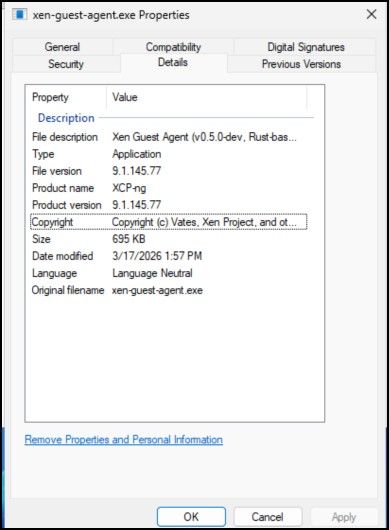
                      They are using the vates provided xcp-ng guest tools.
                      80a1bf8d-0557-4058-a094-c4f1d3611bc8-image.jpeg

                      1 Reply Last reply Reply Quote 0
                      • J Offline
                        jr-m4
                        last edited by

                        I have now tried updating to the latest version included in the xcp-ng guest-tools.iso. Followed by a reboot.

                        At the moment, the zeroes are collapsed. But I won't count my chickens before they've hatched. So I will reply back if they expand out again (as seen before).

                        Thanks!

                        1 Reply Last reply Reply Quote 0
                        • J Offline
                          jr-m4
                          last edited by jr-m4

                          I believe I have a reproducible method to make it expand.
                          The trick aparently is Live migrating the VM.

                          After reboot

                          Pre live migration:
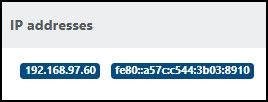
                          5f44f037-3b0a-4b26-927f-f4142399ea4d-image.jpeg

                          Post live migration:
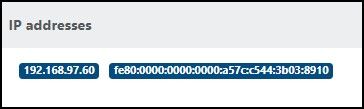
                          52b4fcbf-d7bb-4810-b610-997dbf98530f-image.jpeg

                          1 Reply Last reply Reply Quote 0
                          • TeddyAstieT Offline
                            TeddyAstie Vates 🪐 XCP-ng Team Xen Guru
                            last edited by TeddyAstie

                            Do you have multiple guests agents in the VM (e.g Citrix and XCP-ng ones) that may step on each other for this IP ?

                            J 1 Reply Last reply Reply Quote 0
                            • J Offline
                              jr-m4 @TeddyAstie
                              last edited by jr-m4

                              @TeddyAstie

                              I do not have Citrix ones. This VM was pretty much freshly installed to test Windows2025 on as pure Vates-maintained stack as possible.

                              Update: Please note my post above. Tha this seems to be triggered by live-migrating the vm

                              1 Reply Last reply Reply Quote 0
                              • J Offline
                                jr-m4
                                last edited by

                                ping @poddingue for visibility as I believe I've found the trigger for IPv6 expanding... Live Migrations

                                poddingueP 1 Reply Last reply Reply Quote 0
                                • poddingueP Offline
                                  poddingue Vates 🪐 @jr-m4
                                  last edited by

                                  Thanks for the ping and for narrowing it down; that live-migration repro is a really useful signal. 👍
                                  I don't know enough about how the guest tools report IPs back through XAPI to say where the canonicalisation should happen, but it sounds like something @Team-Hypervisor-Kernel might want to look at since the trigger is on the agent side after migration. 🤷
                                  If it turns out to be reproducible on another Windows guest version (2022, 2019), that might help narrow it further; no pressure though, you've already done the hard part. 🙏

                                  J 1 Reply Last reply Reply Quote 1
                                  • J Offline
                                    jr-m4 @poddingue
                                    last edited by

                                    @poddingue

                                    I have done some more testing.
                                    Windows Server 2022 is also affected. 9.1.145-77

                                    I also tried the latest WindowsPV drivers from Vates, on Windows Server 2025. 9.1.200-0. And the "problem" still persists.

                                    It is a very low impact and low importance "problem". Since it is afaik purely costmetical.

                                    1 Reply Last reply Reply Quote 1
                                    • olivierlambertO Offline
                                      olivierlambert Vates 🪐 Co-Founder CEO
                                      last edited by

                                      Still, something to fix 🙂

                                      1 Reply Last reply Reply Quote 0

                                      Hello! It looks like you're interested in this conversation, but you don't have an account yet.

                                      Getting fed up of having to scroll through the same posts each visit? When you register for an account, you'll always come back to exactly where you were before, and choose to be notified of new replies (either via email, or push notification). You'll also be able to save bookmarks and upvote posts to show your appreciation to other community members.

                                      With your input, this post could be even better 💗

                                      Register Login
                                      • First post
                                        Last post