Full backup failure when upgrading XOce
-
Thanks for writing it up. For anyone landing here: the from-sources guide asks for the latest Node.js LTS (docs), and that has been Node 26 since 28 October, so moving to 26 is also the documented setup now.
I don't know why 24.22.3 broke the remote for you, though.
Do note that there is a PR currently that explicitly says Node should be on 22
https://github.com/vatesfr/xen-orchestra/pull/10790 -
I have asked multiple times in the past about what version of Node.js should be. While using the latest LTS version was stated documentation keep using Node.js 22 in the examples. I do believe XOA is lacking on the latest LTS version last i looked into it. I think this is what may be causing the confusion.
-
Hmmm...

I'll have to dig and ask the team.
Thanks.

-
Small correction to what I wrote above. There's an open PR for XO on Node 26 (https://github.com/vatesfr/xen-orchestra/pull/10721) whose description says several outgoing HTTP requests from xo-server fail on 26 until it's merged: web hooks, Netbox, XO Proxies, the patch list, imports from a URL.

So the docs saying "latest LTS" doesn't make 26 a safe bet right now, and I shouldn't have made it sound like one. My bad.

@ph7, backups to a NAS aren't in that PR's list if I'm reading it right, which would fit with yours working, but the rest might bite you.
As @jr-m4 and @acebmxer pointed out, https://github.com/vatesfr/xen-orchestra/pull/10790 would pin the docs to Node 22 like XOA. I'm still asking the team which version they actually want people on, and I'll come back here once I know. -
@poddingue
My XOce crashed this night during full backup
It was running but could not log in by cli or browser.
Force shutdownin XO-lite made it back.
Maybe a rebuild with node 22 ??edit: it crashed during backup of itself
3 running VMs was backed up before the crash
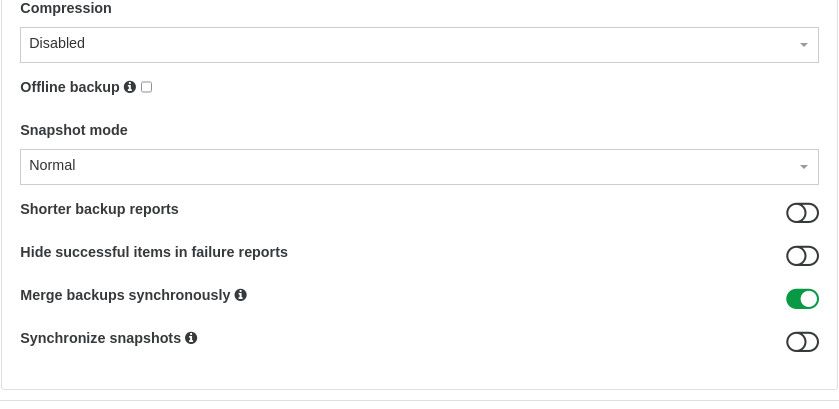
here are some options for the backup job for running VMs
-
@ph7 can you try with node 24 ?
are there any logs ? -
{
  "data": {
    "mode": "full",
    "reportWhen": "failure"
  },
  "id": "1794881400002",
  "jobId": "0ffa03e5-e750-43ad-b66c-0495405fe068",
  "jobName": "BCK_Running",
  "message": "backup",
  "scheduleId": "0c8bba34-e5f1-4f58-9c38-11b514358383",
  "start": 1794881400002,
  "status": "interrupted",
  "tasks": [
    {
      "id": "0mwk21luf-5zyntw173ie",
      "start": 1794881402583,
      "status": "success",
      "tasks": [
        {
          "id": "0mwk21mr0-y3gazw087kf",
          "start": 1794881403757,
          "status": "success",
          "end": 1794881405281,
          "result": "459e3a05-f508-e85d-5cc4-387155dc304b",
          "message": "snapshot"
        },
        {
          "id": "0mwk21nyt-imr121bpgle",
          "start": 1794881405333,
          "status": "success",
          "tasks": [
            {
              "id": "0mwk21nzt-bqf4lzdvlkt",
              "start": 1794881405369,
              "status": "success",
              "end": 1794881441678,
              "result": {
                "size": 3268086272
              },
              "message": "transfer",
              "data": {
                "progress": 0
              }
            }
          ],
          "end": 1794881441822,
          "message": "export",
          "data": {
            "id": "0927f4dc-4476-4ac3-959a-bc37e85956df",
            "type": "remote",
            "isFull": true
          }
        },
        {
          "id": "0mwk22gs1-zazmiofst3r",
          "start": 1794881442673,
          "status": "success",
          "tasks": [
            {
              "id": "0mwk22h6r-uo87g3emm6",
              "start": 1794881443203,
              "status": "success",
              "end": 1794881499852,
              "result": {
                "size": 3268086272,
                "id": "8d6704b6-e005-f300-47e7-be2e9ea21a5c",
                "liveMounts": []
              },
              "message": "transfer",
              "data": {
                "progress": 100
              }
            },
            {
              "id": "0mwk23owd-9ik1ccu4ln",
              "start": 1794881499853,
              "status": "success",
              "end": 1794881504936,
              "message": "vmstart"
            }
          ],
          "end": 1794881507491,
          "message": "health check",
          "data": {
            "progress": 0
          }
        },
        {
          "id": "0mwk23ut6-ah9rc68q15o",
          "start": 1794881507514,
          "status": "success",
          "end": 1794881507850,
          "result": {
            "removedFiles": [],
            "changedFiles": [],
            "merge": false,
            "size": 0
          },
          "message": "clean-vm"
        }
      ],
      "end": 1794881507852,
      "message": "backup VM",
      "data": {
        "id": "a6cc5035-c18c-8f35-e197-b7e55c9cab8a",
        "type": "VM",
        "name_label": "1-pihole",
        "progress": 0
      }
    },
    {
      "id": "0mwk23v2t-gatlyfjkc7l",
      "start": 1794881507861,
      "status": "pending",
      "tasks": [
        {
          "id": "0mwk23v9q-d160t2rhy9k",
          "start": 1794881508110,
          "status": "success",
          "end": 1794881510136,
          "result": "e3625624-81ba-5913-4e69-cca7f5bb5016",
          "message": "snapshot"
        },
        {
          "id": "0mwk23wx8-x8bm3je4ztt",
          "start": 1794881510252,
          "status": "success",
          "tasks": [
            {
              "id": "0mwk23wyy-cfs4vlwf58q",
              "start": 1794881510315,
              "status": "success",
              "end": 1794881836648,
              "result": {
                "size": 31518195712
              },
              "message": "transfer",
              "data": {
                "progress": 0
              }
            }
          ],
          "end": 1794881836755,
          "message": "export",
          "data": {
            "id": "0927f4dc-4476-4ac3-959a-bc37e85956df",
            "type": "remote",
            "isFull": true
          }
        },
        {
          "id": "0mwk2axif-lzd7nijq25i",
          "start": 1794881837607,
          "status": "pending",
          "tasks": [
            {
              "id": "0mwk2ayix-bhm2oqxo1zc",
              "start": 1794881838922,
              "status": "pending",
              "message": "transfer",
              "data": {
                "progress": 62
              }
            }
          ],
          "message": "health check",
          "data": {
            "progress": 0
          }
        }
      ],
      "message": "backup VM",
      "data": {
        "id": "8b921e1c-5cb2-a3d8-6c13-eb9dcf73f993",
        "type": "VM",
        "name_label": "1-Romy",
        "progress": 0
      }
    }
  ],
  "infos": [
    {
      "data": {
        "vms": [
          "a6cc5035-c18c-8f35-e197-b7e55c9cab8a",
          "8b921e1c-5cb2-a3d8-6c13-eb9dcf73f993",
          "235d2a6a-89a5-845d-9310-11938e65a95e",
          "6f5c2553-2150-bd34-db9e-2830820247f1"
        ]
      },
      "message": "vms"
    }
  ]
}
Here are the 3 VMs that ran, the fourth one is XOce that did not run.
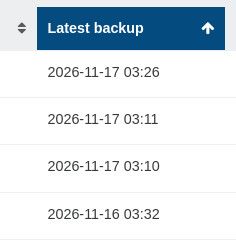
I'l test the backups to see if they are OK, then I'l try with node 24.
-
tried to install with
ronivayscript and node 24 again, didn't install, got thesomething went wrongmessage.
installed a new deb13, ran the script again. did not install and got the samesomething went wrongmessage.
I don't have a github account so I can't report a bug thereTried to install with
acebmxer's script, and it worked
But for some reason, the backup job did not start last night.changed the schedule to run now, and that worked.
Changed the schedule back and hopefully everything work tonight.I got 7 XO test versions now but I will stick to this for now as it seems as it's only my install that didn't work
Used to install XO by the doc's but after a crash, I got lazy and have been using
ronivayscript for the last year.
I'm seriously thinking of destroying my home lab and go full user mode. -
So when you used my script it worked aside from the backup hiccup? My script for the node version I added the ability to choose a node version or stick to LTS releases. If that helps you pin down the node version issue. When switching use the --rebuild option to rebuild xo on the new version. Otherwise if there are xo updates it will upgrade node if change or new LTS. It should downgrade but not tested safe to use the rebuild to make the change.
-



Hello! It looks like you're interested in this conversation, but you don't have an account yet.
Getting fed up of having to scroll through the same posts each visit? When you register for an account, you'll always come back to exactly where you were before, and choose to be notified of new replies (either via email, or push notification). You'll also be able to save bookmarks and upvote posts to show your appreciation to other community members.
With your input, this post could be even better 💗
Register Login