XO Backup [NOBAK] for full backups
-
@marcungeschikts Thanks, that's perfect!
-
@julien-f @marcungeschikts @olivierlambert
Commenting as I feel my recent error (https://xcp-ng.org/forum/post/53557) is somehow related to this thread reading through the comments and history.
cc. @Tristis-Oris
-
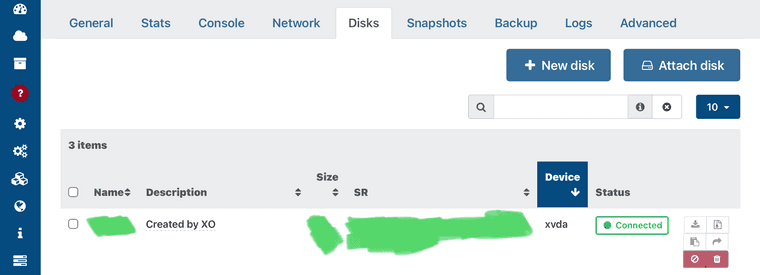
Does the [NOBAK] need to be in the "Name" or "Description" section? This is not really mentioned anywhere.
Thanks
-
It is in the official doc: https://xen-orchestra.com/docs/backups.html#exclude-disks
just edit the VM disk name
-
Found this by googling. Is there any news on being able to exclude disks at the snapshot level?
I have a couple of big SQL server VMs that are too big to snapshot, but the OS disk is relatively small and the attached disks are backed up by a seperate process anyway. So literally just need the OS image backing up.
-
See https://xcp-ng.org/blog/2022/11/18/xcp-ng-8-3-alpha/#
 -vm-snapshot-with-disk-exclusion
It's already used/supported by Xen Orchestra. If you want it for production, you'll need to wait for XCP-ng 8.3 to be available

-
@olivierlambert
Hi.
on VM i have 2 disks each 2Tb.
i created a continuous replication task with 96h timeout. It did take around 48 hours for full transfer but still ended with "task has been destroyed before completion".
can i mark 1 disk with [NOBAK] start a CR task so it copies only 1 disk. When this is finished i mark another disk with [NOBAK] and unmark the 1st one, so it makes a CR for second time and copies another disk. and when this is finished, i remove [NOBAK] completely so that both disks can be transfered delta? -
Hmm I'm not sure about this but worth asking @florent
-
@dave.opc it should work . Add [NoBak] to one disk, transfer it, then remove the [NoBak] on the 2nd , restart the transfer => the first one will only transfer a delta , while the second disk will be transfered as full . If you put [NBak] on the first one for the second transfer, it will be handled as a disk deleted and will remove it on the replica
Note you will have the same issue if ( when ) you'll need to do a full backup later on, for example if there are any replication issue, or if you want to ensure your base copy is not corrupted later on
-
@florent
i just need to transfer that vm to another host so disks will be transfered 1by1. then when both disks are on destination, i will shutdown original vm, make a final CR and start vm on new location
so mine was a bit incorrect. on 2nd transfer both disks should be without NOBAK. thank you. will try. -
@dave.opc that's it
keep us updated on this


Hello! It looks like you're interested in this conversation, but you don't have an account yet.
Getting fed up of having to scroll through the same posts each visit? When you register for an account, you'll always come back to exactly where you were before, and choose to be notified of new replies (either via email, or push notification). You'll also be able to save bookmarks and upvote posts to show your appreciation to other community members.
With your input, this post could be even better 💗
Register Login