XCP-ng
    • Categories
    • Recent
    • Tags
    • Popular
    • Users
    • Groups
    • Register
    • Login

    VMware migration tool: we need your feedback!

    Scheduled Pinned Locked Moved Migrate to XCP-ng
    318 Posts 37 Posters 392.2k Views 30 Watching
    Loading More Posts
    • Oldest to Newest
    • Newest to Oldest
    • Most Votes
    Reply
    • Reply as topic
    Log in to reply
    This topic has been deleted. Only users with topic management privileges can see it.
    • florentF Offline
      florent Vates 🪐 XO Team @ulasdem
      last edited by

      @ulasdem yes, I think I saw that there is limitation to the api, but didn't reach the limit on our test pools

      I will try to work around this

      1 Reply Last reply Reply Quote 0
      • K Offline
        KPS Top contributor @magicker
        last edited by

        Hi!

        I did my first migration: Everything looks good!

        The only thing, that should be noted:
        You need to provide the VM-ID in your script. The ID that is shown through vSphere was not valid for your script. I had to login the the current ESXi-host and to get the ID with:

        vim-cmd vmsvc/getallvms | grep NAME
        
        1 Reply Last reply Reply Quote 0
        • olivierlambertO Offline
          olivierlambert Vates 🪐 Co-Founder CEO
          last edited by

          That will be "solved" with the next release: you'll have a VM selector directly in the web UI 🙂

          1 Reply Last reply Reply Quote 2
          • florentF Offline
            florent Vates 🪐 XO Team @ulasdem
            last edited by

            @ulasdem can you try this branch ? https://github.com/vatesfr/xen-orchestra/pull/6662
            there is a new command esxi.connect that should show all the VM of an ESXI ( even after the first 100 ones)

            @KPS thank you, I note the command

            fbeauchamp opened this pull request in vatesfr/xen-orchestra

            closed Feat(xo-server): implement Api for esxi migration UX #6662

            U 1 Reply Last reply Reply Quote 0
            • S Offline
              severhart
              last edited by

              Have successfully migrated 2 VMs from ESXI, doing MANY Hyper-v migrations, and have a suggestion / feature..
              THIS is likely not the forum for this, but I know you guys are in a similar situation...

              Is it possible to add within XOA or the XCP-ng Center to allow attaching to a hyper-v cluster and do drag and drop style of migrations from hyper-v to XCP?
              I had something similar setup for a past company that allowed me to attach to any type of cluster and manage all from within a single pane of glass ( Until all migrations were complete )

              1 Reply Last reply Reply Quote 1
              • U Offline
                ulasdem @florent
                last edited by

                @florent I will try this branch and inform you in next week

                1 Reply Last reply Reply Quote 1
                • florentF Offline
                  florent Vates 🪐 XO Team
                  last edited by

                  @severhart that would really put the orchestra in xen orchestra , but it would be a huge workload

                  1 Reply Last reply Reply Quote 0
                  • olivierlambertO Offline
                    olivierlambert Vates 🪐 Co-Founder CEO
                    last edited by

                    We are potentially investigating if HyperV APIs are friendly to do a similar thing than we do with VMware.

                    However, we do not have the objective to have XO managing VMware or HyperV clusters 🙂 (at least, not for the next 3 years)

                    S 1 Reply Last reply Reply Quote 1
                    • S Offline
                      severhart @olivierlambert
                      last edited by

                      @olivierlambert I understand that, just for the migration purposes is all.. some of these migrations take months, if not years to get complete, and having it all under a single hood while that migration work is being done would be nice... I know that it is a HUGE ask 🙂

                      1 Reply Last reply Reply Quote 0
                      • olivierlambertO Offline
                        olivierlambert Vates 🪐 Co-Founder CEO
                        last edited by

                        Yeah, each platform got its own logic, that's why having an universal one is very very hard, except if you are a very big company able to have dedicated people on it (while doing all the rest).

                        I mean, if we can do it, it means we had a huge success, so I won't be against that 😉

                        1 Reply Last reply Reply Quote 0
                        • ismo-conguairtaI Offline
                          ismo-conguairta
                          last edited by

                          I have two different behaviour on two different XO instances. Each XO instance refers to a different pool (different hosts, same xcp-ng version). In both the instances I try to connect to the same Private Virtual Datacenter based on VMware/vSphere at OVH.

                          In the first one I get the following error message by using the web UI: "invalid parameters" (take a look at this logfile 2023-02-28T19_25_21.933Z - XO.txt )

                          In the second one, I get the following error message by using the web UI "404 Not Found https://<vsphere-ip>/folder/<vm-name>/<vm-name>.vmx?dsName=<datastore-name>"

                          By using the xo-cli I get the "404 Not Found" on both the instances.

                          Regarding the "404 Not Found", I want to point out that at OVH I have a VMware datacenter (with 2 hosts) and in order to access to the storage I need to specify the parameter dcPath=<datacenter-name>

                          So the right URL should be https://<vsphere-ip>/folder/<vm-name>/<vm-name>.vmx?dcPath=<datacenter-name>&dsName=<datastore-name>

                          Simply adding (in a static way) the dcPath specification on line :54 of esxi.mjs file makes it work.

                          florentF 2 Replies Last reply Reply Quote 0
                          • olivierlambertO Offline
                            olivierlambert Vates 🪐 Co-Founder CEO
                            last edited by

                            Interesting, that's probably a parameter we need to add (as optional) in the case it's needed. Would you mind test a dedicated branch when @florent will add it?

                            ismo-conguairtaI 1 Reply Last reply Reply Quote 0
                            • ismo-conguairtaI Offline
                              ismo-conguairta @olivierlambert
                              last edited by ismo-conguairta

                              @olivierlambert Yeah sure! No problem, it'll be a pleasure.

                              Do you have any idea about the issue related to the message "invalid parameters"? Do you have any suggestion in order to go deeper? Thanks.

                              1 Reply Last reply Reply Quote 0
                              • olivierlambertO Offline
                                olivierlambert Vates 🪐 Co-Founder CEO
                                last edited by

                                No but @florent will take a look ASAP 🙂

                                1 Reply Last reply Reply Quote 0
                                • S Offline
                                  Seclusion
                                  last edited by Seclusion

                                  For what it's worth I'm seeing the same invalid parameters error when I attempt to perform a migration from an on prem ESXI 7.0U2 host.

                                  Error message:

                                  vm.importFromEsxi
                                  {
                                   "host": "* obfuscated *",
                                   "network": "1fb3daf2-b27d-b7ef-48ce-b8986440247a",
                                   "password": "* obfuscated *",
                                   "sr": {
                                     "type": "SR",
                                     "content_type": "user",
                                     "physical_usage": 26223620096,
                                     "allocationStrategy": "thin",
                                     "current_operations": {},
                                     "inMaintenanceMode": false,
                                     "name_description": "",
                                     "name_label": "Local storage",
                                     "size": 964124073984,
                                     "shared": false,
                                     "SR_type": "ext",
                                     "tags": [],
                                     "usage": 79456894976,
                                     "VDIs": [
                                       "393e3767-07c2-4c23-bdca-b573e8ba5980",
                                       "16a72d41-a97d-4b8b-ae6e-3b043882ef8e",
                                       "59ae272b-00a8-483c-975b-48f55a15119b",
                                       "dcf1d26c-1f85-41f5-9045-cb931bf9ab3b"
                                     ],
                                     "other_config": {
                                       "i18n-original-value-name_label": "Local storage",
                                       "i18n-key": "local-storage"
                                     },
                                     "sm_config": {
                                       "devserial": ""
                                     },
                                     "$container": "5a58d8a6-0ed1-4825-b1fd-8d720832bf02",
                                     "$PBDs": [
                                       "26c0dc31-2cf6-15c5-8683-5c60e10382d0"
                                     ],
                                     "id": "3662768f-4a40-31ed-54b9-21eb26876205",
                                     "uuid": "3662768f-4a40-31ed-54b9-21eb26876205",
                                     "$pool": "20ec2c95-dbb7-f4a3-8bb6-a80ff9de4d00",
                                     "$poolId": "20ec2c95-dbb7-f4a3-8bb6-a80ff9de4d00",
                                     "_xapiRef": "OpaqueRef:e1b6c317-a854-449b-80e3-b69bbeb389fc"
                                   },
                                   "sslVerify": false,
                                   "stopSource": false,
                                   "thin": true,
                                   "user": "root",
                                   "vm": "16"
                                  }
                                  {
                                   "code": 10,
                                   "data": {
                                     "errors": [
                                       {
                                         "instancePath": "/sr",
                                         "schemaPath": "#/properties/sr/type",
                                         "keyword": "type",
                                         "params": {
                                           "type": "string"
                                         },
                                         "message": "must be string"
                                       }
                                     ]
                                   },
                                   "message": "invalid parameters",
                                   "name": "XoError",
                                   "stack": "XoError: invalid parameters
                                     at Module.invalidParameters (/opt/xo/xo-builds/xen-orchestra-202302280214/packages/xo-common/api-errors.js:26:11)
                                     at Xo.call (file:///opt/xo/xo-builds/xen-orchestra-202302280214/packages/xo-server/src/xo-mixins/api.mjs:65:20)
                                     at Api.#callApiMethod (file:///opt/xo/xo-builds/xen-orchestra-202302280214/packages/xo-server/src/xo-mixins/api.mjs:390:19)"
                                  }
                                  
                                  ismo-conguairtaI 1 Reply Last reply Reply Quote 0
                                  • olivierlambertO Offline
                                    olivierlambert Vates 🪐 Co-Founder CEO
                                    last edited by

                                    @Seclusion are you doing it while the VM is running on VMware side? If yes, that's normal then, the delta mode (VM on) isn't supported yet on ESXi > 6.5

                                    S 1 Reply Last reply Reply Quote 0
                                    • S Offline
                                      Seclusion @olivierlambert
                                      last edited by

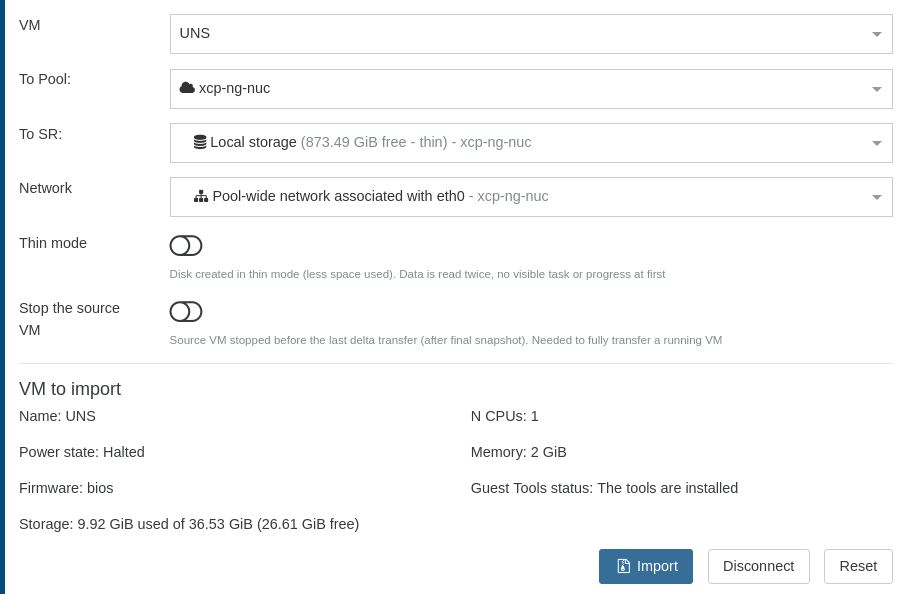
                                      @olivierlambert No, I thought doing a live migration seemed too ambitions to try first, but I also didn't realize that it also wasn't supported, haha. Here are my settings:Screenshot from 2023-02-28 17-41-20.png
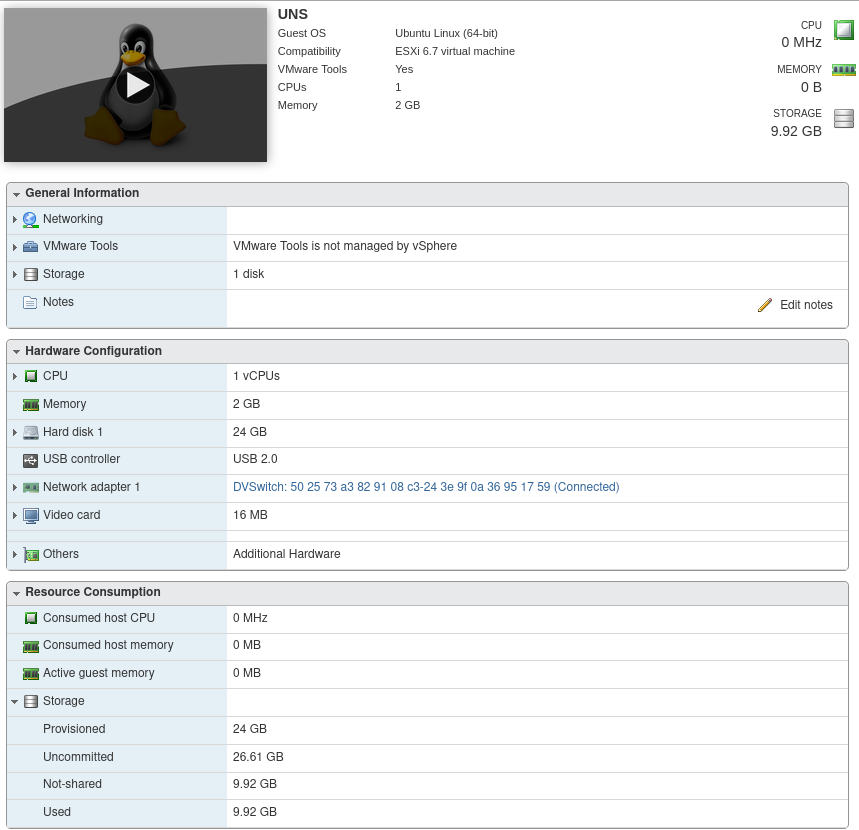
                                      and on on the esxi side:
                                      Screenshot from 2023-02-28 17-45-44.png
                                      XO-log.txt
                                      I am currently on commit 25759

                                      1 Reply Last reply Reply Quote 0
                                      • olivierlambertO Offline
                                        olivierlambert Vates 🪐 Co-Founder CEO
                                        last edited by

                                        @florent will take a look 🙂

                                        1 Reply Last reply Reply Quote 0
                                        • florentF Offline
                                          florent Vates 🪐 XO Team @ismo-conguairta
                                          last edited by

                                          @ismo-conguairta said in VMware migration tool: we need your feedback!:

                                          I have two different behaviour on two different XO instances. Each XO instance refers to a different pool (different hosts, same xcp-ng version). In both the instances I try to connect to the same Private Virtual Datacenter based on VMware/vSphere at OVH.

                                          In the first one I get the following error message by using the web UI: "invalid parameters" (take a look at this logfile 2023-02-28T19_25_21.933Z - XO.txt )

                                          In the second one, I get the following error message by using the web UI "404 Not Found https://<vsphere-ip>/folder/<vm-name>/<vm-name>.vmx?dsName=<datastore-name>"

                                          By using the xo-cli I get the "404 Not Found" on both the instances.

                                          Regarding the "404 Not Found", I want to point out that at OVH I have a VMware datacenter (with 2 hosts) and in order to access to the storage I need to specify the parameter dcPath=<datacenter-name>

                                          So the right URL should be https://<vsphere-ip>/folder/<vm-name>/<vm-name>.vmx?dcPath=<datacenter-name>&dsName=<datastore-name>

                                          Simply adding (in a static way) the dcPath specification on line :54 of esxi.mjs file makes it work.

                                          I thought it was constant. I will look into the api to get it, and if not possible expose it in the UI

                                          @Seclusion : noted I will look into theis error message, this one is a first for me

                                          1 Reply Last reply Reply Quote 2
                                          • ismo-conguairtaI Offline
                                            ismo-conguairta @Seclusion
                                            last edited by

                                            @Seclusion @florent In my case the ESXi version is 7.0.3 (build 20842708) and the vCSA version is 7.0 (build 20845200). The VM I try to migrate is not running on VMware side.
                                            The only difference between the 2 XO instances is that the first one is installed on a PV machine while the second one on a PVHVM machine.


                                            florentF 1 Reply Last reply Reply Quote 0

                                            Hello! It looks like you're interested in this conversation, but you don't have an account yet.

                                            Getting fed up of having to scroll through the same posts each visit? When you register for an account, you'll always come back to exactly where you were before, and choose to be notified of new replies (either via email, or push notification). You'll also be able to save bookmarks and upvote posts to show your appreciation to other community members.

                                            With your input, this post could be even better 💗

                                            Register Login
                                            • First post
                                              Last post